7. The First Join
A join begins by asking which rows belong together.
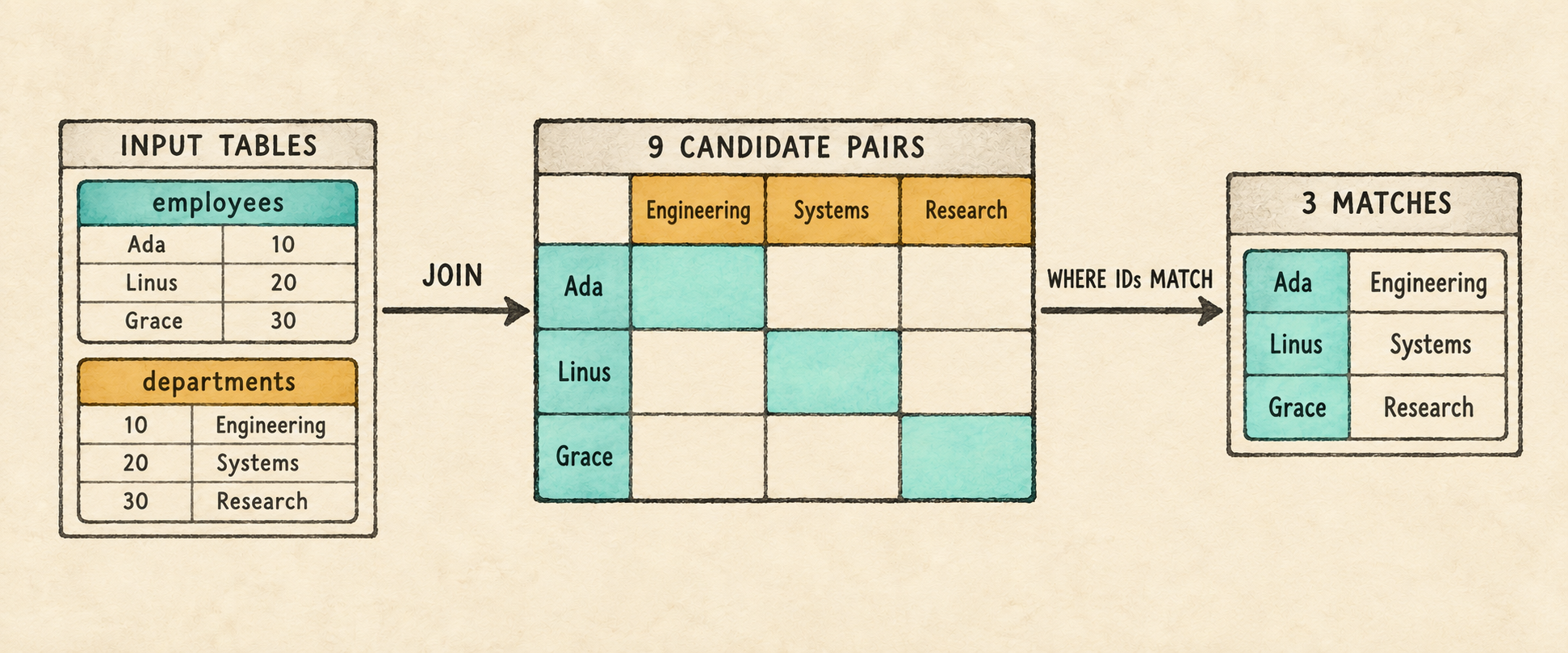
Chapter 6 can return several named expressions from one table. It cannot yet answer a question whose columns come from two tables:
SELECT e.name AS employee_name, d.name AS department_name
FROM employees AS e, departments AS d
WHERE e.department_id = d.id;
Supporting this query requires changes across the pipeline. The parser must
preserve a list of input tables rather than one table. The binder must decide
whether each column belongs to employees or departments, and the executor
must place one row from each table together before it can evaluate
e.department_id = d.id.
That combined row creates a new challenge for Filter. Until now, a bound
column name was enough to retrieve one value from a one-table row. A joined row
contains values from both inputs, which may contribute columns with the same
name. The binder must therefore replace each qualified column reference with
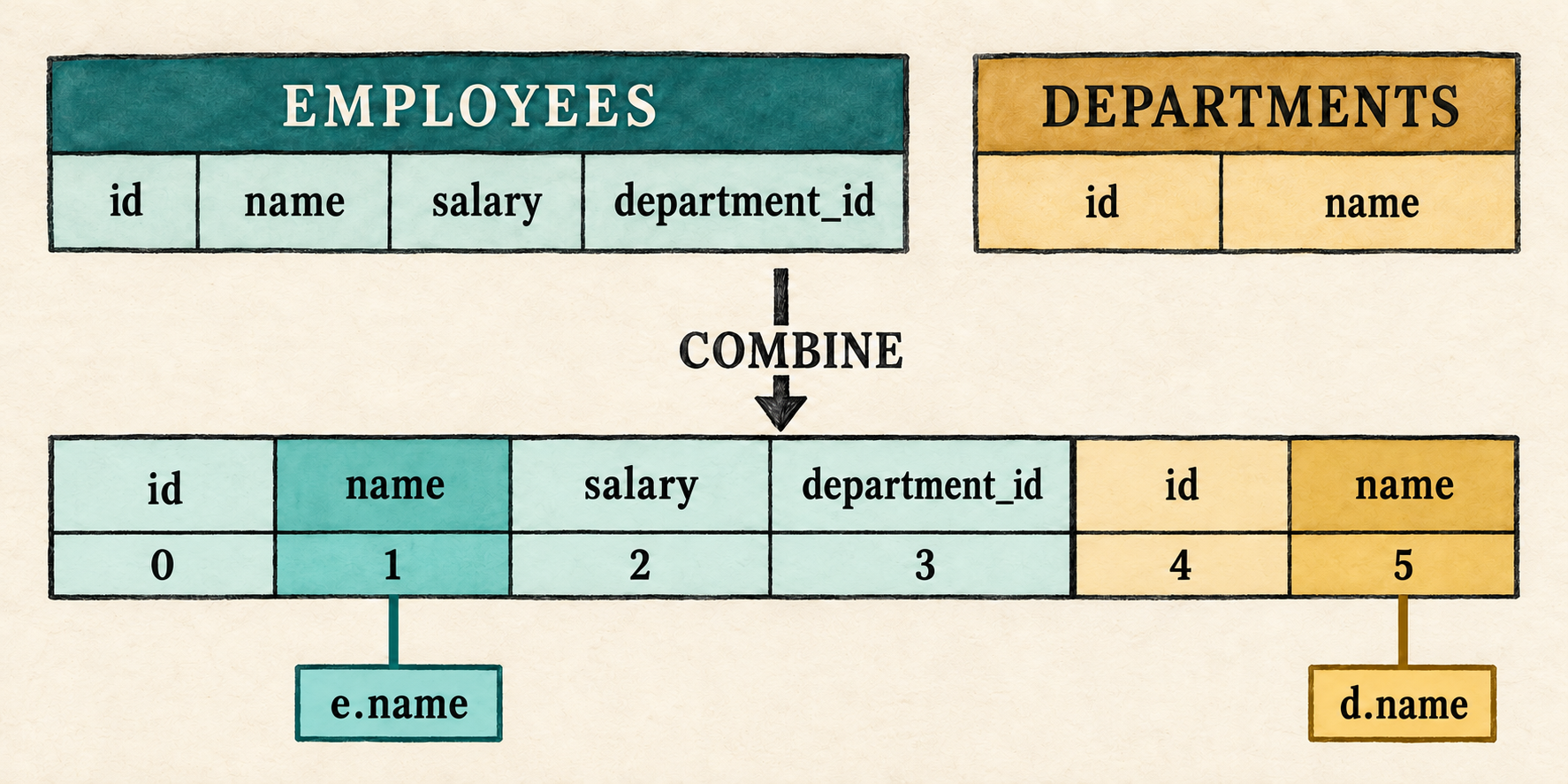
its position, or slot, in the combined row. The filter can then read the
correct values before comparing the employee’s department_id with the
department’s id.
This chapter makes those changes in three steps:
- Extend the query AST to store multiple input tables and an optional
WHEREexpression. - Build a multi-table scope, bind each column to a stable position in the combined row, and reject ambiguous unqualified names.
- Add a logical
Jointhat pairs left and right rows with visible nested loops, then placeFilterabove it when aWHEREpredicate is present.
The two selected columns share the source name name. Their output aliases,
employee_name and department_name, make their roles clear when Project
constructs the result. With the join predicate present, the completed plan
places the new operation beneath the familiar Filter and Project nodes:
Project(employee_name, department_name)
                 |
Filter(e.department_id = d.id)
                 |
                Join
               /    \
 Scan(employees)    Scan(departments)
Read from the scans upward, Join combines the two inputs by pairing every
employee with every department. Filter retains the pairs whose department
identifiers match, and Project produces the two named output columns.
Omitting WHERE removes the Filter, allowing all nine candidate pairs to
reach projection.
The logical Join records that the inputs must be combined; it does not yet
choose among physical join algorithms. This chapter will execute it with
visible nested loops.
By the end of the chapter, the query above returns Ada with Engineering, Linus with Systems, and Grace with Research.
Before changing the program, begin from the completed Chapter 6 checkpoint:
git switch --create chapter-007 lesson-006
7.1 Expand the FROM grammar
The new query shape creates three grammar requirements: FROM must accept
multiple table references, each table reference must retain its optional
alias, and WHERE must be optional so we can run the Cartesian product by
itself. The existing expression and projection rules do not change. Here is
the updated outer grammar for those deltas:
query             = "SELECT" select_list
                    "FROM" table_list
                    ("WHERE" expression)? ";" ;

table_list        = table_reference ("," table_reference)* ;
table_reference   = identifier alias? ;
alias             = "AS"? identifier ;
Table references store input aliases. In FROM employees AS e, the alias e
becomes the qualifier used to identify that input. References such as e.name
and e.department_id use it to tell the binder which table should contain the
column.
An output alias serves a different stage. In
SELECT e.name AS employee_name, the binder first resolves e.name;
Project later evaluates that expression and labels its value employee_name
in the output row. The output alias does not identify an input table or
participate in resolving the query’s source columns.
Parentheses followed by ? make the complete WHERE clause optional. Either
the keyword and expression are both present, or neither is.
The grammar can now describe the new query shape. The AST must next preserve its table list and the possible absence of a filter.
7.2 Preserve the input list in the AST
The parser change has three parts. First the AST must represent several table
references and an optional filter. Then parse_query() must recognize that
outer shape, and two smaller methods must parse the table list itself.
7.2.1 Represent tables and an optional filter
Query already stores a collection of selected expressions. Replace its
single table fields with a vector of table references. The filter becomes
Option<Expr>: Some preserves the parsed predicate, while None records
that the query ended after its input list.
src/parser.rs: replace Query and add TableReference
#[derive(Debug, PartialEq, Eq)]
pub struct Query {
    pub projections: Vec<SelectItem>,
    pub tables: Vec<TableReference>,
    pub filter: Option<Expr>,
}

#[derive(Debug, PartialEq, Eq)]
pub struct TableReference {
    pub name: String,
    pub alias: Option<String>,
}
The AST can now hold the new information. Before the outer parser can populate it, add the methods that consume the new table-list grammar.
7.2.2 Parse the table list
The next two methods implement the productions that make up table_list:
table_list      = table_reference ("," table_reference)* ;
table_reference = identifier alias? ;
alias           = "AS"? identifier ;
The list parser reads one required table reference, then consumes each comma
followed by another reference. Requiring the first table keeps FROM ;
invalid. A table reference reads the table name and delegates its optional
alias to the existing parse_alias() method.
src/parser.rs: add before parse_alias()
fn parse_table_list(&mut self) -> Result<Vec<TableReference>, ParseError> {
    let mut tables = vec![self.parse_table_reference()?];
    while self.consume(&Token::Comma) {
        tables.push(self.parse_table_reference()?);
    }
    Ok(tables)
}

fn parse_table_reference(&mut self) -> Result<TableReference, ParseError> {
    Ok(TableReference {
        name: self.identifier("expected a table name")?,
        alias: self.parse_alias()?,
    })
}
The same parse_alias() method now serves two grammar positions. After a
selected expression, it records an output alias. After a table name, it
records the alias used to qualify that table, which we call an input alias.
The table-list parser stops when the next token is not a comma. At that point,
the outer parser can decide whether the query continues with WHERE or ends
with a semicolon.
7.2.3 Parse the outer query
parse_query() implements the updated outer production:
query = "SELECT" select_list
        "FROM" table_list
        ("WHERE" expression)? ";" ;
The parser reads the complete input list before deciding whether a WHERE
clause follows. Consuming WHERE selects the Some branch. Reaching the
semicolon selects None.
src/parser.rs: replace parse_query()
fn parse_query(&mut self) -> Result<Query, ParseError> {
    self.expect(Token::Select, "expected SELECT at start of query")?;
    let projections = self.parse_select_list()?;
    self.expect(Token::From, "expected FROM after select list")?;
    let tables = self.parse_table_list()?;
    let filter = if self.consume(&Token::Where) {
        Some(self.parse_expression()?)
    } else {
        None
    };
    self.expect(Token::Semicolon, "expected ; after query")?;

    if self.current != self.tokens.len() {
        return Err(ParseError("unexpected token after ;".to_string()));
    }

    Ok(Query {
        projections,
        tables,
        filter,
    })
}
The call to parse_table_list() leaves the cursor at either WHERE or the
semicolon. That makes the optional clause explicit: consuming WHERE requires
an expression and produces Some, while seeing the semicolon preserves
None.
The existing parser tests inspect Chapter 6’s singular table, table_alias,
and required filter fields. Remove the #[cfg(test)] mod tests block from
parser.rs before continuing. The lesson source keeps the rewritten parser
tests, but reproducing test code in the chapter would not add to the parsing
intuition.
Changing Query temporarily makes the Chapter 6 binder stale. Isolate the
frontend before updating the remaining stages.
7.3 Run a parser checkpoint
Temporarily replace main.rs with a small fixed-query inspector. The
allow(dead_code) attributes suppress warnings for expression and row code
that this checkpoint does not execute.
src/main.rs: temporarily replace the file
#[allow(dead_code)]
mod expression;
mod lexer;
mod parser;
#[allow(dead_code)]
mod row;

use parser::parse;

fn main() {
    let sql = "SELECT e.name AS employee_name, d.name AS department_name \
        FROM employees AS e, departments AS d;";
    println!("{:#?}", parse(sql).expect("the checkpoint query should parse"));
}
Run the checkpoint:
cargo run --quiet
The relevant fields show two table references and no filter:
tables: [
    TableReference { name: "employees", alias: Some("e") },
    TableReference { name: "departments", alias: Some("d") },
],
filter: None,
Add WHERE e.department_id = d.id before the semicolon and run it again. The
same input list remains, while filter becomes Some(Binary { ... }). The AST
now distinguishes an omitted predicate from one the binder must validate.
The parser has preserved both input tables, but it has not checked their names or the columns that refer to them. The binder must now keep both tables in the same scope, then use that scope to validate and bind every projection and the optional filter.
7.4 Build a multi-table scope
Chapter 5 introduced a scope for one input table:
struct Scope<'a> {
    table_name: &'a str,
    alias: Option<&'a str>,
    columns: &'a [Column],
}
That representation can expose only one table name, one optional alias, and
one column list. It cannot keep both employees AS e and departments AS d
visible at the same time. It also cannot distinguish two visible columns named
name or record where either table will begin after their rows are combined.
The new scope therefore needs one entry per input table. Each entry records
the qualifier accepted in expressions, the table’s catalog columns, and the
starting position of those columns in the combined row. qualifier is the
alias when one was written and otherwise the table name. offset is the
number of columns contributed by earlier inputs.
src/catalog.rs: replace Scope
struct ScopeTable<'a> {
    qualifier: String,
    columns: &'a [Column],
    offset: usize,
}

struct Scope<'a> {
    tables: Vec<ScopeTable<'a>>,
}
For the representative query, the binder finds both catalog tables before it walks either the projection or filter expressions:
SELECT e.name AS employee_name, d.name AS department_name
FROM employees AS e, departments AS d
WHERE e.department_id = d.id;
It then creates a scope that conceptually contains:
Scope {
    tables: [
        ScopeTable {
            qualifier: "e",
            columns: [
                id: Integer,
                name: Text,
                salary: Integer,
                department_id: Integer,
            ],
            offset: 0,
        },
        ScopeTable {
            qualifier: "d",
            columns: [
                id: Integer,
                name: Text,
            ],
            offset: 4,
        },
    ],
}
Each scope entry records which qualifier identifies an input, which columns that input defines, and where those columns will begin after execution combines the input rows.
The employee entry begins at offset 0 because it is the first input. It defines
four columns, so the department entry begins at offset 4. These offsets predict
the combined layout that Join will later produce; no rows have been scanned
or combined during binding. Other catalog tables remain outside this query’s
scope.
Unqualified lookup now has three possible outcomes:
- no visible table contains the name, so the column is unknown;
- exactly one table contains it, so binding succeeds;
- more than one table contains it, so the name is ambiguous.
For example, both employees and departments contain a column named name.
The binder must reject unqualified name rather than choose one table
silently.
The scope can now identify a column’s owning table and recover its type. The next step turns that ownership and offset into the exact position from which execution will read the value.
7.5 Bind columns to slots
The scope predicts the joined layout before execution sees any data. At
execution time, each Scan still produces rows shaped like its own table: an
employee row has four values and a department row has two. Join appends one
department row to one employee row, producing a six-value combined row.
For the representative query, Filter reads that complete row without
changing its width, and Project creates the final two-value result row.
Chapter 5 stored a bound column by name. That was sufficient while an input row
could contain only one column with that name. The six-value joined row may
contain both employees.name and departments.name.
The binder will therefore replace each resolved name with a column slot,
its zero-based position in the combined row. It retains the original name for
readable diagnostics. The employee fields occupy slots 0 through 3, followed
by the department fields in slots 4 and 5. In this layout, e.name binds to
slot 1 and d.name binds to slot 5. Both bound columns retain name for
diagnostics, but that shared label no longer decides which value is read.
Execution uses slot 1 for the employee name and slot 5 for the department
name, so the two columns remain distinct even though their labels match.
7.5.1 Represent a bound column by slot
src/expression.rs: replace the BoundExpr::Column variant
Column {
    index: usize,
    name: String,
},
This representation records the result that binding must produce. The next step changes column lookup so both qualified and unqualified names resolve to one of these absolute positions.
7.5.2 Resolve a column to its slot
bind_column() receives the qualifier preserved by the parser, the column
name, and the completed query scope. It returns both the checked column node
and the column’s catalog type. Begin with the qualified case.
src/catalog.rs: replace require_qualifier() and begin bind_column()
fn bind_column(
    qualifier: Option<String>,
    name: String,
    scope: &Scope<'_>,
) -> Result<(BoundExpr, DataType), String> {
    if let Some(qualifier) = qualifier {
        let table = scope.tables.iter()
            .find(|table| table.qualifier == qualifier)
            .ok_or_else(|| format!("unknown table or alias: {qualifier}"))?;
        let (index, column) = table.columns.iter().enumerate()
            .find(|(_, column)| column.name == name)
            .ok_or_else(|| format!("unknown column: {name}"))?;
        return Ok((BoundExpr::Column {
            index: table.offset + index,
            name,
        }, column.data_type.clone()));
    }
When a qualifier is present, only the matching ScopeTable is searched. The
index produced by enumerate() is local to that table’s column list. Adding
table.offset converts it into a slot in the combined row:
e.name  → employee offset 0 + local index 1 → slot 1
d.name  → department offset 4 + local index 1 → slot 5
An unknown qualifier fails before column lookup. A known qualifier followed by a missing column fails as an unknown column. A successful lookup retains the name for diagnostics, stores the absolute slot, and returns the column’s type for the surrounding operator checks.
Without a qualifier, the binder must search every visible table and accept the name only if exactly one table defines it.
src/catalog.rs: finish bind_column()
    let mut matched = None;
    for table in &scope.tables {
        if let Some((index, column)) = table.columns.iter().enumerate()
            .find(|(_, column)| column.name == name)
        {
            if matched.is_some() {
                return Err(format!("ambiguous column: {name}"));
            }
            matched = Some((table.offset + index, column));
        }
    }

    let (index, column) = matched
        .ok_or_else(|| format!("unknown column: {name}"))?;
    Ok((BoundExpr::Column { index, name }, column.data_type.clone()))
}
matched begins as None. The first table containing the column stores its
absolute slot and catalog entry. A second match makes the name ambiguous and
returns an error immediately. If the loop ends without a match, the column is
unknown; otherwise the single match becomes the checked column. For example,
unqualified department_id resolves only in employees, while unqualified
name matches both inputs and is rejected.
Delegate the column arm of the recursive binder to that lookup.
src/catalog.rs: replace the Expr::Column arm in bind_expression()
Expr::Column { qualifier, name } => bind_column(qualifier, name, scope),Every parsed column now follows the same lookup path and emerges with a stable slot. Evaluation must use that slot, and the joined row must preserve the left-to-right layout on which the slot calculation depends.
7.5.3 Read slots from combined rows
Execution now needs positional access. Begin the row changes with the checked slot lookup.
src/row.rs: begin replacing the second impl Row
impl Row {
    pub fn value_at(&self, index: usize,
        expected_name: &str) -> Result<&Value, String>
    {
        let (name, value) = self.values.get(index)
            .ok_or_else(|| format!(
                "bound column is missing at execution: {expected_name}"))?;

        if name != expected_name {
            return Err(format!(
                "bound column mismatch at position {index}: \
                 expected {expected_name}, found {name}"));
        }
        Ok(value)
    }
value_at() reads the position chosen during binding. A missing position means
the runtime row is shorter than the catalog layout promised. The name check
does not resolve the column again; it detects an internal mismatch between the
catalog layout used during binding and the row layout received during
execution.
The join also needs to concatenate its two input rows. Their order must match the order used to calculate the scope offsets: all left values first, followed by all right values.
src/row.rs: finish the second impl Row
    pub fn combine(&self, right: &Row) -> Row {
        let mut values = self.values.clone();
        values.extend(right.values.iter().cloned());
        Row { values }
    }
}
Because combine() appends the right row, an employee row with four values
leaves those values in slots 0 through 3 and places the first department value
at slot 4. That is the same layout predicted in Section 7.4.
src/expression.rs: replace the column arm in BoundExpr::evaluate()
BoundExpr::Column { index, name } =>
    row.value_at(*index, name).cloned(),
Bound columns can now retrieve the correct value after two rows are combined. The plan still needs an operation that creates that combined row.
7.6 Add and execute the first join
The plan needs both a logical representation of the new operation and an
execution rule for this first implementation. Adding them together keeps the
Plan::execute() match exhaustive before the binder begins constructing join
plans.
7.6.1 Add the logical Join
The plan gains a Join node with left and right input plans. For this chapter’s
comma-separated FROM list, the node produces every pair of input rows. The
existing Filter represents a present WHERE condition that decides which
pairs belong in the result. If the parsed query has no predicate, binding
places Project directly above Join instead:
Project(employee_name, department_name)
                 |
                Join
               /    \
 Scan(employees)    Scan(departments)
Keeping the node named Join matters. It describes what relation the query
needs, not the physical algorithm eventually chosen to compute it.
src/plan.rs: add after Scan
Join {
    left: Box<Plan>,
    right: Box<Plan>,
},
Join gives the plan a way to represent two inputs and their Cartesian
product. The new variant must now receive an execution arm.
7.6.2 Execute it with nested loops
The first execution rule is intentionally direct: execute both children, then
combine every left row with every right row. Three employees and three
departments create nine rows. Without WHERE, all nine reach projection and
become the query result. With the representative predicate, the filter keeps
the three pairs whose identifiers match.
This is materialized execution, just like the earlier plan nodes. A later chapter will separate logical and physical plans and give the database a choice between nested-loop and hash join algorithms.
src/plan.rs: add the Join arm to Plan::execute() after Scan
Plan::Join { left, right } => {
    let left_rows = left.execute()?;
    let right_rows = right.execute()?;
    let mut output = Vec::new();

    for left_row in &left_rows {
        for right_row in &right_rows {
            output.push(left_row.combine(right_row));
        }
    }

    Ok(output)
}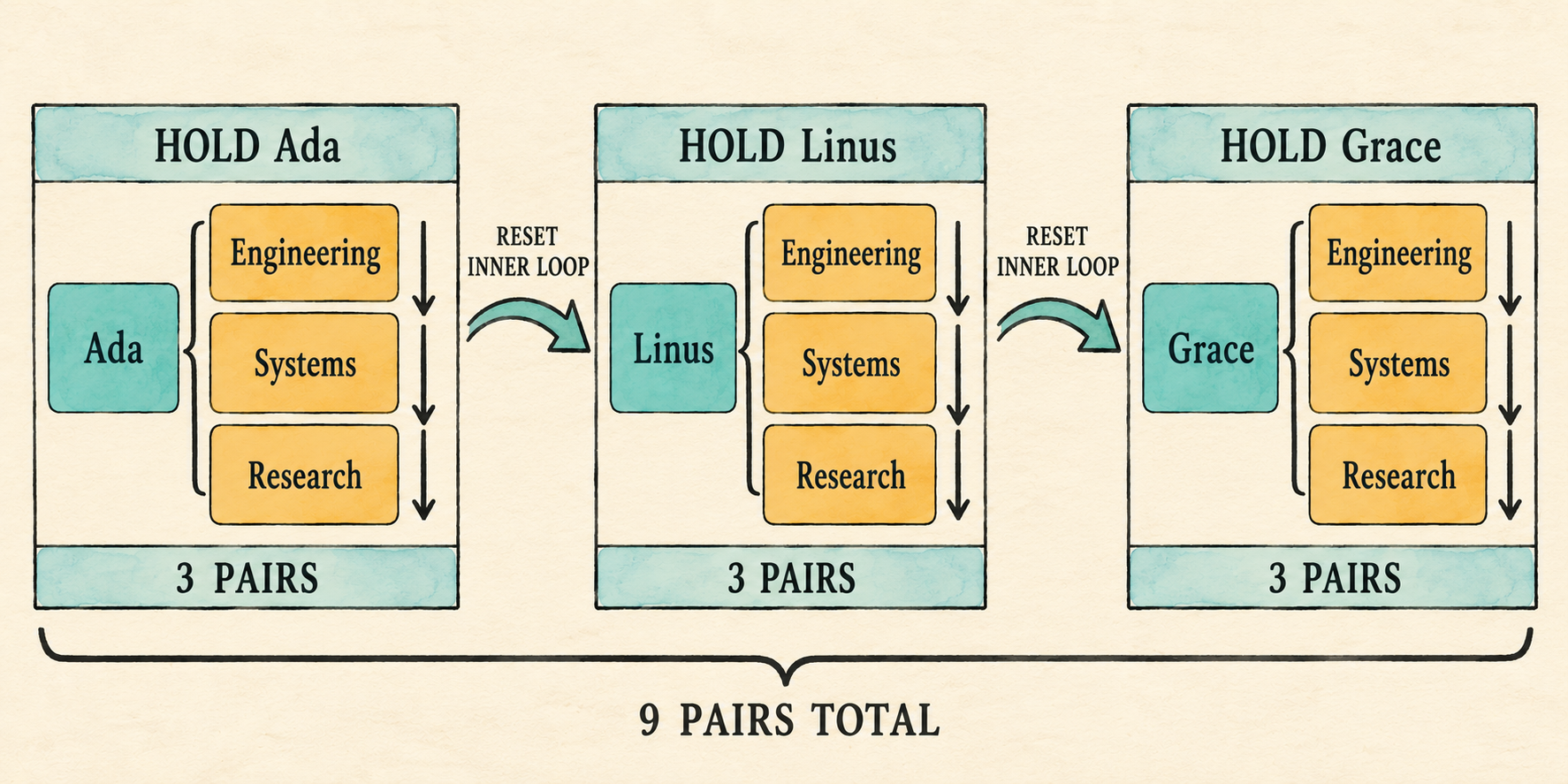
The outer loop fixes one left row while the inner loop visits every right row. Their order makes the output deterministic: all department pairs for Ada come first, followed by all pairs for Linus, then all pairs for Grace.
The plan can now represent and execute a Cartesian product. The binder must next assemble the scans, joins, optional filter, and projection in the correct order.
7.7 Assemble the bound plan
The earlier sections prepared the pieces that Catalog::bind() needs. It can
now turn one parsed Query into a complete plan in four phases:
- Resolve every
FROMinput and establish the shared scope. - Bind each selected item against that scope.
- Bind and type-check the optional filter.
- Assemble scans, joins, the optional filter, and projection.
7.7.1 Resolve inputs and establish the scope
Binding starts with the parsed table references because every projection and
predicate must use the resulting scope. For each reference, find the catalog
table, choose its accepted qualifier, record its offset, and retain the table
for its eventual Scan. Duplicate qualifiers are rejected because a
qualified column would otherwise still be ambiguous.
src/catalog.rs: replace the beginning of Catalog::bind() through scope
let mut input_tables = Vec::new();
let mut scope_tables = Vec::new();
let mut offset = 0;

for table_reference in query.tables {
    let table = self.tables.iter()
        .find(|table| table.name == table_reference.name)
        .ok_or_else(|| format!(
            "unknown table: {}", table_reference.name))?;
    let qualifier = table_reference.alias.unwrap_or(table_reference.name);
    if scope_tables.iter().any(
        |table: &ScopeTable<'_>| table.qualifier == qualifier)
    {
        return Err(format!("duplicate table or alias: {qualifier}"));
    }
    scope_tables.push(ScopeTable {
        qualifier,
        columns: &table.columns,
        offset,
    });
    offset += table.columns.len();
    input_tables.push(table);
}

let scope = Scope { tables: scope_tables };
The two vectors serve different later steps. scope_tables records the names,
types, and offsets needed while binding expressions. input_tables retains
the verified catalog tables whose rows will become Scan nodes. For each
input, unwrap_or(table_reference.name) chooses its alias when present and
otherwise its table name. The current offset is stored before advancing by
that table’s column count, so every scope entry begins immediately after the
previous input. Duplicate accepted qualifiers fail before either the
projection or filter is bound.
For the representative query, the offset progression is concrete. The
employee entry records offset 0, then its four columns advance offset to 4.
The department entry records offset 4, then its two columns advance the final
value to 6. Those recorded offsets agree with the six-value row that Join
will later create.
7.7.2 Bind the projection list
Chapter 6 already loops over query.projections, binding expression items and
expanding wildcards. That loop continues to use one expressions vector for
the eventual Project node, but its bound columns now contain slots.
For an expression item, bind_expression() validates its column references
and operators against the shared scope. An explicit output alias remains the
result label. Without one, a bare column keeps its column name and a computed
expression keeps the temporary label expression. Update the bare-column
match for the new structured variant:
src/catalog.rs: replace the output-name match
let name = alias.unwrap_or_else(|| match &expression {
    BoundExpr::Column { name, .. } => name.clone(),
    _ => "expression".into(),
});
An unqualified wildcard now expands every visible table in input order. A qualified wildcard expands only the named scope entry. Both paths construct the same positional bound columns used by explicit references.
src/catalog.rs: add before impl Catalog
fn expand_wildcard(
    qualifier: Option<String>,
    scope: &Scope<'_>,
    expressions: &mut Vec<ProjectExpression>,
) -> Result<(), String> {
    let tables: Vec<&ScopeTable<'_>> = match qualifier {
        Some(qualifier) => vec![scope.tables.iter()
            .find(|table| table.qualifier == qualifier)
            .ok_or_else(|| format!(
                "unknown table or alias: {qualifier}"))?],
        None => scope.tables.iter().collect(),
    };

    for table in tables {
        for (index, column) in table.columns.iter().enumerate() {
            push_output(expressions, column.name.clone(),
                BoundExpr::Column {
                    index: table.offset + index,
                    name: column.name.clone(),
                });
        }
    }
    Ok(())
}
The first phase chooses which scope entries to expand. A qualified wildcard
selects one entry; an unqualified wildcard collects every entry in FROM
order. The nested loops then visit each selected table’s columns in catalog
order. Adding table.offset to the table-local index produces the same
absolute slots used by explicit column references, while push_output() keeps
the corresponding result labels.
Update the wildcard arm in Catalog::bind():
SelectItem::Wildcard { qualifier } => {
    expand_wildcard(qualifier, &scope, &mut expressions)?;
}
Explicit references such as e.name and the columns produced by e.* or *
now use the same absolute-slot convention.
7.7.3 Bind the optional filter
The parser represented WHERE as Option<Expr>, so binding mirrors those two
cases. Some(filter) binds the expression in the same multi-table scope used
for projection and checks its result type. None means the plan will expose
the Cartesian product without a Filter node. The existing Boolean-or-null
requirement does not change.
src/catalog.rs: replace the old filter binding
let predicate = match query.filter {
    Some(filter) => {
        let (predicate, predicate_type) =
            bind_expression(filter, &scope)?;
        if !matches!(predicate_type, DataType::Boolean | DataType::Null) {
            return Err("WHERE expression must be Boolean".to_string());
        }
        Some(predicate)
    }
    None => None,
};
DataType::Null remains valid because an unknown WHERE result is a legal SQL
condition; execution removes that row just as it removes a false condition.
Any other result type is rejected before a plan is constructed.
7.7.4 Assemble the plan
Finally, turn each catalog input into a Scan. The first scan starts the
input plan; every later scan becomes the right child of another Join. Add a
Filter only when predicate is present, then place the existing Project
at the root.
src/catalog.rs: replace the old plan construction at the end of bind()
let mut inputs = input_tables.into_iter();
let first = inputs.next()
    .ok_or_else(|| "query requires at least one input table".to_string())?;
let mut input = Plan::Scan { rows: first.rows.clone() };

for table in inputs {
    input = Plan::Join {
        left: Box::new(input),
        right: Box::new(Plan::Scan { rows: table.rows.clone() }),
    };
}

if let Some(predicate) = predicate {
    input = Plan::Filter {
        predicate,
        input: Box::new(input),
    };
}

Ok(Plan::Project {
    expressions,
    input: Box::new(input),
})
Using the first scan as the starting plan makes the construction left-deep.
With three inputs A, B, and C, the loop would first produce
Join(Scan(A), Scan(B)), then use that entire plan as the left child of a join
with Scan(C). The table_list grammar begins with one table_reference, so
a query produced by the parser always supplies at least one input. The binder
still checks for an empty input_tables vector before taking its first item.
That defensive check keeps the assumption local to Catalog::bind() and
returns a clear error if a Query is ever constructed directly or a later
parser change stops enforcing the grammar rule.
If a predicate exists, Filter wraps the complete join tree and therefore
sees columns from every input. Project is always the root because it shapes
the final result whether or not the query contains WHERE.
Binding can now produce the complete checked plan for queries with or without
WHERE. Its Join nodes already know how to produce combined rows; the final
application must now reconnect parsing, binding, and execution.
7.8 Reconnect the application
The parser checkpoint has served its purpose. Restore the complete application,
add department_id to the employee schema, and register the departments table.
The entire file is shown because the checkpoint replaced it.
src/main.rs: replace the file
mod catalog;
mod expression;
mod lexer;
mod parser;
mod plan;
mod row;

use std::io::{self, Write};

use catalog::{Catalog, Column, Table};
use expression::DataType;
use parser::parse;
use row::{Row, Value};

fn main() {
    let catalog = employee_catalog();
    if std::env::args().nth(1).as_deref() == Some("--prompt") {
        run_prompt(&catalog).expect("failed to read SQL from the terminal");
    } else {
        run_demo(&catalog);
    }
}

fn employee(id: i64, name: &str, salary: i64,
    department_id: i64) -> Row
{
    Row::new(vec![
        ("id", Value::Integer(id)),
        ("name", Value::Text(name.into())),
        ("salary", Value::Integer(salary)),
        ("department_id", Value::Integer(department_id)),
    ])
}

fn department(id: i64, name: &str) -> Row {
    Row::new(vec![
        ("id", Value::Integer(id)),
        ("name", Value::Text(name.into())),
    ])
}

fn employee_catalog() -> Catalog {
    Catalog::new(vec![
        Table {
            name: "employees".into(),
            columns: vec![
                Column { name: "id".into(), data_type: DataType::Integer },
                Column { name: "name".into(), data_type: DataType::Text },
                Column { name: "salary".into(), data_type: DataType::Integer },
                Column { name: "department_id".into(),
                    data_type: DataType::Integer },
            ],
            rows: vec![
                employee(1, "Ada", 70_000, 10),
                employee(2, "Linus", 50_000, 20),
                employee(3, "Grace", 72_000, 30),
            ],
        },
        Table {
            name: "departments".into(),
            columns: vec![
                Column { name: "id".into(), data_type: DataType::Integer },
                Column { name: "name".into(), data_type: DataType::Text },
            ],
            rows: vec![
                department(10, "Engineering"),
                department(20, "Systems"),
                department(30, "Research"),
            ],
        },
    ])
}

fn execute_sql(sql: &str, catalog: &Catalog) -> Result<Vec<Row>, String> {
    let query = parse(sql).map_err(|error| error.to_string())?;
    catalog.bind(query)?.execute()
}

fn run_demo(catalog: &Catalog) {
    let sql = "SELECT e.name AS employee_name, \
        d.name AS department_name \
        FROM employees AS e, departments AS d \
        WHERE e.department_id = d.id;";
    let rows = execute_sql(sql, catalog)
        .expect("the lesson query should execute");

    println!("Employees and their departments:");
    for row in rows {
        println!("{row}");
    }
}

fn run_prompt(catalog: &Catalog) -> io::Result<()> {
    loop {
        let mut sql = String::new();

        loop {
            if sql.is_empty() { print!("sql> "); }
            else { print!("...> "); }
            io::stdout().flush()?;

            let mut line = String::new();
            if io::stdin().read_line(&mut line)? == 0 {
                println!();
                if !sql.trim().is_empty() {
                    eprintln!("error: incomplete query at end of input");
                }
                return Ok(());
            }
            if sql.is_empty() && line.trim().is_empty() { break; }
            if append_sql_line(&mut sql, &line) { break; }
        }

        if !sql.trim().is_empty() {
            print_query_result(&sql, catalog);
        }
    }
}

fn append_sql_line(sql: &mut String, line: &str) -> bool {
    sql.push_str(line);
    line.trim_end().ends_with(';')
}

fn print_query_result(sql: &str, catalog: &Catalog) {
    match execute_sql(sql, catalog) {
        Ok(rows) => for row in rows { println!("{row}"); },
        Err(error) => eprintln!("error: {error}"),
    }
}
Compile the connected path:
cargo fmt
cargo check
Before executing it, make the plan visible once. Temporarily split
execute_sql() into named steps and print the bound plan:
let query = parse(sql).map_err(|error| error.to_string())?;
let plan = catalog.bind(query)?;
println!("{plan:#?}");
plan.execute()
The filtered query prints a Project above a Filter, whose input is a
Join with two Scan children. Remove only the WHERE clause and the
Filter disappears. After inspecting both shapes, restore the concise final
line catalog.bind(query)?.execute() so ordinary prompt results contain only
rows.
7.9 Observe the product, then filter it
Start the prompt:
cargo run --quiet -- --prompt
First run the query without WHERE:
SELECT e.name AS employee_name, d.name AS department_name
FROM employees AS e, departments AS d;
Its three-by-three inputs produce nine rows. The first three all contain Ada because the inner loop visits every department before the outer loop advances:
{employee_name: "Ada", department_name: "Engineering"}
{employee_name: "Ada", department_name: "Systems"}
{employee_name: "Ada", department_name: "Research"}
...
{employee_name: "Grace", department_name: "Research"}
Then add WHERE e.department_id = d.id. The same Join still creates nine
pairs, but Filter forwards only three:
SELECT e.name AS employee_name, d.name AS department_name
FROM employees AS e, departments AS d
WHERE e.department_id = d.id;
Employees and their departments:
{employee_name: "Ada", department_name: "Engineering"}
{employee_name: "Linus", department_name: "Systems"}
{employee_name: "Grace", department_name: "Research"}
The fixed demonstration runs that filtered form:
cargo run --quiet
The product and filtered query establish the successful path. We should also confirm that invalid and ambiguous multi-table names stop during binding.
7.10 Inspect binding failures
The prompt should distinguish missing and ambiguous names before scanning any
rows. Representative failures include an unknown table, duplicate input alias,
unknown qualifier, unknown column, and unqualified name shared by both
inputs.
An unqualified name has valid syntax, but binding finds it in both scope
entries:
SELECT name
FROM employees AS e, departments AS d
WHERE e.department_id = d.id;
error: ambiguous column: name
Giving both inputs the same alias is rejected before their expressions are bound:
SELECT e.name
FROM employees AS e, departments AS e;
error: duplicate table or alias: e
Run the retained tests to check that the join changes have not broken behavior from earlier chapters:
cargo test
The completed lesson-007 checkpoint also includes tests for the new join
behavior; their code remains outside the build-along narration. We can now
state the boundaries that keep this first join deliberately small.
7.11 What we deliberately did not build
- Join syntax is limited to comma-separated inputs. An optional
WHEREpredicate may filter their Cartesian product. INNER,LEFT,RIGHT, andFULL JOIN ... ONbelong to Chapter 8.- Nested loops are the only execution method, but they are not represented as a physical plan yet.
Filterremains above the complete join. Even a table-local condition such ase.salary > 50000is evaluated after all nine row pairs are created. The first optimizer chapter will introduce predicate pushdown and move such conditions closer to their scans.- There is no join reordering or cost-based choice.
- Bound column slots are local to one plan and are not durable catalog IDs.
- Repeated output labels remain valid final results. Positional result-schema identity arrives before projected rows can become inputs to another query.
These limits leave a compact join implementation whose behavior is visible. The exercises below vary its qualifiers, projection, and predicate without introducing later join syntax or algorithms.
7.12 Try it
Run the prompt and predict the result of each change:
- Remove both output aliases.
- Remove the input aliases and qualify columns with the full table names,
such as
employees.nameanddepartments.name. - Replace the select list with
*and predict the order of its six output columns. - Add
e.salary > 50000 ANDbefore the existing join predicate. Predict both the final rows and the number of candidate pairs created byJoin. - Change the join predicate to
e.id = d.idand predict the surviving rows.
Check your reasoning
- Both fields are labelled
name; repeated result labels remain valid. - The query returns the same three rows. Without aliases, each table name is its accepted qualifier.
- The columns follow input and catalog order: the four employee columns,
then the two department columns. The repeated
idandnamelabels are preserved. - Ada and Grace remain.
Joinstill creates all nine candidate pairs because the complete predicate is evaluated by theFilterabove it. - No rows survive because employee IDs are
1,2, and3, while department IDs are10,20, and30.
7.13 Some joins preserve unmatched rows
The database can now combine two relations. Omitting WHERE exposes exactly
what the logical Join produces: every possible row pair. Adding a predicate
retains the matching pairs and discards the rest. This is the behavior of an
inner join: a row without a match does not appear in the result.
Sometimes the database must keep an unmatched row and fill the missing side
with NULL. The next chapter will add explicit INNER, LEFT, RIGHT, and
FULL JOIN ... ON forms and make their different row-preservation rules
visible. It will keep the straightforward nested-loop execution; choosing
between nested-loop and hash join algorithms remains a later physical-planning
problem.