6. Multiple Outputs
A result row can contain more than one answer.
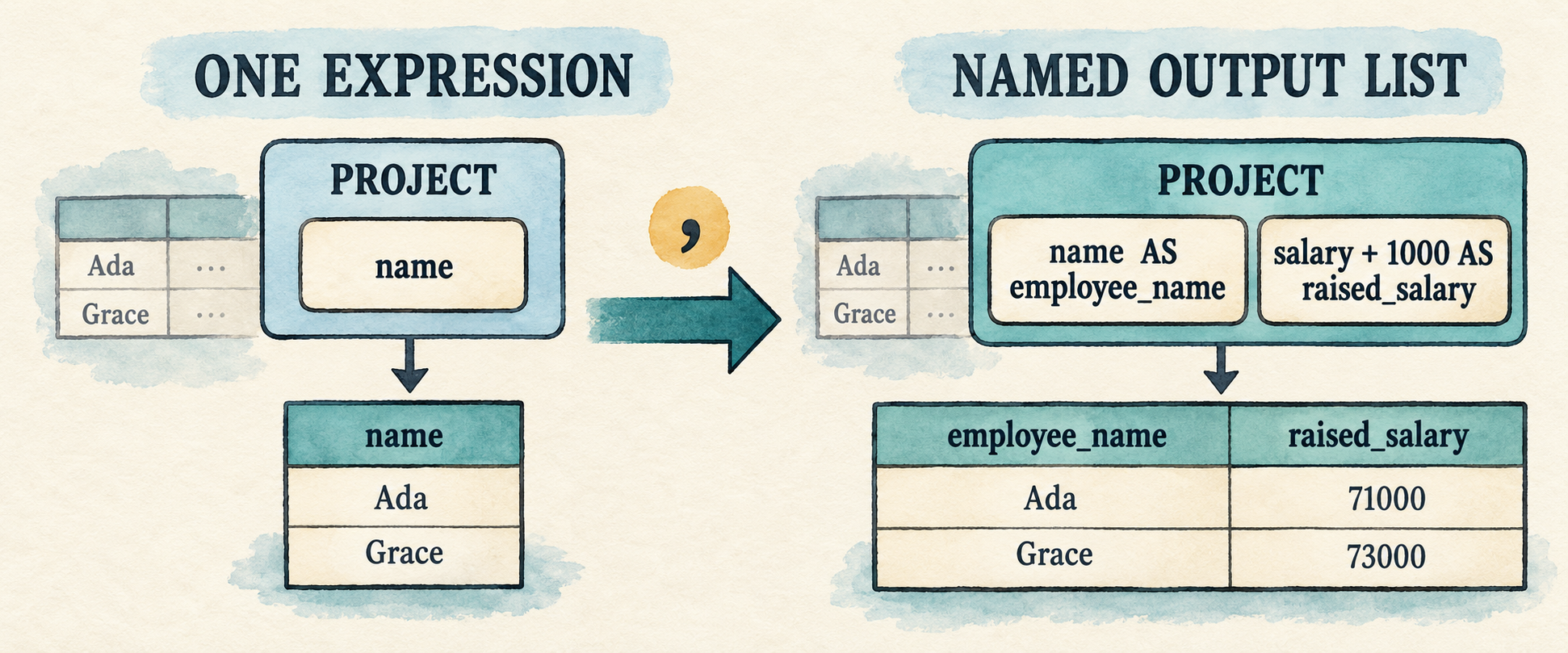
Chapter 5 can evaluate a complete expression tree, but its Query still stores
only one projection expression. That prevents a query from returning a column
and a computed value together:
SELECT e.name AS employee_name,
       e.salary + 1000 AS raised_salary
FROM employees AS e
WHERE e.salary > 50000;
This chapter changes projection from one expression into a list of selected
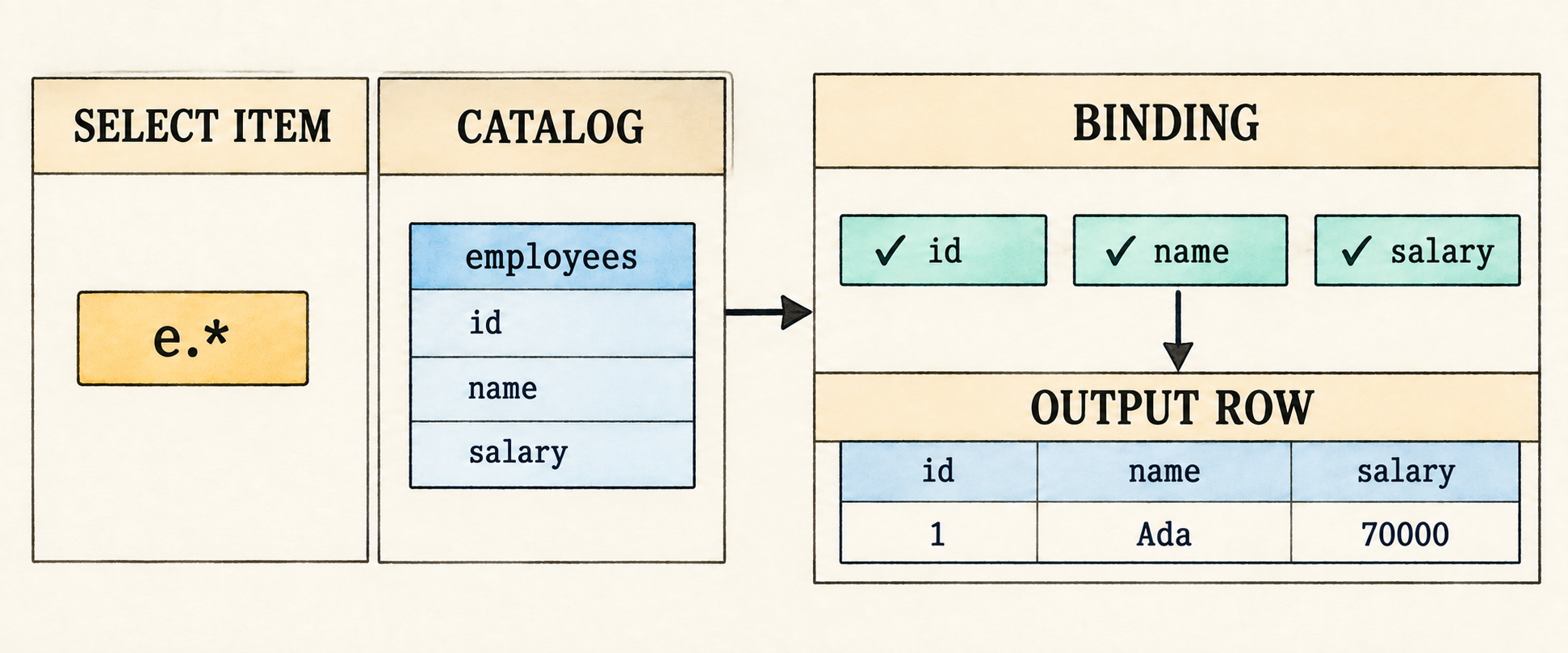
items. Most items are expressions with optional output aliases. A wildcard is
different: * asks the binder to produce one output for every column visible
from the selected table. The input side remains unchanged, so binding still
uses one table and the logical plan remains Project -> Filter -> Scan.
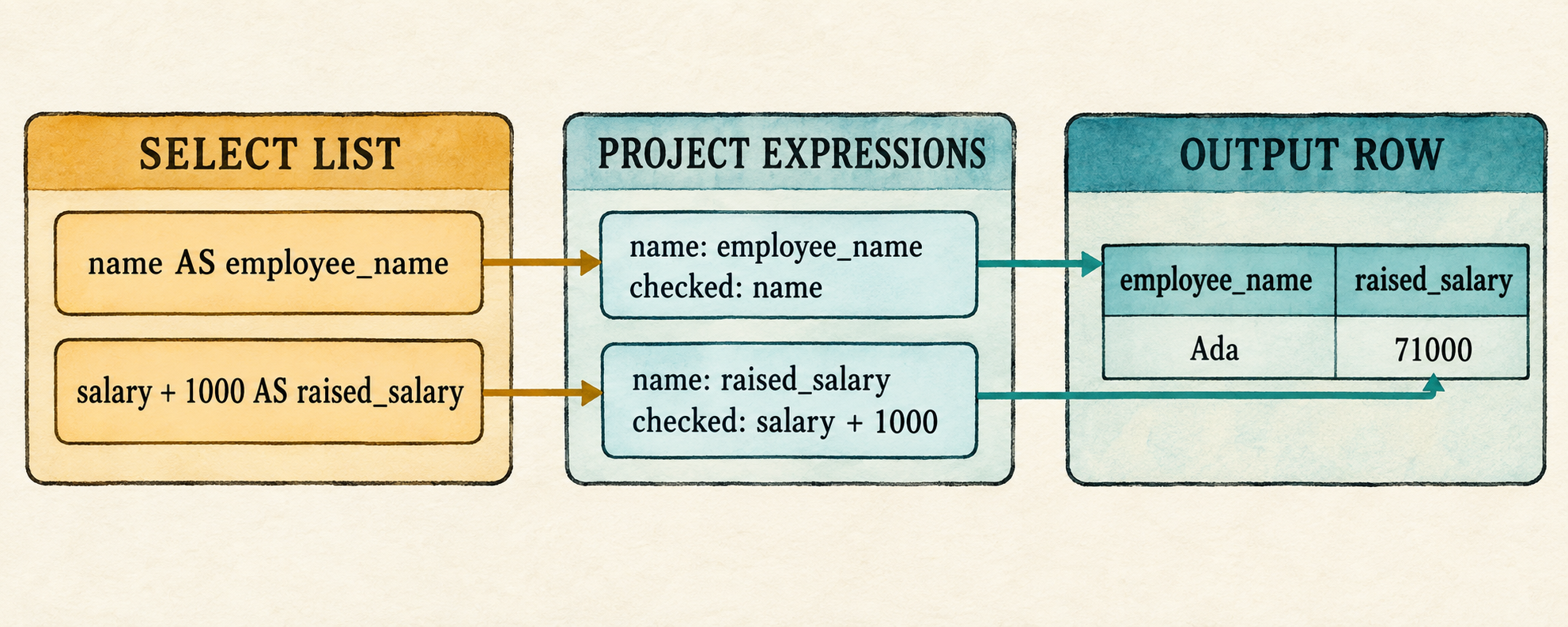
Each selected item also receives an output label. An explicit alias names a computed expression, a bare column keeps its column name, and a wildcard contributes the catalog column names it expands. Labels describe result fields; they do not identify the checked expressions during execution, so two outputs may have the same label. Aliases remain the way to make those fields useful to a reader.
This chapter carries its select list through the frontend:
comma-separated select items
        ↓ parse
Vec<SelectItem>
        ↓ bind in one Scope
Vec<ProjectExpression>
        ↓ evaluate for each surviving row
one wider Row
Multiple selected items do not require a new plan node. Chapter 5 already made
Project hold a vector of checked expressions. This chapter teaches the parser
and binder to fill that vector from explicit expressions and catalog-expanded
wildcards.
Before changing the program, begin from the completed Chapter 5 checkpoint:
git switch --create chapter-006 lesson-005
6.1 Represent a select list
The query grammar currently accepts one expression after SELECT. Replace that
single position with a comma-separated list of selected items:
query             = "SELECT" select_list
                    "FROM" identifier alias?
                    "WHERE" expression ";" ;

select_list       = select_item ("," select_item)* ;
select_item       = "*" | qualified_star | expression alias? ;
qualified_star    = identifier "." "*" ;
alias             = "AS"? identifier ;
select_list must contain at least one item. The parenthesized group may then
repeat zero or more times, so every additional item begins with a comma.
SELECT FROM ... remains invalid, while one item remains valid.
The grammar gives a select_item two distinct shapes. An expression item stores
the Expr to compute and its optional output alias. A wildcard is not an
expression to evaluate; it stores only an optional qualifier until binding
validates that qualifier and expands the matching catalog columns. Represent
the distinction with SelectItem, then let Query hold a vector of those
items instead of one projection expression.
src/parser.rs: replace Query and add SelectItem
#[derive(Debug, PartialEq, Eq)]
pub struct Query {
    pub projections: Vec<SelectItem>,
    pub table: String,
    pub table_alias: Option<String>,
    pub filter: Expr,
}

#[derive(Debug, PartialEq, Eq)]
pub enum SelectItem {
    Wildcard {
        qualifier: Option<String>,
    },
    Expression {
        expression: Expr,
        alias: Option<String>,
    },
}
For the representative query, the vector will contain two entries:
SelectItem::Expression {
    expression: Column(e.name),
    alias: Some("employee_name"),
}

SelectItem::Expression {
    expression: Add(Column(e.salary), Integer(1000)),
    alias: Some("raised_salary"),
}
These are still unresolved AST expressions. The aliases name their eventual
outputs; they do not participate in resolving e.name or e.salary.
The two wildcard forms become:
*    → SelectItem::Wildcard { qualifier: None }
e.*  → SelectItem::Wildcard { qualifier: Some("e") }
The parser records the request but does not expand it. Only the binder knows
which catalog table e names and which columns that table contains.
Together, expression items and wildcard forms complete the planned
select_list alternatives in
Appendix B.
6.2 Recognize the comma
The new grammar contains only one token that the lexer does not already know:
the comma separating selected items. Star already represents * because the
expression grammar uses the same character for multiplication. Add the comma
beside the other punctuation tokens.
src/lexer.rs: add Comma after Dot in Token
Dot,
Comma,
LeftParen,
Then recognize its one-character spelling in the punctuation helper.
src/lexer.rs: add the comma arm after the dot arm in punctuation()
('.', _) => Some((Token::Dot, 1)),
(',', _) => Some((Token::Comma, 1)),
('(', _) => Some((Token::LeftParen, 1)),AS, identifiers, dots, and stars already have tokens, so aliases and
wildcards need no other lexer change. The parser can now distinguish the
boundary between one selected item and the next.
6.3 Parse every selected item
We will implement the three new grammar productions directly:
select_list       = select_item ("," select_item)* ;
select_item       = "*" | qualified_star | expression alias? ;
qualified_star    = identifier "." "*" ;
6.3.1 Parse one selected item
At a select-item boundary, a leading * is an unqualified wildcard. The three
tokens identifier, ., and * form a qualified wildcard. These checks must
happen before expression parsing because the expression parser would otherwise
treat * as multiplication or expect a column name after the dot.
The peek_at() helper used by parse_select_item() below looks as far as two
tokens ahead, making the qualified form visible without consuming the beginning
of an ordinary expression.
src/parser.rs: add after peek()
fn peek_at(&self, offset: usize) -> Option<&Token> {
    self.tokens.get(self.current + offset)
}
If neither wildcard form matches, parse_select_item() delegates to the
precedence parser from Chapter 4. That parser naturally stops at AS, a direct
alias, or a comma because none is an expression operator. The existing
parse_alias() method then consumes the optional output alias.
src/parser.rs: add before parse_alias()
fn parse_select_item(&mut self) -> Result<SelectItem, ParseError> {
    if self.consume(&Token::Star) {
        return Ok(SelectItem::Wildcard { qualifier: None });
    }
    if let (Some(Token::Identifier(qualifier)),
        Some(Token::Dot), Some(Token::Star)) =
        (self.peek_at(0), self.peek_at(1), self.peek_at(2))
    {
        let qualifier = qualifier.clone();
        self.current += 3;
        return Ok(SelectItem::Wildcard {
            qualifier: Some(qualifier),
        });
    }
    Ok(SelectItem::Expression {
        expression: self.parse_expression()?,
        alias: self.parse_alias()?,
    })
}
The two early returns handle the wildcard alternatives. Reaching the final branch means the item begins with an expression; the parser preserves that expression together with any output alias that follows it.
6.3.2 Parse the complete select list
The select_list production requires one item, followed by zero or more
comma-item pairs:
select_list = select_item ("," select_item)* ;
src/parser.rs: add before parse_select_item()
fn parse_select_list(&mut self) -> Result<Vec<SelectItem>, ParseError> {
    let mut expressions = vec![self.parse_select_item()?];
    while self.consume(&Token::Comma) {
        expressions.push(self.parse_select_item()?);
    }
    Ok(expressions)
}
The first call before the loop implements the required first select_item.
Each successful comma consumption implements one repetition of
("," select_item)*. If there is no comma, the loop ends without consuming
FROM.
6.3.3 Connect the list to the query parser
The outer query parser should now ask for the complete list rather than one
expression. Only the first line of the existing query shape changes: SELECT
now produces a vector of items before parsing continues with FROM, the table,
and the filter.
src/parser.rs: replace parse_query()
fn parse_query(&mut self) -> Result<Query, ParseError> {
    self.expect(Token::Select, "expected SELECT at start of query")?;
    let projections = self.parse_select_list()?;
    self.expect(Token::From, "expected FROM after select list")?;
    let table = self.identifier("expected a table name after FROM")?;
    let table_alias = self.parse_alias()?;
    self.expect(Token::Where, "expected WHERE after table name")?;
    let filter = self.parse_expression()?;
    self.expect(Token::Semicolon, "expected ; after query")?;
    if self.current != self.tokens.len() {
        return Err(ParseError("unexpected token after ;".into()));
    }
    Ok(Query {
        projections,
        table,
        table_alias,
        filter,
    })
}
The same parse_alias() now serves two positions. Immediately after a selected
expression it records an output alias; immediately after the table identifier
it records a table alias. The grammar determines which meaning the returned
text has.
Two existing parser tests still inspect the removed query.projection field.
Remove multiplication_binds_more_tightly_than_addition() and
parses_boolean_literals() from src/parser.rs before compiling this
checkpoint. Then remove BinaryOp from the test module’s expression import,
because none of its remaining tests uses that operator type. Their parser
behavior remains valid; the completed lesson source contains updated versions
that inspect an expression item in query.projections.
Changing Query makes Chapter 5’s binder temporarily stale because it still
reads query.projection. Before reconnecting it, inspect exactly what the
frontend now produces.
6.4 Inspect the expanded AST
Temporarily use the program as an AST inspector. This isolates the completed lexer and parser from the binder that we have not updated yet.
src/main.rs: temporarily replace the file
#[allow(dead_code)] // Binding and execution reconnect later in this chapter.
mod expression;
mod lexer;
mod parser;
#[allow(dead_code)] // Row execution reconnects later in this chapter.
mod row;

use std::io::{self, Write};

use parser::parse;

fn main() -> io::Result<()> {
    run_prompt()
}

fn inspect_sql(sql: &str) {
    match parse(sql) {
        Ok(query) => println!("{query:#?}"),
        Err(error) => eprintln!("error: {error}"),
    }
}

fn run_prompt() -> io::Result<()> {
    loop {
        let mut sql = String::new();

        loop {
            if sql.is_empty() {
                print!("sql> ");
            } else {
                print!("...> ");
            }
            io::stdout().flush()?;

            let mut line = String::new();
            if io::stdin().read_line(&mut line)? == 0 {
                println!();
                if !sql.trim().is_empty() {
                    eprintln!("error: incomplete query at end of input");
                }
                return Ok(());
            }
            if sql.is_empty() && line.trim().is_empty() {
                break;
            }
            if append_sql_line(&mut sql, &line) {
                break;
            }
        }

        if !sql.trim().is_empty() {
            inspect_sql(&sql);
        }
    }
}

fn append_sql_line(sql: &mut String, line: &str) -> bool {
    sql.push_str(line);
    line.trim_end().ends_with(';')
}
Run it and enter the representative query:
cargo run --quiet
The relevant portion of the output contains two expression items and both aliases:
projections: [
    Expression {
        expression: Column { qualifier: Some("e"), name: "name" },
        alias: Some("employee_name"),
    },
    Expression {
        expression: Binary { ... },
        alias: Some("raised_salary"),
    },
]
The parser has preserved the list and its names, but it has not checked either expression. Enter a second query to inspect the other item shape:
SELECT *, e.* FROM employees AS e WHERE TRUE;
Its two entries are Wildcard { qualifier: None } and
Wildcard { qualifier: Some("e") }. The AST still does not contain the three
employee columns because parsing has no catalog. We now send every item through
the one-table scope built in Chapter 5.
6.5 Bind and expand every output
Table lookup and scope construction do not change. For the representative query, the binder creates the same one-table scope introduced in Chapter 5:
Scope {
    table_name: "employees",
    alias: Some("e"),
    columns: [
        id: Integer,
        name: Text,
        salary: Integer,
    ],
}
The binder reuses this scope for every selected item. It validates e.name
and e.salary + 1000 against the scope, then uses the same catalog columns to
expand e.*.
6.5.1 Share qualifier validation
Import the new select-item type before changing the binder.
src/catalog.rs: replace the parser import
use crate::parser::{Query, SelectItem};Recall the Chapter 5 qualifier rule: if an alias exists, it is accepted;
otherwise the table name is accepted. The Expr::Column arm currently checks
that rule inline:
if let Some(qualifier) = qualifier {
    let expected = scope.alias.unwrap_or(scope.table_name);
    if qualifier != expected {
        return Err(format!(
            "unknown table or alias: {qualifier}"));
    }
}
Column references and qualified wildcards now need the same check. Move it into a function that both paths can call.
src/catalog.rs: add after Scope
fn require_qualifier(qualifier: Option<&str>, scope: &Scope<'_>)
    -> Result<(), String>
{
    if let Some(qualifier) = qualifier {
        let expected = scope.alias.unwrap_or(scope.table_name);
        if qualifier != expected {
            return Err(format!("unknown table or alias: {qualifier}"));
        }
    }
    Ok(())
}src/catalog.rs: replace the inline qualifier check in the Expr::Column arm
require_qualifier(qualifier.as_deref(), scope)?;Both column references and wildcards now apply the same rule before either path consults the columns in the scope.
6.5.2 Bind expression items and expand wildcards
Expression items and wildcard expansion both append checked outputs. Keep that small construction step in one function.
src/catalog.rs: add after bind_expression()
fn push_output(expressions: &mut Vec<ProjectExpression>,
    name: String, expression: BoundExpr)
{
    expressions.push(ProjectExpression { name, expression });
}
The whole-query binder can now process the complete select list. Replace the
impl Catalog block that contains bind() with the version below. Table
lookup, scope construction, filter checking, and plan assembly remain the
same. The projection code in the middle now loops over query.projections
and expands wildcards from scope.columns.
src/catalog.rs: replace the impl Catalog block that contains bind()
impl Catalog {
    pub fn bind(&self, query: Query) -> Result<Plan, String> {
        let table = self.tables.iter()
            .find(|table| table.name == query.table)
            .ok_or_else(|| format!("unknown table: {}", query.table))?;

        let scope = Scope {
            table_name: &table.name,
            alias: query.table_alias.as_deref(),
            columns: &table.columns,
        };

        let mut expressions = Vec::new();
        for selected in query.projections {
            match selected {
                SelectItem::Expression { expression, alias } => {
                    let (expression, _) =
                        bind_expression(expression, &scope)?;
                    let name = alias.unwrap_or_else(|| match &expression {
                        BoundExpr::Column(name) => name.clone(),
                        _ => "expression".into(),
                    });
                    push_output(&mut expressions, name, expression);
                }
                SelectItem::Wildcard { qualifier } => {
                    require_qualifier(qualifier.as_deref(), &scope)?;
                    for column in scope.columns {
                        push_output(
                            &mut expressions,
                            column.name.clone(),
                            BoundExpr::Column(column.name.clone()),
                        );
                    }
                }
            }
        }

        let (predicate, predicate_type) =
            bind_expression(query.filter, &scope)?;
        if !matches!(predicate_type, DataType::Boolean | DataType::Null) {
            return Err("WHERE expression must be Boolean".to_string());
        }

        Ok(Plan::Project {
            expressions,
            input: Box::new(Plan::Filter {
                predicate,
                input: Box::new(Plan::Scan {
                    rows: table.rows.clone(),
                }),
            }),
        })
    }
}
For an expression item, each iteration does three things in order:
bind_expression()resolves and type-checks the selected expression.- The binder chooses its output name. An explicit alias wins, a bare column
keeps its column name, and an unnamed computation still uses
expression. push_output()pairs that label with the checked tree.
For a wildcard, the qualifier is checked once and the catalog columns are
visited in their stored order. Each column becomes a bound column expression
with the same output name. The three-column employee schema therefore expands
e.* into id, name, and salary without creating a new plan node.
The label is not a column identity. Project is the outermost node in this
chapter, so its rows are displayed rather than rebound by another query.
SELECT name, name may therefore produce two fields labelled name, and two
unnamed computations may both use the temporary label expression. A later
result-schema representation will need positional identity when projected rows
can become another query’s input.
6.5.3 Assemble the plan
After the projection loop has produced every ProjectExpression, the remaining
part of bind() follows the Chapter 5 path. It binds the WHERE expression,
requires a Boolean or null result, and places the complete projection vector
above Filter and Scan.
The resulting plan keeps its existing shape:
Project [employee_name, raised_salary]
  Filter salary > 50000
    Scan employees
There is no change to Plan or Plan::execute(). Chapter 5 already defined
Project with Vec<ProjectExpression> and made it evaluate every entry for
each input row. Previously the binder always created a vector of length one;
now it can fill the same vector from the complete select list.
6.6 Reconnect the application
The AST checkpoint has served its purpose. Restore the complete application and update the fixed demonstration to use both outputs. The catalog, prompt, and shared parse-bind-execute path remain unchanged; only the demonstration query and its projected rows change.
src/main.rs: replace the file
mod catalog;
mod expression;
mod lexer;
mod parser;
mod plan;
mod row;

use std::io::{self, Write};

use catalog::{Catalog, Column, Table};
use expression::DataType;
use parser::parse;
use row::{Row, Value};

fn main() {
    let catalog = employee_catalog();
    if std::env::args().nth(1).as_deref() == Some("--prompt") {
        run_prompt(&catalog).expect("failed to read SQL from the terminal");
    } else {
        run_demo(&catalog);
    }
}

fn employee(id: i64, name: &str, salary: i64) -> Row {
    Row::new(vec![
        ("id", Value::Integer(id)),
        ("name", Value::Text(name.into())),
        ("salary", Value::Integer(salary)),
    ])
}

fn employee_catalog() -> Catalog {
    Catalog::new(vec![Table {
        name: "employees".into(),
        columns: vec![
            Column {
                name: "id".into(),
                data_type: DataType::Integer,
            },
            Column {
                name: "name".into(),
                data_type: DataType::Text,
            },
            Column {
                name: "salary".into(),
                data_type: DataType::Integer,
            },
        ],
        rows: vec![
            employee(1, "Ada", 70_000),
            employee(2, "Linus", 50_000),
            employee(3, "Grace", 72_000),
        ],
    }])
}

fn execute_sql(sql: &str, catalog: &Catalog) -> Result<Vec<Row>, String> {
    let query = parse(sql).map_err(|error| error.to_string())?;
    catalog.bind(query)?.execute()
}

fn run_demo(catalog: &Catalog) {
    let sql = "SELECT e.name AS employee_name, \
        e.salary + 1000 AS raised_salary \
        FROM employees AS e \
        WHERE e.salary > 50000;";
    let rows = execute_sql(sql, catalog).expect("the lesson query should execute");
    println!("Employees with projected raises:");
    for row in rows {
        println!("{row}");
    }
}

fn run_prompt(catalog: &Catalog) -> io::Result<()> {
    loop {
        let mut sql = String::new();

        loop {
            if sql.is_empty() {
                print!("sql> ");
            } else {
                print!("...> ");
            }
            io::stdout().flush()?;

            let mut line = String::new();
            if io::stdin().read_line(&mut line)? == 0 {
                println!();
                if !sql.trim().is_empty() {
                    eprintln!("error: incomplete query at end of input");
                }
                return Ok(());
            }
            if sql.is_empty() && line.trim().is_empty() {
                break;
            }
            if append_sql_line(&mut sql, &line) {
                break;
            }
        }

        if !sql.trim().is_empty() {
            print_query_result(&sql, catalog);
        }
    }
}

fn append_sql_line(sql: &mut String, line: &str) -> bool {
    sql.push_str(line);
    line.trim_end().ends_with(';')
}

fn print_query_result(sql: &str, catalog: &Catalog) {
    match execute_sql(sql, catalog) {
        Ok(rows) => {
            for row in rows {
                println!("{row}");
            }
        }
        Err(error) => eprintln!("error: {error}"),
    }
}
Compile the reconnected application:
cargo check
6.7 Run the wider projection
Run the fixed demonstration:
cargo run --quiet
Employees with projected raises:
{employee_name: "Ada", raised_salary: 71000}
{employee_name: "Grace", raised_salary: 73000}
The filter retains Ada and Grace exactly as before. For each surviving input
row, Project evaluates both checked expressions and passes their two names
and values to Row::from_owned(). One input row therefore produces one output
row with two fields.
Start the prompt and enter the same query in its readable form:
cargo run --quiet -- --prompt
SELECT e.name AS employee_name,
       e.salary + 1000 AS raised_salary
FROM employees AS e
WHERE e.salary > 50000;
{employee_name: "Ada", raised_salary: 71000}
{employee_name: "Grace", raised_salary: 73000}
After the inherited prompt receives the semicolon, parsing produces two
expression-shaped SelectItem nodes, binding produces two checked
ProjectExpression nodes, and the existing executor constructs the wider
rows.
A qualified wildcard can also appear beside another select item. This query
expands every employees column, then appends the computed salary:
SELECT e.*, e.salary + 1000 AS raised_salary
FROM employees AS e
WHERE e.id = 1;
{id: 1, name: "Ada", salary: 70000, raised_salary: 71000}
Parsing records one qualified wildcard followed by one expression item.
Binding validates e, expands the employee columns in catalog order, and
then appends the checked computation named raised_salary. Project still
receives an ordinary list of checked expressions.
An unknown qualifier stops during binding:
SELECT x.* FROM employees AS e WHERE TRUE;
error: unknown table or alias: x
Repeated labels are allowed. Two unnamed computations both use the temporary
label expression:
SELECT salary + 1, salary + 1000
FROM employees
WHERE id = 1;
{expression: 70001, expression: 71000}
Aliases make the result easier to interpret:
SELECT salary + 1 AS next_salary,
       salary + 1000 AS raised_salary
FROM employees
WHERE id = 1;
{next_salary: 70001, raised_salary: 71000}
6.8 What we deliberately did not build
This chapter changes projection only. The catalog, expression, type, and planning limits from Chapter 5 still apply. The expanded select list remains bounded in these ways:
- A query still has exactly one input table.
- Every query still requires
WHERE. - Wildcards expand only the one table in the current scope; Chapter 7 will define their behavior when several inputs are visible.
DISTINCTandALLremain in Chapter 10, where duplicate handling becomes observable.- A computed expression without an alias still receives the temporary name
expression. - Output labels may repeat because projected rows are final results in this chapter. Chapter 11 will introduce a result schema with positional identity before projected rows can become inputs to another query.
These limits keep the chapter focused on widening projection. The next chapter changes the other side of the query by allowing more than one input table.
6.9 Try it
Run the prompt, predict the output labels, and then try each query.
- Select
name, salarywithout aliases. - Select
name, salary + 1000 AS raised_salary. - Remove
ASfrom both aliases in the representative query. - Select
salary + 1000, salary - 1000without aliases. - Select
name AS result, salary AS result. - Select
name AS employee_name, salary, salary + 1000 AS raised_salary. - Select
*and predict the output order fromemployee_catalog().
Check your reasoning
- Both bare columns retain their names, producing
nameandsalary. - The bare column is named
name; the computation uses its explicitraised_salaryalias. - Direct aliases are accepted, so the result is unchanged.
- Both computations receive the fallback label
expression; both values remain in the result row. - Both values remain in the result row with the shared label
result. - The result contains three fields in select-list order:
employee_name,salary, andraised_salary. - The wildcard expands to
id,name, andsalaryin catalog order.
6.10 One output list, one input scope
Projection can now compute and name several values or expand a table wildcard,
but every column still comes from the same table. That makes an unqualified
name such as name unambiguous and gives * only one possible input.
Consider what changes when the database has two tables:
employees(id, name, department_id)
departments(id, name)
A useful query needs values from both:
SELECT e.name AS employee_name, d.name AS department_name
FROM employees AS e, departments AS d
WHERE e.department_id = d.id;
The projection list and its output aliases are no longer a problem. The
remaining difficulty is on the input side. The binder must track both table
aliases, decide which table owns each column, reject an unqualified name
because both inputs define one, and decide which schemas an unqualified *
should expand.
After those names are resolved, execution must combine an employee row with a department row before the existing filter can test their identifiers and the project node can produce the two named outputs. That row-combining operation is a join.
The next chapter expands the binding scope from one table to several, adds the first
logical Join node, and makes its straightforward nested-loop execution
visible.