Database: Zero to Distributed
Build a database from its first in-memory row to durable, distributed state. Each chapter begins with a limitation in the current implementation, adds the smallest concept needed to overcome it, and leaves behind a runnable checkpoint.
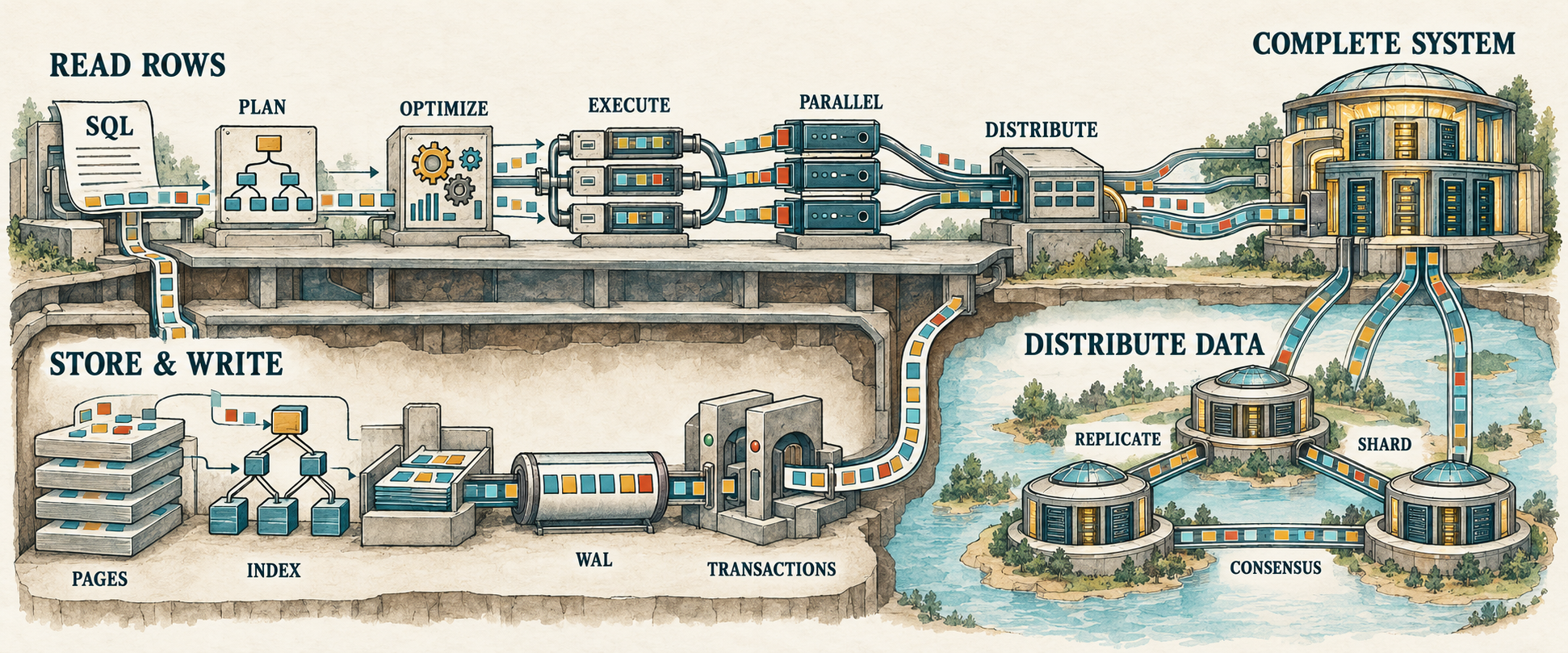
Start with The Smallest Query Engine, then
follow the chapters in order. Every completed chapter corresponds to a
verified lesson-NNN repository tag.
Volume I: Read Rows
The first volume follows a query from SQL text to rows, then makes that work faster and spreads it across threads and machines. Five seasons form one continuous implementation.
Season 1: Build the Smallest Query Engine
Begin with Scan -> Filter -> Project. Add SQL parsing, expression trees,
binding, richer projections, joins, aggregation, sorting, and subqueries until
the database can answer substantial read-only queries.
- The Smallest Query Engine
- Relational Algebra Without the Math
- SQL Is Just a Frontend
- Expressions Are Trees
- Binding Gives Names Meaning
- Multiple Outputs
- The First Join
- Outer Joins Preserve Unmatched Rows
Season 2: See How Query Engines Execute
Measure the cost of materializing every intermediate result, replace it with iterator-based execution, and separate the logical request from the physical algorithm that performs it.
Season 3: Make Plans Better
Introduce meaning-preserving rewrites, statistics, costs, and join ordering. The database will be able to explain why it chose one plan over another.
Season 4: Use More Than One Core
Partition tables, turn plans into task graphs, and schedule parallel work while keeping row movement and ordering visible.
Season 5: Execute Across Machines
Move from local workers to processes and networked workers. Build exchange, shuffle, distributed joins and aggregation, then confront failures, skew, finite memory, and spill.
Later volumes
- Store and Write Rows Correctly builds pages, heap files, indexes, write-ahead logging, recovery, concurrency control, and transactions.
- Distribute Data and Correctness adds replication, sharding, consensus, and cross-shard transactions.
- Complete the Language and Bring Everything Together expands SQL, integrates the full system, benchmarks it, and tests its failure behavior.
Future chapters receive links only when their implementation and manuscript
begin. The complete curriculum lives in
Roadmap.md,
and current progress lives in
TODO.md.
Appendices
- Appendix A: Enough Rust to Build a Database
- Appendix B: The SQL Grammar We Support
- Appendix C: Values, Types, and Operators
1. The Smallest Query Engine
Before a database can become distributed, it must first answer one small question correctly.

A database begins with a query: a request for some result. The query engine turns that request into a plan, reads the required data, performs the plan’s operations, and returns the result. A large database may spread this work across many processors and machines, but we will begin with a version small enough to hold in our heads.
In this chapter, we will build a tiny database program. Instead of reading SQL, it will execute a plan that we construct ourselves. Our first engine will know only three operations: read rows, remove rows that fail a condition, and remove columns that were not requested. Databases call these operations scan, filter, and project. Together they can answer an ordinary question such as this one:
SELECT name
FROM employees
WHERE salary > 50000;
Read the query one line at a time. FROM employees identifies the table named
employees. WHERE salary > 50000 keeps a row only when its salary is greater
than 50,000. SELECT name asks for the name column from each remaining row.
SQL writes numbers without thousands separators, so 50000 means 50,000.
Here is the complete employees table we will use:
| id | name | salary |
|---|---|---|
| 1 | Ada | 70,000 |
| 2 | Linus | 50,000 |
| 3 | Grace | 72,000 |
Ada and Grace earn more than 50,000, so their names belong in the result. Linus
earns exactly 50,000. The query uses >, not >=, so equality is not enough
and his row is removed. After removing the unrequested id and salary
columns, our tiny database program should print:
Employees earning more than 50,000:
{name: "Ada"}
{name: "Grace"}
The work sounds manageable: read the employees, discard the row whose salary does not satisfy the condition, and remove every column except the name.
By the end of the chapter, we will have represented the table in Rust, described the required work, executed it, and checked the result. That is not much of a database, but it is enough database to teach us how a query engine begins.
This chapter uses a small amount of Rust without pausing to teach the language. If any syntax is unfamiliar, keep Appendix A nearby and return here when the code is readable again.
To build alongside this chapter, clone the repository and create a working branch from the pre-code checkpoint:
git clone https://github.com/shashankkhasare/database-zero-to-distributed.git
cd database-zero-to-distributed
git switch --create chapter-001 lesson-000
cargo init --bin .
cargo init adds Cargo.toml and a starter src/main.rs to the existing
directory. The lesson-001 tag contains the completed chapter for comparison
or recovery; it is the destination, not the starting point.
1.1 Begin without SQL
We know what result this SQL query should produce. What we do not yet know is how the database performs the work.
Before a database can execute SQL, it must translate the text into an internal description of the required operations. That begins with a parser, which recognizes the query’s words, names, punctuation, and structure. We will build that machinery later. We will skip parsing for now and begin with the internal description a parser would produce. That leaves us with the question at the heart of this chapter:
Once the database knows which operations to perform, how does it produce the requested rows?
We will construct that plan directly in Rust and create the employee rows ourselves. A later chapter will translate SQL into the same plan.
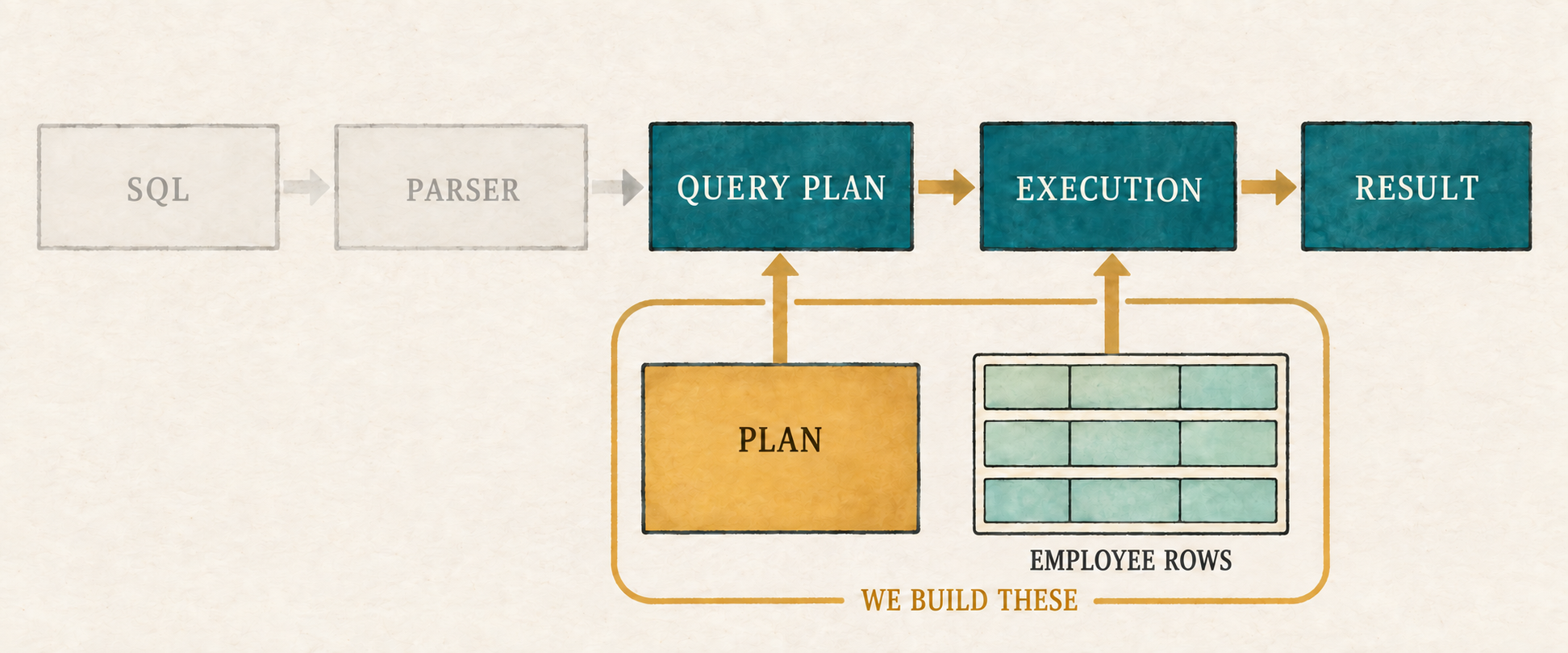
We already know the input and expected answer. Before our program can connect the two, it needs a way to represent one row.
1.2 Represent the table as rows
A table is made of rows and columns. Each row represents one item, in this case
one employee, and each column describes one fact about it. Database theory often
calls a table-like collection of rows a relation. We will use both words,
but “table” is a perfectly good mental picture. Our rows need integers for id
and salary, and text for name.
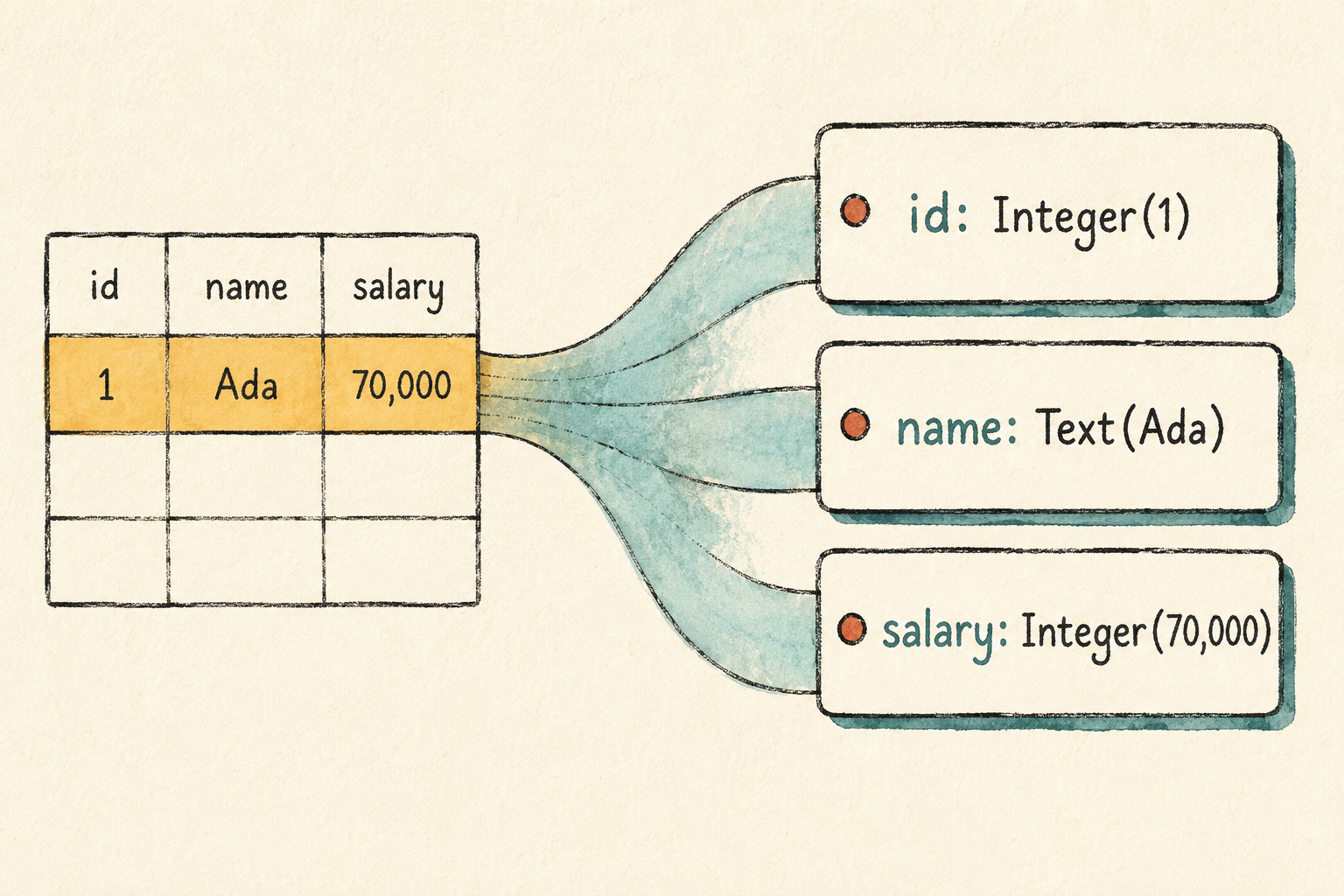
Look at the places where rows and columns meet. Ada’s id cell contains the
number 1, while her name cell contains the text Ada. Each cell holds one
value, and the engine must know what kind of value it holds before it can
compare or display it. We will begin with a type named Value.
src/row.rs: create this file
#[derive(Clone, Debug, PartialEq, Eq)]
pub enum Value {
    Integer(i64),
    Text(String),
}
Rust compiles a source file only after it is included in the program’s module
tree. Add the new row module at the top of the starter file.
src/main.rs: add at the top of the file
mod row;Integer and Text cover every cell in our employee table. Keeping the two
kinds distinct makes it impossible to mistake a name for a salary. We can add
another kind of value when a later query gives us a reason.
One Value represents only one cell in the table. A row brings together all
the cells that describe one employee. Ada’s row contains id 1, name Ada,
and salary 70,000. Our program will represent that complete record with a
type named Row, storing each column name beside its value.
src/row.rs: add after Value
#[derive(Clone, Debug, PartialEq, Eq)]
pub struct Row {
    values: Vec<(String, Value)>,
}
The values field stores the row as a list of column-and-value pairs. Ada’s row
will contain ("id", Integer(1)), ("name", Text("Ada")), and
("salary", Integer(70_000)). The column name travels with each value, so we
can tell what every value means by inspecting the row itself.
A stored row is useful only if the engine can work with it. We need to create rows for the employee table, find a value when the filter asks for a column, and build a smaller row when the project selects columns. We will add one method for each job.
src/row.rs: add after Row
impl Row {
    pub fn new(values: Vec<(&str, Value)>) -> Self {
        let mut owned_values = Vec::new();

        for (column, value) in values {
            owned_values.push((column.to_string(), value));
        }

        Self {
            values: owned_values,
        }
    }
}
Row::new() stores each column name as an owned String beside its value.
src/row.rs: add after the first impl Row
impl Row {
    pub fn get(&self, column: &str) -> Option<&Value> {
        for (name, value) in &self.values {
            if name == column {
                return Some(value);
            }
        }

        None
    }
}
Row::get() searches by column name and returns the matching value, or None
when the column does not exist.
src/row.rs: add after the second impl Row
impl Row {
    pub fn project(&self, columns: &[String]) -> Self {
        let mut values = Vec::new();

        for column in columns {
            let value = match self.get(column) {
                Some(value) => value,
                None => panic!("unknown column: {column}"),
            };

            values.push((column.clone(), value.clone()));
        }

        Self { values }
    }
}
Row::project() copies the requested columns, in order, into a new row. An
unknown column stops the program because plans are still written directly by
the programmer.
We can now represent Ada’s complete employee row:
Row::new(vec![
    ("id", Value::Integer(1)),
    ("name", Value::Text("Ada".to_string())),
    ("salary", Value::Integer(70_000)),
])
This design repeats column names in every row and searches them one by one. That would be wasteful for a large table, but it keeps our first implementation easy to inspect and works well enough for three rows. We will improve it when the limitation begins to matter.
Production note: Where is the schema?
Real database systems usually keep column names and types in a separate description called a schema. Rows can then store values compactly without repeating the names. Our first lesson keeps the names inside each row so the relationship between a column and its value remains obvious.
Each row can now store data, find a named value, and create a smaller row with selected columns. Those are all the row operations our first plan will need. Before we build that plan, we need one practical addition: a readable way to display its result rows.
1.2.1 Make result rows readable
The query will be easier to inspect if each result resembles a small record rather than Rust’s internal representation. We will print a row inside braces, separate its columns with commas, and place a colon between each column name and value. Text will appear in quotation marks, while integers will not.
For example, projecting Ada’s row to the name column should produce:
{name: "Ada"}
The following formatting code establishes that output. It preserves the order of values stored in the row, which also preserves the order requested by a project.
Rust’s formatting interfaces live in the standard library’s fmt module.
Import it at the top of row.rs before adding the display implementations.
src/row.rs: add at the top of the file
use std::fmt;src/row.rs: add after impl Row
impl fmt::Display for Row {
    fn fmt(&self, formatter: &mut fmt::Formatter<'_>) -> fmt::Result {
        write!(formatter, "{{")?;

        for (index, (column, value)) in self.values.iter().enumerate() {
            if index > 0 {
                write!(formatter, ", ")?;
            }

            write!(formatter, "{column}: {value}")?;
        }

        write!(formatter, "}}")
    }
}src/row.rs: add after impl fmt::Display for Row
impl fmt::Display for Value {
    fn fmt(&self, formatter: &mut fmt::Formatter<'_>) -> fmt::Result {
        match self {
            Value::Integer(value) => write!(formatter, "{value}"),
            Value::Text(value) => write!(formatter, "\"{value}\""),
        }
    }
}
This code controls presentation only. It does not change the values stored in a row or the way query operations process them. Appendix A explains Rust’s formatting machinery in more detail. Our rows are now represented and readable; the next piece must describe what the engine should do with them.
1.3 Describe the work as a plan
We need three operations:
- read the employee rows
- keep rows whose salary is greater than 50,000
- keep only the
namecolumn
Databases commonly call these operations scan, filter, and project. They must run in a particular order. The scan supplies rows to the filter, and the filter supplies its surviving rows to the project. We can connect them like this:
Project name
    ↑
Filter salary > 50,000
    ↑
Scan employees
Each operation is a node, and the connected nodes form a query plan, a description of the work used to answer a query. This plan has only one path, so it looks like a chain. We still describe the structure as a tree because later operations, such as joins, can receive rows from more than one input and create branches.
The scan sits at the bottom because it needs no earlier result. A node without a child is called a leaf. The filter consumes the scan’s rows, and the project consumes the filter’s rows. The arrows point upward because rows flow from the scan toward the final result at the top.
Early diagrams will show these arrows explicitly. Once the convention is familiar, a plain connecting line may imply the same upward flow.
The engine needs more than the three operation names. A scan must hold the rows it will read. A filter must remember which column to inspect, what value to compare against, and which operation supplies its rows. A project must remember which columns to keep and where its rows come from.
Each operation becomes one node in the plan. In this tree, every node above the
scan stores an input that points to its child below it. The filter’s child is
the scan, and the project’s child is the filter. These links form the hierarchy
we drew above. Since a node can be a scan, filter, or project, we can represent
all three possibilities with one Plan type.
src/plan.rs: create this file
use crate::row::{Row, Value};

pub enum Plan {
    Scan {
        rows: Vec<Row>,
    },
    Filter {
        column: String,
        greater_than: i64,
        input: Box<Plan>,
    },
    Project {
        columns: Vec<String>,
        input: Box<Plan>,
    },
}
This first filter is deliberately narrow. It compares one integer column with
>. That is enough for the employee query, and we will generalize predicates
when another query requires more.
Include the second source file in the module tree as soon as we create it.
src/main.rs: add above mod row;
mod plan;For our employee query, those nodes and their attributes form this structure:
Project
├── columns: ["name"]
└── input
    └── Filter
        ├── column: "salary"
        ├── greater_than: 50,000
        └── input
            └── Scan
                └── rows: employees
This diagram shows the plan’s structure, not the direction in which calls or
rows travel. Project is the root. Its input points to the filter child, and
the filter’s input points to the scan child. The scan is the leaf because it
reads the employee rows without needing another operation below it.
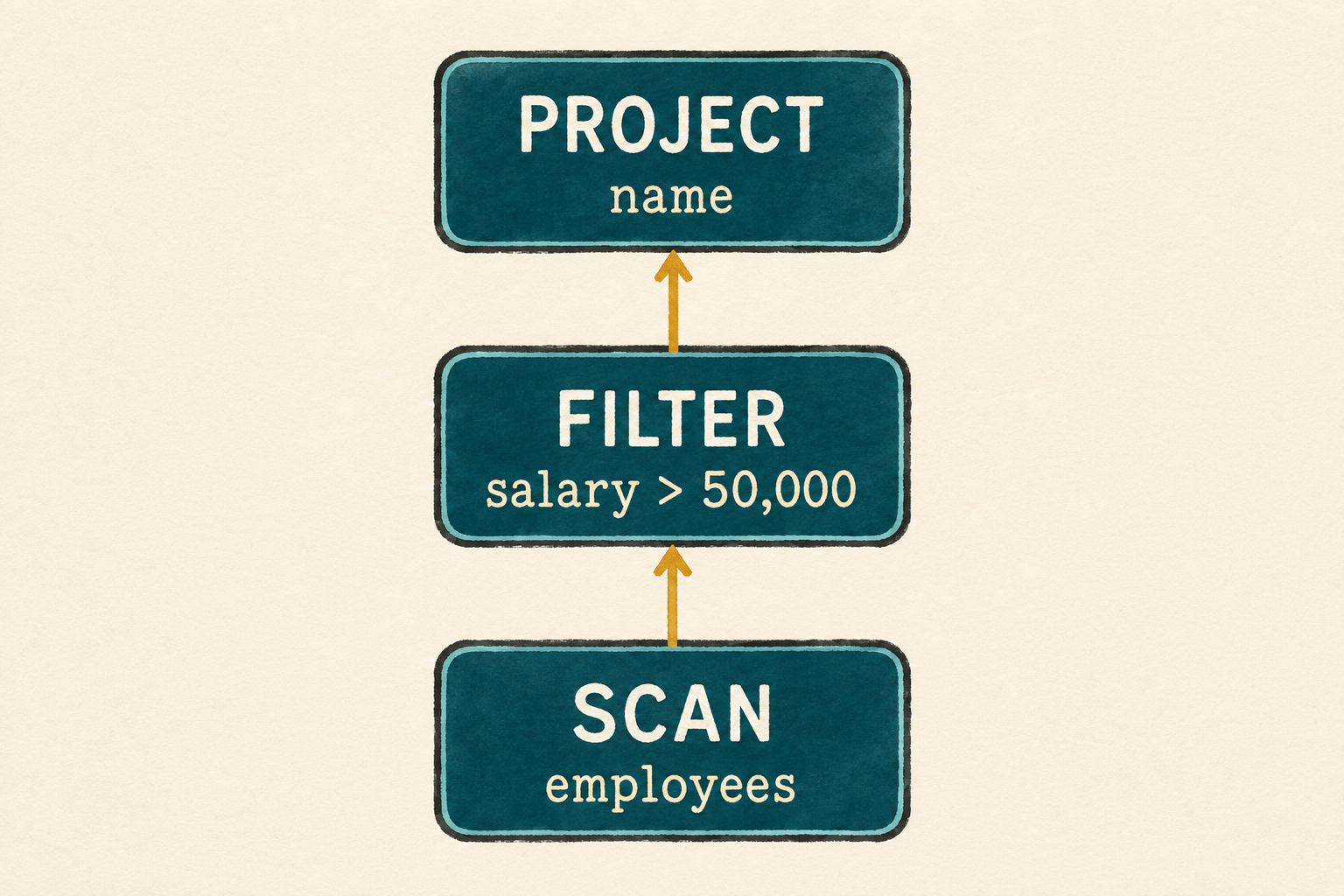
We keep all three operations together in one Plan type, so the engine’s
complete vocabulary remains visible in one place. In the next section, we will
define the behavior of each kind of node directly. Splitting them behind
additional layers would make this first tree harder to see without solving a
problem we currently have.
We can now describe the query. Describing it is not the same as running it, so let’s teach the plan how to execute.
1.4 Execute the plan
Our plan currently describes work but cannot perform it. We will give Plan a
method named execute(). Calling it asks that plan to run and return its result
rows.
Calling execute() on the project does not begin by projecting a row. The
project has no rows yet. It first asks its input, the filter, to execute. The
filter has the same problem, so it asks the scan to execute. The requests occur
in this order:
Project.execute()
        ↓ asks its input
Filter.execute()
        ↓ asks its input
Scan.execute()
The scan already has the employee rows, so it can answer. It returns them to the filter, which removes Linus and returns two complete employee rows to the project. The project then keeps only their names:
Scan result: all three employee rows
        ↓ filter keeps two rows
Filter result: Ada and Grace rows
        ↓ project keeps one column
Project result: Ada and Grace names
Each node asks its child to execute before processing the returned rows. The
same execute() method therefore calls itself on a smaller input plan. Calling
a function from within itself is recursion.
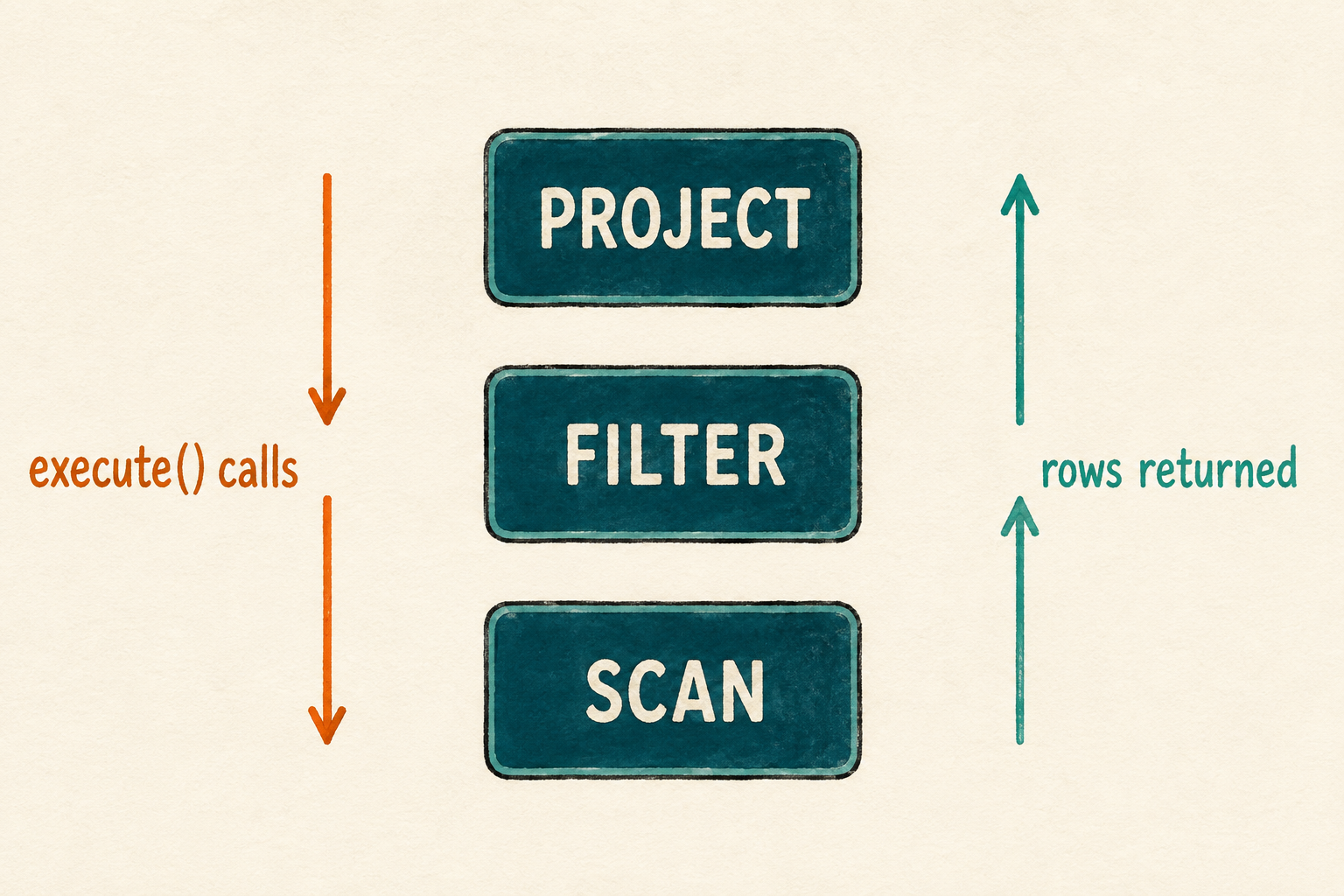
The implementation will follow the same conversation. It examines the current node and runs the behavior for a scan, filter, or project. We will begin with a placeholder for each operation, then replace them one at a time.
src/plan.rs: add an implementation block after the Plan enum
impl Plan {
    pub fn execute(&self) -> Vec<Row> {
        match self {
            Plan::Scan { .. } => todo!("execute scan"),
            Plan::Filter { .. } => todo!("execute filter"),
            Plan::Project { .. } => todo!("execute project"),
        }
    }
}
Each todo!() marks behavior we have not implemented yet. The temporary
version gives every kind of plan node a place in execute(), allowing us to
build the executor in the same order that rows travel upward: scan, filter,
then project.
Before replacing the placeholders, let one run. Temporarily replace the starter
program with the smallest plan that calls execute().
src/main.rs: temporarily replace the file
mod plan;
mod row;

use plan::Plan;

fn main() {
    let plan = Plan::Scan { rows: Vec::new() };
    plan.execute();
}
cargo run --quiet
Rust first prints warnings because this temporary program does not yet use all the row methods and plan variants we have defined. Those warnings are expected at this incomplete checkpoint. After them, the program stops at the first unfinished operation:
thread 'main' panicked:
not yet implemented: execute scan
The exact output may also include a thread number, source location, and note about backtraces. The final panic is what matters: it proves that execution reached the scan placeholder. We can now replace that placeholder with real behavior and continue upward through the plan.
1.4.1 Scan returns its rows
The scan is the leaf of the plan, so it does not ask another node for input. It already contains the employee rows and returns all of them without filtering or changing their columns. Our first executor returns a complete copy of those rows. That is sufficient for this small, materialized query, although copying every row would become expensive for a large table. We will keep that cost visible until a later lesson gives us a reason to change how rows move through the engine.
src/plan.rs: replace the Scan placeholder
Plan::Scan { rows } => rows.clone(),1.4.2 Filter decides which rows survive
The filter cannot decide which rows survive until its child has produced them. It therefore executes its input first and stores the complete result. It then visits those rows one at a time, building a new output that will contain only the rows that satisfy the filter’s condition.
For each employee, the filter finds the requested column and checks whether it contains an integer. It then asks whether that integer is greater than the stored boundary. This yes-or-no condition is called a predicate. A row is added to the output only when the predicate is true.
Our plans are still written directly by the programmer, so a missing column or a text value indicates a mistake in the plan. This implementation stops with a focused message instead of adding error-handling machinery to the first executor.
src/plan.rs: replace the Filter placeholder
Plan::Filter {
    column,
    greater_than,
    input,
} => {
    let input_rows = input.execute();
    let mut output_rows = Vec::new();
    for row in input_rows {
        let value = match row.get(column) {
            Some(Value::Integer(value)) => value,
            Some(Value::Text(_)) => panic!("column is not an integer: {column}"),
            None => panic!("unknown column: {column}"),
        };
        if value > greater_than {
            output_rows.push(row);
        }
    }

    output_rows
}
Production note: Invalid plans
Stopping is a temporary shortcut, not a claim about good database behavior. Both filtering and
Row::project()currently panic when a requested column is missing; filtering also panics when its column contains text instead of an integer. Once plans come from user-written SQL, invalid names and incompatible types will need ordinary error messages instead.
1.4.3 Project makes each row smaller
Filtering changes how many rows remain. Projection changes what each remaining row contains. We asked for names rather than complete employee records, so this operation constructs a smaller row for every input row.
src/plan.rs: replace the Project placeholder
Plan::Project { columns, input } => {
    let input_rows = input.execute();
    let mut output_rows = Vec::new();

    for row in input_rows {
        output_rows.push(row.project(columns));
    }

    output_rows
}
Like the filter, the project executes its input and creates an empty output
list. The filter may discard an input row, but the project adds exactly one
output row for every input row. Row::project() keeps the requested columns in
the requested order and copies their values into a new row. Database theory
calls this choice of columns projection.
Scan can now return rows, filter can remove rows, and project can reshape rows. Each operation performs one small job. Their request-and-response pattern lets the output from one operation become the input to the operation above it. We have all three behaviors, so it is time to connect them into the employee query.
1.5 Build the employee query
The executor now knows how each kind of node behaves, but it still needs a
specific relation and plan to execute. We will represent the three rows from
the employees table in their original order. These rows become the source
owned by the scan at the bottom of the plan.
Now we connect the operations. The scan contains every employee row. The
filter uses the scan as its input and keeps salaries greater than 50,000. The
project uses the filter as its input and keeps only name. In Rust, the scan
is nested inside the filter, which is nested inside the project. Execution
reaches the scan first, then returns through the filter and project.
Finally, the program executes the completed plan and prints every result row. We will assemble the entry point in short pieces, beginning with the modules and a function that creates one employee row.
src/main.rs: replace the temporary file
mod plan;
mod row;

use plan::Plan;
use row::{Row, Value};

fn employee(id: i64, name: &str, salary: i64) -> Row {
    Row::new(vec![
        ("id", Value::Integer(id)),
        ("name", Value::Text(name.to_string())),
        ("salary", Value::Integer(salary)),
    ])
}
Now create the three-row table with that function.
src/main.rs: add after employee()
fn employee_rows() -> Vec<Row> {
    vec![
        employee(1, "Ada", 70_000),
        employee(2, "Linus", 50_000),
        employee(3, "Grace", 72_000),
    ]
}
The entry point connects those rows to the plan.
src/main.rs: add after employee_rows()
fn main() {
    let plan = Plan::Project {
        columns: vec!["name".to_string()],
        input: Box::new(Plan::Filter {
            column: "salary".to_string(),
            greater_than: 50_000,
            input: Box::new(Plan::Scan {
                rows: employee_rows(),
            }),
        }),
};src/main.rs: finish main()
    println!("Employees earning more than 50,000:");
    for row in plan.execute() {
        println!("{row}");
    }
}
cargo run --quiet
Expected output:
Employees earning more than 50,000:
{name: "Ada"}
{name: "Grace"}
Ada and Grace remain because their salaries are greater than 50,000, while
Linus is absent because equality is not enough for >. Each result contains
only a name, showing that projection ran after filtering. Together, these rows
confirm that the scan read the employees, the filter applied the strict salary
condition, and the project removed the columns we did not request.
1.6 What we deliberately did not build
Our query engine runs, but calling it a database in polite company would be optimistic. It currently:
- stores every row in memory
- repeats column names inside every row
- searches columns one by one
- copies rows between operations
- collects a complete result at every step
- supports one kind of integer comparison
- has no SQL parser, files, indexes, schema, or transactions
- uses one thread in one process
Notice that each operation finishes a complete list of rows before the next operation processes it. The scan returns all employee rows, the filter builds its entire output, and only then does the project build the final result. A complete intermediate result like this is called a materialized result, so our engine uses materialized execution.
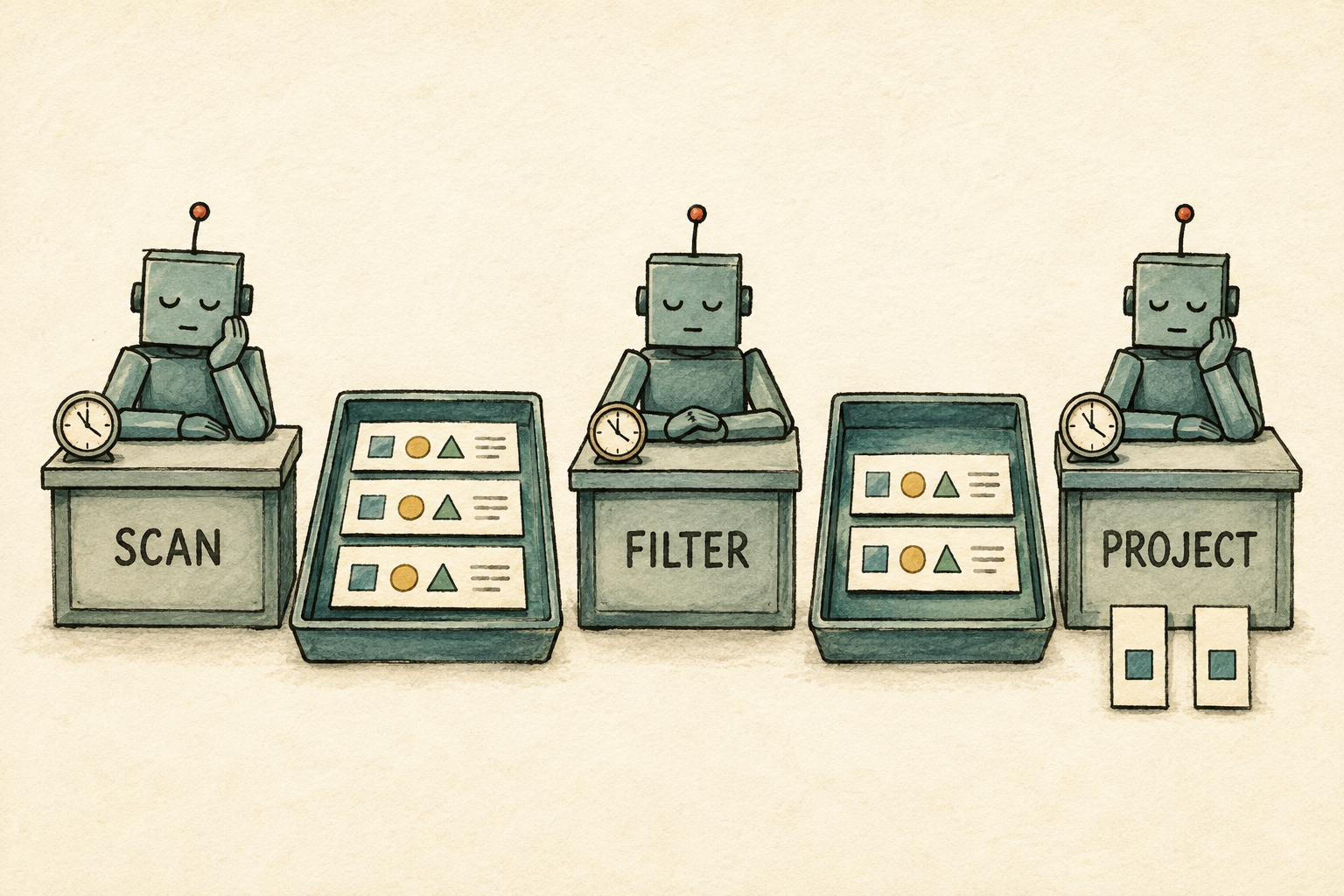
Materialized execution is easy to follow and works well for three rows. With a large table, however, those intermediate lists could consume a great deal of memory. A later chapter will let the next operation process rows as they become available instead of waiting for a complete list.
1.7 Try it
These experiments stay within the ideas from this chapter:
- Change the salary boundary to 70,000. Predict the output before running the program.
- Project both
nameandsalary. Notice that the requested column order becomes the output order. - Reverse the employee input rows. Confirm that the output order changes in
the same way. This demonstrates how our current
Vec<Row>implementation behaves; it is not yet a guarantee of the relational model. - Add an employee who earns 50,001 and confirm that the strict comparison includes the new row.
Restore the original employee rows after experimenting, then continue.
1.8 We accidentally built some algebra
We began with three ordinary actions: read rows, keep some rows, and keep some columns. Connecting them gave us this tree:
Project(name)
    ↑
Filter(salary > 50000)
    ↑
Scan(employees)
This plan is more than a convenient Rust data structure. Its operations belong to relational algebra, a language for describing how relations are transformed. Relational algebra gives each operation a precise meaning, which lets us compare plans instead of treating them as arbitrary arrangements of Rust values.
Two plans can have different shapes and still answer the same query. That matters because one arrangement may perform less work than another. But before we can choose a better plan, we must know that it preserves the original result.
So the next chapter asks: when do two different query plans mean the same thing?
2. Relational Algebra Without the Math
A plan is not a pile of operations. Its shape is part of the answer.
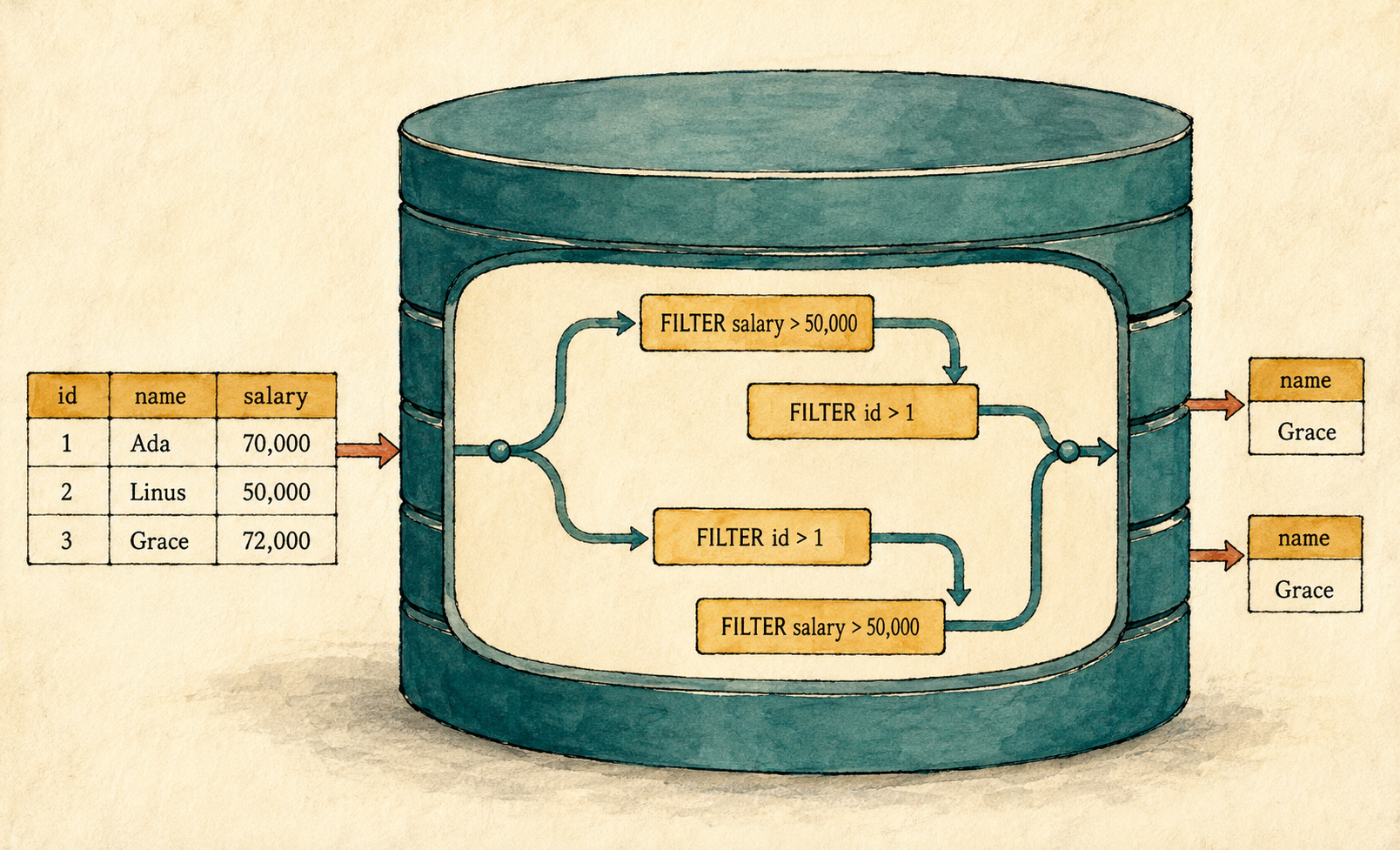
Chapter 1 left us with a working query engine and one unanswered question: how can we tell whether two query plans mean the same thing? This matters because databases often rearrange operations to perform less work. A different arrangement is useful only when it preserves the original answer. Before we can build an optimizer, we need a reliable way to distinguish safe transformations from incorrect ones.
To compare plans, we need a precise way to describe what each operation means. Relational algebra provides that language. We will introduce it through the employee rows and operations already present in our program, then use it to explain why one plan rearrangement preserves the result while another changes it.
Instead of adding another operator, this chapter uses the engine we already have. We will define equivalence, learn three laws for transforming the operators our engine supports, and use counterexamples to reject transformations that satisfy no valid law.
Build-along checkpoint
Begin with the completed Chapter 1 checkpoint:
git switch --create chapter-002 lesson-001This chapter does not require source changes. We will use the existing engine to compare plans and search for counterexamples. The
lesson-002tag is the completed Chapter 2 checkpoint.
2.1 We already have the pieces
Return to our first request: find the names of employees who earn more than 50,000. Ada and Grace appear in the result. Linus does not. Three operations produce that answer: a scan reads the rows, a filter applies a predicate, and a project keeps the requested columns.
Here is the request in ordinary language:
From the employees, keep those earning more than 50,000, then show only their names.
Each part corresponds to one plan node:
Project(name)
    ↑
Filter(salary > 50000)
    ↑
Scan(employees)
Read from the bottom upward. The scan supplies all three employee rows. The
filter’s predicate keeps Ada and Grace. The project removes id and salary
from those rows. Each node performs one small transformation, and its result
feeds the node above it.
The same structure could query products, books, or bank accounts. Only the source rows, predicate, and requested columns would change. This repeatable shape lets us compare plans instead of treating every query as unrelated code. Because a plan is an expression built from smaller expressions, we can ask whether changing its structure preserves its meaning.
2.2 Intermediate results are relations too
Chapter 1 introduced a relation as the table-shaped collection of rows on
which our engine operates. The original employees table is one relation:
| id | name | salary |
|---|---|---|
| 1 | Ada | 70,000 |
| 2 | Linus | 50,000 |
| 3 | Grace | 72,000 |
The important extension is that a relation does not need to be a stored table. After the filter runs, its two-row result is also a relation. After the project runs, its one-column result is another. An intermediate result may exist only long enough to feed the next operation, but it still has rows and columns.
This shared shape is what lets operations connect. A filter accepts a relation and produces a relation. A project does the same. The output of one operation can therefore become the input of another without changing into a completely different kind of value. That makes rearrangement possible, although it does not make every rearrangement correct.
Now we can name the two transformations more precisely.
2.3 Selection, projection, and logical plans
Our Filter keeps rows for which its predicate is true. Relational algebra
calls this operation selection and represents it with the Greek letter
σ, pronounced “sigma.” The predicate is written as a subscript, so
σsalary > 50000 means “keep rows whose salary is
greater than 50,000.”
The terminology can be confusing because SQL uses SELECT to choose output
columns. In relational algebra, selection chooses rows. Applied to our
employees, it produces:
| id | name | salary |
|---|---|---|
| 1 | Ada | 70,000 |
| 3 | Grace | 72,000 |
Our Project keeps named columns and removes the others. Relational algebra
calls this operation projection, represents it with π, pronounced “pi,”
and writes the retained columns as a subscript. Thus
πname means “keep the name column.”
| name |
|---|
| Ada |
| Grace |
Selection changes which rows continue. Projection changes which columns continue. Together with relations and rules for connecting operations, they form the small relational algebra that Chapter 1 uncovered. Our query can now be written as an algebra tree:
Projection: πname
             ↑
Selection:  σsalary > 50000
             ↑
Relation:   employees
The compact form contains the same nesting:
πname(σsalary > 50000(employees))
Read the inner operation first. Selection receives employees, and projection
receives the selection result. The symbols are useful shorthand, but the tree
often makes the flow easier to inspect.
This tree describes what result the query requires without choosing among algorithms for producing it. A description at this level is a logical plan. It lets us reason about the query independently of whether rows later come from memory, a file, or an index.
A physical plan describes how the database performs that logical work. For example, one logical scan might become a full table scan or an index scan. Our engine has no such alternatives yet, so a later Season 2 lesson will split logical and physical plans when there are real choices to represent.
For now, the Plan enum serves both roles. Its Scan is the leaf that brings
stored rows into execution, while its boxed inputs connect operations into the
same tree shown above. Chapter 1 already followed execute() through that
structure, so we do not need to draw it again. Once every node has a precise
meaning, two differently shaped trees can be compared by the relations they
produce.
Production note: Projection and duplicate rows
In textbook relational algebra, a relation is a set, so it cannot contain duplicate rows. Projection therefore removes duplicates. Our engine stores rows in a
Vec<Row>and produces one projected row for every input row. If two employees are named Ada,Project(name)returns two Ada rows. This is closer to SQL projection withoutDISTINCTthan to textbookπ.Chapter 1’s third experiment showed that reversing the input also reverses our output. That observation describes this
Vec<Row>implementation, not a promise made by the relational model, which does not define row order.
2.4 What makes two plans equivalent?
Suppose two different plan trees both return Ada and Grace for our current table. That is encouraging, but it does not prove that they mean the same thing. They may agree only because these three rows do not expose their difference. To rule out that possibility, we must compare them across every input that both plans can process.
A plan can run only when its input contains the columns and value types its operations require. We call an input valid for two plans when both plans can run on it. The plans are equivalent when they produce the same result for every such input. This prevents one convenient example from becoming a false proof.
For this chapter, the same result means the same number of rows in the same
order, with the same columns and values, including the same duplicates. Those
requirements describe what our current Vec<Row> engine exposes. Textbook
relations use set semantics and do not promise row order, so their definition
does not include all of these details.
The formal study of this question goes much deeper. Aho, Sagiv, and Ullman studied equivalence for expressions built from selection, projection, and join with query optimization in mind. Their method represents expressions with tableaux and can account for functional dependencies. This chapter uses only the small fragment justified by the operators and behavior our engine already has. See “Equivalences among Relational Expressions,” SIAM Journal on Computing, 1979.
2.5 Three equivalence laws we can use
An equivalence law describes a plan transformation that preserves the result whenever its conditions hold. The conditions matter as much as the shapes. A matching result for Ada, Linus, and Grace is evidence about one input; a law lets us reason about every valid input covered by its conditions.
These are not all the laws of relational algebra. They are the first three supported by selection, projection, and the deliberately narrow semantics of our engine.
2.5.1 Filters can exchange places
Consider two predicates, p and q:
Filter(p)              Filter(q)
   │                      │
Filter(q)      ≡       Filter(p)
   │                      │
   R                      R
A row reaches either root exactly when both predicates are true. The compact relational-algebra law is:
σp(σq(R)) ≡ σq(σp(R))
Both filters must be able to evaluate every input row. In our engine, that means each named column exists and contains an integer. Each filter then compares that integer with a fixed boundary without changing the row or anything else. Swapping the filters may change which predicate runs first, but it cannot change which rows satisfy both predicates.
2.5.2 Nested projections can collapse
Suppose projection A keeps a subset of the columns kept by projection B:
Project(A)              Project(A)
    │                       │
Project(B)      ≡           R
    │
    R
The inner projection removes nothing that the outer projection needs, so it cannot affect the final row:
πA(πB(R)) ≡ πA(R), when A ⊆ B
For our engine, A keeps the same final column order on both sides, and each
projection produces one output row for every input row. The law therefore also
preserves the duplicates and row order that our implementation exposes.
2.5.3 An early projection can remove unused columns
The final projection cannot simply move below the filter. The filter may need columns that do not belong in the final answer. Instead, we keep the final projection and introduce another projection below the filter:
Project(A)              Project(A)
    │                       │
Filter(p)       ≡       Filter(p)
    │                       │
    R               Project(A ∪ cols(p))
                            │
                            R
Let A be the columns required in the final result, and let cols(p) be the
columns read by predicate p. The lower projection must retain both groups:
πA(σp(R)) ≡ πA(σp(πA ∪ cols(p)(R)))
For the employee query:
A           = {name}
cols(p)     = {salary}
A ∪ cols(p) = {name, salary}
The lower projection may remove id, but it must preserve both name for the
answer and salary for the filter. Every column in A ∪ cols(p) must exist in
the input relation.
The lower projection removes only columns needed by neither the filter nor the final result. The filter therefore sees the same predicate values and makes the same decisions. The outer projection then returns the same final columns in the same order. This argument applies to every valid input, not only the table currently in front of us, and gives us a reusable criterion for the safe and unsafe rearrangements ahead.
2.6 Apply the laws
The order of nodes is part of a plan’s meaning. Moving an operation changes which columns and rows are available to the next operation. We can see the difference by trying one unsafe rearrangement and one safe one.
2.6.1 An unsafe projection
The working plan filters before removing columns. Now place
Project(name) below the filter:
Filter(salary > 50000)
       │
Project(name)
       │
Scan(employees)
We already know that data moves from the bottom toward the root, so plain lines
can now stand for that flow. The scan supplies complete rows, but the project
removes salary. When the filter receives those smaller rows, its predicate
asks for a column that no longer exists. Our engine stops with
unknown column: salary.
The nodes have familiar names, but the plan cannot perform the request. This
transformation does not satisfy the projection law because the lower project
omits salary, a column in cols(p). A rearrangement is valid only if every
operation still receives the information it needs.
2.6.2 A safe projection
Removing columns early was not the mistake. Removing a required column was.
An early projection may discard id while retaining name for the final
answer and salary for the predicate:
Original                         Remove id early

Project(name)                    Project(name)
       │                                │
Filter(salary > 50000)           Filter(salary > 50000)
       │                                │
Scan(employees)                  Project(name, salary)
                                        │
                                 Scan(employees)
Here, A is {name} and cols(p) is {salary}. Their union is
{name, salary}, exactly what the lower project retains. The filter can still
read salary, and the upper project still returns name. The transformation
satisfies the projection law, so its correctness does not depend on Ada,
Linus, or Grace.
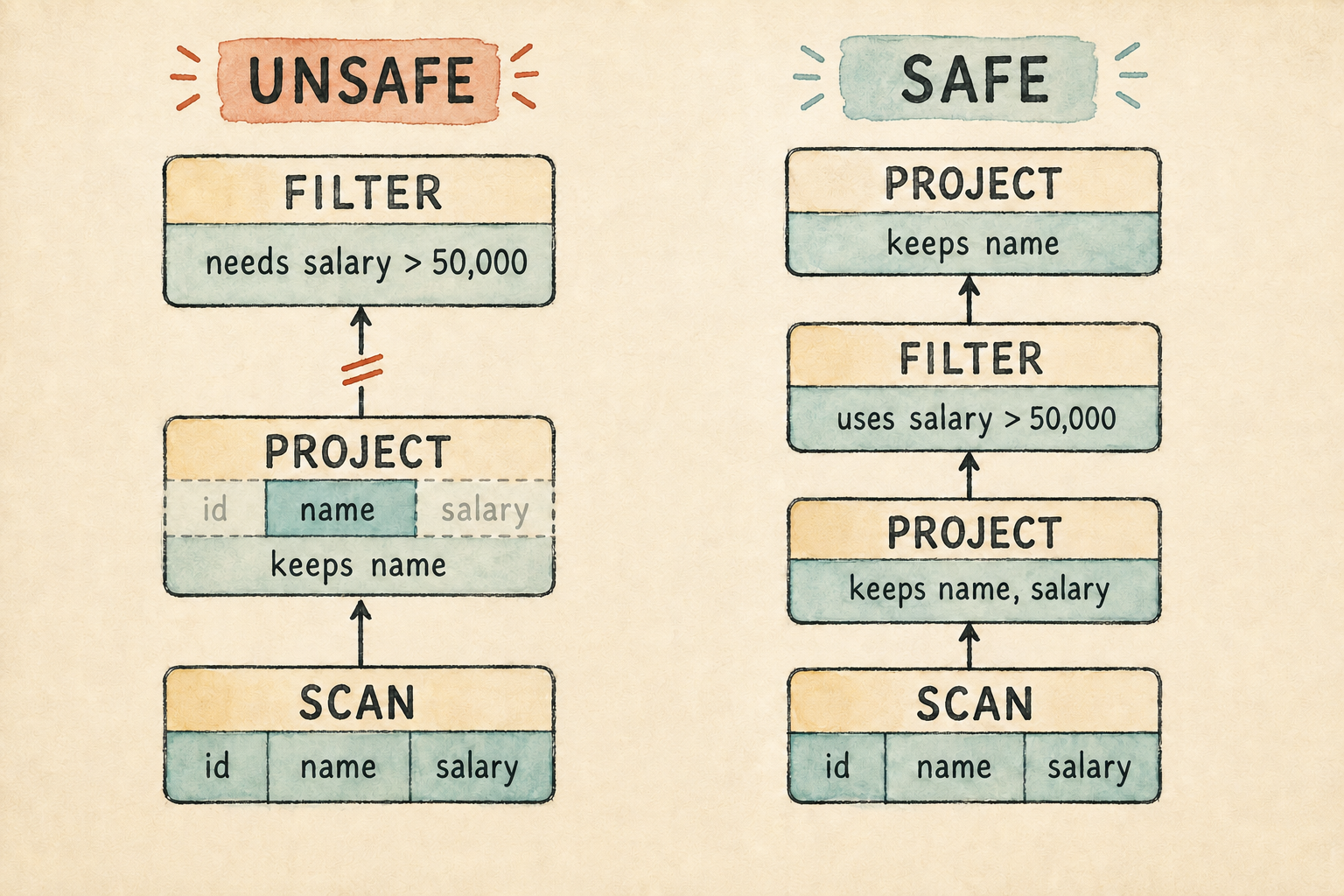
We have justified one meaning-preserving transformation. We have not taught the database to discover or apply it. Automatic rewriting belongs to the optimizer we will build in Season 3.
2.6.3 A counterexample
Testing several inputs can expose an invalid claim. Suppose one plan contains two salary filters while another accidentally drops the stricter filter:
Both filters                     Stricter filter dropped

Filter(salary > 60000)           Filter(salary > 50000)
          │                                │
Filter(salary > 50000)           Scan(employees)
          │
Scan(employees)
Both plans return Ada and Grace for our original table. Neither table contains a salary between 50,000 and 60,000, so the missing condition appears harmless. Now add Edsger:
| id | name | salary |
|---|---|---|
| 4 | Edsger | 55,000 |
The first plan removes Edsger; the second keeps him. This row is a counterexample, one valid input that proves the plans are not equivalent. Equivalence requires agreement for every valid input, so one disagreement is enough to reject the transformation. An optimizer may not use it as a general rewrite rule.
There is a redundant condition in the first plan, but it is the weaker one. Any salary greater than 60,000 is already greater than 50,000. We learn which condition is removable from their meanings, not from the particular rows in our first table.
Passing examples are not a general proof. A law and its conditions justify a transformation; a counterexample rejects a false one.
2.7 Why equivalent plans matter
A database often has several ways to answer the same query. One plan may remove unused columns early. Another may delay that work. Joins will eventually create choices with much larger consequences. Different arrangements may process fewer rows, use less memory, or finish sooner.
An optimizer does not rearrange plans arbitrarily. It applies transformations whose equivalence conditions are known to hold. A fast plan that returns different rows is not an optimization. It is a bug. Equivalence is the safety boundary: change the shape as much as useful, but do not change the meaning.
Season 3 will turn that freedom into a query optimizer. It will apply rewrite rules, estimate costs, and choose among equivalent alternatives. Correctness comes first because the optimizer can choose only among plans that preserve the query’s meaning.
2.8 What we deliberately did not build
This chapter gives our small plans a logical interpretation, but the engine is still intentionally incomplete:
- It does not separate logical nodes from physical execution algorithms.
- It cannot discover or apply equivalent-plan rewrites automatically.
- It has no statistics or cost model for choosing a faster plan.
- Its
Vec<Row>preserves row order and permits duplicate rows, unlike a mathematical relation. - Its
Projectpreserves duplicates instead of implementing textbookπ. - Its predicates only read a column and compare an integer. We have not introduced nulls, expressions that can fail while being evaluated, functions that may return a different answer each time, or expressions that change data or other state.
- We did not implement the paper’s tableaux or its procedures for deciding equivalence.
- We have not introduced joins or functional dependencies, even though both belong to the broader formal treatment.
- These three laws do not cover full relational algebra or SQL. Additional operators and different duplicate semantics can add conditions to otherwise familiar transformations.
Those missing predicate behaviors matter to equivalence. An expression might fail because it divides by zero or converts invalid text. A function based on the current time or a random value may not return the same answer twice. An expression that changes data, increments a counter, or writes output changes something beyond its own true-or-false result. If predicates can behave in these ways, swapping two filters may change which failures or changes occur. The filter law therefore needs more conditions in a richer language than it does in our current engine.
These limitations matter, but solving them together would hide the idea we needed first. This chapter asks whether a transformation is correct. Later lessons can ask how to represent alternatives, find them, and choose among them.
2.9 Try it
Use the current Plan, Row, and Value types as a concrete model for these
experiments. Try to decide each answer before opening the explanation.
- Build two filters,
salary > 50000andid > 1, then swap their order. Which law permits the transformation, and which conditions does it assume? - Place a projection below those two filters. Use the projection law to find the smallest set of columns it must retain while still returning names.
- Explain which condition is violated when
Project(name)is placed belowFilter(salary > 50000). - Remove one filter from the two-filter plan in Section 2.6.3. Find the smallest counterexample that shows the new plan is not equivalent.
- Add two employees named Ada and run
Project(name). How does the result differ from textbookπ?
Check your reasoning
- Filters can exchange places. Both predicates must be deterministic, valid for the input rows, free of side effects, and able to read their columns.
- The final result needs
name, while the predicates needsalaryandid. Their union is{name, salary, id}, so nothing can be removed from our three-column rows. - The projection law requires the lower project to retain
cols(p). Keeping onlynameremovessalary, so the filter cannot evaluate its predicate. - One employee earning 55,000 is enough. The two-filter plan removes that
row, while the plan containing only
salary > 50000keeps it. - Our project returns two identical
{name: "Ada"}rows. Textbook projection produces one because mathematical relations do not contain duplicates.
2.10 From SQL to a plan
We can now assign meaning to a small logical plan, apply three justified
transformations, and reject a false one with a counterexample. Yet every plan
in the program is still assembled from Rust enum values. A person should not
need to write Box::new(Plan::Filter { ... }) merely to ask for employee
names.
SQL provides a convenient way to express the request. Its words and punctuation are not the plan itself. They are source text from which the database can build a plan. The plan carries the meaning we studied here, regardless of the text that produced it.
That separation creates our next problem. How does a database turn characters
such as SELECT, FROM, and WHERE into the tree our engine knows how to
execute? The next lesson builds the smallest SQL frontend needed to answer
that question.
3. SQL Is Just a Frontend
SQL lets us write a plan without drawing the tree ourselves.
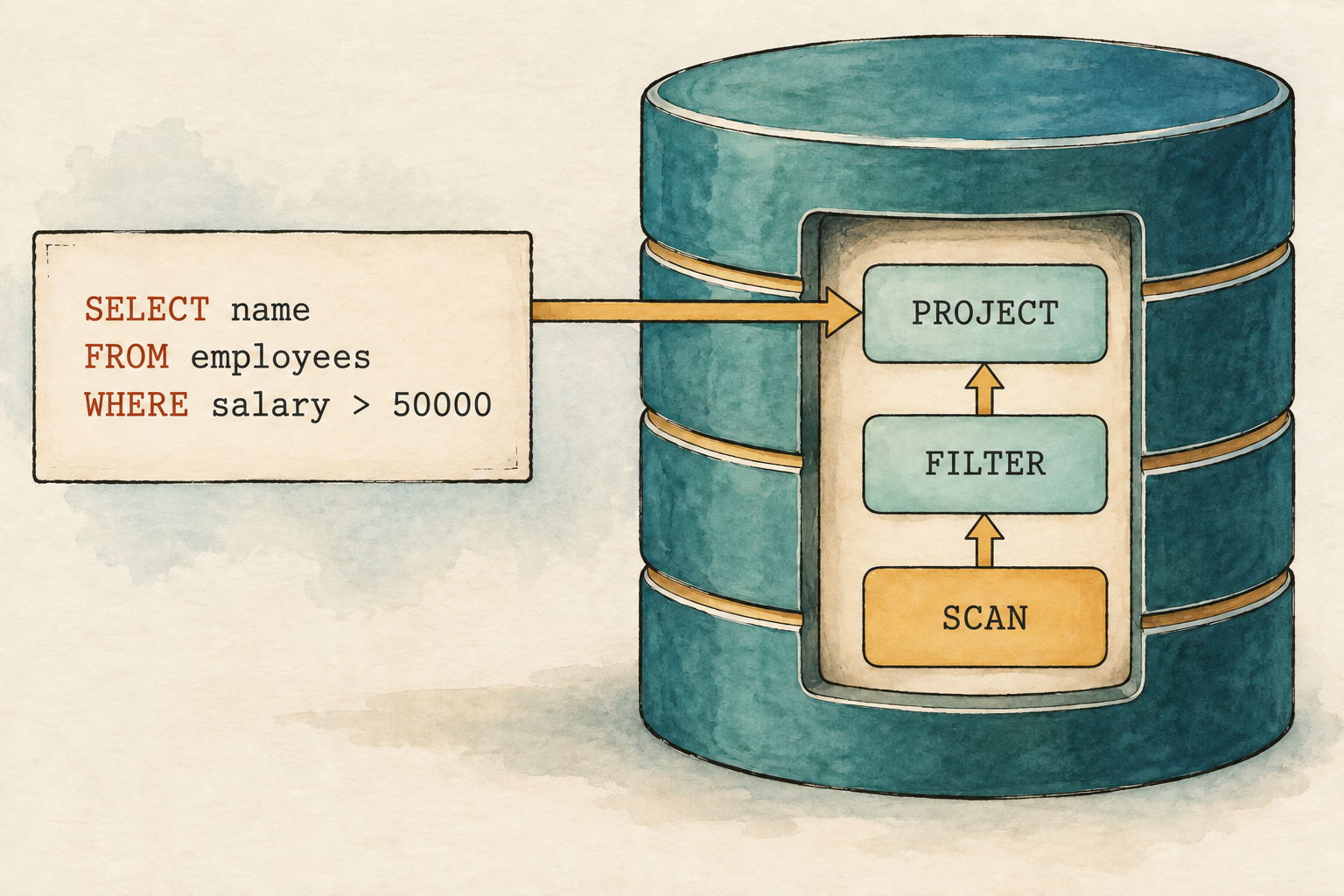
Chapter 2 ended with a plan that our engine could inspect and execute. There was only one inconvenience: we had to construct that plan ourselves. A person should be able to write a request like this instead:
SELECT name
FROM employees
WHERE salary > 50000;
To us, the request already looks meaningful. To the program, it begins as a sequence of characters. Before the existing engine can run it, a new frontend must recognize the words and punctuation, discover how they fit together, and turn that structure into the logical plan we already understand. That translation must preserve the request’s meaning: producing a plan is not enough if the plan answers a different question.
This chapter follows that journey:
SQL
 ↓
Tokens
 ↓
Abstract syntax tree
 ↓
Logical plan
 ↓
Rows
We will support only the query shown above and other queries with the same shape. That narrow boundary lets us see every stage without hiding parsing inside a library. Appendix B records the complete planned grammar. Later chapters will implement more of it when aliases, expressions, joins, aggregation, sorting, and subqueries give us a reason.
Before changing the program, create a working branch from the completed Chapter 2 checkpoint:
git switch --create chapter-003 lesson-002
The existing executor will remain unchanged while we add the frontend above it.
3.1 Give the frontend a place to answer
Before recognizing a single SQL word, we need somewhere to enter a query and observe what the frontend does with it. We will add a small interactive prompt that accepts one query at a time and prints what the database produces:
$ cargo run --quiet -- --prompt
sql> SELECT name FROM employees WHERE salary > 50000;
{name: "Ada"}
{name: "Grace"}
sql>
This is a read-evaluate-print loop, usually shortened to REPL. It reads
one statement, evaluates that statement, prints either rows or an error, and
then loops back for another query. SQL uses ; to mark the end of the statement,
so a query may span several input lines. An end-of-file signal, usually
Control-D on Linux and macOS or Control-Z followed by Enter on Windows, leaves
the prompt.
The prompt will make the frontend’s growth visible. Its first version will print tokens. The next version will print the AST. Once plan conversion is connected, the same entered line will produce rows. Each step gives us something concrete to inspect before we add the next one.
characters → tokens → Query AST → logical plan → rows
The loop has only two jobs: collect one semicolon-terminated statement and print the response. It passes the complete string to another function that does the database work. The loop itself will not need to change as the frontend grows.
Begin with a prompt that echoes each nonempty line. We will replace only
inspect_sql() as the frontend gains meaning.
src/main.rs: temporarily replace the file with this first block
use std::io::{self, Write};

fn main() -> io::Result<()> {
    run_prompt()
}

fn inspect_sql(sql: &str) {
    println!("{}", sql.trim());
}
One small function appends a line and reports whether that line ends the
statement. trim_end() permits spaces after the semicolon.
src/main.rs: add after inspect_sql()
fn append_sql_line(sql: &mut String, line: &str) -> bool {
    sql.push_str(line);
    line.trim_end().ends_with(';')
}
The input loop uses sql> for the first line and ...> while it waits for
the terminating semicolon. An outer loop accepts later statements.
src/main.rs: add after append_sql_line()
fn run_prompt() -> io::Result<()> {
    loop {
        let mut sql = String::new();

        loop {
            if sql.is_empty() {
                print!("sql> ");
            } else {
                print!("...> ");
            }
            io::stdout().flush()?;

            let mut line = String::new();
            if io::stdin().read_line(&mut line)? == 0 {
                println!();
                if !sql.trim().is_empty() {
                    eprintln!("error: incomplete query at end of input");
                }
                return Ok(());
            }
            if sql.is_empty() && line.trim().is_empty() {
                break;
            }
            if append_sql_line(&mut sql, &line) {
                break;
            }
        }

        if !sql.trim().is_empty() {
            inspect_sql(&sql);
        }
    }
}
Run cargo run --quiet and enter the opening query in its multiline form. The
prompt displays ...> until the line containing ;, prints the accumulated
text, and waits for another statement. It cannot understand SQL yet, but the
input loop works.
3.2 SQL begins as characters
Place the query in a Rust string:
SELECT name FROM employees WHERE salary > 50000;
The string preserves every character, but it does not record where one word
ends and another begins or what role each word plays. The computer receives an
S, followed by an E, followed by an L, and so on. It does not begin with
a SELECT clause, a table name, or a predicate. The frontend must recover
those boundaries and roles before it can construct a plan.
Trying to find each clause with string splitting would work for this one example, but small changes would quickly expose the trick. Extra spaces, newlines, and lowercase keywords should not change the query. Names also have different roles depending on where they occur. We need a representation that is more useful than individual characters but simpler than a complete query.
3.3 Turn characters into tokens
Read the query from left to right and collect characters that belong together.
SELECT is one meaningful unit. So are name, >, 50000, and ;.
Such a unit is called a token. The component that produces tokens is a
lexer, sometimes called a scanner.
We will build the lexer in three steps. First, we will decide how the program represents tokens and characters it cannot recognize. Next, we will walk through the SQL text and produce those tokens. Finally, we will connect the lexer to the prompt so we can see both successful output and errors.
3.3.1 Represent tokens and lexical errors
Begin with the seven kinds of token our query can contain.
src/lexer.rs: create this file
use std::fmt;

#[derive(Clone, Debug, PartialEq, Eq)]
pub enum Token {
    Select,
    From,
    Where,
    Identifier(String),
    GreaterThan,
    Integer(i64),
    Semicolon,
}
The keyword variants represent SQL words with fixed meanings. Identifier
stores a name chosen by the user, while Integer stores a numeric value.
GreaterThan and Semicolon represent the two punctuation marks supported by
this chapter.
Using these variants, the employee query becomes:
Select
Identifier("name")
From
Identifier("employees")
Where
Identifier("salary")
GreaterThan
Integer(50000)
Semicolon
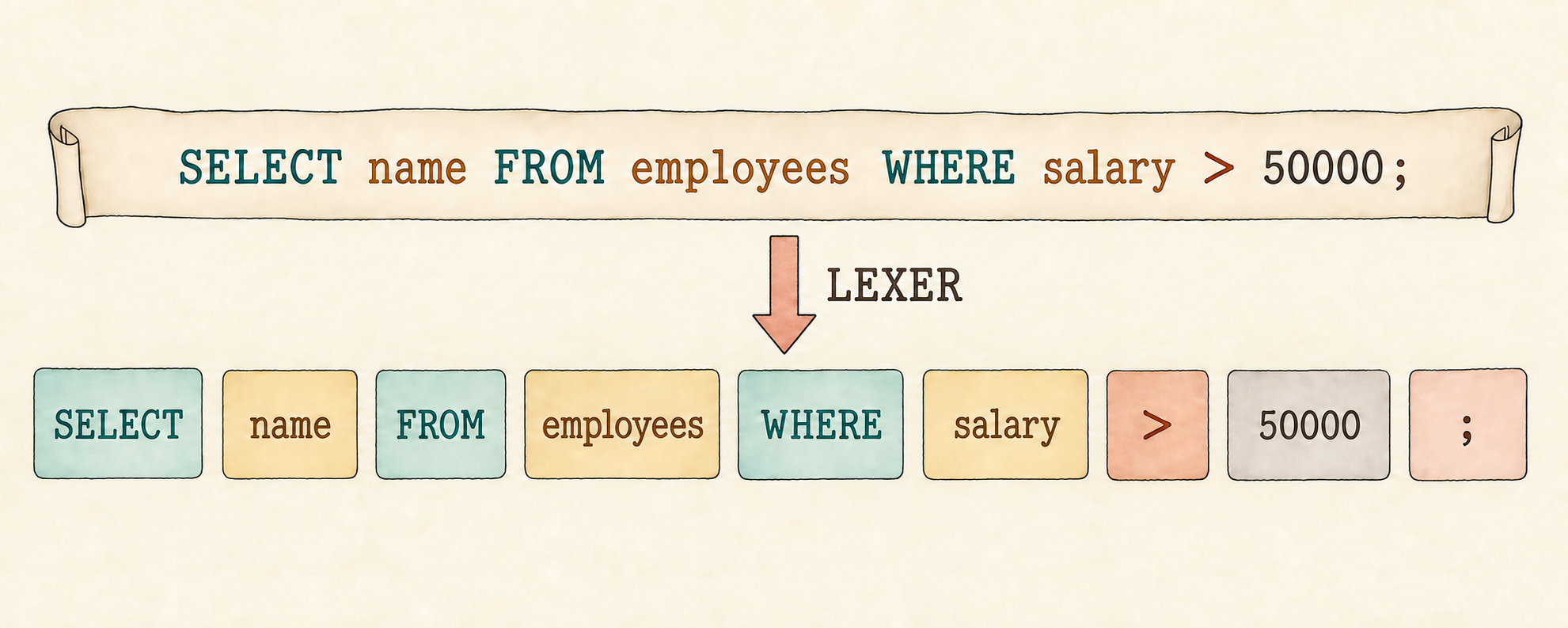
Whitespace does not appear in the sequence because it only separates tokens.
The spelling of each identifier is preserved, while the five digits in
50000 have become one integer value.
An invalid character needs a position and a readable explanation. Add the
error value below Token.
src/lexer.rs: add after Token
#[derive(Debug, PartialEq, Eq)]
pub struct LexError {
    position: usize,
    message: String,
}

impl fmt::Display for LexError {
    fn fmt(&self, formatter: &mut fmt::Formatter<'_>) -> fmt::Result {
        write!(
            formatter,
            "at character {}: {}",
            self.position, self.message
        )
    }
}
LexError records where the unexpected character appeared and explains why
the lexer stopped.
3.3.2 Walk the input once
The lexer keeps one cursor pointing at the next character to inspect. At each position, it performs one of six actions:
whitespace             → skip it
letter or underscore   → read one word
digit                  → read one integer
>                      → emit a greater-than token
;                      → emit a semicolon token
anything else          → return a lexical error
Start the lexer by storing the input SQL query as characters, creating an empty token list, and placing the cursor at the beginning.
src/lexer.rs: add after impl fmt::Display for LexError
pub fn tokenize(sql: &str) -> Result<Vec<Token>, LexError> {
    let characters: Vec<char> = sql.chars().collect();
    let mut tokens = Vec::new();
    let mut current = 0;

    while current < characters.len() {
        let character = characters[current];
Whitespace separates tokens, so it advances the cursor without adding
anything. A letter or underscore begins a word. The inner loop consumes the
rest of that word before word_token() classifies it.
src/lexer.rs: continue inside the while loop
        if character.is_whitespace() {
            current += 1;
        } else if character.is_ascii_alphabetic() || character == '_' {
            let start = current;
            current += 1;
            while current < characters.len()
                && (characters[current].is_ascii_alphanumeric()
                    || characters[current] == '_')
            {
                current += 1;
            }

            let word: String = characters[start..current].iter().collect();
            tokens.push(word_token(word));
characters[start..current] is the portion of the input occupied by the
word. Calling iter().collect() gathers those characters into a String.
A digit starts an integer. This branch consumes all adjacent digits and
converts them together, so 50000 becomes one value instead of five tokens.
src/lexer.rs: continue the same if chain
        } else if character.is_ascii_digit() {
            let start = current;
            current += 1;
            while current < characters.len() && characters[current].is_ascii_digit() {
                current += 1;
            }

            let digits: String = characters[start..current].iter().collect();
            let value = digits.parse().map_err(|_| LexError {
                position: start + 1,
                message: format!("integer is too large: {digits}"),
            })?;
            tokens.push(Token::Integer(value));
Only > and ; remain. Any other character becomes the LexError defined
above. This branch also closes the loop and returns the completed token list.
src/lexer.rs: finish the if chain and tokenize()
        } else {
            let token = match character {
                '>' => Token::GreaterThan,
                ';' => Token::Semicolon,
                _ => {
                    return Err(LexError {
                        position: current + 1,
                        message: format!("unexpected character '{character}'"),
                    });
                }
            };
            tokens.push(token);
            current += 1;
        }
    }

    Ok(tokens)
}
Finally, classify a completed word. SQL keywords ignore letter case; every other word remains an identifier with its original spelling.
src/lexer.rs: add after tokenize()
fn word_token(word: String) -> Token {
    if word.eq_ignore_ascii_case("SELECT") {
        Token::Select
    } else if word.eq_ignore_ascii_case("FROM") {
        Token::From
    } else if word.eq_ignore_ascii_case("WHERE") {
        Token::Where
    } else {
        Token::Identifier(word)
    }
}
Keywords ignore ASCII letter case, so select and SELECT produce the same
token. Identifiers keep their original spelling because the next chapter must
decide how names correspond to tables and columns. The lexer recognizes units;
it does not decide whether a name exists or whether the sequence makes sense.
3.3.3 First prompt checkpoint
We now have enough code to make the prompt recognize something. Keep the loop from Section 3.1 and connect the lexer above it.
src/main.rs: add at the top of the file
mod lexer;src/main.rs: add after use std::io::{self, Write};
use lexer::tokenize;src/main.rs: replace inspect_sql()
fn inspect_sql(sql: &str) {
    match tokenize(sql) {
        Ok(tokens) => println!("{tokens:#?}"),
        Err(error) => eprintln!("error: {error}"),
    }
}
Run cargo run --quiet and enter:
SELECT name FROM employees WHERE salary > 50000;
The prompt prints the nine-token sequence shown in Section 3.3.1. Then enter
SELECT @;. It prints:
error: at character 8: unexpected character '@'
The prompt then asks for another line. We have now observed both successful tokenization and a lexical error.
The tokens are correct, but they are still only a flat list. Nothing in that
list says that name belongs after SELECT, or that 50000 must follow
>. To recover those relationships, we need to describe which token
sequences form a query.
3.4 Give the tokens a shape
A grammar is a set of rules describing valid structure. The complete planned course grammar lives in Appendix B, but our first parser needs only four productions:
query          = select_clause from_clause where_clause ";" ;
select_clause  = "SELECT" identifier ;
from_clause    = "FROM" identifier ;
where_clause   = "WHERE" identifier ">" integer ;
The unquoted semicolon at the end of each line marks the end of a grammar
production. In the query rule, the quoted ";" is different: it is the
literal semicolon that must appear in the SQL input.
Read the first rule as a recipe. A query contains a select clause, followed by
a from clause, followed by a where clause and a semicolon. The other rules say
what each clause contains. The quoted words and symbols must appear literally;
identifier and integer refer to token categories.
These productions will do more than recognize valid text. Together they describe one complete query form, and later in this chapter we will give that form a meaning by translating it into relational operations. This approach is called syntax-directed translation: the recognized grammatical structure tells the frontend which translation rule to apply. As the grammar grows, each new query form will need both syntax and a meaning instead of a collection of special cases hidden in the parser.
This grammar accepts only the query form needed in this lesson. It cannot yet
select multiple columns, accept a query without a WHERE clause, compare
text, or use another comparison operator. Those forms are outside the current
language rather than parser mistakes. The parser should reject them clearly
instead of guessing what the user intended.
The component that checks tokens against these rules is a parser. We will
write a recursive-descent parser, in which one method represents each
grammar production. It begins with the outer query rule and consumes one
expected token at a time. When the next token cannot satisfy the current rule,
parsing stops with a syntax error.
Each production will become one parser method:
| Grammar production | Parser method | Information produced |
|---|---|---|
query | parse_query() | complete Query AST |
select_clause | parse_select_clause() | selected column |
from_clause | parse_from_clause() | table name |
where_clause | parse_where_clause() | filter column and integer |
The public parse() function will tokenize the SQL and then call
parse_query() to begin applying these productions.
The clause methods will recover a selected column, a table name, a filter
column, and an integer. The outer parse_query() method will gather those
pieces. Before writing the methods, we need a value that can hold what they
discover.
3.5 Store what the parser discovers
A parser must do more than report that the tokens follow the grammar. It must preserve the names and number needed by the next stage. We store them in an abstract syntax tree, usually shortened to AST. An AST preserves the meaningful structure while discarding details, such as whitespace and keyword capitalization, that no longer matter.
Our grammar has no nesting yet, so its first AST looks more like a record than a branching tree:
src/parser.rs: create the parsed-query representation
#[derive(Debug, PartialEq, Eq)]
pub struct Query {
    pub selected_column: String,
    pub table: String,
    pub filter_column: String,
    pub greater_than: i64,
}
For the employee query, the four fields contain name, employees,
salary, and 50000. The value records the structure recovered from the SQL;
it has not read a table, filtered a row, or chosen a column.
We now have all three ingredients:
Tokens provide the input
          ↓
Grammar provides the recipe
          ↓
The Query AST stores the result
The parser connects them.
3.6 Parse one complete query
Keep the Query structure from the previous section and build the parser
around it. The parser will consume tokens in grammar order and fill the
corresponding fields.
Start by importing the lexer and defining the error returned to callers.
src/parser.rs: add at the top of the file
use std::fmt;

use crate::lexer::{Token, tokenize};

#[derive(Debug, PartialEq, Eq)]
pub struct ParseError(String);

impl fmt::Display for ParseError {
    fn fmt(&self, formatter: &mut fmt::Formatter<'_>) -> fmt::Result {
        formatter.write_str(&self.0)
    }
}
ParseError(String) is a tuple struct with one unnamed field. Inside its
implementation, .0 accesses that field.
The public function turns SQL into tokens, places them in a Parser, and asks
that parser for one query.
src/parser.rs: add after impl fmt::Display for ParseError
pub fn parse(sql: &str) -> Result<Query, ParseError> {
    let tokens = tokenize(sql).map_err(|error| ParseError(error.to_string()))?;
    let mut parser = Parser { tokens, current: 0 };
    parser.parse_query()
}

struct Parser {
    tokens: Vec<Token>,
    current: usize,
}
tokenize() returns a LexError, while parse() returns a ParseError.
map_err() converts the lexical error, and ? returns it immediately when
tokenization fails.
Each grammar clause gets a method. These first two consume a keyword followed by an identifier.
select_clause = "SELECT" identifier ;
from_clause   = "FROM" identifier ;
src/parser.rs: begin impl Parser
impl Parser {
    fn parse_select_clause(&mut self) -> Result<String, ParseError> {
        self.expect(Token::Select, "expected SELECT at start of query")?;
        self.identifier("expected a column name after SELECT")
    }

    fn parse_from_clause(&mut self) -> Result<String, ParseError> {
        self.expect(Token::From, "expected FROM after selected column")?;
        self.identifier("expected a table name after FROM")
    }
The WHERE clause returns both pieces needed by our filter.
where_clause = "WHERE" identifier ">" integer ;
src/parser.rs: continue inside impl Parser
    fn parse_where_clause(&mut self) -> Result<(String, i64), ParseError> {
        self.expect(Token::Where, "expected WHERE after table name")?;
        let column = self.identifier("expected a column name after WHERE")?;
        self.expect(Token::GreaterThan, "expected > after filter column")?;
        let value = self.integer("expected an integer after >")?;
        Ok((column, value))
    }
The outer rule calls those clause methods in grammar order and then requires the semicolon. It also confirms that no token follows the semicolon. The grammar describes one complete query, so anything remaining is extra input.
query = select_clause from_clause where_clause ";" ;
src/parser.rs: continue inside impl Parser
    fn parse_query(&mut self) -> Result<Query, ParseError> {
        let selected_column = self.parse_select_clause()?;
        let table = self.parse_from_clause()?;
        let (filter_column, greater_than) = self.parse_where_clause()?;
        self.expect(Token::Semicolon, "expected ; after query")?;

        if self.current != self.tokens.len() {
            return Err(ParseError("unexpected token after ;".to_string()));
        }

        Ok(Query {
            selected_column,
            table,
            filter_column,
            greater_than,
        })
    }
Each grammar method delegates token matching to one of three cursor helpers.
expect() consumes a fixed token. identifier() and integer() recover the
value stored inside a token while advancing the cursor.
src/parser.rs: continue inside impl Parser
    fn expect(&mut self, expected: Token, message: &str) -> Result<(), ParseError> {
        if self.tokens.get(self.current) == Some(&expected) {
            self.current += 1;
            Ok(())
        } else {
            Err(ParseError(message.to_string()))
        }
}src/parser.rs: add after expect()
    fn identifier(&mut self, message: &str) -> Result<String, ParseError> {
        match self.tokens.get(self.current) {
            Some(Token::Identifier(value)) => {
                self.current += 1;
                Ok(value.clone())
            }
            _ => Err(ParseError(message.to_string())),
        }
    }
clone() gives the Query its own String; the parser’s token list retains
the original.
src/parser.rs: finish impl Parser
    fn integer(&mut self, message: &str) -> Result<i64, ParseError> {
        match self.tokens.get(self.current) {
            Some(Token::Integer(value)) => {
                self.current += 1;
                Ok(*value)
            }
            _ => Err(ParseError(message.to_string())),
        }
    }
}
The parser stores the token list and the position of the next token. Each successful helper call advances that position, so the next call sees exactly what remains.
3.6.1 Second prompt checkpoint
Now let the same prompt reveal the structure recovered by the parser.
src/main.rs: add after mod lexer;
mod parser;src/main.rs: replace use lexer::tokenize;
use parser::parse;src/main.rs: replace inspect_sql()
fn inspect_sql(sql: &str) {
    match parse(sql) {
        Ok(query) => println!("{query:#?}"),
        Err(error) => eprintln!("error: {error}"),
    }
}
Running the employee query now prints a Query containing name,
employees, salary, and 50000. The characters have become tokens, and the
tokens have become structured data. The prompt uses the required semicolon as
its statement boundary, so omitting it leaves the prompt at ...> waiting for
the rest of the query.
The order of these calls mirrors the four grammar rules. After consuming the semicolon, the parser also checks that no token remains. Without that final check, it could accept one valid query followed by arbitrary text and silently ignore the unwanted part.
The parser still requires Token::Semicolon independently of the prompt. That
keeps parse() correct for callers that provide SQL directly. It stops after
the first syntax error rather than attempting recovery. A later
multi-statement interface may need to find the next safe boundary after an
error; today, one precise failure keeps the behavior easy to inspect.
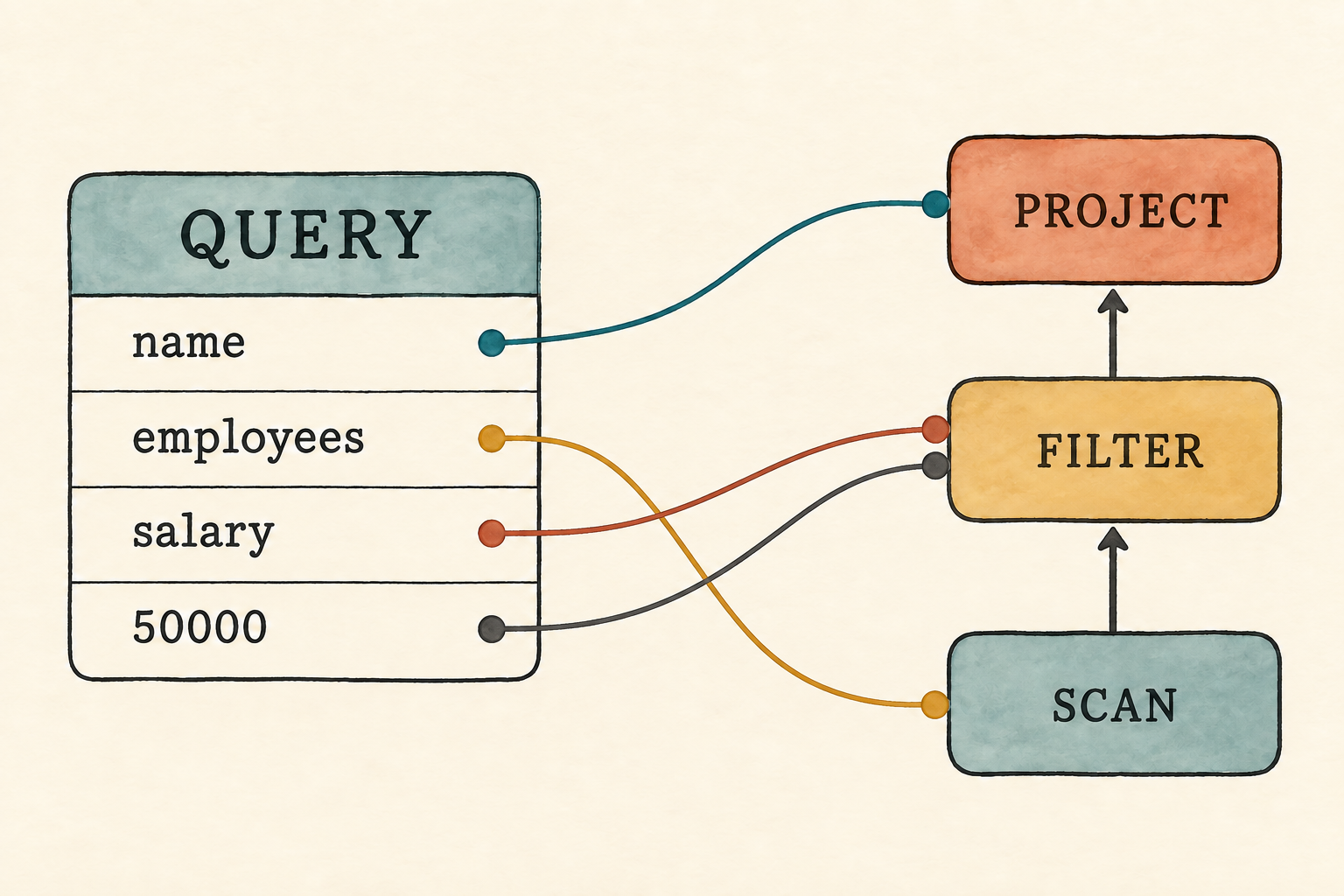
3.7 Build the logical plan
Parsing gives us a Query, but the executor from Chapter 1 accepts a Plan.
The conversion is direct: the table supplies a scan, the WHERE clause
supplies a filter, and the selected column supplies a project at the root.
The two representations have different jobs. The AST records the structure of the SQL text, while the logical plan describes relational work. As the SQL language grows, different ASTs may describe the same work and translate into equivalent plans in the Chapter 2 sense. Keeping the representations separate means the executor can continue to receive familiar relational operators instead of learning a special case for every SQL spelling.
The conversion is the meaning of our complete query form, written as one rule:
SELECT c FROM t WHERE p → πc(σp(t))
Read the relational expression from the inside out. Begin with table t, keep
the rows that satisfy predicate p, then retain column c. Substituting the
four fields in our AST gives employees, salary > 50000, and name, which
is exactly the plan we constructed by hand in Chapter 1.
The rule is a promise about answers, not merely a convenient tree shape. If the translation loses the predicate or projects a different column, the plan may execute successfully while answering the wrong question. Our plan still preserves duplicates and row order as described in Chapter 2; the algebraic notation here names the operations without changing those engine semantics.
This separation creates another useful boundary. A future optimizer can transform the logical plan while the SQL text and AST remain unchanged. It must still obey the equivalence conditions from Chapter 2, so a faster plan is acceptable only when it preserves the answer.
Query AST                         Logical plan

selected_column: name             Project(name)
table: employees                       ↑
filter_column: salary             Filter(salary > 50000)
greater_than: 50000                    ↑
                                  Scan(employee rows)
Before parser.rs can refer to crate::plan and crate::row, declare those
modules at the crate root.
src/main.rs: add after mod parser;
mod plan;
mod row;src/parser.rs: add the two new imports near the top
use crate::plan::Plan;
use crate::row::Row;src/parser.rs: add after Query
impl Query {
    pub fn into_plan(self, rows: Vec<Row>) -> Plan {
        // The parser records the table name, but cannot resolve it yet.
        // Chapter 5 introduces binding. For now the caller supplies the rows.

        Plan::Project {
            columns: vec![self.selected_column],
            input: Box::new(Plan::Filter {
                column: self.filter_column,
                greater_than: self.greater_than,
                input: Box::new(Plan::Scan { rows }),
            }),
        }
    }
}
One missing action deserves attention. The AST records employees, but
into_plan() does not use that field to find data. Our database has no
catalog of named tables. The caller supplies the employee rows directly, and
the table name remains unresolved. We keep that gap visible instead of
pretending that parsing has solved name lookup.
Further reading
Stefano Ceri and Georg Gottlob describe syntax-directed translation for a larger SQL subset and use the resulting relational expressions to study meaning, equivalence, and optimization. Our single rule is the fragment that matches this chapter’s language. See “Translating SQL into Relational Algebra: Optimization, Semantics, and Equivalence of SQL Queries,” IEEE Transactions on Software Engineering, 1985.
3.8 Run SQL repeatedly
The frontend can now replace the hand-built plan with a query string. We will
add an execute_sql() function that parses the text, converts the AST into a
plan, and executes that plan. Then we will restore the fixed demonstration and
update the interactive prompt so both paths use this function.
3.8.1 Restore the fixed demonstration
We will restore the fixed demonstration first, giving us a runnable checkpoint
before reconnecting the prompt. The plan and row modules are already
declared for plan conversion. Import the row types needed to rebuild the
employee table.
src/main.rs: add alongside the existing imports
use row::{Row, Value};The program still needs the same employee rows from Chapter 1. Begin with a small function that creates one employee row.
src/main.rs: add after main()
fn employee(id: i64, name: &str, salary: i64) -> Row {
    Row::new(vec![
        ("id", Value::Integer(id)),
        ("name", Value::Text(name.to_string())),
        ("salary", Value::Integer(salary)),
    ])
}
Now use it to construct the table.
src/main.rs: add after employee()
fn employee_rows() -> Vec<Row> {
    vec![
        employee(1, "Ada", 70_000),
        employee(2, "Linus", 50_000),
        employee(3, "Grace", 72_000),
    ]
}
Add the function that owns the complete SQL-to-rows path.
src/main.rs: add after employee_rows()
fn execute_sql(sql: &str, rows: &[Row]) -> Result<Vec<Row>, String> {
    let query = parse(sql).map_err(|error| error.to_string())?;
    Ok(query.into_plan(rows.to_vec()).execute())
}
Plan::Scan currently owns its rows, so rows.to_vec() gives the plan an
owned copy. This means every query copies the small employee table. We accept
that ownership simplification for now.
The final line converts the AST into a plan, executes the plan, and wraps the
resulting rows in Ok.
Returning String keeps this first shared entry point small, but it also
erases whether an error came from lexing or parsing. A later error type can
preserve that distinction when callers need it.
The fixed demonstration calls it with the original query.
src/main.rs: add after execute_sql()
fn run_demo(employees: &[Row]) {
    let sql = "SELECT name FROM employees WHERE salary > 50000;";
    let result = execute_sql(sql, employees).expect("the lesson query should execute");

    println!("Employees earning more than 50,000:");
    for row in result {
        println!("{row}");
    }
}
The query is fixed by the program, so failure here would indicate a mistake in
the lesson code. expect() returns the rows on success; on failure, it stops
the program and prints the supplied message with the error.
Now replace the temporary prompt-only main() with a demonstration-only
entry point.
src/main.rs: replace main()
fn main() {
    let employees = employee_rows();
    run_demo(&employees);
}
Remove the temporary prompt
Before running this checkpoint, remove the prompt code left by Section 3.6.1:
- remove
use std::io::{self, Write}; - remove the complete
inspect_sql()function - remove the complete
append_sql_line()function - remove the complete no-argument
run_prompt()function
Section 3.8.2 will add the final prompt after the demonstration works.
Run the fixed demonstration
Run this checkpoint:
cargo run --quiet
It prints Ada and Grace, now using SQL rather than a plan assembled inside
main().
3.8.2 Connect the final prompt
The fixed demonstration works again. Now let main() choose between it and the
interactive prompt. Begin by restoring the terminal I/O import.
src/main.rs: add with the imports
use std::io::{self, Write};src/main.rs: replace main()
fn main() {
    let employees = employee_rows();
    if std::env::args().nth(1).as_deref() == Some("--prompt") {
        run_prompt(&employees).expect("failed to read SQL from the terminal");
    } else {
        run_demo(&employees);
    }
}
std::env::args().nth(1) reads the first command-line argument after the
program name. as_deref() lets us compare that optional String with the
string slice "--prompt". With that argument, the program opens the prompt;
without it, the fixed demonstration runs.
run_prompt() returns an io::Result. If terminal input or output fails,
expect() stops the program because the prompt cannot continue using that
terminal.
The final prompt preserves the statement-collection behavior from Section 3.1,
but sends the completed SQL to execute_sql() instead of inspect_sql().
src/main.rs: add after run_demo()
fn run_prompt(employees: &[Row]) -> io::Result<()> {
    loop {
        let mut sql = String::new();

        loop {
            if sql.is_empty() {
                print!("sql> ");
            } else {
                print!("...> ");
            }
            io::stdout().flush()?;

            let mut line = String::new();
            if io::stdin().read_line(&mut line)? == 0 {
                println!();
                if !sql.trim().is_empty() {
                    eprintln!("error: incomplete query at end of input");
                }
                return Ok(());
            }
            if sql.is_empty() && line.trim().is_empty() {
                break;
            }
            if append_sql_line(&mut sql, &line) {
                break;
            }
        }

        if !sql.trim().is_empty() {
            print_query_result(&sql, employees);
        }
    }
}src/main.rs: add after run_prompt()
fn append_sql_line(sql: &mut String, line: &str) -> bool {
    sql.push_str(line);
    line.trim_end().ends_with(';')
}src/main.rs: add after append_sql_line()
fn print_query_result(sql: &str, employees: &[Row]) {
    match execute_sql(sql, employees) {
        Ok(rows) => {
            for row in rows {
                println!("{row}");
            }
        }
        Err(error) => eprintln!("error: {error}"),
    }
}
Read run_prompt() from the inside out. The inner loop collects lines through
the semicolon. execute_sql() then evaluates the complete statement. The
match prints either the returned rows or a frontend error, and the outer loop
starts another statement. An empty first line does no work. End-of-file exits;
if it arrives during a statement, the prompt reports that the query is
incomplete.
Try the interactive prompt
Run the interactive path:
cargo run --quiet -- --prompt
Enter the original query across four lines, then change the boundary to
70000. The first statement returns Ada and Grace. The second returns only
Grace. Then enter this malformed query:
SELECT name FROM employees WHERE salary > @;
The lexer reports the unexpected @, and the prompt remains ready for another
line.
Step back from the prompt for a moment.
The executor has not changed. The same scan, filter, and project still produce the rows. We added a frontend that turns one human-facing representation into the logical representation the engine already knew. SQL is not the execution engine; it is one way to describe work to it.
3.9 What we deliberately did not parse
Our first frontend is intentionally narrow:
- It accepts exactly one selected column, one table, and one
WHEREcomparison. - The comparison must use
>with a non-negative integer. - A semicolon is required, and no second statement may follow it.
- It has no aliases, qualified names, Boolean expressions, joins, functions, aggregation, ordering, or subqueries.
- It recognizes only ASCII letters, digits, and underscores in identifiers.
- It stops at the first lexical or syntax error.
- It records names but does not resolve them against tables or columns.
Appendix B shows where the language is heading, not what this version already implements. Each later chapter will move a small group of rules into the executable language. Accepting syntax before we can give it correct database meaning would make the grammar look impressive while making the system less trustworthy.
Production note: Real SQL parsers
Production systems accept much larger dialects, preserve source locations, report richer diagnostics, and often recover far enough to find several errors in one input. Our handwritten parser is useful because every token and rule is visible. We can replace or extend it when maintaining syntax begins to distract from the database concepts it serves.
3.10 Try it
Use the current lexer, parser, and employee rows for these experiments. Enter each query at the prompt after predicting which stage will accept or reject it.
- Change every keyword to lowercase. Does the result change?
- Add several spaces and newlines between tokens. Which tokens record them?
- Replace
>with@. Does the lexer or parser report the error? - Remove
WHERE salary > 50000. What token does the parser expect next? - Change
employeestomissing_table. Does parsing succeed? What happens if the caller still supplies the employee rows?
Check your reasoning
- The result does not change because keywords are case-insensitive.
- No token records whitespace. The lexer uses it only as a separator.
- The lexer rejects
@because it cannot form any token in this lesson. - After the table name, the parser reports that it expected
WHERE. - Parsing succeeds, and the current conversion still executes the supplied employee rows. The parser knows that a table name belongs there, but it cannot decide what that name refers to.
The fifth result is the important one. Our frontend can recognize valid syntax without understanding whether its names make sense. This is not a tokenization or parsing problem. It requires a different kind of work.
3.11 Parsing is not understanding
Consider two queries:
SELECT name FROM employees WHERE salary > 50000;
SELECT name FROM missing_table WHERE salary > 50000;
Both follow the grammar, so both produce a Query AST. Yet only the first
table name should lead to our employee rows. The same problem appears with an
unknown column, and a subtler version appears when a query compares text with
an integer. Grammar alone cannot answer any of those questions.
The database eventually needs a step that connects names in the AST to actual tables and columns, then checks whether operations make sense for their types. That step is called binding. Before a binder can check richer requests, however, the frontend must represent more than one column and one fixed comparison. The next chapter turns arithmetic, comparisons, Boolean operators, and null tests into expression trees that a binder can later inspect.
4. Expressions Are Trees
Expressions turn a flat token sequence into a tree of operations.
Chapter 3 could parse only one deliberately fixed query shape:
SELECT name FROM employees WHERE salary > 50000;
Its Query stored one selected column, one table name, one filter column, and
one integer boundary. Those four fields cannot represent salary + 5000,
condition_a AND condition_b, or parentheses that change evaluation order.
Before the database can reason about such expressions, the frontend must
preserve their structure.
This chapter extends the frontend path:
SQL → tokens → expression AST
We will use this query to exercise the richer grammar:
SELECT e.name
FROM employees AS e
WHERE e.salary + 5000 > 70000 AND e.name IS NOT NULL;
Compared with Chapter 3, accepting this query requires table aliases, qualified columns, arithmetic, Boolean operators, and null tests. The frontend must preserve that structure before a later stage can resolve names and check types. Here is the expanded grammar:
query               = "SELECT" expression
                      "FROM" identifier alias?
                      "WHERE" expression ";" ;

alias               = "AS"? identifier ;

expression          = or_expression ;
or_expression       = and_expression ("OR" and_expression)* ;
and_expression      = not_expression ("AND" not_expression)* ;
not_expression      = "NOT" not_expression | predicate ;

predicate           = additive comparison_operator additive
                    | additive "IS" "NOT"? "NULL"
                    | additive ;

additive            = term (("+" | "-") term)* ;
term                = factor (("*" | "/") factor)* ;
factor              = ("+" | "-") factor | primary ;

primary             = column_reference | integer | string
                    | "TRUE" | "FALSE" | "NULL"
                    | "(" expression ")" ;

column_reference    = (identifier ".")? identifier ;
comparison_operator = "=" | "<>" | "<" | "<=" | ">" | ">=" ;
This block describes how tokens form a query. Identifiers and integers retain the lexical rules implemented in Chapter 3. This chapter adds single-quoted strings; Appendix B records the complete lexical grammar.
The grammar describes structure, not database meaning. Sections 4.2 through 4.5 add the runtime values, tokens, expression AST, and precedence parser needed to preserve that structure. Section 4.6 makes the resulting tree visible. The next chapter will resolve its names and check its types.
Before changing the program, begin from the completed Chapter 3 checkpoint:
git switch --create chapter-004 lesson-003
4.1 See why flat fields stop working
Try to place the representative query into Chapter 3’s Query:
pub struct Query {
    pub selected_column: String,
    pub table: String,
    pub filter_column: String,
    pub greater_than: i64,
}
There is nowhere to store the addition inside e.salary + 5000, the two
conditions joined by AND, or the IS NOT NULL test. Adding one field for
each operation would fail as soon as expressions nest in a different way. An
expression tree can represent those combinations without adding a field for
every possible shape. We will start by adding the value kinds those
expressions can produce.
4.2 Extend Value
This chapter’s grammar requires rows to carry Boolean and null results, so
Value needs two new variants. Adding those variants also makes every existing
match on Value incomplete until it handles them. We will update row.rs
first, then make a temporary compatibility change to Chapter 3’s integer-only
filter.
4.2.1 Add Boolean and null values
The new grammar adds Boolean expressions, TRUE, FALSE, and NULL.
Their results must fit into rows and pass between expression operators, so the
runtime Value representation needs two more variants. Boolean stores
true or false, while Null represents SQL’s unknown value rather than an
empty string or zero.
src/row.rs: add two variants to Value
pub enum Value {
    Integer(i64),
    Text(String),
    Boolean(bool),
    Null,
}
Value::Null represents SQL NULL while a query is running. It is a distinct
value rather than an empty string, zero, or false.
The two new values also need printable forms.
src/row.rs: add arms to impl fmt::Display for Value
Value::Boolean(value) => write!(formatter, "{value}"),
Value::Null => write!(formatter, "NULL"),
4.2.2 Keep the old filter compiling
The Chapter 3 Plan::Filter stores a column and a greater_than integer, so
it can evaluate only one fixed predicate: column > greater_than. This chapter
needs a general expression predicate that can include arithmetic, comparisons,
Boolean operators, and null tests. The next chapter will make that larger
change after it has checked the expressions.
Until then, the old filter must continue compiling. It calls
row.get(column), which returns Some(value) when the column exists and
None when it does not. Previously, Text was the only non-integer Value,
so the match handled an integer, text, or a missing column.
Adding Boolean and Null creates two more possible values. Rust now requires
the match to handle them, even though this temporary filter cannot use them.
Group every non-integer value under Some(_):
src/plan.rs: replace the value match in Plan::Filter
let value = match row.get(column) {
    Some(Value::Integer(value)) => value,
    Some(_) => panic!("column is not an integer: {column}"),
    None => panic!("unknown column: {column}"),
};
The first arm extracts an integer. The second reports that an existing column contains the wrong kind of value, and the third reports that the column does not exist. This temporary edit preserves the old behavior while we build its replacement. We now have the value kinds expressions can produce. Next we teach the lexer to recognize the expanded grammar.
4.3 Extend the lexer
The expanded grammar introduces three kinds of input that Chapter 3’s lexer
cannot yet recognize: new fixed words such as AND and TRUE, quoted string
literals, and additional punctuation operators such as <= and <>. We
will add a token representation for each kind, then teach the scanner how to
recognize it.
4.3.1 Add the new tokens
The representative query uses many of the new tokens. Others support
additional forms in the grammar, such as name = 'Ada' or
(salary + 5000) > 70000. The table groups the new token variants by the
role they play.
| Tokens | Purpose |
|---|---|
As | introduce a table alias |
And, Or, Not | combine or negate conditions |
Is, Null | form null tests and null literals |
True, False | represent Boolean literals |
String | preserve text inside single quotes |
Plus, Minus, Star, Slash | form arithmetic expressions |
| comparison variants | compare two expressions |
Dot | separate a qualifier from a column |
| parentheses | group an expression explicitly |
Every quoted keyword or symbol in the grammar needs a fixed token variant.
For example, grammar terminal "AND" becomes Token::And, "+" becomes
Token::Plus, and "." becomes Token::Dot. Grammar categories that carry
input data use variants with fields: identifier becomes
Identifier(String), integer becomes Integer(i64), and string becomes
String(String).
src/lexer.rs: replace Token
#[derive(Clone, Debug, PartialEq, Eq)]
pub enum Token {
    Select, From, Where, As, And, Or, Not, Is, Null, True, False,
    Identifier(String), Integer(i64), String(String),
    Plus, Minus, Star, Slash, Equal, NotEqual,
    Less, LessOrEqual, Greater, GreaterOrEqual,
    Dot, LeftParen, RightParen, Semicolon,
}
These variants define how the lexer will represent the expanded vocabulary. The scanning rules below still need to recognize the corresponding text.
The single > token is now named Greater alongside Less,
GreaterOrEqual, and the other comparison variants. The Chapter 3 parser and
two lexer tests still use its old name, GreaterThan. Rename those remaining
references so the existing query continues to compile while we extend the
parser.
src/lexer.rs and src/parser.rs: replace every remaining
Token::GreaterThan
Token::Greater4.3.2 Lex string literals
The lexical rule for string begins with a single quote, consumes characters
until its closing quote, and produces one Token::String. For example:
'Ada'         → String("Ada")
'It''s ready' → String("It's ready")
SQL writes two adjacent quotes inside a string to represent one quote in its value. The lexer therefore needs a string branch that consumes the entire multi-character token. A lone quote must not fall through to the punctuation helper and become an unexpected character.
src/lexer.rs: add after the integer branch in tokenize()
} else if character == '\'' {
    let start = current;
    current += 1;
    let mut value = String::new();

    loop {
        if current >= characters.len() {
            return Err(LexError {
                position: start + 1,
                message: "unterminated string".to_string(),
            });
        }
        if characters[current] == '\'' {
            if characters.get(current + 1) == Some(&'\'') {
                value.push('\'');
                current += 2;
            } else {
                current += 1;
                break;
            }
        } else {
            value.push(characters[current]);
            current += 1;
        }
    }
    tokens.push(Token::String(value));
The complete branch turns both examples into one string token. An unmatched
opening quote instead returns unterminated string.
4.3.3 Recognize operators and keywords
The expanded grammar also adds several punctuation tokens, including
two-character operators such as <= and <>. Moving punctuation recognition
into a helper keeps that growing match separate from the main character scan.
src/lexer.rs: replace the final else branch in tokenize()
} else {
    let (token, consumed) = punctuation(&characters, current)
        .ok_or_else(|| LexError {
            position: current + 1,
            message: format!("unexpected character '{character}'"),
        })?;

    tokens.push(token);
    current += consumed;
}
The helper recognizes two-character operators before their one-character prefixes.
src/lexer.rs: add after tokenize()
fn punctuation(characters: &[char], current: usize) -> Option<(Token, usize)> {
    match (characters[current], characters.get(current + 1)) {
        ('<', Some('=')) => Some((Token::LessOrEqual, 2)),
        ('<', Some('>')) => Some((Token::NotEqual, 2)),
        ('>', Some('=')) => Some((Token::GreaterOrEqual, 2)),
        ('+', _) => Some((Token::Plus, 1)),
        ('-', _) => Some((Token::Minus, 1)),
        ('*', _) => Some((Token::Star, 1)),
        ('/', _) => Some((Token::Slash, 1)),
        ('=', _) => Some((Token::Equal, 1)),
        ('<', _) => Some((Token::Less, 1)),
        ('>', _) => Some((Token::Greater, 1)),
        ('.', _) => Some((Token::Dot, 1)),
        ('(', _) => Some((Token::LeftParen, 1)),
        (')', _) => Some((Token::RightParen, 1)),
        (';', _) => Some((Token::Semicolon, 1)),
        _ => None,
    }
}
The first three arms inspect the following character because < and > may
begin a two-character operator. For punctuation with no two-character form,
_ ignores whatever follows and only the first character matters.
Classify the new fixed words alongside the original keywords.
src/lexer.rs: replace word_token()
fn word_token(word: String) -> Token {
    match word.to_ascii_uppercase().as_str() {
        "SELECT" => Token::Select,
        "FROM" => Token::From,
        "WHERE" => Token::Where,
        "AS" => Token::As,
        "AND" => Token::And,
        "OR" => Token::Or,
        "NOT" => Token::Not,
        "IS" => Token::Is,
        "NULL" => Token::Null,
        "TRUE" => Token::True,
        "FALSE" => Token::False,
        _ => Token::Identifier(word),
    }
}
The lexer recognizes vocabulary. It still does not know whether e is an
alias or whether name + 1 is meaningful. Tokens tell the parser what units
it received. We now need an AST capable of storing the structure that the
parser recovers from those tokens.
4.4 Define expression operators and the AST
The expanded grammar introduced several ways to build an expression. The
factor rule added unary + and -, while not_expression added NOT.
The term and additive rules added arithmetic operators, predicate added
comparisons and null tests, and the two outer expression levels added AND
and OR. The AST needs a value for each operator and a tree shape that
preserves how those operations are nested.
Create expression.rs with two operator enums and one expression tree. The
operator enums represent the vocabulary added by those grammar rules; the tree
records how a particular query composes the operators.
UnaryOp contains the three operators that take one operand. Plus and
Minus represent leading signs such as -salary. Not represents Boolean
negation such as NOT active.
BinaryOp contains operators that take a left and a right operand. They fall
into three groups: arithmetic, comparison, and Boolean. The binder will use
the same groups when it checks operand types in the next chapter. Arithmetic
works on integers. Comparison operators compare compatible operands and
produce a Boolean; the binder will define the accepted types. And and Or
combine Boolean operands.
src/expression.rs: create this file
use crate::row::Value;

#[derive(Clone, Debug, PartialEq, Eq)]
pub enum UnaryOp {
    Plus,
    Minus,
    Not,
}

#[derive(Clone, Debug, PartialEq, Eq)]
pub enum BinaryOp {
    Add,
    Subtract,
    Multiply,
    Divide,
    Equal,
    NotEqual,
    Less,
    LessOrEqual,
    Greater,
    GreaterOrEqual,
    And,
    Or,
}
Expr is the unresolved expression tree recovered by the parser. The tree is
recursive: Unary contains one child expression and Binary contains two.
Those children use Box so the recursive enum has a finite, known size.
src/expression.rs: add after BinaryOp
#[derive(Clone, Debug, PartialEq, Eq)]
pub enum Expr {
    Column {
        qualifier: Option<String>,
        name: String,
    },
    Literal(Value),
    Unary {
        op: UnaryOp,
        expression: Box<Expr>,
    },
    Binary {
        left: Box<Expr>,
        op: BinaryOp,
        right: Box<Expr>,
    },
    IsNull {
        expression: Box<Expr>,
        negated: bool,
    },
}
Column preserves both parts of a possibly qualified name. An unqualified
column has no qualifier; a qualified one retains both pieces for the binder:
name    → Column { qualifier: None, name: "name" }
e.name  → Column { qualifier: Some("e"), name: "name" }
The qualifier is still only text. The parser has not proved that e is a
valid alias.
Literal stores a value written directly in SQL: 5000, 'Ada', TRUE,
FALSE, or NULL. The parser converts each corresponding token into a
Value variant.
Unary and Binary carry an operator and their child expressions. For
example, a unary-minus node with the salary column as its child will produce
the negated salary when evaluated.
IsNull remains separate because IS NULL and IS NOT NULL test for the
unknown value rather than comparing two operands. Its negated flag
distinguishes the two forms.
We now have the values the parser must produce. Next we will follow the grammar
from the outer query through each precedence level and build the corresponding
Expr nodes.
4.5 Parse columns, literals, and precedence
Before we begin, replace src/main.rs with this temporary AST inspector. It
retains Chapter 3’s rule that the prompt collects lines through the terminating
semicolon:
mod expression;
mod lexer;
mod parser;
#[allow(dead_code)] // Row execution reconnects in Chapter 5.
mod row;

use std::io::{self, Write};
use parser::parse;

fn main() -> io::Result<()> {
    run_prompt()
}

fn inspect_sql(sql: &str) {
    match parse(sql) {
        Ok(query) => println!("{query:#?}"),
        Err(error) => eprintln!("error: {error}"),
    }
}

fn run_prompt() -> io::Result<()> {
    loop {
        let mut sql = String::new();

        loop {
            if sql.is_empty() {
                print!("sql> ");
            } else {
                print!("...> ");
            }
            io::stdout().flush()?;

            let mut line = String::new();
            if io::stdin().read_line(&mut line)? == 0 {
                println!();
                if !sql.trim().is_empty() {
                    eprintln!("error: incomplete query at end of input");
                }
                return Ok(());
            }
            if sql.is_empty() && line.trim().is_empty() {
                break;
            }
            if append_sql_line(&mut sql, &line) {
                break;
            }
        }

        if !sql.trim().is_empty() {
            inspect_sql(&sql);
        }
    }
}

fn append_sql_line(sql: &mut String, line: &str) -> bool {
    sql.push_str(line);
    line.trim_end().ends_with(';')
}
The parser mirrors the grammar, beginning with parse_query() and descending
through expression methods from the weakest precedence level to the tightest.
As in Chapter 3, methods that implement grammar productions begin with
parse_. Small helpers such as peek(), consume(), and expect() only
inspect or move through the token list, so they do not use that prefix. We
will define those helpers before the production methods that call them.
The next six subsections rebuild the parser as one connected change. The
program will not compile until parse_primary() closes the new impl Parser
in Section 4.5.6. Section 4.5.7 then removes tests tied to the old
representation.
Chapter 3’s Query stored a selected-column name, a filter-column name, and
an integer boundary. In the expanded query production, both the SELECT
position and the WHERE position now contain an expression, so the new
Query stores an Expr for its projection and filter.
Before rebuilding parser.rs, delete the complete old impl Query and
impl Parser blocks. Keep ParseError, parse(), and the Parser struct;
the following subsections will build a new impl Parser around them.
src/parser.rs: replace the imports and Query
use std::fmt;

use crate::expression::{BinaryOp, Expr, UnaryOp};
use crate::lexer::{Token, tokenize};
use crate::row::Value;

#[derive(Debug, PartialEq, Eq)]
pub struct Query {
    pub projection: Expr,
    pub table: String,
    pub table_alias: Option<String>,
    pub filter: Expr,
}
The existing ParseError, parse(), and Parser still fit. Only the body of
parse() must call the new outer method:
src/parser.rs: replace the body of parse()
let tokens = tokenize(sql).map_err(|error| ParseError(error.to_string()))?;
Parser { tokens, current: 0 }.parse_query()
4.5.1 Move through the token list
Before implementing the grammar productions, add the operations they will use
to inspect and consume tokens. peek() borrows the next token without
advancing. consume() advances only when that token matches. expect() turns
a failed match into a parse error, while identifier() extracts the text
stored inside an identifier token.
Now begin the parser implementation with the cursor helpers.
src/parser.rs: begin the new impl Parser
impl Parser {
    fn peek(&self) -> Option<&Token> {
        self.tokens.get(self.current)
    }

    fn consume(&mut self, token: &Token) -> bool {
        if self.peek() == Some(token) {
            self.current += 1;
            true
        } else {
            false
        }
    }

    fn expect(&mut self, token: Token,
        message: &str) -> Result<(), ParseError> {
        if self.consume(&token) { Ok(()) }
        else { Err(ParseError(message.to_string())) }
    }

    fn identifier(&mut self, message: &str)
        -> Result<String, ParseError> {
        match self.peek().cloned() {
            Some(Token::Identifier(value)) => {
                self.current += 1;
                Ok(value)
            }
            _ => Err(ParseError(message.to_string())),
        }
    }
identifier() calls peek().cloned() to copy the next token before advancing
the cursor. It can then return the identifier’s owned String without keeping
a borrow of the token list.
4.5.2 Parse the query and its alias
We begin with the outer query and alias productions:
query = "SELECT" expression "FROM" identifier alias?
        "WHERE" expression ";" ;
alias = "AS"? identifier ;
The ? after alias makes the whole alias optional. Inside the alias
production, the second ? makes only AS optional. The parser therefore
accepts employees, employees AS e, or employees e.
The query production divides a shortened version of the query into four
pieces:
SELECT e.name FROM employees AS e WHERE e.salary + 5000 > 70000;
       └────┘      └───────┘    └┘      └──────────────────────┘
     projection      table     alias              filter
parse_query() follows that order. It delegates both expression-shaped
pieces to parse_expression(), reads the table identifier itself, and
delegates the optional alias to parse_alias().
src/parser.rs: continue impl Parser
    fn parse_query(&mut self) -> Result<Query, ParseError> {
        self.expect(Token::Select, "expected SELECT at start of query")?;
        let projection = self.parse_expression()?;
        self.expect(Token::From, "expected FROM after selected expression")?;
        let table = self.identifier("expected a table name after FROM")?;
        let table_alias = self.parse_alias()?;
        self.expect(Token::Where, "expected WHERE after table name")?;
        let filter = self.parse_expression()?;
        self.expect(Token::Semicolon, "expected ; after query")?;

        if self.current != self.tokens.len() {
            return Err(ParseError("unexpected token after ;".to_string()));
        }

        Ok(Query { projection, table, table_alias, filter })
    }

    fn parse_alias(&mut self) -> Result<Option<String>, ParseError> {
        let alias = if self.consume(&Token::As) {
            Some(self.identifier("expected an alias after AS")?)
        } else if matches!(self.peek(), Some(Token::Identifier(_))) {
            Some(self.identifier("expected a table alias")?)
        } else {
            None
        };
        Ok(alias)
    }
parse_alias() implements the second production. consume() returns true
and advances when the next token is AS. Without AS, matches! returns
true when the next token fits the Identifier pattern without extracting
its text. If it matches, identifier() takes that name as the alias.
Otherwise the query has no alias.
4.5.3 Parse Boolean operators
Boolean expressions use four precedence productions:
expression     = or_expression ;
or_expression  = and_expression ("OR" and_expression)* ;
and_expression = not_expression ("AND" not_expression)* ;
not_expression = "NOT" not_expression | predicate ;
Each rule asks the next tighter rule for its operands, which makes the tree
preserve precedence. Consider a AND b OR c AND d.
parse_or_expression() first asks parse_and_expression() for its left
operand. That call consumes a AND b and returns a complete AND node. After
the OR, another call consumes c AND d. The resulting tree is
(a AND b) OR (c AND d).
Every binary-operator level builds the same Expr::Binary shape. Add a small
constructor here so the parsing methods can concentrate on when an operator
belongs in the tree. The constructor does not use parser state, so it is an
associated function called with Self::binary() rather than a method called
with self.binary().
src/parser.rs: continue impl Parser
    fn binary(left: Expr, op: BinaryOp, right: Expr) -> Expr {
        Expr::Binary {
            left: Box::new(left),
            op,
            right: Box::new(right),
        }
    }

    fn parse_expression(&mut self) -> Result<Expr, ParseError> {
        self.parse_or_expression()
    }

    fn parse_or_expression(&mut self) -> Result<Expr, ParseError> {
        let mut expression = self.parse_and_expression()?;
        while self.consume(&Token::Or) {
            expression = Self::binary(expression, BinaryOp::Or,
                self.parse_and_expression()?);
        }
        Ok(expression)
    }

    fn parse_and_expression(&mut self) -> Result<Expr, ParseError> {
        let mut expression = self.parse_not_expression()?;
        while self.consume(&Token::And) {
            expression = Self::binary(expression, BinaryOp::And,
                self.parse_not_expression()?);
        }
        Ok(expression)
    }
The first call to parse_and_expression() implements the required first
operand in the or_expression production. Then
while self.consume(&Token::Or) implements
("OR" and_expression)*: while the next token is OR, consume() both
recognizes it and advances past it. The while loop parses the required right
operand and combines it with the expression accumulated on the left. The
AND loop maps to its production in exactly the same way.
The vertical bar in the not_expression production separates two
alternatives. If the next token is NOT, the method consumes it and calls
itself, allowing chains such as NOT NOT condition. Otherwise it chooses the
predicate alternative, which ends the recursion. The parse_predicate()
call also hands the work to the next precedence level, introduced in the
following subsection.
src/parser.rs: continue impl Parser
    fn parse_not_expression(&mut self) -> Result<Expr, ParseError> {
        if self.consume(&Token::Not) {
            return Ok(Expr::Unary {
                op: UnaryOp::Not,
                expression: Box::new(self.parse_not_expression()?),
            });
        }
        self.parse_predicate()
    }
4.5.4 Parse comparisons and null tests
Comparisons and null tests come from the predicate production:
predicate = additive comparison_operator additive
          | additive "IS" "NOT"? "NULL"
          | additive ;

comparison_operator = "=" | "<>" | "<" | "<=" | ">" | ">=" ;
Every alternative begins with an additive expression. After parsing that
left expression once, the method inspects the next token to decide which
alternative applies. A comparison operator requires a second additive
expression. IS requires NULL, with an optional NOT; otherwise the first
additive expression is already the complete predicate. Because this method
calls the tighter arithmetic level for its operands, comparisons and null
tests bind more tightly than NOT.
src/parser.rs: continue impl Parser
    fn parse_predicate(&mut self) -> Result<Expr, ParseError> {
        let left = self.parse_additive()?;

        if let Some(op) = self.parse_comparison_operator() {
            return Ok(Self::binary(left, op, self.parse_additive()?));
        }

        if self.consume(&Token::Is) {
            let negated = self.consume(&Token::Not);
            self.expect(Token::Null, "expected NULL after IS")?;
            return Ok(Expr::IsNull {
                expression: Box::new(left), negated,
            });
        }

        Ok(left)
    }

    fn parse_comparison_operator(&mut self) -> Option<BinaryOp> {
        if self.consume(&Token::Equal) { Some(BinaryOp::Equal) }
        else if self.consume(&Token::NotEqual) { Some(BinaryOp::NotEqual) }
        else if self.consume(&Token::Less) { Some(BinaryOp::Less) }
        else if self.consume(&Token::LessOrEqual) { Some(BinaryOp::LessOrEqual) }
        else if self.consume(&Token::Greater) { Some(BinaryOp::Greater) }
        else if self.consume(&Token::GreaterOrEqual) { Some(BinaryOp::GreaterOrEqual) }
        else { None }
    }
parse_comparison_operator() implements the operator production and returns
the matching BinaryOp, if one is present. If there is no comparison or null
test, parse_predicate() returns the arithmetic expression itself. Binding
will later reject it in WHERE unless it produces a Boolean or null result.
4.5.5 Parse arithmetic
Arithmetic uses three progressively tighter productions:
additive = term (("+" | "-") term)* ;
term     = factor (("*" | "/") factor)* ;
factor   = ("+" | "-") factor | primary ;
The parentheses group alternatives, while the following * permits the
entire operator-and-operand group to repeat. parse_additive() therefore asks
parse_term() for its first operand and for every operand after + or -.
Because parse_term() finishes multiplication or division before returning,
those operations become deeper nodes in the tree and bind more tightly.
Precedence decides how different operators group. Associativity decides
how repeated operators at the same precedence level group. Each loop replaces
the accumulated left expression with a new binary node, so a - b - c
becomes (a - b) - c. Subtraction is therefore left-associative.
src/parser.rs: continue impl Parser
    fn parse_additive(&mut self) -> Result<Expr, ParseError> {
        let mut expression = self.parse_term()?;
        loop {
            let op = if self.consume(&Token::Plus) { Some(BinaryOp::Add) }
            else if self.consume(&Token::Minus) { Some(BinaryOp::Subtract) }
            else { None };
            match op {
                Some(op) => expression = Self::binary(
                    expression, op, self.parse_term()?),
                None => break,
            }
        }
        Ok(expression)
    }

    fn parse_term(&mut self) -> Result<Expr, ParseError> {
        let mut expression = self.parse_factor()?;
        loop {
            let op = if self.consume(&Token::Star) { Some(BinaryOp::Multiply) }
            else if self.consume(&Token::Slash) { Some(BinaryOp::Divide) }
            else { None };
            match op {
                Some(op) => expression = Self::binary(
                    expression, op, self.parse_factor()?),
                None => break,
            }
        }
        Ok(expression)
    }
The factor production uses alternatives rather than repetition. A leading
sign is followed by another complete factor, so unary signs call themselves
and --salary nests correctly. The recursion ends when the parser chooses the
primary alternative. Any token other than + or - falls through to
parse_primary() immediately.
src/parser.rs: continue impl Parser
    fn parse_factor(&mut self) -> Result<Expr, ParseError> {
        if self.consume(&Token::Plus) {
            return Ok(Expr::Unary {
                op: UnaryOp::Plus,
                expression: Box::new(self.parse_factor()?),
            });
        }
        if self.consume(&Token::Minus) {
            return Ok(Expr::Unary {
                op: UnaryOp::Minus,
                expression: Box::new(self.parse_factor()?),
            });
        }
        self.parse_primary()
    }
4.5.6 Parse primary expressions
The tightest level supplies the leaves of the expression tree:
primary = column_reference | integer | string
        | "TRUE" | "FALSE" | "NULL"
        | "(" expression ")" ;

column_reference = (identifier ".")? identifier ;
The vertical bars list the possible primary forms. A column reference begins
with an optional qualifier-and-dot group followed by the required column name.
Integer, string, Boolean, and null tokens become literals. Parentheses contain
a complete expression, so they deliberately restart parsing at the weakest
precedence level while making the enclosed tree act as one primary outside.
Showing the entire match together keeps every possible leaf visible in one
place.
src/parser.rs: finish impl Parser with parse_primary()
    fn parse_column_reference(&mut self) -> Result<Expr, ParseError> {
        let first = self.identifier("expected a column name")?;
        if self.consume(&Token::Dot) {
            let name = self.identifier(
                "expected a column name after .")?;
            Ok(Expr::Column {
                qualifier: Some(first), name,
            })
        } else {
            Ok(Expr::Column { qualifier: None, name: first })
        }
    }

    fn parse_primary(&mut self) -> Result<Expr, ParseError> {
        match self.peek().cloned() {
            Some(Token::Identifier(_)) => self.parse_column_reference(),
            Some(Token::Integer(value)) => {
                self.current += 1;
                Ok(Expr::Literal(Value::Integer(value)))
            }
            Some(Token::String(value)) => {
                self.current += 1;
                Ok(Expr::Literal(Value::Text(value)))
            }
            Some(Token::Null) => {
                self.current += 1;
                Ok(Expr::Literal(Value::Null))
            }
            Some(Token::True) => {
                self.current += 1;
                Ok(Expr::Literal(Value::Boolean(true)))
            }
            Some(Token::False) => {
                self.current += 1;
                Ok(Expr::Literal(Value::Boolean(false)))
            }
            Some(Token::LeftParen) => {
                self.current += 1;
                let expression = self.parse_expression()?;
                self.expect(Token::RightParen,
                    "expected ) after expression")?;
                Ok(expression)
            }
            _ => Err(ParseError("expected an expression".to_string())),
        }
    }
}
parse_column_reference() implements the second production. It first reads an
identifier. A following dot makes that first name the qualifier and requires
another identifier for the column; without a dot, the first name is the
unqualified column.
peek().cloned() gives this method an owned token before it advances the
cursor. The resulting AST can therefore own identifier and string contents
instead of borrowing them from the parser’s token list.
4.5.7 Remove obsolete parser tests
The Chapter 3 parser tests still include two checks tied to the old Query.
Remove parses_the_supported_query_shape(), which constructs the removed flat
fields, and parsed_sql_executes_the_employee_query(), which calls the removed
into_plan() method. Keep the tests for a required semicolon and trailing
tokens. Those checks still describe valid parser behavior.
The remaining tests use only parse(), so remove their obsolete Query,
Row, and Value imports.
src/parser.rs: replace the imports in mod tests
use super::parse;Further reading
In Robert Nystrom’s Crafting Interpreters, Chapter 5, “Representing Code”, motivates recursive syntax trees, while Chapter 6, “Parsing Expressions”, shows how layered grammar productions encode precedence and associativity. The language differs from SQL, but the tree and parser ideas are the same.
4.6 Run an AST checkpoint
The temporary shell installed before the parser replacement can now display the recovered expression tree. Run the prompt and enter the representative query:
cargo run --quiet
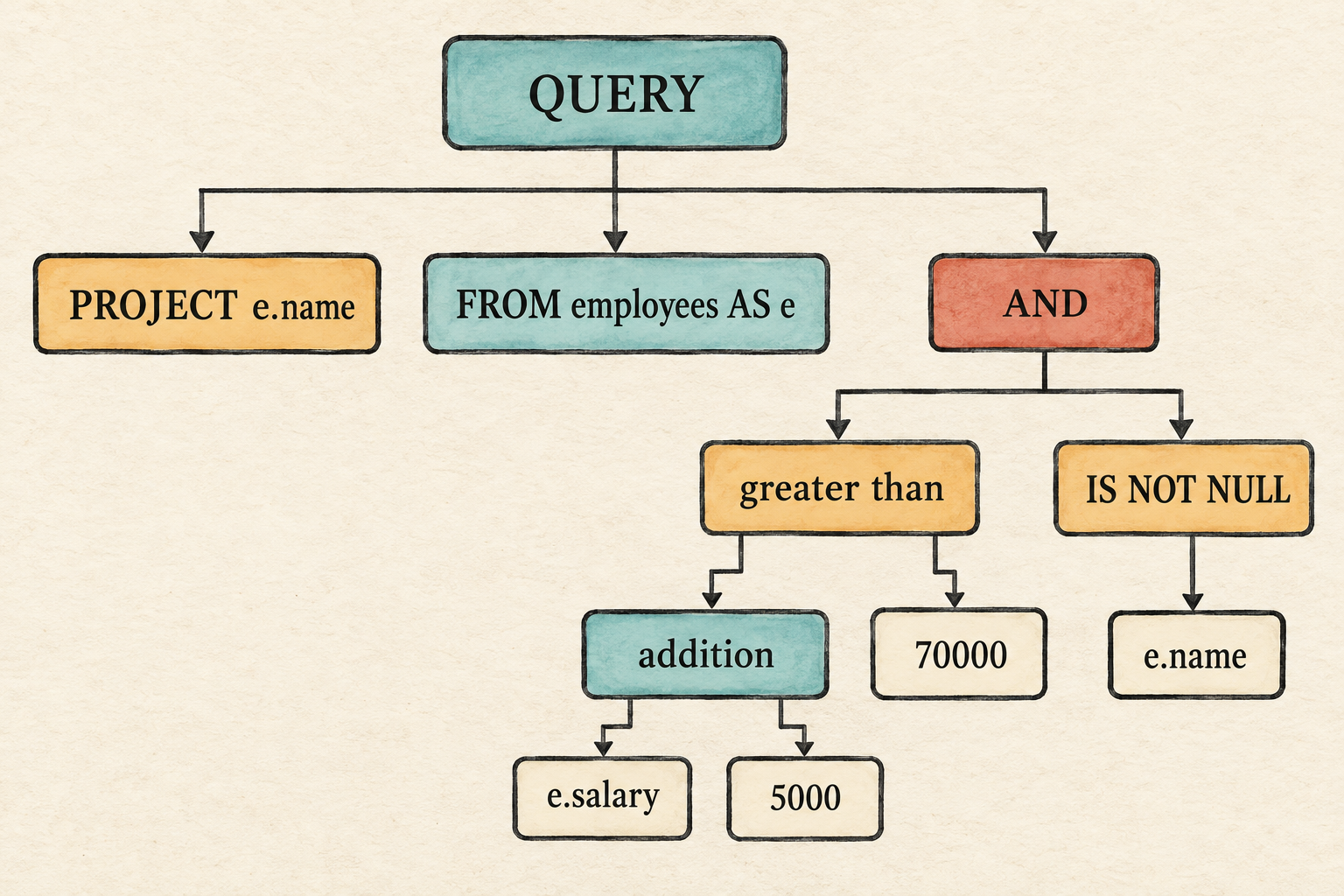
The printed tree places the addition inside the comparison, then joins that
comparison and the null test beneath AND. It also retains e on each
qualified column reference. This proves that parsing recovered the intended
structure. It does not prove that employees, e, or any referenced column
exists.
4.7 What we deliberately did not build
This expression frontend remains intentionally bounded:
- A query still has one input table and one selected expression.
- A
WHEREclause is still required. - Arithmetic uses integer literals; decimal values are not yet supported.
- There are no functions,
BETWEEN,LIKE,IN,CASE,CAST, dates, or intervals. - Parsing preserves qualifiers such as
e, but does not prove they exist. - Parsing does not decide whether an operator receives sensible operand types.
These limits keep the chapter focused on one transition: a flat query record becomes a nested expression tree.
4.8 Try it
Run the AST prompt, predict the tree shape for each change, and then inspect the result.
- Compare
salary + 2 * 3with(salary + 2) * 3. - Replace
e.salary + 5000 > 70000withNOT e.salary > 70000. - Use the string literal
'It''s ready'as the selected expression. - Replace
e.namewithx.name. - Try
name + 1 > 0.
Check your reasoning
- Multiplication is nested beneath addition in the first tree. Parentheses make addition the deeper operation in the second.
- The
NOTnode contains the comparison because predicates bind more tightly than Boolean negation. - The AST contains
Literal(Text("It's ready")). The lexer consumes the doubled quote and stores one quote in the text value before parsing begins. - Parsing succeeds and preserves
xas the qualifier; it cannot know whether that alias exists. - Parsing succeeds because the tokens have a valid shape; it cannot know that adding an integer to a text column is invalid.
4.9 The plan cannot use these trees yet
In Chapter 3, each parsed piece was a single, non-nested value. The projection
was one column name, while the filter was one column, the fixed > operator,
and one integer:
selected_column: name
filter_column: salary
greater_than: 50000
Those fields mapped directly into the fixed Project and Filter fields in
our logical plan. This chapter changed that representation. The projection and
filter are now nested trees:
projection: Expr
filter: Expr
The AST-only shell stops after printing those trees because the current plan
cannot carry them. More importantly, the trees still contain unchecked names.
Attaching them directly to the plan would force the executor to decide whether
employees, e, and salary exist and whether an operation such as
name + 1 makes sense.
The next chapter introduces the missing boundary. The binder will walk each expression tree, resolve its names through a catalog, check its operand types, and produce a checked expression tree that the logical plan can safely store and the executor can evaluate.
5. Binding Gives Names Meaning
A parser can recognize a name. A database must decide what it names.
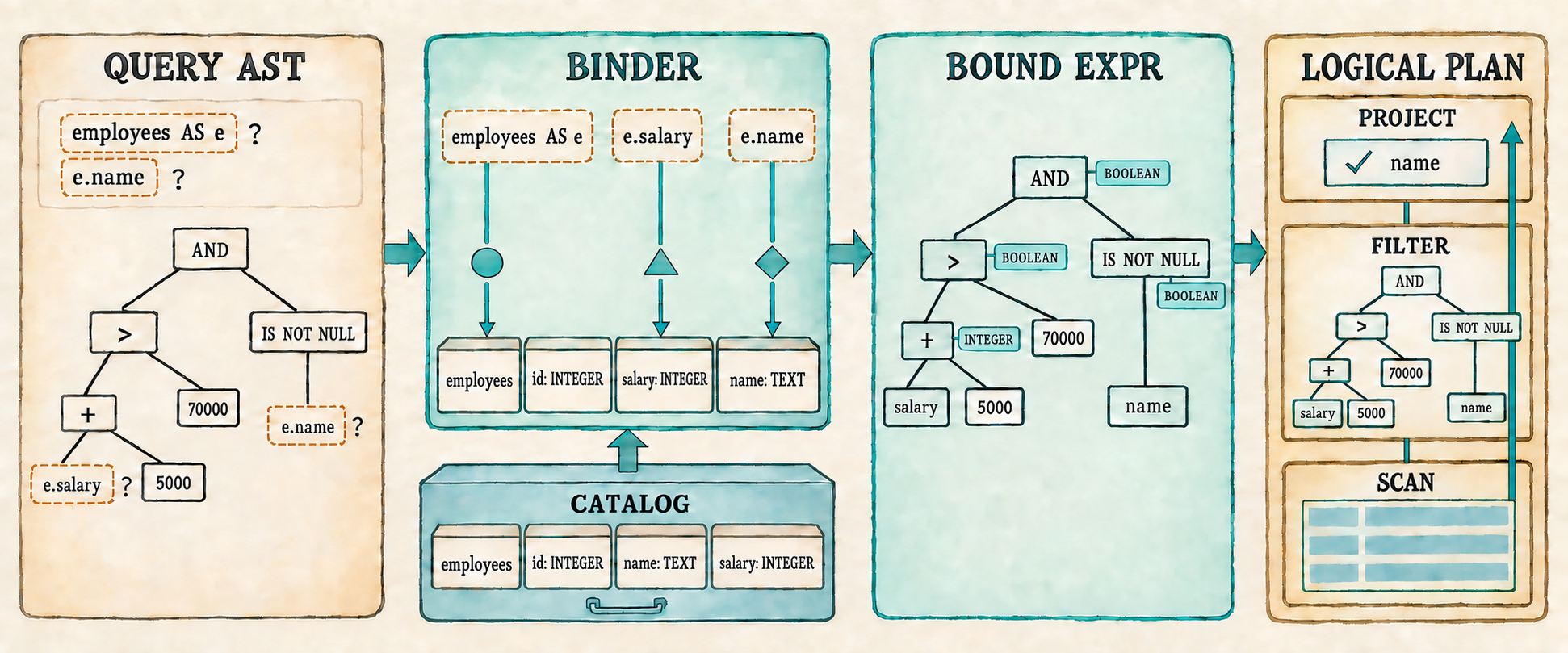
Chapter 4 can now parse this request into an expression tree:
SELECT e.name
FROM employees AS e
WHERE e.salary + 5000 > 70000 AND e.name IS NOT NULL;
The tree preserves precedence and nesting, but names such as employees, e,
name, and salary remain unchecked. Grammar also cannot tell us whether
salary + 5000 is type-correct or whether the complete WHERE expression
produces a Boolean.
The expression grammar deliberately accepts general combinations such as
1 + 'cat' and salary + 1. We could complicate the grammar to reject some
incompatible literals, but it still could not determine the type of salary
without consulting the catalog. Operand compatibility therefore belongs to
binding and type checking rather than parsing.
This chapter inserts a binding stage between parsing and planning. The binder performs three jobs:
- It resolves tables, aliases, and columns against the catalog.
- It checks that each operator receives compatible operand types.
- It converts each
Exprinto aBoundExprand places those checked trees in the logical plan.
Once the binder is in place, Filter and Project can trust their checked
expression trees. One logical plan shape can then run many non-trivial
single-table queries instead of one fixed comparison.
We will stop at three checkpoints. Section 5.5 prints the checked plan after all three binding jobs are complete. Section 5.7 executes that plan to produce rows. Section 5.9 reconnects the complete application and verifies its fixed demonstration and interactive prompt.
The completed query returns Ada and Grace but not Linus. Invalid tables, columns, qualifiers, and operand types fail before any rows are scanned.
Before changing the program, begin from the completed Chapter 4 checkpoint:
git switch --create chapter-005 lesson-004
5.1 Names are still unresolved
Run the Chapter 4 AST prompt:
cargo run --quiet
First enter the representative query:
SELECT e.name
FROM employees AS e
WHERE e.salary + 5000 > 70000 AND e.name IS NOT NULL;
The printed Query preserves the complete expression structure, but its names
are still strings. The table is stored as "employees", the alias as "e",
and the projection contains a column with qualifier "e" and name "name".
Nothing in that tree proves that any of those names exist.
Now enter a query whose table name is deliberately wrong:
SELECT name FROM missing_table WHERE salary > 50000;
It also produces a Query because its tokens follow the grammar. Its table
field contains missing_table, but nothing has compared that text with the
database’s available tables. The same is true of name and salary.
Lexing answered which tokens were present. Parsing answered how those tokens fit together. Binding must now connect the names in that structure to real database objects. It needs a place to look them up.
5.2 Introduce the catalog
The AST checkpoint leaves names such as employees, e, and salary
unresolved. Binding needs a description of the objects those names may refer
to. A database calls that description a catalog. Our first catalog is only
an in-memory list of tables.
The catalog structures themselves live in catalog.rs. DataType, however,
is also expression vocabulary because the binder uses it to describe the type
produced by an expression. We therefore add it to expression.rs beside the
operator and expression types.
Begin with the type categories that the catalog and binder need.
src/expression.rs: add before UnaryOp
#[derive(Clone, Debug, PartialEq, Eq)]
pub enum DataType {
    Integer,
    Text,
    Boolean,
    Null,
}
DataType describes a category such as integers or text, while Value stores
one actual piece of row data such as Value::Integer(70000) or
Value::Text("Ada"). A catalog column must describe every value allowed in
that position, not hold one representative value. Using Value there would
require a meaningless placeholder such as Value::Integer(0) merely to say
that a column contains integers. We therefore pair the column name with its
DataType.
src/catalog.rs: create this file
use crate::expression::DataType;
use crate::row::Row;

#[derive(Clone)]
pub struct Column {
    pub name: String,
    pub data_type: DataType,
}
A table combines those columns with the rows they describe. The catalog then holds the tables available to this database.
src/catalog.rs: add after Column
#[derive(Clone)]
pub struct Table {
    pub name: String,
    pub columns: Vec<Column>,
    pub rows: Vec<Row>,
}

pub struct Catalog {
    tables: Vec<Table>,
}

impl Catalog {
    pub fn new(tables: Vec<Table>) -> Self {
        Self { tables }
    }
}
This catalog describes tables, columns, and rows in memory. Persisting catalog information to storage comes later. We now know where binding can look up a name; next we define what it produces after a lookup succeeds.
5.3 Represent a checked expression
The AST checkpoint showed an unresolved tree: e.name still contains two
strings whose meaning has not been checked. Binding needs to produce a second
tree for the executable form that remains after those checks succeed.
When binding succeeds in this single-table engine, the binder will have checked the qualifier, found the column in the selected table, and recovered its type. The resulting bound column can therefore discard the qualifier and retain only the column name used to read the row.
Keeping Expr and BoundExpr as separate Rust enums will make that validation
step visible. Code that accepts Expr must still resolve its names and check
its operators. Once we build the binder, code that receives BoundExpr will
know that those checks succeeded.
src/expression.rs: add after Expr
#[derive(Clone, Debug, PartialEq, Eq)]
pub enum BoundExpr {
    Column(String),
    Literal(Value),
    Unary {
        op: UnaryOp,
        expression: Box<BoundExpr>,
    },
    Binary {
        left: Box<BoundExpr>,
        op: BinaryOp,
        right: Box<BoundExpr>,
    },
    IsNull {
        expression: Box<BoundExpr>,
        negated: bool,
    },
}
The two trees have similar shapes but different promises:
Expr::Column { qualifier: Some("e"), name: "salary" }
                         ↓ binding
BoundExpr::Column("salary")
The two trees represent different stages. Expr records what the user wrote;
BoundExpr is the executable form produced after validation. In this
chapter’s one-table plans, a checked column can be represented by its name
alone. Plans with multiple inputs will eventually need a less ambiguous
column identity.
Writing the binder starts with the names available for a lookup, which we will collect in a scope.
5.4 Bind a whole query
We will bind the complete query in the three steps shown in the opening
illustration: resolve the input table and column references, check operand
types while converting Expr into BoundExpr, and place the checked
projection and filter in a logical plan. The recursive expression walk will
handle the middle of that path; the final subsection will connect it to the
whole query.
5.4.1 Define the type-checking rules
Binding an expression will need two kinds of context: rules for valid operand types and a scope for resolving column names. We will define the type rules first because they do not depend on a particular query or table. Keeping them in small functions lets the recursive walk state what each operator requires without repeating the error handling.
require_type() checks an operand against one expected type. Unary - and
integer arithmetic will require Integer; NOT, AND, and OR will require
Boolean.
src/catalog.rs: add after impl Catalog
fn require_type(actual: &DataType, expected: &DataType,
    message: &str) -> Result<(), String>
{
    if actual == expected || actual == &DataType::Null {
        Ok(())
    } else {
        Err(format!("{message}: found {actual:?}"))
    }
}
A bare NULL receives the temporary type DataType::Null. When the helper
compares the actual and expected types, the code above also accepts
DataType::Null as a valid operand. SQL operations normally propagate this
unknown value and produce Value::Null, so binding should not reject it merely
because it differs from the expected integer or Boolean type.
The comparison operators =, <>, <, <=, >, and >= compare a left
operand with a right operand. All of them require matching operand types unless
either operand is NULL; the ordered operators will need one further check.
src/catalog.rs: add after require_type()
fn require_matching_types(left: &DataType, right: &DataType)
    -> Result<(), String>
{
    if left == &DataType::Null || right == &DataType::Null
        || left == right
    {
        Ok(())
    } else {
        Err(format!("cannot compare {left:?} with {right:?}"))
    }
}
An ordered comparison uses <, <=, >, or >= to ask whether one value
comes before or after another. These operators also reject types such as
Boolean, which have no ordering in this chapter’s SQL dialect.
src/catalog.rs: add after require_matching_types()
fn require_ordered_type(data_type: &DataType) -> Result<(), String> {
    match data_type {
        DataType::Integer | DataType::Text | DataType::Null => Ok(()),
        _ => Err(format!(
            "ordered comparison requires integers or text: found {data_type:?}"
        )),
    }
}
These helpers give the expression walk a compact vocabulary: require one specific type, require two compatible types, or require a type that can be ordered.
5.4.2 Establish the scope
A database may contain hundreds of tables, but a query can refer only to the
inputs named in its FROM clause. A scope records that smaller set of visible
tables, aliases, and columns. The binder must establish it before walking the
expressions so that every column reference is checked against the names
available to this query. Our current query has one input table; later queries
will place several tables in the same scope.
The type rules are independent of a query, but its scope is not. After parsing
produces a Query, its input table and optional alias determine which names
are visible to the projection and filter expression trees.
The whole-query binder will use query.table to find the corresponding
catalog table, then create one Scope. The scope borrows the verified table
name and column definitions from that catalog entry and the optional alias
from the parsed query. We will pass it through every recursive expression
binding call.
src/catalog.rs: add after require_ordered_type()
struct Scope<'a> {
    table_name: &'a str,
    alias: Option<&'a str>,
    columns: &'a [Column],
}
table_name and alias determine which qualifier is valid. If an alias
exists, that alias is accepted; otherwise, the table name may qualify a
column. columns contains the selected table’s catalog columns. The binder
searches this slice to verify a column name and recover its type.
This teaching dialect compares table, alias, and column names using their exact spelling. Standard SQL normally folds unquoted identifiers to a canonical case, but identifier normalization and quoted identifiers remain outside the current chapter.
For the representative query:
SELECT e.name
FROM employees AS e
WHERE e.salary + 5000 > 70000 AND e.name IS NOT NULL;
the parsed Query supplies employees and the alias e. After finding the
employees table in the catalog, the whole-query binder will create a scope
that conceptually contains:
Scope {
    table_name: "employees",
    alias: Some("e"),
    columns: [
        id: Integer,
        name: Text,
        salary: Integer,
    ],
}
That scope makes e.name and e.salary available to both expression trees.
It would reject another qualifier, such as x.name, and a column absent from
the catalog schema, such as e.department.
The whole-query binder will pass the same shared &Scope to the projection
and filter. Binding changes the expression as it walks the tree, but it never
changes the scope.
5.4.3 Walk and check the expression tree
The whole-query binder will call bind_expression() twice: once with the
projection Expr and once with the filter Expr. Each call handles one AST
tree and returns a pair containing its checked BoundExpr and result
DataType. Parent nodes use the child types to validate their operators before
constructing their own bound nodes.
The complete walk consumes Expr and needs every expression type involved in
that conversion. Add them to the catalog import first.
src/catalog.rs: replace the DataType import
use crate::expression::{BinaryOp, BoundExpr, DataType, Expr, UnaryOp};src/catalog.rs: begin bind_expression() after Scope
fn bind_expression(expression: Expr, scope: &Scope<'_>)
    -> Result<(BoundExpr, DataType), String>
{
    match expression {
        Expr::Column { qualifier, name } => {
            if let Some(qualifier) = qualifier {
                let expected = scope.alias.unwrap_or(scope.table_name);
                if qualifier != expected {
                    return Err(format!(
                        "unknown table or alias: {qualifier}"));
                }
            }

            let column = scope.columns.iter()
                .find(|column| column.name == name)
                .ok_or_else(|| format!("unknown column: {name}"))?;
            Ok((BoundExpr::Column(name), column.data_type.clone()))
        }
After the qualifier and column name have been validated against the Scope,
the binder no longer needs the qualifier. It produces
BoundExpr::Column(name) and returns the column type recorded by the catalog.
Unlike a column, literal and operator nodes do not require name lookup, but
they still return their result types. A literal maps its stored Value
directly to the corresponding DataType; no validation is needed because the
parser has already constructed the value.
src/catalog.rs: continue the match in bind_expression()
        Expr::Literal(value) => {
            let data_type = match &value {
                crate::row::Value::Integer(_) => DataType::Integer,
                crate::row::Value::Text(_) => DataType::Text,
                crate::row::Value::Boolean(_) => DataType::Boolean,
                crate::row::Value::Null => DataType::Null,
            };
            Ok((BoundExpr::Literal(value), data_type))
        }
A unary node first binds its child. It then chooses the only valid operand
type for its operator: NOT requires a Boolean, while unary + and -
require an integer. The earlier require_type() helper performs that check.
src/catalog.rs: continue the match
        Expr::Unary { op, expression } => {
            let (expression, data_type) =
                bind_expression(*expression, scope)?;
            let expected = match op {
                UnaryOp::Not => DataType::Boolean,
                _ => DataType::Integer,
            };
            require_type(&data_type, &expected,
                "invalid unary operand")?;
            Ok((BoundExpr::Unary {
                op,
                expression: Box::new(expression),
            }, expected))
        }
Binary operators fall into four groups with distinct operand and result rules:
| Operator group | Operand rule | Result type |
|---|---|---|
+, -, *, / | Integer on both sides | Integer |
AND, OR | Boolean on both sides | Boolean |
=, <> | matching Integer, Text, or Boolean types; either side may be NULL | Boolean |
<, <=, >, >= | matching Integer or Text types; either side may be NULL | Boolean |
Text supports equality and ordering, but not arithmetic. Appendix C records the implemented value and operator rules in one reference table.
Each binary node recursively binds both children before inspecting its operator. Arithmetic and Boolean operators require one specific type on both sides.
src/catalog.rs: continue the match
        Expr::Binary { left, op, right } => {
            let (left, left_type) = bind_expression(*left, scope)?;
            let (right, right_type) = bind_expression(*right, scope)?;
            let result_type = match op {
                BinaryOp::Add | BinaryOp::Subtract
                | BinaryOp::Multiply | BinaryOp::Divide => {
                    require_type(&left_type, &DataType::Integer,
                        "arithmetic requires integers")?;
                    require_type(&right_type, &DataType::Integer,
                        "arithmetic requires integers")?;
                    DataType::Integer
                }
                BinaryOp::And | BinaryOp::Or => {
                    require_type(&left_type, &DataType::Boolean,
                        "AND and OR require Boolean expressions")?;
                    require_type(&right_type, &DataType::Boolean,
                        "AND and OR require Boolean expressions")?;
                    DataType::Boolean
                }
Equality needs compatible operands but does not require them to be ordered. The four ordering operators require both compatibility and an orderable type. Every comparison produces a Boolean result.
src/catalog.rs: continue the operator match
                BinaryOp::Equal | BinaryOp::NotEqual => {
                    require_matching_types(&left_type, &right_type)?;
                    DataType::Boolean
                }
                BinaryOp::Less | BinaryOp::LessOrEqual
                | BinaryOp::Greater | BinaryOp::GreaterOrEqual => {
                    require_matching_types(&left_type, &right_type)?;
                    require_ordered_type(&left_type)?;
                    require_ordered_type(&right_type)?;
                    DataType::Boolean
                }
            };
            Ok((BoundExpr::Binary {
                left: Box::new(left),
                op,
                right: Box::new(right),
            }, result_type))
        }
IS NULL and IS NOT NULL accept every operand type because either test can
ask whether any value is NULL. The recursive call still binds the child, so
column lookup and any nested operator checks occur normally. There is no
expected child type to compare, which is why the returned child type is
ignored. The null test itself always produces a Boolean result. This arm also
closes the match and the function.
src/catalog.rs: finish bind_expression()
        Expr::IsNull { expression, negated } => {
            let (expression, _) = bind_expression(*expression, scope)?;
            Ok((BoundExpr::IsNull {
                expression: Box::new(expression),
                negated,
            }, DataType::Boolean))
        }
    }
}
Equality therefore accepts matching integer, text, or Boolean operands.
Ordered comparisons accept matching integers or text. name + 1 fails during
binding because name is text, so execution does not discover that mistake
halfway through a scan.
Trace one part of the representative filter from its leaves upward:
e.salary + 5000 > 70000

e.salary       → resolve column → Integer
5000           → bind literal   → Integer
Integer + Integer               → Integer
70000          → bind literal   → Integer
Integer > Integer               → Boolean
Each child returns a checked expression and its result type. Only then can its
parent validate the operator and construct the next BoundExpr node. The
walk therefore checks the same tree shape that the parser produced, working
from the leaves toward the root.
5.4.4 Assemble the bound plan
bind_expression() handles one tree. A complete Query has two of them: the
projection and the filter. It also has an input table that must be resolved
first. The whole-query binder will find that table, construct the scope, bind
both trees, check the filter’s result type, and assemble a logical plan.
That plan needs to carry bound expressions before it can be constructed. Replace the Chapter 4 plan shape now, but leave execution for the second checkpoint.
src/plan.rs: replace the file
use crate::expression::BoundExpr;
use crate::row::Row;

#[derive(Debug)]
pub struct ProjectExpression {
    pub name: String,
    pub expression: BoundExpr,
}

#[derive(Debug)]
pub enum Plan {
    Scan { rows: Vec<Row> },
    Filter { predicate: BoundExpr, input: Box<Plan> },
    Project {
        expressions: Vec<ProjectExpression>,
        input: Box<Plan>,
    },
}
ProjectExpression pairs a checked expression with the column name used in
the output row. A bare column can reuse its column name. A computed expression
has no SQL alias in the grammar yet, but Row still requires every value to
have a String name, so the binder uses "expression" temporarily. Making
this field optional would only postpone the same naming decision until the
row is constructed. A later chapter can replace the placeholder when selected
expression aliases are introduced.
Catalog::bind() will consume the parsed query and produce this plan.
src/catalog.rs: add with the imports
use crate::parser::Query;
use crate::plan::{Plan, ProjectExpression};
The original impl Catalog ended after new(). Reopen it at the current
position so bind() is an associated method rather than a free function.
src/catalog.rs: add after bind_expression()
impl Catalog {
    pub fn bind(&self, query: Query) -> Result<Plan, String> {
        let table = self.tables.iter()
            .find(|table| table.name == query.table)
            .ok_or_else(|| format!("unknown table: {}", query.table))?;

        let scope = Scope {
            table_name: &table.name,
            alias: query.table_alias.as_deref(),
            columns: &table.columns,
        };

        let (projection, _) = bind_expression(query.projection, &scope)?;
        let projection_name = match &projection {
            BoundExpr::Column(name) => name.clone(),
            _ => "expression".to_string(),
        };
        let (predicate, predicate_type) =
            bind_expression(query.filter, &scope)?;
        if !matches!(predicate_type, DataType::Boolean | DataType::Null) {
            return Err("WHERE expression must be Boolean".to_string());
        }

        Ok(Plan::Project {
            expressions: vec![ProjectExpression {
                name: projection_name,
                expression: projection,
            }],
            input: Box::new(Plan::Filter {
                predicate,
                input: Box::new(Plan::Scan { rows: table.rows.clone() }),
            }),
        })
    }
}
WHERE normally requires a Boolean expression. A bare NULL has the
temporary type DataType::Null, so it is also accepted; during execution its
unknown result removes every row. The matches! condition rejects every
other result type, including integer and text expressions.
The Scope introduced at the start of this section is now concrete. Its table
name and columns come from the catalog entry found through query.table; its
alias comes from the parsed query. Both expression walks receive a shared
reference to that same scope.
Type checking does not happen in a separate pass. Each successful expression match arm constructs the checked node that corresponds to the AST node it just validated:
| AST node | Bound result | Result type |
|---|---|---|
Expr::Column | verified column name | catalog column type |
Expr::Literal | literal value | type of the value |
Expr::Unary | checked operator and child | operator’s result type |
Expr::Binary | checked operator and children | operator’s result type |
Expr::IsNull | checked child and null test | Boolean |
Because the recursive calls return BoundExpr, a parent can be produced only
after all of its children have resolved names and passed their type checks.
The resulting plan contains two checked trees but has no execution method yet.
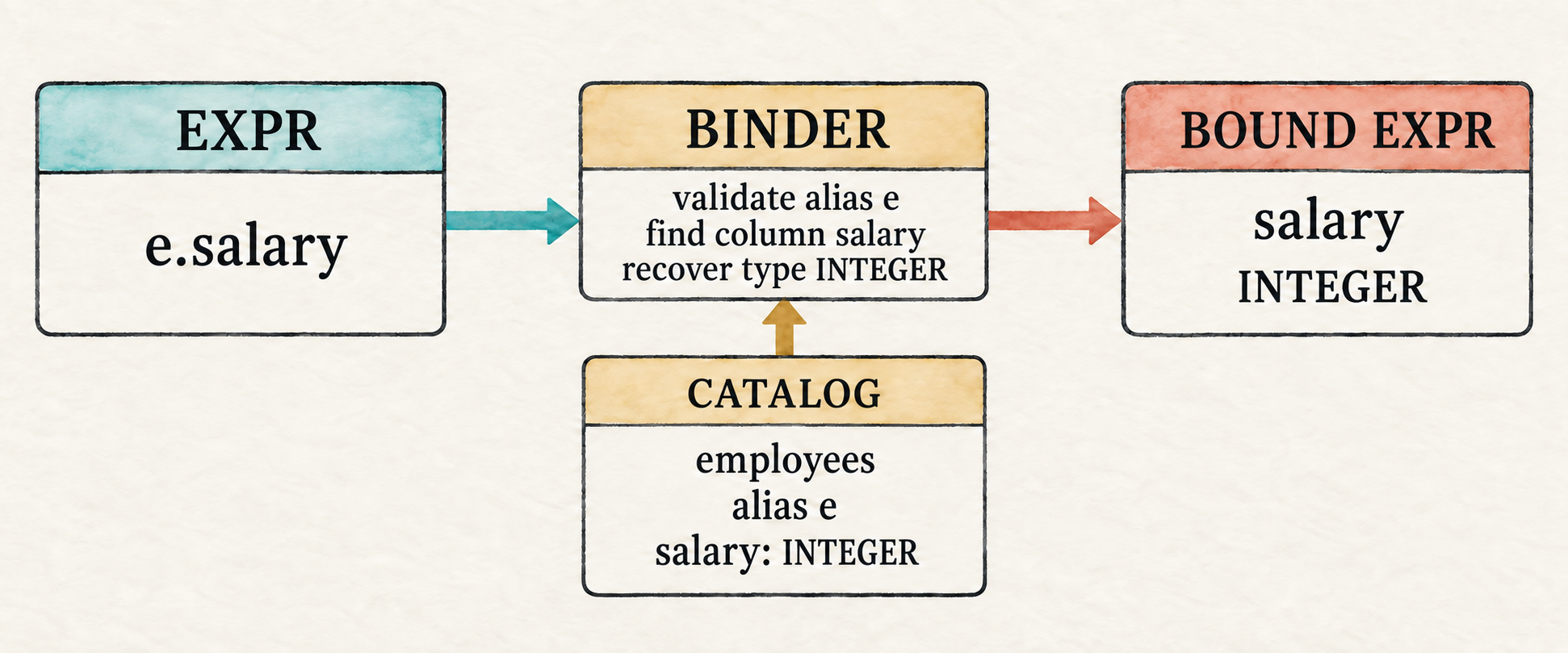
5.5 Inspect the bound plan
The first checkpoint makes binding visible before evaluation is added. We will populate the catalog, parse each entered query, bind it, and print the checked plan. The temporary shell allows dead code in modules whose execution methods will arrive in the next two sections.
src/main.rs: temporarily replace the file
mod catalog;
#[allow(dead_code)]
mod expression;
mod lexer;
mod parser;
#[allow(dead_code)]
mod plan;
#[allow(dead_code)]
mod row;

use std::io::{self, Write};
use catalog::{Catalog, Column, Table};
use expression::DataType;
use parser::parse;
use row::{Row, Value};

fn main() -> io::Result<()> {
    let catalog = employee_catalog();
    run_binding_prompt(&catalog)
}
Add the employee table that gives the catalog real names and types to resolve.
src/main.rs: add after main()
fn employee(id: i64, name: &str, salary: i64) -> Row {
    Row::new(vec![
        ("id", Value::Integer(id)),
        ("name", Value::Text(name.to_string())),
        ("salary", Value::Integer(salary)),
    ])
}

fn employee_catalog() -> Catalog {
    Catalog::new(vec![Table {
        name: "employees".to_string(),
        columns: vec![
            Column { name: "id".to_string(),
                data_type: DataType::Integer },
            Column { name: "name".to_string(),
                data_type: DataType::Text },
            Column { name: "salary".to_string(),
                data_type: DataType::Integer },
        ],
        rows: vec![
            employee(1, "Ada", 70_000),
            employee(2, "Linus", 50_000),
            employee(3, "Grace", 72_000),
        ],
    }])
}
The column list is the schema for the rows below it. Nothing in this small
catalog forces that schema and employee() to agree, so adding or changing a
column requires updating both. Later, when rows are created from a table’s
schema, the database can prevent this mismatch instead of relying on the
application to keep the column definitions and row values synchronized. The
roadmap deliberately leaves that exact chapter boundary open.
The prompt retains Chapter 3’s multiline statement collection. It stops after binding and prints the plan rather than executing it.
src/main.rs: add after employee_catalog()
fn run_binding_prompt(catalog: &Catalog) -> io::Result<()> {
    loop {
        let mut sql = String::new();

        loop {
            if sql.is_empty() {
                print!("sql> ");
            } else {
                print!("...> ");
            }
            io::stdout().flush()?;

            let mut line = String::new();
            if io::stdin().read_line(&mut line)? == 0 {
                println!();
                if !sql.trim().is_empty() {
                    eprintln!("error: incomplete query at end of input");
                }
                return Ok(());
            }
            if sql.is_empty() && line.trim().is_empty() {
                break;
            }
            if append_sql_line(&mut sql, &line) {
                break;
            }
        }

        if !sql.trim().is_empty() {
            let result = parse(&sql)
                .map_err(|error| error.to_string())
                .and_then(|query| catalog.bind(query));
            match result {
                Ok(plan) => println!("{plan:#?}"),
                Err(error) => eprintln!("error: {error}"),
            }
        }
    }
}

fn append_sql_line(sql: &mut String, line: &str) -> bool {
    sql.push_str(line);
    line.trim_end().ends_with(';')
}
Run the prompt and enter the representative query:
cargo run --quiet
The complete debug output includes the predicate tree and every employee row. This abridged rendering shows its important shape:
Project {
    expressions: [
        ProjectExpression {
            name: "name",
            expression: Column("name"),
        },
    ],
    input: Filter {
        predicate: Binary {
            left: Binary {
                left: Binary { ... },
                op: Greater,
                right: Literal(Integer(70000)),
            },
            op: And,
            right: IsNull {
                expression: Column("name"),
                negated: true,
            },
        },
        input: Scan { rows: [...] },
    },
}
The outer Project contains a checked column expression. Its input is a
Filter containing the checked Boolean tree, whose input is the employee
scan. No alias or unresolved column reference remains in the plan.
Binding errors are visible at the same checkpoint:
sql> SELECT name FROM missing_table WHERE salary > 50000;
error: unknown table: missing_table
sql> SELECT x.name FROM employees AS e WHERE e.salary > 50000;
error: unknown table or alias: x
sql> SELECT name FROM employees WHERE name + 1 > 0;
error: arithmetic requires integers: found Text
The binder has now completed the three jobs shown at the beginning of the chapter: it resolved names, checked types, and placed checked expressions in a logical plan. The plan is printable but not executable. That limitation gives us the next task: evaluate its bound expressions. The final application in Section 5.8 will replace this temporary shell; for now it makes the binder’s work visible.
5.6 Evaluate the bound expression
Binding asks whether an expression is meaningful. Evaluation asks what value that checked expression produces for the current row.
Binding has already removed unresolved names and rejected invalid operand types. Evaluation can therefore work from the leaves upward for each current row: a column leaf reads its value from that row, a literal supplies its stored value, and each parent operator combines the values produced by its children. As with binding, we will define the operation-specific functions first and assemble the recursive dispatcher last.
5.6.1 Evaluate unary operations
Evaluation will read columns from a Row, so import Row alongside Value
before adding the operation-specific functions.
src/expression.rs: replace the first import
use crate::row::{Row, Value};Unary evaluation is small because binding has already checked the operand
type. NULL propagates through all three unary operators.
src/expression.rs: add after BoundExpr
fn evaluate_unary(op: &UnaryOp, value: Value) -> Result<Value, String> {
    match (op, value) {
        (_, Value::Null) => Ok(Value::Null),
        (UnaryOp::Plus, Value::Integer(value)) =>
            Ok(Value::Integer(value)),
        (UnaryOp::Minus, Value::Integer(value)) =>
            Ok(Value::Integer(-value)),
        (UnaryOp::Not, Value::Boolean(value)) =>
            Ok(Value::Boolean(!value)),
        _ => Err("bound unary expression received an invalid value".into()),
    }
}
5.6.2 Define three-valued Boolean logic
Binary evaluation must account for SQL’s unknown value. NULL propagates
through arithmetic and comparisons: for example, both 1 + NULL and
1 = NULL produce NULL. AND and OR are different because one known
operand can sometimes decide the result. They follow these truth tables:
AND | TRUE | FALSE | NULL |
|---|---|---|---|
TRUE | TRUE | FALSE | NULL |
FALSE | FALSE | FALSE | FALSE |
NULL | NULL | FALSE | NULL |
OR | TRUE | FALSE | NULL |
|---|---|---|---|
TRUE | TRUE | TRUE | TRUE |
FALSE | TRUE | FALSE | NULL |
NULL | TRUE | NULL | NULL |
A false value decides AND even when the other side is unknown. A true value
similarly decides OR. Encode those two tables before adding the binary
evaluator that calls them.
src/expression.rs: add the three-valued Boolean helpers after
evaluate_unary()
fn and(left: Value, right: Value) -> Result<Value, String> {
    match (left, right) {
        (Value::Boolean(false), _) | (_, Value::Boolean(false)) =>
            Ok(Value::Boolean(false)),
        (Value::Boolean(true), Value::Boolean(true)) =>
            Ok(Value::Boolean(true)),
        (Value::Boolean(true), Value::Null)
        | (Value::Null, Value::Boolean(true))
        | (Value::Null, Value::Null) => Ok(Value::Null),
        _ => Err("AND received a non-Boolean value".into()),
    }
}

fn or(left: Value, right: Value) -> Result<Value, String> {
    match (left, right) {
        (Value::Boolean(true), _) | (_, Value::Boolean(true)) =>
            Ok(Value::Boolean(true)),
        (Value::Boolean(false), Value::Boolean(false)) =>
            Ok(Value::Boolean(false)),
        (Value::Boolean(false), Value::Null)
        | (Value::Null, Value::Boolean(false))
        | (Value::Null, Value::Null) => Ok(Value::Null),
        _ => Err("OR received a non-Boolean value".into()),
    }
}
5.6.3 Evaluate binary operations
With the Boolean helpers in place, binary evaluation can handle nulls before dispatching ordinary arithmetic, comparison, and Boolean operations. Division by zero remains an execution error.
src/expression.rs: add after or()
fn evaluate_binary(left: Value, op: &BinaryOp, right: Value)
    -> Result<Value, String>
{
    if left == Value::Null || right == Value::Null {
        return match op {
            BinaryOp::And => and(left, right),
            BinaryOp::Or => or(left, right),
            _ => Ok(Value::Null),
        };
    }

    match (left, op, right) {
        (Value::Integer(left), BinaryOp::Add,
            Value::Integer(right)) => Ok(Value::Integer(left + right)),
        (Value::Integer(left), BinaryOp::Subtract,
            Value::Integer(right)) => Ok(Value::Integer(left - right)),
        (Value::Integer(left), BinaryOp::Multiply,
            Value::Integer(right)) => Ok(Value::Integer(left * right)),
        (Value::Integer(_), BinaryOp::Divide,
            Value::Integer(0)) => Err("division by zero".to_string()),
        (Value::Integer(left), BinaryOp::Divide,
            Value::Integer(right)) => Ok(Value::Integer(left / right)),
        (Value::Integer(left), op, Value::Integer(right)) =>
            compare(left, op, right),
        (Value::Text(left), op, Value::Text(right)) =>
            compare(left, op, right),
        (Value::Boolean(left), BinaryOp::Equal,
            Value::Boolean(right)) => Ok(Value::Boolean(left == right)),
        (Value::Boolean(left), BinaryOp::NotEqual,
            Value::Boolean(right)) => Ok(Value::Boolean(left != right)),
        (Value::Boolean(left), BinaryOp::And,
            Value::Boolean(right)) => Ok(Value::Boolean(left && right)),
        (Value::Boolean(left), BinaryOp::Or,
            Value::Boolean(right)) => Ok(Value::Boolean(left || right)),
        _ => Err("bound binary expression received invalid values".into()),
    }
}
The first branch handles every operation involving NULL. Most such
operations return NULL; only AND and OR need their truth-table helpers.
Once both operands are known, the main match performs the operation selected
by BinaryOp. The final arm guards against a broken binder invariant.
src/expression.rs: add the comparison helper
fn compare<T: PartialEq + PartialOrd>(left: T,
    op: &BinaryOp, right: T) -> Result<Value, String>
{
    let result = match op {
        BinaryOp::Equal => left == right,
        BinaryOp::NotEqual => left != right,
        BinaryOp::Less => left < right,
        BinaryOp::LessOrEqual => left <= right,
        BinaryOp::Greater => left > right,
        BinaryOp::GreaterOrEqual => left >= right,
        _ => return Err(
            "bound comparison received an invalid operator".into()),
    };
    Ok(Value::Boolean(result))
}
Binding guarantees that compare() receives a comparison operator. Its error
arm remains because the Rust type BinaryOp also contains non-comparison
variants and cannot express that narrower guarantee by itself.
5.6.4 Assemble the bound-tree evaluator
The supporting functions now cover unary, Boolean, arithmetic, and comparison
operations. BoundExpr::evaluate() can dispatch each node to the appropriate
behavior and recursively evaluate child expressions.
src/expression.rs: add after compare()
impl BoundExpr {
    pub fn evaluate(&self, row: &Row) -> Result<Value, String> {
        match self {
            BoundExpr::Column(name) => row.get(name).cloned()
                .ok_or_else(|| format!(
                    "bound column is missing at execution: {name}")),
            BoundExpr::Literal(value) => Ok(value.clone()),
            BoundExpr::Unary { op, expression } => {
                evaluate_unary(op, expression.evaluate(row)?)
            }
            BoundExpr::Binary { left, op, right } => {
                evaluate_binary(left.evaluate(row)?, op,
                    right.evaluate(row)?)
            }
            BoundExpr::IsNull { expression, negated } => {
                let is_null = expression.evaluate(row)? == Value::Null;
                Ok(Value::Boolean(if *negated {
                    !is_null
                } else {
                    is_null
                }))
            }
        }
    }
}
Columns read a value from the current row, and literals clone their stored
value. Unary and binary nodes recursively evaluate their children before
applying an operator. IsNull asks whether its child produced Value::Null
and always returns a Boolean.
The missing-column error should be unreachable for rows constructed through the catalog schema because binding has already verified the column. Today, however, the catalog schema and row values are assembled separately. The error exposes a mismatch between them rather than silently producing an incorrect result. Schema-aware row construction can make that mismatch unrepresentable later; retaining this check would still provide a useful defense against a broken internal invariant.
A bound expression can now evaluate one row. The checked plan from the first checkpoint must next call that evaluator for every row it filters or projects.
5.7 Turn the plan into rows
Section 5.6 gave BoundExpr an evaluator. Plan::Filter and Plan::Project
can now use it to turn the checked plan from the first checkpoint into rows.
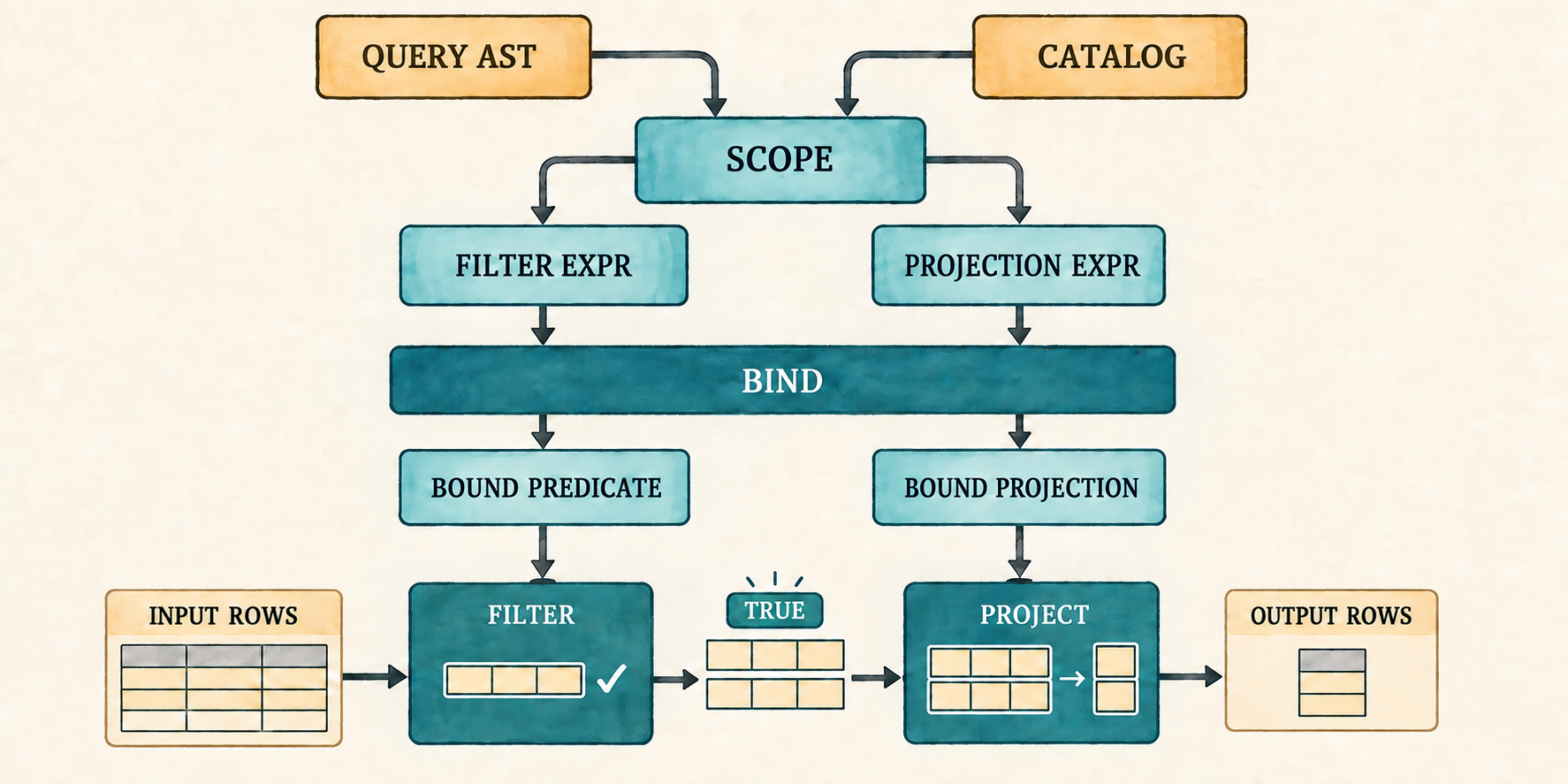
Filter evaluates its bound predicate for every input row and forwards only
rows whose result is TRUE. Project evaluates its bound expressions for
each forwarded row and constructs a new row. Those output rows become the
input of the next plan node.
Projection will produce a Vec<(String, Value)> whose column names are already
owned. Row::new() accepts borrowed names and converts each one into a new
String; this second constructor can instead move the completed vector into
the row directly. The project node added below will use this constructor after
it evaluates its expressions.
src/row.rs: add to the first impl Row
pub fn from_owned(values: Vec<(String, Value)>) -> Self {
    Self { values }
}
With a constructor for projected rows in place, the plan can evaluate its filter and projection.
plan.rs already imports Row. Execution also inspects Boolean and null
values, so extend that import.
src/plan.rs: replace the Row import
use crate::row::{Row, Value};A filter retains only TRUE. FALSE and NULL both remove the row, which is
how SQL treats an unknown WHERE condition. The whole-query binder accepted a
WHERE expression with a Boolean or temporary null type; this match defines
what those results do during execution. Execution does not search the catalog
or reinterpret SQL because binding has already settled those questions.
The three plan arms preserve the recursive execution order established in
Chapter 1. Scan returns its rows. Filter executes its input and evaluates
one predicate for each row. Project executes its input, evaluates every
selected expression, and moves the resulting names and values into a new row.
src/plan.rs: add Plan::execute()
impl Plan {
    pub fn execute(&self) -> Result<Vec<Row>, String> {
        match self {
            Plan::Scan { rows } => Ok(rows.clone()),
            Plan::Filter { predicate, input } => {
                let mut output = Vec::new();
                for row in input.execute()? {
                    match predicate.evaluate(&row)? {
                        Value::Boolean(true) => output.push(row),
                        Value::Boolean(false) | Value::Null => {}
                        _ => return Err(
                            "WHERE expression did not produce a Boolean".into()),
                    }
                }
                Ok(output)
            }
            Plan::Project { expressions, input } => {
                let mut output = Vec::new();
                for row in input.execute()? {
                    let mut values = Vec::new();
                    for expression in expressions {
                        values.push((expression.name.clone(),
                            expression.expression.evaluate(&row)?));
                    }
                    output.push(Row::from_owned(values));
                }
                Ok(output)
            }
        }
    }
}
The second checkpoint executes the plan that the binding prompt previously
printed. Extend its result pipeline through Plan::execute() and print the
returned rows.
src/main.rs: replace the result and match inside run_binding_prompt()
let result = parse(&sql)
    .map_err(|error| error.to_string())
    .and_then(|query| catalog.bind(query))
    .and_then(|plan| plan.execute());
match result {
    Ok(rows) => for row in rows { println!("{row}"); },
    Err(error) => eprintln!("error: {error}"),
}
Run the prompt and enter the representative query again:
cargo run --quiet
sql> SELECT e.name FROM employees AS e WHERE e.salary + 5000 > 70000 AND e.name IS NOT NULL;
{name: "Ada"}
{name: "Grace"}
The same bound plan that was visible at the first checkpoint can now produce rows. The final checkpoint will give this path a shared application function, a fixed demonstration, and error-preserving prompt behavior.
5.8 Connect the application
Parsing, binding, and execution now work together in the temporary prompt. We
will move that pipeline into one shared function, restore the fixed
demonstration, and reconnect the final prompt. The reader has already seen this
application shape, so replace the temporary checkpoint file with the complete
application portion of main.rs.
src/main.rs: replace the file
mod catalog;
mod expression;
mod lexer;
mod parser;
mod plan;
mod row;

use std::io::{self, Write};

use catalog::{Catalog, Column, Table};
use expression::DataType;
use parser::parse;
use row::{Row, Value};

fn main() {
    let catalog = employee_catalog();
    if std::env::args().nth(1).as_deref() == Some("--prompt") {
        run_prompt(&catalog).expect("failed to read SQL from the terminal");
    } else {
        run_demo(&catalog);
    }
}

fn employee(id: i64, name: &str, salary: i64) -> Row {
    Row::new(vec![
        ("id", Value::Integer(id)),
        ("name", Value::Text(name.into())),
        ("salary", Value::Integer(salary)),
    ])
}

fn employee_catalog() -> Catalog {
    Catalog::new(vec![Table {
        name: "employees".into(),
        columns: vec![
            Column {
                name: "id".into(),
                data_type: DataType::Integer,
            },
            Column {
                name: "name".into(),
                data_type: DataType::Text,
            },
            Column {
                name: "salary".into(),
                data_type: DataType::Integer,
            },
        ],
        rows: vec![
            employee(1, "Ada", 70_000),
            employee(2, "Linus", 50_000),
            employee(3, "Grace", 72_000),
        ],
    }])
}

fn execute_sql(sql: &str, catalog: &Catalog) -> Result<Vec<Row>, String> {
    let query = parse(sql).map_err(|error| error.to_string())?;
    catalog.bind(query)?.execute()
}

fn run_demo(catalog: &Catalog) {
    let sql =
        "SELECT e.name FROM employees AS e WHERE e.salary + 5000 > 70000 AND e.name IS NOT NULL;";
    let rows = execute_sql(sql, catalog).expect("the lesson query should execute");
    println!("Employees matching the bound expression:");
    for row in rows {
        println!("{row}");
    }
}

fn run_prompt(catalog: &Catalog) -> io::Result<()> {
    loop {
        let mut sql = String::new();

        loop {
            if sql.is_empty() {
                print!("sql> ");
            } else {
                print!("...> ");
            }
            io::stdout().flush()?;

            let mut line = String::new();
            if io::stdin().read_line(&mut line)? == 0 {
                println!();
                if !sql.trim().is_empty() {
                    eprintln!("error: incomplete query at end of input");
                }
                return Ok(());
            }
            if sql.is_empty() && line.trim().is_empty() {
                break;
            }
            if append_sql_line(&mut sql, &line) {
                break;
            }
        }

        if !sql.trim().is_empty() {
            print_query_result(&sql, catalog);
        }
    }
}

fn append_sql_line(sql: &mut String, line: &str) -> bool {
    sql.push_str(line);
    line.trim_end().ends_with(';')
}

fn print_query_result(sql: &str, catalog: &Catalog) {
    match execute_sql(sql, catalog) {
        Ok(rows) => {
            for row in rows {
                println!("{row}");
            }
        }
        Err(error) => eprintln!("error: {error}"),
    }
}
Projection now lives in Plan::Project, which evaluates bound expressions and
constructs each result with Row::from_owned(). The older method that copies a
fixed list of named columns therefore has no caller.
src/row.rs: remove Row::project() and its
project_keeps_only_requested_columns() test. That is the only test in the
module, so remove the now-empty mod tests block as well.
The application now connects the parser, catalog and binder, plan, and executor. Compile it before running queries so missing modules, stale imports, or mismatched plan fields fail at this checkpoint.
cargo check
5.9 Run and verify
The complete path is now connected. Verify its successful result with the fixed demonstration and its failures through the prompt.
Run the completed path:
cargo run --quiet
Employees matching the bound expression:
{name: "Ada"}
{name: "Grace"}
The source text now becomes an unresolved AST, then a checked bound plan, and only then rows. The executor itself never sees an alias or table name.
Start the interactive path:
cargo run --quiet -- --prompt
The old false success now stops during binding:
sql> SELECT name FROM missing_table WHERE salary > 50000;
error: unknown table: missing_table
An invalid qualifier and invalid operand type fail just as clearly:
sql> SELECT x.name FROM employees AS e WHERE e.salary > 50000;
error: unknown table or alias: x
sql> SELECT name FROM employees WHERE name + 1 > 0;
error: arithmetic requires integers: found Text
The prompt remains ready after each failure. A bad query no longer becomes a process panic or silently reads an unrelated table.
5.10 What we deliberately did not build
With the complete path verified, we can state the boundaries that remain. The new frontend remains intentionally bounded:
- A query has one input table and one selected expression.
- The selected expression cannot have an output alias. A bare column reuses
its column name, while a computed expression is named
expression. - The catalog exists only in memory and is assembled by the application.
- Names use exact spelling; quoted identifiers are absent.
- Arithmetic uses integers only.
- Text equality and ordering use Rust’s case-sensitive string comparison; SQL collations and locale-aware ordering are absent.
- Division by zero is an execution error.
- There are no functions,
BETWEEN,LIKE,IN,CASE,CAST, dates, or intervals. - There is no optimizer or separate physical plan.
- Bound columns use names rather than stable catalog identifiers.
These limits keep the chapter focused on the boundary between syntax and meaning. Appendix B records where the remaining expression forms belong; Appendix C records the implemented value and operator rules.
5.11 Try it
Run the prompt, predict the stage that will accept or reject each query, and then try it.
- Change
employeestoEmployeeswithout changing the catalog. - Use
employees.namewithout a table alias, then addAS ewhile keeping the same qualifier. - Select
salary + 5000and useWHERE TRUE. Inspect the output column name. - Use
WHERE salarywithout a comparison. - Try
WHERE TRUE OR NULL, thenWHERE FALSE AND NULL. - Use bare
NULLas the completeWHEREexpression. - Select
10 / 0withWHERE TRUE. Predict whether parsing, binding, or execution reports the error.
Check your reasoning
- Parsing succeeds, but exact-name catalog lookup reports
unknown table: Employeesduring binding. employees.namebinds when no alias exists. AfterAS e, the accepted qualifier ise, soemployees.namereports an unknown table or alias.- The arithmetic expression binds and evaluates for every row. Until output
aliases are added, the projected column is named
expression. - Binding rejects the integer result because
WHERErequires Boolean orNULL. TRUE OR NULLis true, so every row survives.FALSE AND NULLis false, so no rows survive.- Binding accepts the temporary
Nulltype, and execution removes every row because an unknown predicate is not true. - Parsing and binding succeed because both operands are integers. Evaluation
reports
division by zerowhile executing the projection.
5.12 One selected expression is no longer enough
The frontend can now preserve expression structure, and the binder can reject
unknown names and incompatible types before execution. One limitation remains
in the outer query representation: Query stores exactly one projection
expression.
That is enough to select name or compute salary + 1000, but not to return
both results together:
SELECT name AS employee_name,
       salary + 1000 AS raised_salary
FROM employees
WHERE salary > 50000;
This query still uses the one-table scope built in this chapter. Its new
problem is on the output side. The parser must preserve a list of selected
expressions, the binder must check every expression in that list, and the
project node must give each resulting value a useful name. A bare column can
retain its column name, while a computed expression needs an output alias such
as raised_salary instead of the temporary name expression.
The next chapter widens projection from one expression to a named list while keeping the existing single-table scope unchanged. The prompt already accepts the longer query across several lines.
6. Multiple Outputs
A result row can contain more than one answer.
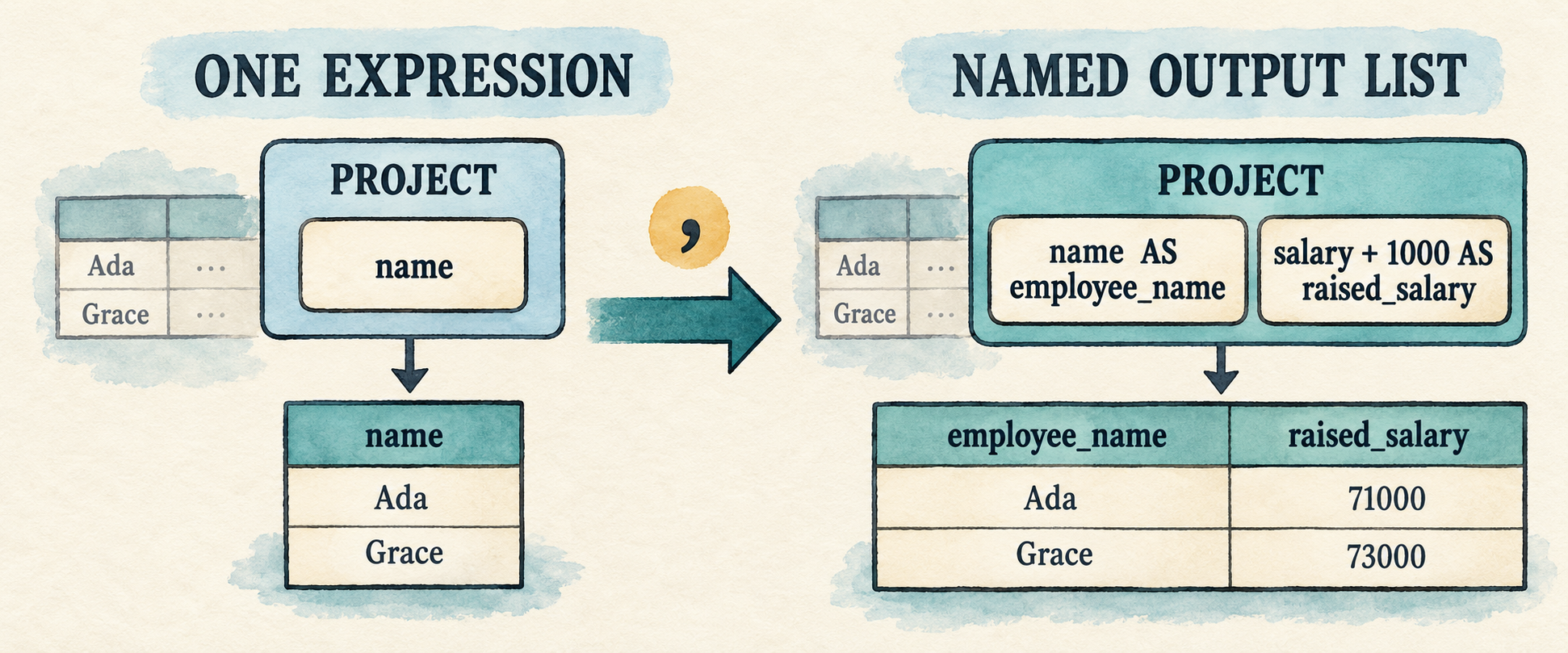
Chapter 5 can evaluate a complete expression tree, but its Query still stores
only one projection expression. That prevents a query from returning a column
and a computed value together:
SELECT e.name AS employee_name,
       e.salary + 1000 AS raised_salary
FROM employees AS e
WHERE e.salary > 50000;
This chapter changes projection from one expression into a list of selected
items. Most items are expressions with optional output aliases. A wildcard is
different: * asks the binder to produce one output for every column visible
from the selected table. The input side remains unchanged, so binding still
uses one table and the logical plan remains Project -> Filter -> Scan.
Each selected item also receives an output label. An explicit alias names a computed expression, a bare column keeps its column name, and a wildcard contributes the catalog column names it expands. Labels describe result fields; they do not identify the checked expressions during execution, so two outputs may have the same label. Aliases remain the way to make those fields useful to a reader.
This chapter carries its select list through the frontend:
comma-separated select items
        ↓ parse
Vec<SelectItem>
        ↓ bind in one Scope
Vec<ProjectExpression>
        ↓ evaluate for each surviving row
one wider Row
Multiple selected items do not require a new plan node. Chapter 5 already made
Project hold a vector of checked expressions. This chapter teaches the parser
and binder to fill that vector from explicit expressions and catalog-expanded
wildcards.
Before changing the program, begin from the completed Chapter 5 checkpoint:
git switch --create chapter-006 lesson-005
6.1 Represent a select list
The query grammar currently accepts one expression after SELECT. Replace that
single position with a comma-separated list of selected items:
query             = "SELECT" select_list
                    "FROM" identifier alias?
                    "WHERE" expression ";" ;

select_list       = select_item ("," select_item)* ;
select_item       = "*" | qualified_star | expression alias? ;
qualified_star    = identifier "." "*" ;
alias             = "AS"? identifier ;
select_list must contain at least one item. The parenthesized group may then
repeat zero or more times, so every additional item begins with a comma.
SELECT FROM ... remains invalid, while one item remains valid.
The grammar gives a select_item two distinct shapes. An expression item stores
the Expr to compute and its optional output alias. A wildcard is not an
expression to evaluate; it stores only an optional qualifier until binding
validates that qualifier and expands the matching catalog columns. Represent
the distinction with SelectItem, then let Query hold a vector of those
items instead of one projection expression.
src/parser.rs: replace Query and add SelectItem
#[derive(Debug, PartialEq, Eq)]
pub struct Query {
    pub projections: Vec<SelectItem>,
    pub table: String,
    pub table_alias: Option<String>,
    pub filter: Expr,
}

#[derive(Debug, PartialEq, Eq)]
pub enum SelectItem {
    Wildcard {
        qualifier: Option<String>,
    },
    Expression {
        expression: Expr,
        alias: Option<String>,
    },
}
For the representative query, the vector will contain two entries:
SelectItem::Expression {
    expression: Column(e.name),
    alias: Some("employee_name"),
}

SelectItem::Expression {
    expression: Add(Column(e.salary), Integer(1000)),
    alias: Some("raised_salary"),
}
These are still unresolved AST expressions. The aliases name their eventual
outputs; they do not participate in resolving e.name or e.salary.
The two wildcard forms become:
*    → SelectItem::Wildcard { qualifier: None }
e.*  → SelectItem::Wildcard { qualifier: Some("e") }
The parser records the request but does not expand it. Only the binder knows
which catalog table e names and which columns that table contains.
Together, expression items and wildcard forms complete the planned
select_list alternatives in
Appendix B.
6.2 Recognize the comma
The new grammar contains only one token that the lexer does not already know:
the comma separating selected items. Star already represents * because the
expression grammar uses the same character for multiplication. Add the comma
beside the other punctuation tokens.
src/lexer.rs: add Comma after Dot in Token
Dot,
Comma,
LeftParen,
Then recognize its one-character spelling in the punctuation helper.
src/lexer.rs: add the comma arm after the dot arm in punctuation()
('.', _) => Some((Token::Dot, 1)),
(',', _) => Some((Token::Comma, 1)),
('(', _) => Some((Token::LeftParen, 1)),AS, identifiers, dots, and stars already have tokens, so aliases and
wildcards need no other lexer change. The parser can now distinguish the
boundary between one selected item and the next.
6.3 Parse every selected item
We will implement the three new grammar productions directly:
select_list       = select_item ("," select_item)* ;
select_item       = "*" | qualified_star | expression alias? ;
qualified_star    = identifier "." "*" ;
6.3.1 Parse one selected item
At a select-item boundary, a leading * is an unqualified wildcard. The three
tokens identifier, ., and * form a qualified wildcard. These checks must
happen before expression parsing because the expression parser would otherwise
treat * as multiplication or expect a column name after the dot.
The peek_at() helper used by parse_select_item() below looks as far as two
tokens ahead, making the qualified form visible without consuming the beginning
of an ordinary expression.
src/parser.rs: add after peek()
fn peek_at(&self, offset: usize) -> Option<&Token> {
    self.tokens.get(self.current + offset)
}
If neither wildcard form matches, parse_select_item() delegates to the
precedence parser from Chapter 4. That parser naturally stops at AS, a direct
alias, or a comma because none is an expression operator. The existing
parse_alias() method then consumes the optional output alias.
src/parser.rs: add before parse_alias()
fn parse_select_item(&mut self) -> Result<SelectItem, ParseError> {
    if self.consume(&Token::Star) {
        return Ok(SelectItem::Wildcard { qualifier: None });
    }
    if let (Some(Token::Identifier(qualifier)),
        Some(Token::Dot), Some(Token::Star)) =
        (self.peek_at(0), self.peek_at(1), self.peek_at(2))
    {
        let qualifier = qualifier.clone();
        self.current += 3;
        return Ok(SelectItem::Wildcard {
            qualifier: Some(qualifier),
        });
    }
    Ok(SelectItem::Expression {
        expression: self.parse_expression()?,
        alias: self.parse_alias()?,
    })
}
The two early returns handle the wildcard alternatives. Reaching the final branch means the item begins with an expression; the parser preserves that expression together with any output alias that follows it.
6.3.2 Parse the complete select list
The select_list production requires one item, followed by zero or more
comma-item pairs:
select_list = select_item ("," select_item)* ;
src/parser.rs: add before parse_select_item()
fn parse_select_list(&mut self) -> Result<Vec<SelectItem>, ParseError> {
    let mut expressions = vec![self.parse_select_item()?];
    while self.consume(&Token::Comma) {
        expressions.push(self.parse_select_item()?);
    }
    Ok(expressions)
}
The first call before the loop implements the required first select_item.
Each successful comma consumption implements one repetition of
("," select_item)*. If there is no comma, the loop ends without consuming
FROM.
6.3.3 Connect the list to the query parser
The outer query parser should now ask for the complete list rather than one
expression. Only the first line of the existing query shape changes: SELECT
now produces a vector of items before parsing continues with FROM, the table,
and the filter.
src/parser.rs: replace parse_query()
fn parse_query(&mut self) -> Result<Query, ParseError> {
    self.expect(Token::Select, "expected SELECT at start of query")?;
    let projections = self.parse_select_list()?;
    self.expect(Token::From, "expected FROM after select list")?;
    let table = self.identifier("expected a table name after FROM")?;
    let table_alias = self.parse_alias()?;
    self.expect(Token::Where, "expected WHERE after table name")?;
    let filter = self.parse_expression()?;
    self.expect(Token::Semicolon, "expected ; after query")?;
    if self.current != self.tokens.len() {
        return Err(ParseError("unexpected token after ;".into()));
    }
    Ok(Query {
        projections,
        table,
        table_alias,
        filter,
    })
}
The same parse_alias() now serves two positions. Immediately after a selected
expression it records an output alias; immediately after the table identifier
it records a table alias. The grammar determines which meaning the returned
text has.
Two existing parser tests still inspect the removed query.projection field.
Remove multiplication_binds_more_tightly_than_addition() and
parses_boolean_literals() from src/parser.rs before compiling this
checkpoint. Then remove BinaryOp from the test module’s expression import,
because none of its remaining tests uses that operator type. Their parser
behavior remains valid; the completed lesson source contains updated versions
that inspect an expression item in query.projections.
Changing Query makes Chapter 5’s binder temporarily stale because it still
reads query.projection. Before reconnecting it, inspect exactly what the
frontend now produces.
6.4 Inspect the expanded AST
Temporarily use the program as an AST inspector. This isolates the completed lexer and parser from the binder that we have not updated yet.
src/main.rs: temporarily replace the file
#[allow(dead_code)] // Binding and execution reconnect later in this chapter.
mod expression;
mod lexer;
mod parser;
#[allow(dead_code)] // Row execution reconnects later in this chapter.
mod row;

use std::io::{self, Write};

use parser::parse;

fn main() -> io::Result<()> {
    run_prompt()
}

fn inspect_sql(sql: &str) {
    match parse(sql) {
        Ok(query) => println!("{query:#?}"),
        Err(error) => eprintln!("error: {error}"),
    }
}

fn run_prompt() -> io::Result<()> {
    loop {
        let mut sql = String::new();

        loop {
            if sql.is_empty() {
                print!("sql> ");
            } else {
                print!("...> ");
            }
            io::stdout().flush()?;

            let mut line = String::new();
            if io::stdin().read_line(&mut line)? == 0 {
                println!();
                if !sql.trim().is_empty() {
                    eprintln!("error: incomplete query at end of input");
                }
                return Ok(());
            }
            if sql.is_empty() && line.trim().is_empty() {
                break;
            }
            if append_sql_line(&mut sql, &line) {
                break;
            }
        }

        if !sql.trim().is_empty() {
            inspect_sql(&sql);
        }
    }
}

fn append_sql_line(sql: &mut String, line: &str) -> bool {
    sql.push_str(line);
    line.trim_end().ends_with(';')
}
Run it and enter the representative query:
cargo run --quiet
The relevant portion of the output contains two expression items and both aliases:
projections: [
    Expression {
        expression: Column { qualifier: Some("e"), name: "name" },
        alias: Some("employee_name"),
    },
    Expression {
        expression: Binary { ... },
        alias: Some("raised_salary"),
    },
]
The parser has preserved the list and its names, but it has not checked either expression. Enter a second query to inspect the other item shape:
SELECT *, e.* FROM employees AS e WHERE TRUE;
Its two entries are Wildcard { qualifier: None } and
Wildcard { qualifier: Some("e") }. The AST still does not contain the three
employee columns because parsing has no catalog. We now send every item through
the one-table scope built in Chapter 5.
6.5 Bind and expand every output
Table lookup and scope construction do not change. For the representative query, the binder creates the same one-table scope introduced in Chapter 5:
Scope {
    table_name: "employees",
    alias: Some("e"),
    columns: [
        id: Integer,
        name: Text,
        salary: Integer,
    ],
}
The binder reuses this scope for every selected item. It validates e.name
and e.salary + 1000 against the scope, then uses the same catalog columns to
expand e.*.
6.5.1 Share qualifier validation
Import the new select-item type before changing the binder.
src/catalog.rs: replace the parser import
use crate::parser::{Query, SelectItem};Recall the Chapter 5 qualifier rule: if an alias exists, it is accepted;
otherwise the table name is accepted. The Expr::Column arm currently checks
that rule inline:
if let Some(qualifier) = qualifier {
    let expected = scope.alias.unwrap_or(scope.table_name);
    if qualifier != expected {
        return Err(format!(
            "unknown table or alias: {qualifier}"));
    }
}
Column references and qualified wildcards now need the same check. Move it into a function that both paths can call.
src/catalog.rs: add after Scope
fn require_qualifier(qualifier: Option<&str>, scope: &Scope<'_>)
    -> Result<(), String>
{
    if let Some(qualifier) = qualifier {
        let expected = scope.alias.unwrap_or(scope.table_name);
        if qualifier != expected {
            return Err(format!("unknown table or alias: {qualifier}"));
        }
    }
    Ok(())
}src/catalog.rs: replace the inline qualifier check in the Expr::Column arm
require_qualifier(qualifier.as_deref(), scope)?;Both column references and wildcards now apply the same rule before either path consults the columns in the scope.
6.5.2 Bind expression items and expand wildcards
Expression items and wildcard expansion both append checked outputs. Keep that small construction step in one function.
src/catalog.rs: add after bind_expression()
fn push_output(expressions: &mut Vec<ProjectExpression>,
    name: String, expression: BoundExpr)
{
    expressions.push(ProjectExpression { name, expression });
}
The whole-query binder can now process the complete select list. Replace the
impl Catalog block that contains bind() with the version below. Table
lookup, scope construction, filter checking, and plan assembly remain the
same. The projection code in the middle now loops over query.projections
and expands wildcards from scope.columns.
src/catalog.rs: replace the impl Catalog block that contains bind()
impl Catalog {
    pub fn bind(&self, query: Query) -> Result<Plan, String> {
        let table = self.tables.iter()
            .find(|table| table.name == query.table)
            .ok_or_else(|| format!("unknown table: {}", query.table))?;

        let scope = Scope {
            table_name: &table.name,
            alias: query.table_alias.as_deref(),
            columns: &table.columns,
        };

        let mut expressions = Vec::new();
        for selected in query.projections {
            match selected {
                SelectItem::Expression { expression, alias } => {
                    let (expression, _) =
                        bind_expression(expression, &scope)?;
                    let name = alias.unwrap_or_else(|| match &expression {
                        BoundExpr::Column(name) => name.clone(),
                        _ => "expression".into(),
                    });
                    push_output(&mut expressions, name, expression);
                }
                SelectItem::Wildcard { qualifier } => {
                    require_qualifier(qualifier.as_deref(), &scope)?;
                    for column in scope.columns {
                        push_output(
                            &mut expressions,
                            column.name.clone(),
                            BoundExpr::Column(column.name.clone()),
                        );
                    }
                }
            }
        }

        let (predicate, predicate_type) =
            bind_expression(query.filter, &scope)?;
        if !matches!(predicate_type, DataType::Boolean | DataType::Null) {
            return Err("WHERE expression must be Boolean".to_string());
        }

        Ok(Plan::Project {
            expressions,
            input: Box::new(Plan::Filter {
                predicate,
                input: Box::new(Plan::Scan {
                    rows: table.rows.clone(),
                }),
            }),
        })
    }
}
For an expression item, each iteration does three things in order:
bind_expression()resolves and type-checks the selected expression.- The binder chooses its output name. An explicit alias wins, a bare column
keeps its column name, and an unnamed computation still uses
expression. push_output()pairs that label with the checked tree.
For a wildcard, the qualifier is checked once and the catalog columns are
visited in their stored order. Each column becomes a bound column expression
with the same output name. The three-column employee schema therefore expands
e.* into id, name, and salary without creating a new plan node.
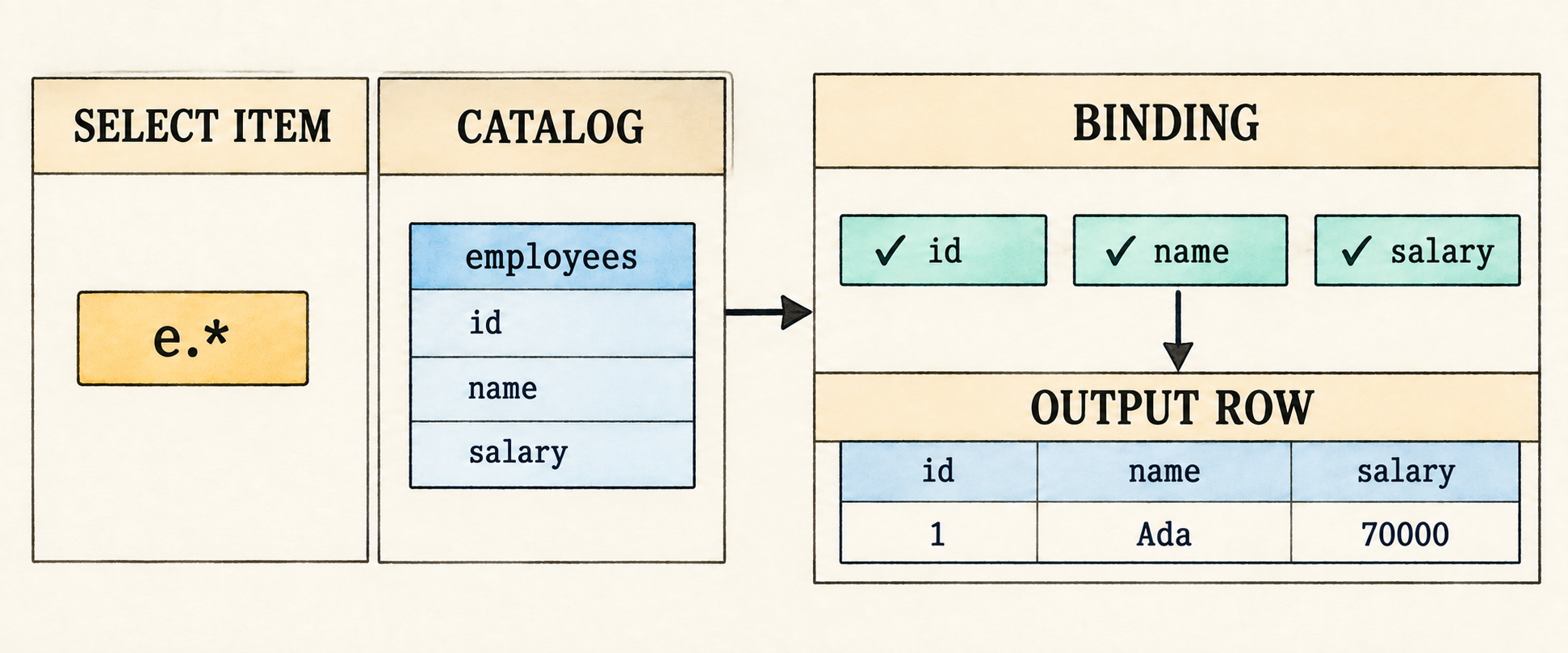
The label is not a column identity. Project is the outermost node in this
chapter, so its rows are displayed rather than rebound by another query.
SELECT name, name may therefore produce two fields labelled name, and two
unnamed computations may both use the temporary label expression. A later
result-schema representation will need positional identity when projected rows
can become another query’s input.
6.5.3 Assemble the plan
After the projection loop has produced every ProjectExpression, the remaining
part of bind() follows the Chapter 5 path. It binds the WHERE expression,
requires a Boolean or null result, and places the complete projection vector
above Filter and Scan.
The resulting plan keeps its existing shape:
Project [employee_name, raised_salary]
  Filter salary > 50000
    Scan employees
There is no change to Plan or Plan::execute(). Chapter 5 already defined
Project with Vec<ProjectExpression> and made it evaluate every entry for
each input row. Previously the binder always created a vector of length one;
now it can fill the same vector from the complete select list.
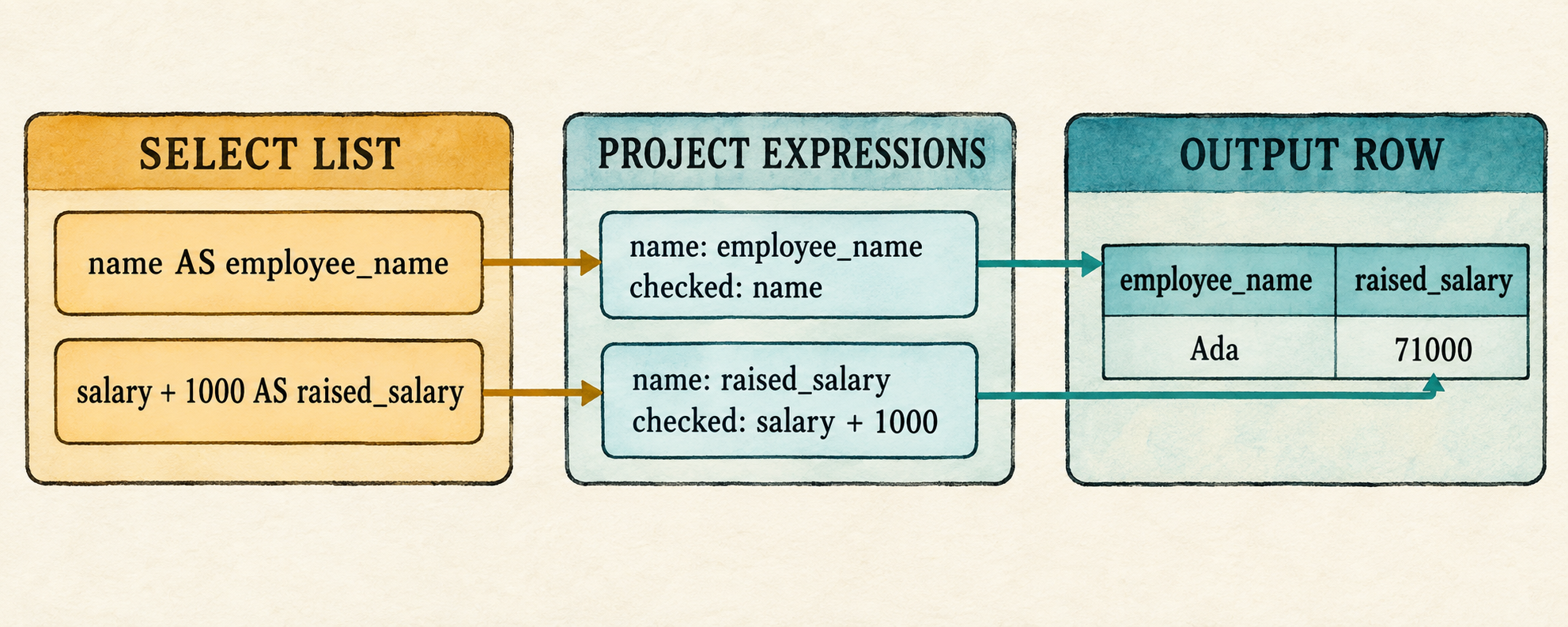
6.6 Reconnect the application
The AST checkpoint has served its purpose. Restore the complete application and update the fixed demonstration to use both outputs. The catalog, prompt, and shared parse-bind-execute path remain unchanged; only the demonstration query and its projected rows change.
src/main.rs: replace the file
mod catalog;
mod expression;
mod lexer;
mod parser;
mod plan;
mod row;

use std::io::{self, Write};

use catalog::{Catalog, Column, Table};
use expression::DataType;
use parser::parse;
use row::{Row, Value};

fn main() {
    let catalog = employee_catalog();
    if std::env::args().nth(1).as_deref() == Some("--prompt") {
        run_prompt(&catalog).expect("failed to read SQL from the terminal");
    } else {
        run_demo(&catalog);
    }
}

fn employee(id: i64, name: &str, salary: i64) -> Row {
    Row::new(vec![
        ("id", Value::Integer(id)),
        ("name", Value::Text(name.into())),
        ("salary", Value::Integer(salary)),
    ])
}

fn employee_catalog() -> Catalog {
    Catalog::new(vec![Table {
        name: "employees".into(),
        columns: vec![
            Column {
                name: "id".into(),
                data_type: DataType::Integer,
            },
            Column {
                name: "name".into(),
                data_type: DataType::Text,
            },
            Column {
                name: "salary".into(),
                data_type: DataType::Integer,
            },
        ],
        rows: vec![
            employee(1, "Ada", 70_000),
            employee(2, "Linus", 50_000),
            employee(3, "Grace", 72_000),
        ],
    }])
}

fn execute_sql(sql: &str, catalog: &Catalog) -> Result<Vec<Row>, String> {
    let query = parse(sql).map_err(|error| error.to_string())?;
    catalog.bind(query)?.execute()
}

fn run_demo(catalog: &Catalog) {
    let sql = "SELECT e.name AS employee_name, \
        e.salary + 1000 AS raised_salary \
        FROM employees AS e \
        WHERE e.salary > 50000;";
    let rows = execute_sql(sql, catalog).expect("the lesson query should execute");
    println!("Employees with projected raises:");
    for row in rows {
        println!("{row}");
    }
}

fn run_prompt(catalog: &Catalog) -> io::Result<()> {
    loop {
        let mut sql = String::new();

        loop {
            if sql.is_empty() {
                print!("sql> ");
            } else {
                print!("...> ");
            }
            io::stdout().flush()?;

            let mut line = String::new();
            if io::stdin().read_line(&mut line)? == 0 {
                println!();
                if !sql.trim().is_empty() {
                    eprintln!("error: incomplete query at end of input");
                }
                return Ok(());
            }
            if sql.is_empty() && line.trim().is_empty() {
                break;
            }
            if append_sql_line(&mut sql, &line) {
                break;
            }
        }

        if !sql.trim().is_empty() {
            print_query_result(&sql, catalog);
        }
    }
}

fn append_sql_line(sql: &mut String, line: &str) -> bool {
    sql.push_str(line);
    line.trim_end().ends_with(';')
}

fn print_query_result(sql: &str, catalog: &Catalog) {
    match execute_sql(sql, catalog) {
        Ok(rows) => {
            for row in rows {
                println!("{row}");
            }
        }
        Err(error) => eprintln!("error: {error}"),
    }
}
Compile the reconnected application:
cargo check
6.7 Run the wider projection
Run the fixed demonstration:
cargo run --quiet
Employees with projected raises:
{employee_name: "Ada", raised_salary: 71000}
{employee_name: "Grace", raised_salary: 73000}
The filter retains Ada and Grace exactly as before. For each surviving input
row, Project evaluates both checked expressions and passes their two names
and values to Row::from_owned(). One input row therefore produces one output
row with two fields.
Start the prompt and enter the same query in its readable form:
cargo run --quiet -- --prompt
SELECT e.name AS employee_name,
       e.salary + 1000 AS raised_salary
FROM employees AS e
WHERE e.salary > 50000;
{employee_name: "Ada", raised_salary: 71000}
{employee_name: "Grace", raised_salary: 73000}
After the inherited prompt receives the semicolon, parsing produces two
expression-shaped SelectItem nodes, binding produces two checked
ProjectExpression nodes, and the existing executor constructs the wider
rows.
A qualified wildcard can also appear beside another select item. This query
expands every employees column, then appends the computed salary:
SELECT e.*, e.salary + 1000 AS raised_salary
FROM employees AS e
WHERE e.id = 1;
{id: 1, name: "Ada", salary: 70000, raised_salary: 71000}
Parsing records one qualified wildcard followed by one expression item.
Binding validates e, expands the employee columns in catalog order, and
then appends the checked computation named raised_salary. Project still
receives an ordinary list of checked expressions.
An unknown qualifier stops during binding:
SELECT x.* FROM employees AS e WHERE TRUE;
error: unknown table or alias: x
Repeated labels are allowed. Two unnamed computations both use the temporary
label expression:
SELECT salary + 1, salary + 1000
FROM employees
WHERE id = 1;
{expression: 70001, expression: 71000}
Aliases make the result easier to interpret:
SELECT salary + 1 AS next_salary,
       salary + 1000 AS raised_salary
FROM employees
WHERE id = 1;
{next_salary: 70001, raised_salary: 71000}
6.8 What we deliberately did not build
This chapter changes projection only. The catalog, expression, type, and planning limits from Chapter 5 still apply. The expanded select list remains bounded in these ways:
- A query still has exactly one input table.
- Every query still requires
WHERE. - Wildcards expand only the one table in the current scope; Chapter 7 will define their behavior when several inputs are visible.
DISTINCTandALLremain in Chapter 10, where duplicate handling becomes observable.- A computed expression without an alias still receives the temporary name
expression. - Output labels may repeat because projected rows are final results in this chapter. Chapter 11 will introduce a result schema with positional identity before projected rows can become inputs to another query.
These limits keep the chapter focused on widening projection. The next chapter changes the other side of the query by allowing more than one input table.
6.9 Try it
Run the prompt, predict the output labels, and then try each query.
- Select
name, salarywithout aliases. - Select
name, salary + 1000 AS raised_salary. - Remove
ASfrom both aliases in the representative query. - Select
salary + 1000, salary - 1000without aliases. - Select
name AS result, salary AS result. - Select
name AS employee_name, salary, salary + 1000 AS raised_salary. - Select
*and predict the output order fromemployee_catalog().
Check your reasoning
- Both bare columns retain their names, producing
nameandsalary. - The bare column is named
name; the computation uses its explicitraised_salaryalias. - Direct aliases are accepted, so the result is unchanged.
- Both computations receive the fallback label
expression; both values remain in the result row. - Both values remain in the result row with the shared label
result. - The result contains three fields in select-list order:
employee_name,salary, andraised_salary. - The wildcard expands to
id,name, andsalaryin catalog order.
6.10 One output list, one input scope
Projection can now compute and name several values or expand a table wildcard,
but every column still comes from the same table. That makes an unqualified
name such as name unambiguous and gives * only one possible input.
Consider what changes when the database has two tables:
employees(id, name, department_id)
departments(id, name)
A useful query needs values from both:
SELECT e.name AS employee_name, d.name AS department_name
FROM employees AS e, departments AS d
WHERE e.department_id = d.id;
The projection list and its output aliases are no longer a problem. The
remaining difficulty is on the input side. The binder must track both table
aliases, decide which table owns each column, reject an unqualified name
because both inputs define one, and decide which schemas an unqualified *
should expand.
After those names are resolved, execution must combine an employee row with a department row before the existing filter can test their identifiers and the project node can produce the two named outputs. That row-combining operation is a join.
The next chapter expands the binding scope from one table to several, adds the first
logical Join node, and makes its straightforward nested-loop execution
visible.
7. The First Join
A join begins by asking which rows belong together.
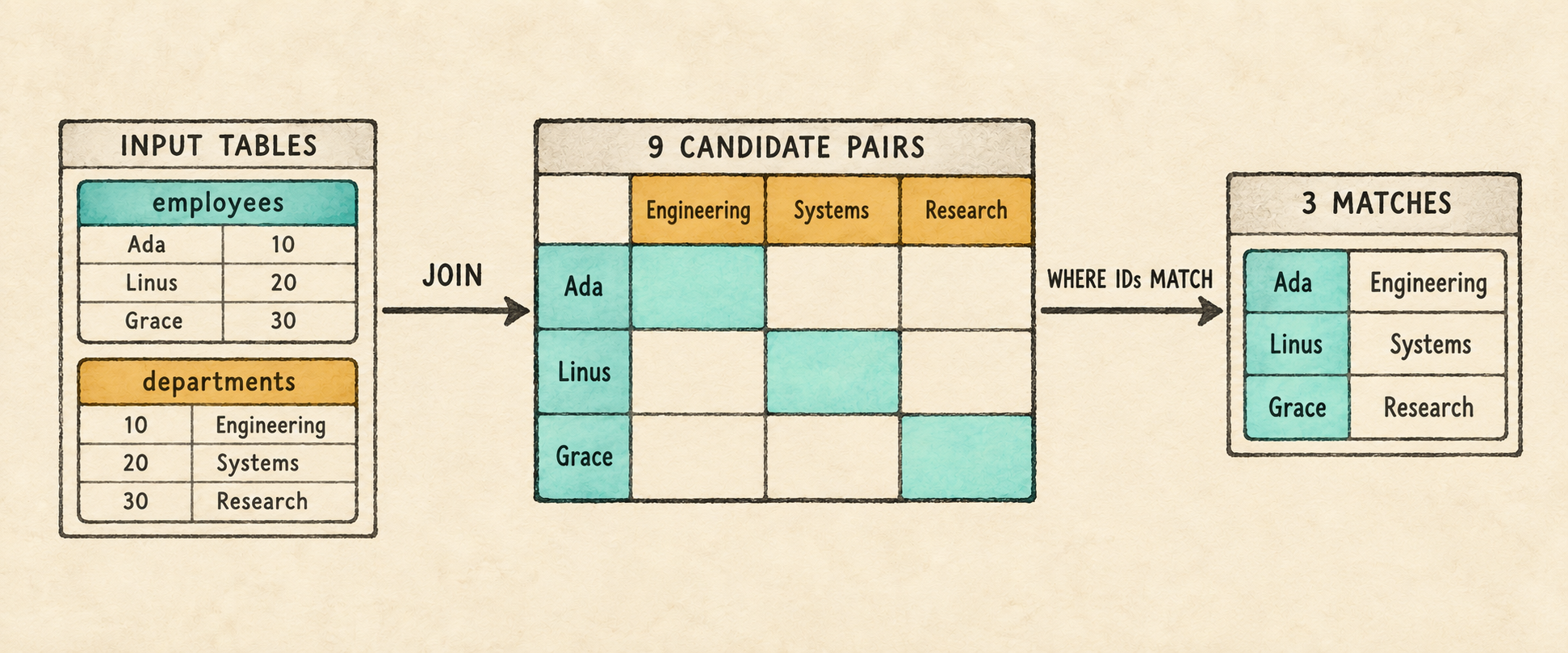
Chapter 6 can return several named expressions from one table. It cannot yet answer a question whose columns come from two tables:
SELECT e.name AS employee_name, d.name AS department_name
FROM employees AS e, departments AS d
WHERE e.department_id = d.id;
Supporting this query requires changes across the pipeline. The parser must
preserve a list of input tables rather than one table. The binder must decide
whether each column belongs to employees or departments, and the executor
must place one row from each table together before it can evaluate
e.department_id = d.id.
That combined row creates a new challenge for Filter. Until now, a bound
column name was enough to retrieve one value from a one-table row. A joined row
contains values from both inputs, which may contribute columns with the same
name. The binder must therefore replace each qualified column reference with
its position, or slot, in the combined row. The filter can then read the
correct values before comparing the employee’s department_id with the
department’s id.
This chapter makes those changes in three steps:
- Extend the query AST to store multiple input tables and an optional
WHEREexpression. - Build a multi-table scope, bind each column to a stable position in the combined row, and reject ambiguous unqualified names.
- Add a logical
Jointhat pairs left and right rows with visible nested loops, then placeFilterabove it when aWHEREpredicate is present.
The two selected columns share the source name name. Their output aliases,
employee_name and department_name, make their roles clear when Project
constructs the result. With the join predicate present, the completed plan
places the new operation beneath the familiar Filter and Project nodes:
Project(employee_name, department_name)
                 |
Filter(e.department_id = d.id)
                 |
                Join
               /    \
 Scan(employees)    Scan(departments)
Read from the scans upward, Join combines the two inputs by pairing every
employee with every department. Filter retains the pairs whose department
identifiers match, and Project produces the two named output columns.
Omitting WHERE removes the Filter, allowing all nine candidate pairs to
reach projection.
The logical Join records that the inputs must be combined; it does not yet
choose among physical join algorithms. This chapter will execute it with
visible nested loops.
By the end of the chapter, the query above returns Ada with Engineering, Linus with Systems, and Grace with Research.
Before changing the program, begin from the completed Chapter 6 checkpoint:
git switch --create chapter-007 lesson-006
7.1 Expand the FROM grammar
The new query shape creates three grammar requirements: FROM must accept
multiple table references, each table reference must retain its optional
alias, and WHERE must be optional so we can run the Cartesian product by
itself. The existing expression and projection rules do not change. Here is
the updated outer grammar for those deltas:
query             = "SELECT" select_list
                    "FROM" table_list
                    ("WHERE" expression)? ";" ;

table_list        = table_reference ("," table_reference)* ;
table_reference   = identifier alias? ;
alias             = "AS"? identifier ;
Table references store input aliases. In FROM employees AS e, the alias e
becomes the qualifier used to identify that input. References such as e.name
and e.department_id use it to tell the binder which table should contain the
column.
An output alias serves a different stage. In
SELECT e.name AS employee_name, the binder first resolves e.name;
Project later evaluates that expression and labels its value employee_name
in the output row. The output alias does not identify an input table or
participate in resolving the query’s source columns.
Parentheses followed by ? make the complete WHERE clause optional. Either
the keyword and expression are both present, or neither is.
The grammar can now describe the new query shape. The AST must next preserve its table list and the possible absence of a filter.
7.2 Preserve the input list in the AST
The parser change has three parts. First the AST must represent several table
references and an optional filter. Then parse_query() must recognize that
outer shape, and two smaller methods must parse the table list itself.
7.2.1 Represent tables and an optional filter
Query already stores a collection of selected expressions. Replace its
single table fields with a vector of table references. The filter becomes
Option<Expr>: Some preserves the parsed predicate, while None records
that the query ended after its input list.
src/parser.rs: replace Query and add TableReference
#[derive(Debug, PartialEq, Eq)]
pub struct Query {
    pub projections: Vec<SelectItem>,
    pub tables: Vec<TableReference>,
    pub filter: Option<Expr>,
}

#[derive(Debug, PartialEq, Eq)]
pub struct TableReference {
    pub name: String,
    pub alias: Option<String>,
}
The AST can now hold the new information. Before the outer parser can populate it, add the methods that consume the new table-list grammar.
7.2.2 Parse the table list
The next two methods implement the productions that make up table_list:
table_list      = table_reference ("," table_reference)* ;
table_reference = identifier alias? ;
alias           = "AS"? identifier ;
The list parser reads one required table reference, then consumes each comma
followed by another reference. Requiring the first table keeps FROM ;
invalid. A table reference reads the table name and delegates its optional
alias to the existing parse_alias() method.
src/parser.rs: add before parse_alias()
fn parse_table_list(&mut self) -> Result<Vec<TableReference>, ParseError> {
    let mut tables = vec![self.parse_table_reference()?];
    while self.consume(&Token::Comma) {
        tables.push(self.parse_table_reference()?);
    }
    Ok(tables)
}

fn parse_table_reference(&mut self) -> Result<TableReference, ParseError> {
    Ok(TableReference {
        name: self.identifier("expected a table name")?,
        alias: self.parse_alias()?,
    })
}
The same parse_alias() method now serves two grammar positions. After a
selected expression, it records an output alias. After a table name, it
records the alias used to qualify that table, which we call an input alias.
The table-list parser stops when the next token is not a comma. At that point,
the outer parser can decide whether the query continues with WHERE or ends
with a semicolon.
7.2.3 Parse the outer query
parse_query() implements the updated outer production:
query = "SELECT" select_list
        "FROM" table_list
        ("WHERE" expression)? ";" ;
The parser reads the complete input list before deciding whether a WHERE
clause follows. Consuming WHERE selects the Some branch. Reaching the
semicolon selects None.
src/parser.rs: replace parse_query()
fn parse_query(&mut self) -> Result<Query, ParseError> {
    self.expect(Token::Select, "expected SELECT at start of query")?;
    let projections = self.parse_select_list()?;
    self.expect(Token::From, "expected FROM after select list")?;
    let tables = self.parse_table_list()?;
    let filter = if self.consume(&Token::Where) {
        Some(self.parse_expression()?)
    } else {
        None
    };
    self.expect(Token::Semicolon, "expected ; after query")?;

    if self.current != self.tokens.len() {
        return Err(ParseError("unexpected token after ;".to_string()));
    }

    Ok(Query {
        projections,
        tables,
        filter,
    })
}
The call to parse_table_list() leaves the cursor at either WHERE or the
semicolon. That makes the optional clause explicit: consuming WHERE requires
an expression and produces Some, while seeing the semicolon preserves
None.
The existing parser tests inspect Chapter 6’s singular table, table_alias,
and required filter fields. Remove the #[cfg(test)] mod tests block from
parser.rs before continuing. The lesson source keeps the rewritten parser
tests, but reproducing test code in the chapter would not add to the parsing
intuition.
Changing Query temporarily makes the Chapter 6 binder stale. Isolate the
frontend before updating the remaining stages.
7.3 Run a parser checkpoint
Temporarily replace main.rs with a small fixed-query inspector. The
allow(dead_code) attributes suppress warnings for expression and row code
that this checkpoint does not execute.
src/main.rs: temporarily replace the file
#[allow(dead_code)]
mod expression;
mod lexer;
mod parser;
#[allow(dead_code)]
mod row;

use parser::parse;

fn main() {
    let sql = "SELECT e.name AS employee_name, d.name AS department_name \
        FROM employees AS e, departments AS d;";
    println!("{:#?}", parse(sql).expect("the checkpoint query should parse"));
}
Run the checkpoint:
cargo run --quiet
The relevant fields show two table references and no filter:
tables: [
    TableReference { name: "employees", alias: Some("e") },
    TableReference { name: "departments", alias: Some("d") },
],
filter: None,
Add WHERE e.department_id = d.id before the semicolon and run it again. The
same input list remains, while filter becomes Some(Binary { ... }). The AST
now distinguishes an omitted predicate from one the binder must validate.
The parser has preserved both input tables, but it has not checked their names or the columns that refer to them. The binder must now keep both tables in the same scope, then use that scope to validate and bind every projection and the optional filter.
7.4 Build a multi-table scope
Chapter 5 introduced a scope for one input table:
struct Scope<'a> {
    table_name: &'a str,
    alias: Option<&'a str>,
    columns: &'a [Column],
}
That representation can expose only one table name, one optional alias, and
one column list. It cannot keep both employees AS e and departments AS d
visible at the same time. It also cannot distinguish two visible columns named
name or record where either table will begin after their rows are combined.
The new scope therefore needs one entry per input table. Each entry records
the qualifier accepted in expressions, the table’s catalog columns, and the
starting position of those columns in the combined row. qualifier is the
alias when one was written and otherwise the table name. offset is the
number of columns contributed by earlier inputs.
src/catalog.rs: replace Scope
struct ScopeTable<'a> {
    qualifier: String,
    columns: &'a [Column],
    offset: usize,
}

struct Scope<'a> {
    tables: Vec<ScopeTable<'a>>,
}
For the representative query, the binder finds both catalog tables before it walks either the projection or filter expressions:
SELECT e.name AS employee_name, d.name AS department_name
FROM employees AS e, departments AS d
WHERE e.department_id = d.id;
It then creates a scope that conceptually contains:
Scope {
    tables: [
        ScopeTable {
            qualifier: "e",
            columns: [
                id: Integer,
                name: Text,
                salary: Integer,
                department_id: Integer,
            ],
            offset: 0,
        },
        ScopeTable {
            qualifier: "d",
            columns: [
                id: Integer,
                name: Text,
            ],
            offset: 4,
        },
    ],
}
Each scope entry records which qualifier identifies an input, which columns that input defines, and where those columns will begin after execution combines the input rows.
The employee entry begins at offset 0 because it is the first input. It defines
four columns, so the department entry begins at offset 4. These offsets predict
the combined layout that Join will later produce; no rows have been scanned
or combined during binding. Other catalog tables remain outside this query’s
scope.
Unqualified lookup now has three possible outcomes:
- no visible table contains the name, so the column is unknown;
- exactly one table contains it, so binding succeeds;
- more than one table contains it, so the name is ambiguous.
For example, both employees and departments contain a column named name.
The binder must reject unqualified name rather than choose one table
silently.
The scope can now identify a column’s owning table and recover its type. The next step turns that ownership and offset into the exact position from which execution will read the value.
7.5 Bind columns to slots
The scope predicts the joined layout before execution sees any data. At
execution time, each Scan still produces rows shaped like its own table: an
employee row has four values and a department row has two. Join appends one
department row to one employee row, producing a six-value combined row.
For the representative query, Filter reads that complete row without
changing its width, and Project creates the final two-value result row.
Chapter 5 stored a bound column by name. That was sufficient while an input row
could contain only one column with that name. The six-value joined row may
contain both employees.name and departments.name.
The binder will therefore replace each resolved name with a column slot,
its zero-based position in the combined row. It retains the original name for
readable diagnostics. The employee fields occupy slots 0 through 3, followed
by the department fields in slots 4 and 5. In this layout, e.name binds to
slot 1 and d.name binds to slot 5. Both bound columns retain name for
diagnostics, but that shared label no longer decides which value is read.
Execution uses slot 1 for the employee name and slot 5 for the department
name, so the two columns remain distinct even though their labels match.
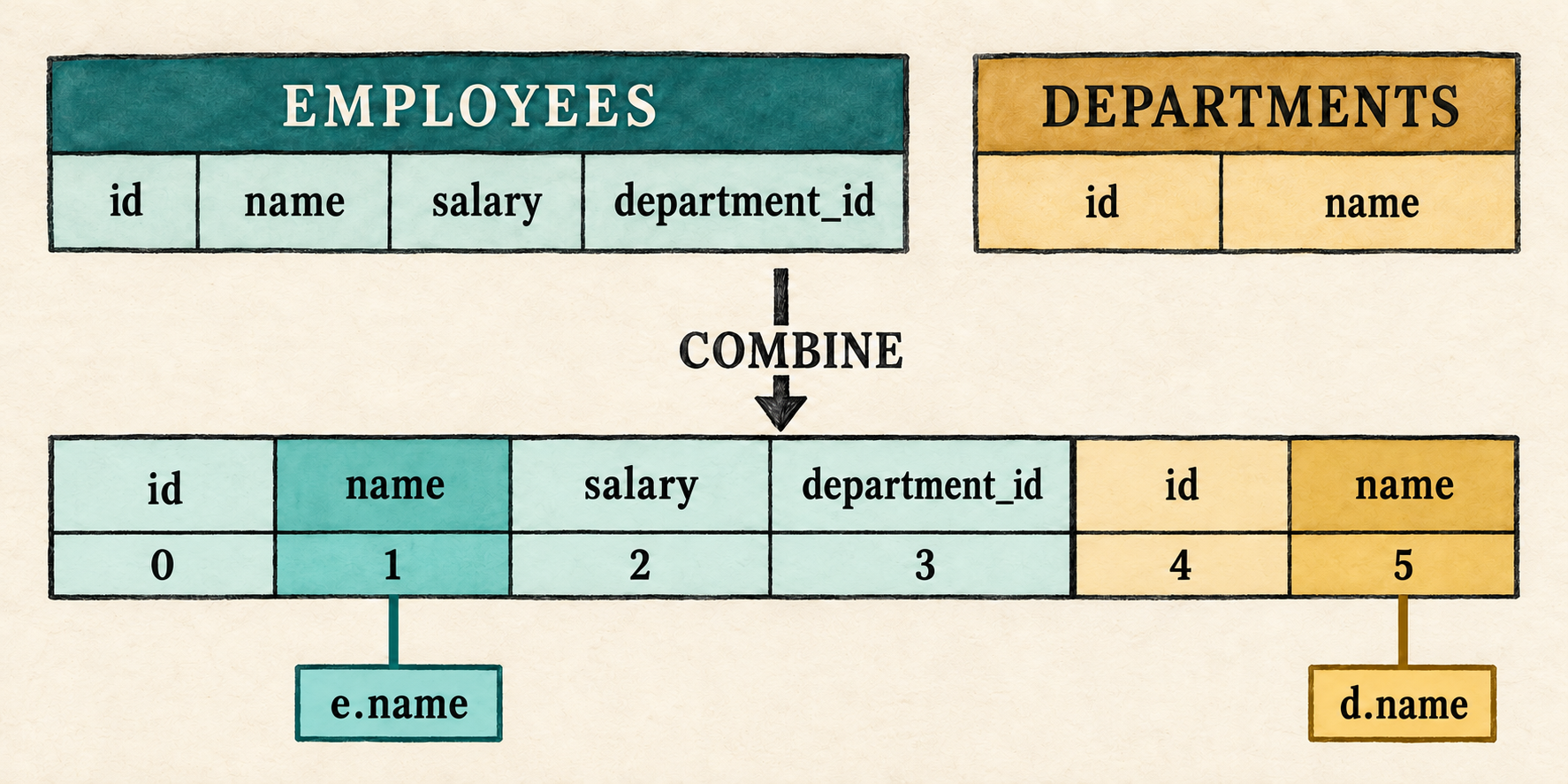
7.5.1 Represent a bound column by slot
src/expression.rs: replace the BoundExpr::Column variant
Column {
    index: usize,
    name: String,
},
This representation records the result that binding must produce. The next step changes column lookup so both qualified and unqualified names resolve to one of these absolute positions.
7.5.2 Resolve a column to its slot
bind_column() receives the qualifier preserved by the parser, the column
name, and the completed query scope. It returns both the checked column node
and the column’s catalog type. Begin with the qualified case.
src/catalog.rs: replace require_qualifier() and begin bind_column()
fn bind_column(
qualifier: Option<String>,
name: String,
scope: &Scope<'_>,
) -> Result<(BoundExpr, DataType), String> {
if let Some(qualifier) = qualifier {
let table = scope.tables.iter()
.find(|table| table.qualifier == qualifier)
.ok_or_else(|| format!("unknown table or alias: {qualifier}"))?;
let (index, column) = table.columns.iter().enumerate()
.find(|(_, column)| column.name == name)
.ok_or_else(|| format!("unknown column: {name}"))?;
return Ok((BoundExpr::Column {
index: table.offset + index,
name,
}, column.data_type.clone()));
}When a qualifier is present, only the matching ScopeTable is searched. The
index produced by enumerate() is local to that table’s column list. Adding
table.offset converts it into a slot in the combined row:
e.name → employee offset 0 + local index 1 → slot 1
d.name → department offset 4 + local index 1 → slot 5
An unknown qualifier fails before column lookup. A known qualifier followed by a missing column fails as an unknown column. A successful lookup retains the name for diagnostics, stores the absolute slot, and returns the column’s type for the surrounding operator checks.
Without a qualifier, the binder must search every visible table and accept the name only if exactly one table defines it.
src/catalog.rs: finish bind_column()
let mut matched = None;
for table in &scope.tables {
if let Some((index, column)) = table.columns.iter().enumerate()
.find(|(_, column)| column.name == name)
{
if matched.is_some() {
return Err(format!("ambiguous column: {name}"));
}
matched = Some((table.offset + index, column));
}
}
let (index, column) = matched
.ok_or_else(|| format!("unknown column: {name}"))?;
Ok((BoundExpr::Column { index, name }, column.data_type.clone()))
}matched begins as None. The first table containing the column stores its
absolute slot and catalog entry. A second match makes the name ambiguous and
returns an error immediately. If the loop ends without a match, the column is
unknown; otherwise the single match becomes the checked column. For example,
unqualified department_id resolves only in employees, while unqualified
name matches both inputs and is rejected.
Delegate the column arm of the recursive binder to that lookup.
src/catalog.rs: replace the Expr::Column arm in bind_expression()
Expr::Column { qualifier, name } => bind_column(qualifier, name, scope),Every parsed column now follows the same lookup path and emerges with a stable slot. Evaluation must use that slot, and the joined row must preserve the left-to-right layout on which the slot calculation depends.
7.5.3 Read slots from combined rows
Execution now needs positional access. Begin the row changes with the checked slot lookup.
src/row.rs: begin replacing the second impl Row
impl Row {
pub fn value_at(&self, index: usize,
expected_name: &str) -> Result<&Value, String>
{
let (name, value) = self.values.get(index)
.ok_or_else(|| format!(
"bound column is missing at execution: {expected_name}"))?;
if name != expected_name {
return Err(format!(
"bound column mismatch at position {index}: \
expected {expected_name}, found {name}"));
}
Ok(value)
}value_at() reads the position chosen during binding. A missing position means
the runtime row is shorter than the catalog layout promised. The name check
does not resolve the column again; it detects an internal mismatch between the
catalog layout used during binding and the row layout received during
execution.
The join also needs to concatenate its two input rows. Their order must match the order used to calculate the scope offsets: all left values first, followed by all right values.
src/row.rs: finish the second impl Row
pub fn combine(&self, right: &Row) -> Row {
let mut values = self.values.clone();
values.extend(right.values.iter().cloned());
Row { values }
}
}Because combine() appends the right row, an employee row with four values
leaves those values in slots 0 through 3 and places the first department value
at slot 4. That is the same layout predicted in Section 7.4.
src/expression.rs: replace the column arm in BoundExpr::evaluate()
BoundExpr::Column { index, name } =>
row.value_at(*index, name).cloned(),Bound columns can now retrieve the correct value after two rows are combined. The plan still needs an operation that creates that combined row.
7.6 Add and execute the first join
The plan needs both a logical representation of the new operation and an
execution rule for this first implementation. Adding them together keeps the
Plan::execute() match exhaustive before the binder begins constructing join
plans.
7.6.1 Add the logical Join
The plan gains a Join node with left and right input plans. For this chapter’s
comma-separated FROM list, the node produces every pair of input rows. The
existing Filter represents a present WHERE condition that decides which
pairs belong in the result. If the parsed query has no predicate, binding
places Project directly above Join instead:
Project(employee_name, department_name)
|
Join
/ \
Scan(employees) Scan(departments)
Keeping the node named Join matters. It describes what relation the query
needs, not the physical algorithm eventually chosen to compute it.
src/plan.rs: add after Scan
Join {
left: Box<Plan>,
right: Box<Plan>,
},Join gives the plan a way to represent two inputs and their Cartesian
product. The new variant must now receive an execution arm.
7.6.2 Execute it with nested loops
The first execution rule is intentionally direct: execute both children, then
combine every left row with every right row. Three employees and three
departments create nine rows. Without WHERE, all nine reach projection and
become the query result. With the representative predicate, the filter keeps
the three pairs whose identifiers match.
This is materialized execution, just like the earlier plan nodes. A later chapter will separate logical and physical plans and give the database a choice between nested-loop and hash join algorithms.
src/plan.rs: add the Join arm to Plan::execute() after Scan
Plan::Join { left, right } => {
let left_rows = left.execute()?;
let right_rows = right.execute()?;
let mut output = Vec::new();
for left_row in &left_rows {
for right_row in &right_rows {
output.push(left_row.combine(right_row));
}
}
Ok(output)
}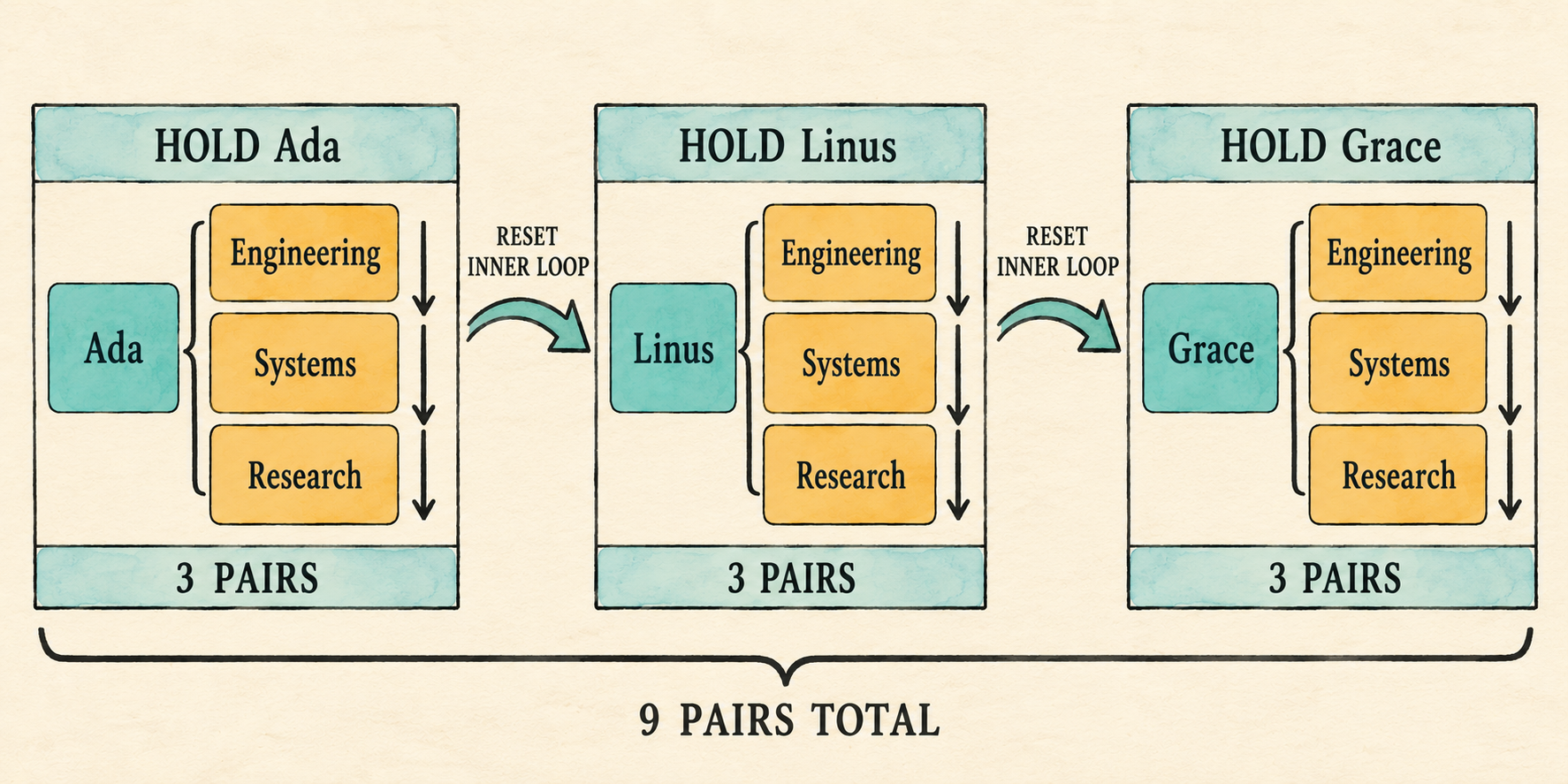
The outer loop fixes one left row while the inner loop visits every right row. Their order makes the output deterministic: all department pairs for Ada come first, followed by all pairs for Linus, then all pairs for Grace.
The plan can now represent and execute a Cartesian product. The binder must next assemble the scans, joins, optional filter, and projection in the correct order.
7.7 Assemble the bound plan
The earlier sections prepared the pieces that Catalog::bind() needs. It can
now turn one parsed Query into a complete plan in four phases:
- Resolve every
FROMinput and establish the shared scope. - Bind each selected item against that scope.
- Bind and type-check the optional filter.
- Assemble scans, joins, the optional filter, and projection.
7.7.1 Resolve inputs and establish the scope
Binding starts with the parsed table references because every projection and
predicate must use the resulting scope. For each reference, find the catalog
table, choose its accepted qualifier, record its offset, and retain the table
for its eventual Scan. Duplicate qualifiers are rejected because a
qualified column would otherwise still be ambiguous.
src/catalog.rs: replace the beginning of Catalog::bind() through scope
let mut input_tables = Vec::new();
let mut scope_tables = Vec::new();
let mut offset = 0;
for table_reference in query.tables {
let table = self.tables.iter()
.find(|table| table.name == table_reference.name)
.ok_or_else(|| format!(
"unknown table: {}", table_reference.name))?;
let qualifier = table_reference.alias.unwrap_or(table_reference.name);
if scope_tables.iter().any(
|table: &ScopeTable<'_>| table.qualifier == qualifier)
{
return Err(format!("duplicate table or alias: {qualifier}"));
}
scope_tables.push(ScopeTable {
qualifier,
columns: &table.columns,
offset,
});
offset += table.columns.len();
input_tables.push(table);
}
let scope = Scope { tables: scope_tables };The two vectors serve different later steps. scope_tables records the names,
types, and offsets needed while binding expressions. input_tables retains
the verified catalog tables whose rows will become Scan nodes. For each
input, unwrap_or(table_reference.name) chooses its alias when present and
otherwise its table name. The current offset is stored before advancing by
that table’s column count, so every scope entry begins immediately after the
previous input. Duplicate accepted qualifiers fail before either the
projection or filter is bound.
For the representative query, the offset progression is concrete. The
employee entry records offset 0, then its four columns advance offset to 4.
The department entry records offset 4, then its two columns advance the final
value to 6. Those recorded offsets agree with the six-value row that Join
will later create.
7.7.2 Bind the projection list
Chapter 6 already loops over query.projections, binding expression items and
expanding wildcards. That loop continues to use one expressions vector for
the eventual Project node, but its bound columns now contain slots.
For an expression item, bind_expression() validates its column references
and operators against the shared scope. An explicit output alias remains the
result label. Without one, a bare column keeps its column name and a computed
expression keeps the temporary label expression. Update the bare-column
match for the new structured variant:
src/catalog.rs: replace the output-name match
let name = alias.unwrap_or_else(|| match &expression {
BoundExpr::Column { name, .. } => name.clone(),
_ => "expression".into(),
});An unqualified wildcard now expands every visible table in input order. A qualified wildcard expands only the named scope entry. Both paths construct the same positional bound columns used by explicit references.
src/catalog.rs: add before impl Catalog
fn expand_wildcard(
qualifier: Option<String>,
scope: &Scope<'_>,
expressions: &mut Vec<ProjectExpression>,
) -> Result<(), String> {
let tables: Vec<&ScopeTable<'_>> = match qualifier {
Some(qualifier) => vec![scope.tables.iter()
.find(|table| table.qualifier == qualifier)
.ok_or_else(|| format!(
"unknown table or alias: {qualifier}"))?],
None => scope.tables.iter().collect(),
};
for table in tables {
for (index, column) in table.columns.iter().enumerate() {
push_output(expressions, column.name.clone(),
BoundExpr::Column {
index: table.offset + index,
name: column.name.clone(),
});
}
}
Ok(())
}The first phase chooses which scope entries to expand. A qualified wildcard
selects one entry; an unqualified wildcard collects every entry in FROM
order. The nested loops then visit each selected table’s columns in catalog
order. Adding table.offset to the table-local index produces the same
absolute slots used by explicit column references, while push_output() keeps
the corresponding result labels.
Update the wildcard arm in Catalog::bind():
SelectItem::Wildcard { qualifier } => {
expand_wildcard(qualifier, &scope, &mut expressions)?;
}Explicit references such as e.name and the columns produced by e.* or *
now use the same absolute-slot convention.
7.7.3 Bind the optional filter
The parser represented WHERE as Option<Expr>, so binding mirrors those two
cases. Some(filter) binds the expression in the same multi-table scope used
for projection and checks its result type. None means the plan will expose
the Cartesian product without a Filter node. The existing Boolean-or-null
requirement does not change.
src/catalog.rs: replace the old filter binding
let predicate = match query.filter {
Some(filter) => {
let (predicate, predicate_type) =
bind_expression(filter, &scope)?;
if !matches!(predicate_type, DataType::Boolean | DataType::Null) {
return Err("WHERE expression must be Boolean".to_string());
}
Some(predicate)
}
None => None,
};DataType::Null remains valid because an unknown WHERE result is a legal SQL
condition; execution removes that row just as it removes a false condition.
Any other result type is rejected before a plan is constructed.
7.7.4 Assemble the plan
Finally, turn each catalog input into a Scan. The first scan starts the
input plan; every later scan becomes the right child of another Join. Add a
Filter only when predicate is present, then place the existing Project
at the root.
src/catalog.rs: replace the old plan construction at the end of bind()
let mut inputs = input_tables.into_iter();
let first = inputs.next()
.ok_or_else(|| "query requires at least one input table".to_string())?;
let mut input = Plan::Scan { rows: first.rows.clone() };
for table in inputs {
input = Plan::Join {
left: Box::new(input),
right: Box::new(Plan::Scan { rows: table.rows.clone() }),
};
}
if let Some(predicate) = predicate {
input = Plan::Filter {
predicate,
input: Box::new(input),
};
}
Ok(Plan::Project {
expressions,
input: Box::new(input),
})Using the first scan as the starting plan makes the construction left-deep.
With three inputs A, B, and C, the loop would first produce
Join(Scan(A), Scan(B)), then use that entire plan as the left child of a join
with Scan(C). The table_list grammar begins with one table_reference, so
a query produced by the parser always supplies at least one input. The binder
still checks for an empty input_tables vector before taking its first item.
That defensive check keeps the assumption local to Catalog::bind() and
returns a clear error if a Query is ever constructed directly or a later
parser change stops enforcing the grammar rule.
If a predicate exists, Filter wraps the complete join tree and therefore
sees columns from every input. Project is always the root because it shapes
the final result whether or not the query contains WHERE.
Binding can now produce the complete checked plan for queries with or without
WHERE. Its Join nodes already know how to produce combined rows; the final
application must now reconnect parsing, binding, and execution.
7.8 Reconnect the application
The parser checkpoint has served its purpose. Restore the complete application,
add department_id to the employee schema, and register the departments table.
The entire file is shown because the checkpoint replaced it.
src/main.rs: replace the file
mod catalog;
mod expression;
mod lexer;
mod parser;
mod plan;
mod row;
use std::io::{self, Write};
use catalog::{Catalog, Column, Table};
use expression::DataType;
use parser::parse;
use row::{Row, Value};
fn main() {
let catalog = employee_catalog();
if std::env::args().nth(1).as_deref() == Some("--prompt") {
run_prompt(&catalog).expect("failed to read SQL from the terminal");
} else {
run_demo(&catalog);
}
}
fn employee(id: i64, name: &str, salary: i64,
department_id: i64) -> Row
{
Row::new(vec![
("id", Value::Integer(id)),
("name", Value::Text(name.into())),
("salary", Value::Integer(salary)),
("department_id", Value::Integer(department_id)),
])
}
fn department(id: i64, name: &str) -> Row {
Row::new(vec![
("id", Value::Integer(id)),
("name", Value::Text(name.into())),
])
}
fn employee_catalog() -> Catalog {
Catalog::new(vec![
Table {
name: "employees".into(),
columns: vec![
Column { name: "id".into(), data_type: DataType::Integer },
Column { name: "name".into(), data_type: DataType::Text },
Column { name: "salary".into(), data_type: DataType::Integer },
Column { name: "department_id".into(),
data_type: DataType::Integer },
],
rows: vec![
employee(1, "Ada", 70_000, 10),
employee(2, "Linus", 50_000, 20),
employee(3, "Grace", 72_000, 30),
],
},
Table {
name: "departments".into(),
columns: vec![
Column { name: "id".into(), data_type: DataType::Integer },
Column { name: "name".into(), data_type: DataType::Text },
],
rows: vec![
department(10, "Engineering"),
department(20, "Systems"),
department(30, "Research"),
],
},
])
}
fn execute_sql(sql: &str, catalog: &Catalog) -> Result<Vec<Row>, String> {
let query = parse(sql).map_err(|error| error.to_string())?;
catalog.bind(query)?.execute()
}
fn run_demo(catalog: &Catalog) {
let sql = "SELECT e.name AS employee_name, \
d.name AS department_name \
FROM employees AS e, departments AS d \
WHERE e.department_id = d.id;";
let rows = execute_sql(sql, catalog)
.expect("the lesson query should execute");
println!("Employees and their departments:");
for row in rows {
println!("{row}");
}
}
fn run_prompt(catalog: &Catalog) -> io::Result<()> {
loop {
let mut sql = String::new();
loop {
if sql.is_empty() { print!("sql> "); }
else { print!("...> "); }
io::stdout().flush()?;
let mut line = String::new();
if io::stdin().read_line(&mut line)? == 0 {
println!();
if !sql.trim().is_empty() {
eprintln!("error: incomplete query at end of input");
}
return Ok(());
}
if sql.is_empty() && line.trim().is_empty() { break; }
if append_sql_line(&mut sql, &line) { break; }
}
if !sql.trim().is_empty() {
print_query_result(&sql, catalog);
}
}
}
fn append_sql_line(sql: &mut String, line: &str) -> bool {
sql.push_str(line);
line.trim_end().ends_with(';')
}
fn print_query_result(sql: &str, catalog: &Catalog) {
match execute_sql(sql, catalog) {
Ok(rows) => for row in rows { println!("{row}"); },
Err(error) => eprintln!("error: {error}"),
}
}Compile the connected path:
cargo fmt
cargo check
Before executing it, make the plan visible once. Temporarily split
execute_sql() into named steps and print the bound plan:
let query = parse(sql).map_err(|error| error.to_string())?;
let plan = catalog.bind(query)?;
println!("{plan:#?}");
plan.execute()The filtered query prints a Project above a Filter, whose input is a
Join with two Scan children. Remove only the WHERE clause and the
Filter disappears. After inspecting both shapes, restore the concise final
line catalog.bind(query)?.execute() so ordinary prompt results contain only
rows.
7.9 Observe the product, then filter it
Start the prompt:
cargo run --quiet -- --prompt
First run the query without WHERE:
SELECT e.name AS employee_name, d.name AS department_name
FROM employees AS e, departments AS d;
Its three-by-three inputs produce nine rows. The first three all contain Ada because the inner loop visits every department before the outer loop advances:
{employee_name: "Ada", department_name: "Engineering"}
{employee_name: "Ada", department_name: "Systems"}
{employee_name: "Ada", department_name: "Research"}
...
{employee_name: "Grace", department_name: "Research"}
Then add WHERE e.department_id = d.id. The same Join still creates nine
pairs, but Filter forwards only three:
SELECT e.name AS employee_name, d.name AS department_name
FROM employees AS e, departments AS d
WHERE e.department_id = d.id;
Employees and their departments:
{employee_name: "Ada", department_name: "Engineering"}
{employee_name: "Linus", department_name: "Systems"}
{employee_name: "Grace", department_name: "Research"}
The fixed demonstration runs that filtered form:
cargo run --quiet
The product and filtered query establish the successful path. We should also confirm that invalid and ambiguous multi-table names stop during binding.
7.10 Inspect binding failures
The prompt should distinguish missing and ambiguous names before scanning any
rows. Representative failures include an unknown table, duplicate input alias,
unknown qualifier, unknown column, and unqualified name shared by both
inputs.
An unqualified name has valid syntax, but binding finds it in both scope
entries:
SELECT name
FROM employees AS e, departments AS d
WHERE e.department_id = d.id;
error: ambiguous column: name
Giving both inputs the same alias is rejected before their expressions are bound:
SELECT e.name
FROM employees AS e, departments AS e;
error: duplicate table or alias: e
Run the retained tests to check that the join changes have not broken behavior from earlier chapters:
cargo test
The completed lesson-007 checkpoint also includes tests for the new join
behavior; their code remains outside the build-along narration. We can now
state the boundaries that keep this first join deliberately small.
7.11 What we deliberately did not build
- Join syntax is limited to comma-separated inputs. An optional
WHEREpredicate may filter their Cartesian product. INNER,LEFT,RIGHT, andFULL JOIN ... ONbelong to Chapter 8.- Nested loops are the only execution method, but they are not represented as a physical plan yet.
Filterremains above the complete join. Even a table-local condition such ase.salary > 50000is evaluated after all nine row pairs are created. The first optimizer chapter will introduce predicate pushdown and move such conditions closer to their scans.- There is no join reordering or cost-based choice.
- Bound column slots are local to one plan and are not durable catalog IDs.
- Repeated output labels remain valid final results. Positional result-schema identity arrives before projected rows can become inputs to another query.
These limits leave a compact join implementation whose behavior is visible. The exercises below vary its qualifiers, projection, and predicate without introducing later join syntax or algorithms.
7.12 Try it
Run the prompt and predict the result of each change:
- Remove both output aliases.
- Remove the input aliases and qualify columns with the full table names,
such as
employees.nameanddepartments.name. - Replace the select list with
*and predict the order of its six output columns. - Add
e.salary > 50000 ANDbefore the existing join predicate. Predict both the final rows and the number of candidate pairs created byJoin. - Change the join predicate to
e.id = d.idand predict the surviving rows.
Check your reasoning
- Both fields are labelled
name; repeated result labels remain valid. - The query returns the same three rows. Without aliases, each table name is its accepted qualifier.
- The columns follow input and catalog order: the four employee columns,
then the two department columns. The repeated
idandnamelabels are preserved. - Ada and Grace remain.
Joinstill creates all nine candidate pairs because the complete predicate is evaluated by theFilterabove it. - No rows survive because employee IDs are
1,2, and3, while department IDs are10,20, and30.
7.13 Some joins preserve unmatched rows
The database can now combine two relations. Omitting WHERE exposes exactly
what the logical Join produces: every possible row pair. Adding a predicate
retains the matching pairs and discards the rest. This is the behavior of an
inner join: a row without a match does not appear in the result.
Sometimes the database must keep an unmatched row and fill the missing side
with NULL. The next chapter will add explicit INNER, LEFT, RIGHT, and
FULL JOIN ... ON forms and make their different row-preservation rules
visible. It will keep the straightforward nested-loop execution; choosing
between nested-loop and hash join algorithms remains a later physical-planning
problem.
8. Outer Joins Preserve Unmatched Rows
A join kind decides whether an unmatched row disappears or survives with
NULLs for the absent side.
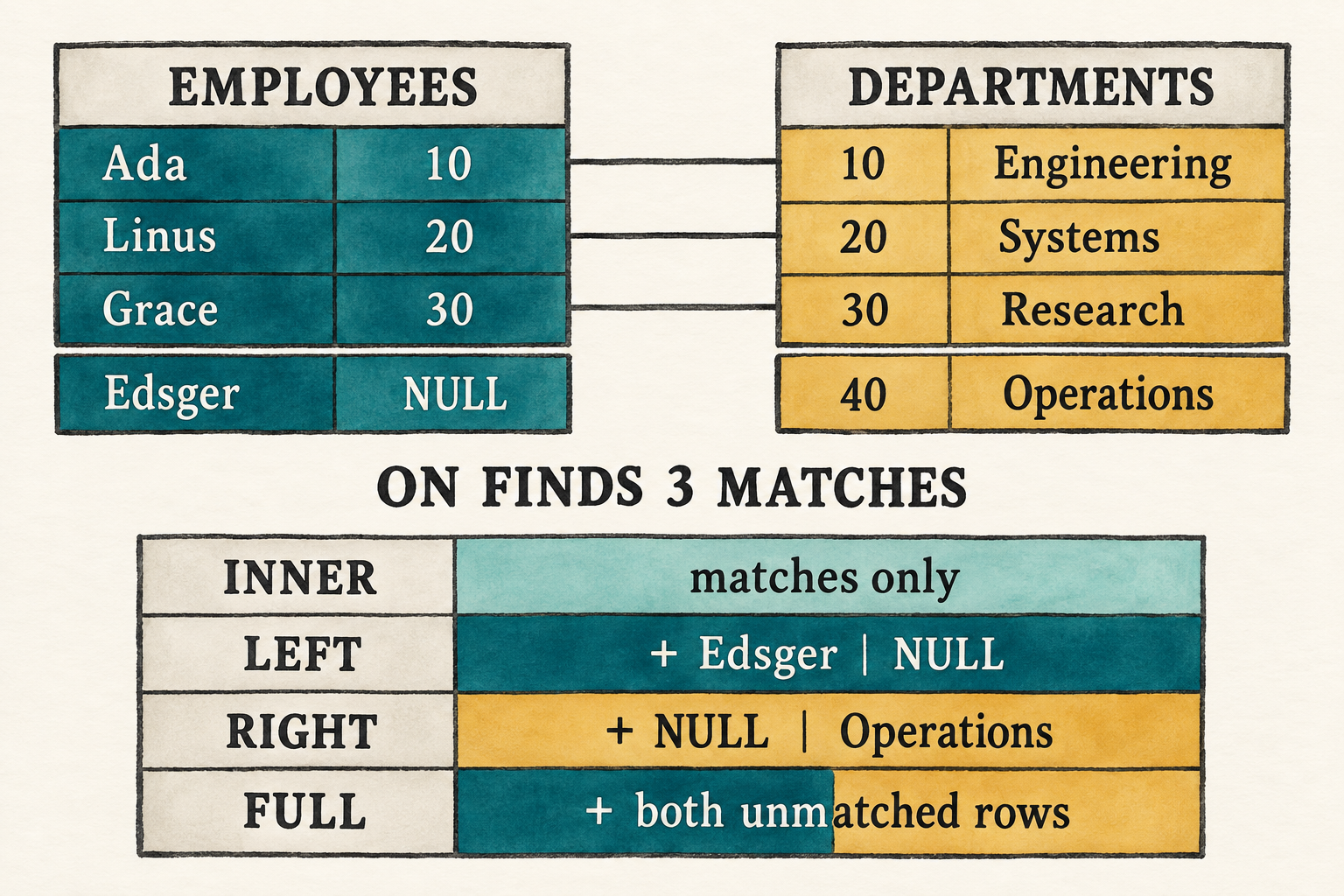
ON finds matching pairs first; the join kind then decides which unmatched rows survive with NULLs for the absent side.Chapter 7 created every possible pair and let WHERE discard the pairs that
do not match:
SELECT e.name AS employee_name, d.name AS department_name
FROM employees AS e, departments AS d
WHERE e.department_id = d.id;
That is enough when a report needs only employees who belong to a department.
A staffing report may need to expose the gaps as well: employees who have not
been assigned to any department, departments that currently have no employees,
or both. The inner-join result cannot show those cases because a row without a
match disappears. An outer join preserves the requested unmatched rows and
fills the columns from the absent side with NULL.
This chapter will make that distinction visible by adding one unmatched row to each input:
employees departments
Ada department_id 10 10 Engineering
Linus department_id 20 20 Systems
Grace department_id 30 30 Research
Edsger department_id NULL 40 Operations
Edsger has not been assigned to a department, while Operations has no employees. These are valid missing relationships rather than a broken department reference, and they leave one unmatched row on each side for the outer joins to preserve.
The representative left join is:
SELECT e.name AS employee_name, d.name AS department_name
FROM employees AS e
LEFT JOIN departments AS d ON e.department_id = d.id;
It returns the three matches plus {employee_name: "Edsger", department_name: NULL}. A right join instead preserves the unmatched
Operations department. A full join preserves both.
Supporting that result requires more than new keywords. The parser must attach
an ON expression to a particular join. The binder must resolve that
expression after both inputs are visible. The executor must distinguish a pair
that satisfies ON from an unmatched row that the join kind promises to keep.
This chapter makes those changes in four steps:
- Extend the grammar and query AST to represent explicit join clauses and
their
ONexpressions. - Bind each
ONexpression in the scope of the inputs available at that join. - Add the join kind and checked condition to the logical
Joinnode. - Extend the nested loops to emit null-extended rows when the join kind preserves an unmatched side.
Before changing the program, begin from the completed Chapter 7 checkpoint:
git switch --create chapter-008 lesson-007
8.1 A filter cannot preserve a missing match
For inner joins, these two queries return the same rows:
SELECT e.name, d.name
FROM employees AS e, departments AS d
WHERE e.department_id = d.id;
SELECT e.name, d.name
FROM employees AS e
INNER JOIN departments AS d ON e.department_id = d.id;
Both forms retain only matching pairs. The second form places the matching rule beside the operation that combines the tables, which becomes essential for an outer join.
A plan passes rows upward. The join therefore decides which combined rows
exist before WHERE sees any of them. An inner join emits only matching pairs,
so Edsger never reaches the filter. Because WHERE can only keep or discard
rows it receives, it cannot recreate his missing row.
Preservation must instead happen inside the join. After a left join has tried Edsger against every department and found no match, it emits one combined row:
employee values + NULL department values
That is null extension. It makes the preserved row the same width as an ordinary joined row, so the existing slot-based expressions can still read it.
The distinction gives ON and WHERE separate jobs:
ONdecides whether a left and right row match.- the join kind decides which unmatched rows are preserved;
WHERE, when present, filters the rows produced by the join, including null-extended rows.
We will preserve that order in the grammar, AST, logical plan, and executor.
8.2 Extend the join grammar
The syntax change has two layers. First we will extend the grammar to describe
explicit join kinds, their right inputs, and their ON expressions. Then we
will add the fixed-word tokens that let the lexer distinguish that syntax from
ordinary identifiers. The parser can construct the join AST only after both
layers are in place.
8.2.1 Describe explicit joins
Chapter 7 treated FROM as a comma-separated list of simple table references.
The expanded grammar lets each table reference carry explicit joins.
Appendix B places this addition in the larger SQL
grammar:
query = "SELECT" select_list
"FROM" table_reference ("," table_reference)*
("WHERE" expression)? ";" ;
table_reference = table_primary join_clause* ;
table_primary = identifier alias? ;
join_clause = ("INNER"
| "LEFT" "OUTER"?
| "RIGHT" "OUTER"?
| "FULL" "OUTER"?)?
"JOIN" table_primary "ON" expression ;
The grammar calls one unjoined input a table_primary. In this chapter, that
means one catalog table with an optional alias. Subqueries and parenthesized
table expressions remain later work.
The optional prefix makes bare JOIN mean INNER JOIN. OUTER is optional in
LEFT OUTER JOIN, RIGHT OUTER JOIN, and FULL OUTER JOIN; it does not change
their meaning.
8.2.2 Recognize the join words
Every new fixed word needs a token before the parser can recognize the new productions.
src/lexer.rs: add the join tokens after False
Inner,
Left,
Right,
Full,
Outer,
Join,
On,Classify those words alongside the existing SQL keywords.
src/lexer.rs: add to word_token()
"INNER" => Token::Inner,
"LEFT" => Token::Left,
"RIGHT" => Token::Right,
"FULL" => Token::Full,
"OUTER" => Token::Outer,
"JOIN" => Token::Join,
"ON" => Token::On,The lexer now distinguishes join syntax from identifiers. The AST must retain
which kind was written, which table appears on the right, and which expression
follows ON.
8.3 Represent a chain of joins in the AST
The current TableReference stores only one table name and alias. It cannot
record that departments AS d is the right input of a left join or that the
following expression belongs to its ON clause.
Replace the single-table shape with a first input followed by the joins attached to it.
src/parser.rs: replace TableReference and add the join types
#[derive(Debug, PartialEq, Eq)]
pub struct TableReference {
pub first: TablePrimary,
pub joins: Vec<JoinClause>,
}
#[derive(Debug, PartialEq, Eq)]
pub struct TablePrimary {
pub name: String,
pub alias: Option<String>,
}
#[derive(Debug, PartialEq, Eq)]
pub struct JoinClause {
pub kind: JoinKind,
pub right: TablePrimary,
pub condition: Expr,
}
#[derive(Clone, Copy, Debug, PartialEq, Eq)]
pub enum JoinKind {
Inner,
Left,
Right,
Full,
}For the representative query, first stores employees AS e. Its one
JoinClause stores Left, departments AS d, and the unresolved expression
tree for e.department_id = d.id.
The outer Vec<TableReference> preserves comma-separated inputs. Each
TableReference now starts with one table and carries any explicit join
clauses attached to it.
This representation also permits a chain such as a JOIN b ON ... JOIN c ON ...: first stores a, and joins stores the clauses for b and c in
source order. We can now teach the parser to construct that shape.
8.4 Parse table references and join clauses
The parser will construct the nested AST from the outside inward. We will first
parse a complete table reference and its required first table, then parse each
join clause attached to it. An AST checkpoint will finish the section by
showing that the join kind, right input, and ON expression landed in the
intended nodes.
A table reference may build a left-deep chain:
FROM employees AS e
LEFT JOIN departments AS d ON e.department_id = d.id
INNER JOIN locations AS l ON d.location_id = l.id
This chapter’s demonstration uses two tables, but the AST does not need a special two-table shape.
8.4.1 Parse the first table in a table reference
table_reference = table_primary join_clause* ;
table_primary = identifier alias? ;
parse_table_reference() begins with the required first table, then consumes
every join that follows it. Each loop iteration implements the join_clause*
part of the grammar.
src/parser.rs: replace parse_table_reference()
fn parse_table_reference(&mut self) -> Result<TableReference, ParseError> {
let first = self.parse_table_primary()?;
let mut joins = Vec::new();
while matches!(
self.peek(),
Some(Token::Inner | Token::Left | Token::Right
| Token::Full | Token::Join)
) {
joins.push(self.parse_join_clause()?);
}
Ok(TableReference { first, joins })
}The delegated table_primary production contains the name-and-alias behavior
that the old parse_table_reference() handled by itself.
src/parser.rs: add after parse_table_reference()
fn parse_table_primary(&mut self) -> Result<TablePrimary, ParseError> {
Ok(TablePrimary {
name: self.identifier("expected a table name")?,
alias: self.parse_alias()?,
})
}8.4.2 Parse one join clause
join_clause = ("INNER"
| "LEFT" "OUTER"?
| "RIGHT" "OUTER"?
| "FULL" "OUTER"?)?
"JOIN" table_primary "ON" expression ;
The join parser treats an omitted kind as Inner. For an outer join it also
accepts, but does not require, the noise word OUTER. After the right table it
requires ON and parses a complete expression tree.
src/parser.rs: add after parse_table_primary()
fn parse_join_clause(&mut self) -> Result<JoinClause, ParseError> {
let kind = if self.consume(&Token::Inner) {
JoinKind::Inner
} else if self.consume(&Token::Left) {
self.consume(&Token::Outer);
JoinKind::Left
} else if self.consume(&Token::Right) {
self.consume(&Token::Outer);
JoinKind::Right
} else if self.consume(&Token::Full) {
self.consume(&Token::Outer);
JoinKind::Full
} else {
JoinKind::Inner
};
self.expect(Token::Join, "expected JOIN")?;
let right = self.parse_table_primary()?;
self.expect(Token::On, "expected ON after joined table")?;
let condition = self.parse_expression()?;
Ok(JoinClause { kind, right, condition })
}8.4.3 Inspect the join AST
Changing TableReference temporarily makes the Chapter 7 binder stale. As in
the previous frontend checkpoint, isolate the parser before updating the
remaining stages.
The existing parser tests still inspect the old TableReference fields.
Remove the #[cfg(test)] mod tests block from parser.rs before running this
checkpoint. The completed lesson source contains the rewritten tests, but
reproducing them in the build-along would not add to the parsing explanation.
src/main.rs: temporarily replace the file
#[allow(dead_code)]
mod expression;
mod lexer;
mod parser;
#[allow(dead_code)]
mod row;
use parser::parse;
fn main() {
let sql = "SELECT e.name AS employee_name, \
d.name AS department_name \
FROM employees AS e \
LEFT JOIN departments AS d \
ON e.department_id = d.id;";
println!("{:#?}",
parse(sql).expect("the checkpoint query should parse"));
}Run the checkpoint:
cargo run --quiet
The printed AST makes three facts visible:
Leftbelongs to the join clause;departments AS dis its right input;e.department_id = d.idremains an unresolvedExpr.
That tree preserves the request. The binder must now decide which names and types make the request valid.
8.5 Teach the logical plan which rows to preserve
Chapter 7 needed a Join to hold two input plans, so its variant recorded only
those children:
Join {
left: Box<Plan>,
right: Box<Plan>,
}That representation means “combine every left row with every right row.” It
cannot record the ON condition that decides whether a pair matches, the join
kind that decides which unmatched rows survive, or the shape needed to fill a
missing side with correctly labelled NULL values.
The logical plan must now carry all three facts alongside its two inputs.
Import the join kind, then replace the old Join variant.
src/plan.rs: add with the imports
use crate::parser::JoinKind;src/plan.rs: replace Plan::Join
Join {
kind: JoinKind,
condition: Option<BoundExpr>,
left_columns: Vec<String>,
right_columns: Vec<String>,
left: Box<Plan>,
right: Box<Plan>,
}condition is absent only for Chapter 7’s comma-separated Cartesian join.
Explicit joins carry their checked ON expression. kind tells execution
which unmatched sides, if any, it must preserve.
The column-name lists describe the shapes of the two inputs. When one side has
no match, the executor needs those names to construct the correct number of
labelled NULL values. It cannot infer that shape from the first row because
an input table may be empty.
The logical plan for the representative query becomes:
Project(employee_name, department_name)
|
Left Join(on: e.department_id = d.id)
/ \
Scan(employees) Scan(departments)
There is no Filter unless the SQL also contains WHERE. The match condition
belongs to Join because row preservation depends on it. With this
representation in place, the binder can construct the expanded Plan::Join
node.
8.6 Bind ON when both inputs are visible
The parser has produced TableReference nodes containing table names, join
kinds, and unresolved ON expressions. The logical plan now has an expanded
Plan::Join variant ready to hold checked information. The binder must bridge
those representations: resolve each table, add its columns to the scope,
convert each ON expression from Expr to BoundExpr, and assemble the
corresponding Scan and Join plan nodes.
That work must follow the left-to-right structure recorded in each
TableReference. This section first establishes when an ON expression may
see each input. It then adds the scope operations needed to preserve that
boundary, builds the first input and any comma joins, binds each explicit join,
and finally binds projection and WHERE against the completed scope.
8.6.1 Establish the binding order
Chapter 7 built one scope containing every comma-separated input before it
bound projection and WHERE. An explicit join needs a more precise moment for
its condition.
For:
FROM employees AS e
LEFT JOIN departments AS d ON e.department_id = d.id
binding proceeds in this order:
add employees AS e to scope
↓
add departments AS d to scope
↓
bind e.department_id = d.id in that scope
↓
construct the checked Join
The right input must be visible before binding ON, but a table mentioned
later in FROM must not be used early by that condition. Building the scope
incrementally keeps that boundary explicit.
As with WHERE, the checked condition must produce Boolean or Null:
error: ON expression must be Boolean
NULL is accepted as a condition type because SQL three-valued logic treats
it as not matching a pair. Name resolution, ambiguity checks, column slots, and
ordinary operator type checks remain the same as Chapter 7.
After the complete FROM input is bound, projection and the optional WHERE
expression use the full resulting scope.
8.6.2 Maintain the growing scope
The binder first needs the new AST types.
src/catalog.rs: replace the parser import
use crate::parser::{JoinKind, Query, SelectItem, TablePrimary};Each join plan stores the column names expected from its left and right inputs.
scope_columns() captures the current left-input shape before another table
is added to the scope.
src/catalog.rs: add before impl Catalog
fn scope_columns(scope: &Scope<'_>) -> Vec<String> {
scope.tables.iter()
.flat_map(|table| table.columns.iter()
.map(|column| column.name.clone()))
.collect()
}These names later let execution construct a correctly shaped null row even when the corresponding input contains no rows.
The companion function resolves one table against the catalog, rejects a repeated qualifier, and assigns the table the next available column offset.
src/catalog.rs: add after scope_columns()
fn add_table_to_scope<'a>(
catalog: &'a Catalog,
table_primary: TablePrimary,
scope: &mut Scope<'a>,
) -> Result<&'a Table, String> {
let table = catalog.tables.iter()
.find(|table| table.name == table_primary.name)
.ok_or_else(|| format!(
"unknown table: {}", table_primary.name))?;
let qualifier = table_primary.alias
.unwrap_or(table_primary.name);
if scope.tables.iter()
.any(|table| table.qualifier == qualifier)
{
return Err(format!("duplicate table or alias: {qualifier}"));
}
let offset = scope.tables.iter()
.map(|table| table.columns.len()).sum();
scope.tables.push(ScopeTable {
qualifier,
columns: &table.columns,
offset,
});
Ok(table)
}The returned Table supplies the scan rows and right-input schema. The new
ScopeTable makes that table available to subsequent expression binding.
8.6.3 Build the first input and comma joins
Now change the beginning of Catalog::bind(). Destructuring Query separates
the input, projection, and optional-filter phases. The outer loop begins each
table reference with its first table.
src/catalog.rs: replace the beginning of Catalog::bind() through the start
of the old input-table loop
let Query { projections, tables, filter } = query;
let mut scope = Scope { tables: Vec::new() };
let mut input = None;
for table_reference in tables {
let left_columns = scope_columns(&scope);
let table = add_table_to_scope(
self, table_reference.first, &mut scope)?;
let right_columns: Vec<String> = table.columns.iter()
.map(|column| column.name.clone()).collect();
let scan = Plan::Scan { rows: table.rows.clone() };
input = Some(match input {
None => scan,
Some(left) => Plan::Join {
kind: JoinKind::Inner,
condition: None,
left_columns,
right_columns,
left: Box::new(left),
right: Box::new(scan),
},
});The first table becomes the first scan. A later comma-separated table becomes
an unconditional inner Join: condition: None tells execution that every
candidate pair matches.
8.6.4 Bind each explicit join
Still inside the outer loop, process each explicit join after its left input
exists. Capture the left shape first, add the right table, and only then bind
the ON expression in the enlarged scope.
src/catalog.rs: continue the table-reference loop
for join in table_reference.joins {
let left_columns = scope_columns(&scope);
let table = add_table_to_scope(
self, join.right, &mut scope)?;
let right_columns = table.columns.iter()
.map(|column| column.name.clone()).collect();
let (condition, condition_type) =
bind_expression(join.condition, &scope)?;
if !matches!(condition_type,
DataType::Boolean | DataType::Null)
{
return Err("ON expression must be Boolean".to_string());
}
input = Some(Plan::Join {
kind: join.kind,
condition: Some(condition),
left_columns,
right_columns,
left: Box::new(input
.expect("a join always has a left input")),
right: Box::new(Plan::Scan {
rows: table.rows.clone(),
}),
});
}
}An explicit join stores Some(condition). Because later tables have not yet
entered the scope, an earlier ON expression cannot refer to them.
8.6.5 Finish projection and filter binding
The remainder of binding uses the renamed local fields. Iterate over
projections instead of query.projections, and match on filter instead of
query.filter. Replace the old code that assembled input_tables with:
let mut input = input
.ok_or_else(|| "query requires at least one input table".to_string())?;Projection and WHERE now see the completed scope, while each ON expression
saw exactly the inputs available at its join. The binder has produced a plan
whose join conditions are checked at the correct point.
8.7 Construct a null-extended row
Row::combine() already establishes the slot order: all left values followed
by all right values. Add a constructor that creates one NULL value for each
column name supplied by the plan.
src/row.rs: add to the second impl Row
pub fn nulls(columns: &[String]) -> Row {
Row {
values: columns.iter()
.map(|column| (column.clone(), Value::Null))
.collect(),
}
}For the departments input, that constructor produces:
null row for departments
[(id, NULL), (name, NULL)]
Combining Edsger’s employee row with that null row preserves the six-slot layout predicted by binding:
[4, Edsger, 65000, NULL] + [NULL, NULL]
d.name still reads the department-name slot. The value at that slot is now
NULL rather than missing, so projection and later expressions need no special
outer-join lookup rule.
The same mechanism creates null employee values when a right or full join
preserves the unmatched Operations department.
8.8 Execute INNER JOIN with the existing loops
The existing nested loops already visit every left-right pair. Inner-join execution adds one decision inside those loops:
combine left and right rows
↓
evaluate ON against the combined row
↓
TRUE: emit the row
FALSE or NULL: discard it
The three matching employee-department pairs survive. Edsger and Operations do not appear because neither has a match.
This produces the same rows as Chapter 7’s comma-plus-WHERE query. That
equivalence is useful, but it is limited to inner joins. Moving an outer join’s
ON condition into WHERE changes which unmatched rows survive.
8.9 Preserve the left or right side
A left join remembers whether each left row matched at least one right row. After the inner loop finishes:
- if a match occurred, the matching combined rows have already been emitted;
- if no match occurred, emit the left row combined with a null right row.
For the representative query, Edsger reaches the second branch.
A right join needs the mirror image, but the loop order need not change. Keep a Boolean entry for each materialized right row. Whenever a pair matches, mark that right position. After all left rows have been examined, emit a null left row combined with each right row that was never marked.
The output remains deterministic:
- matching pairs appear in left-row then right-row order;
- unmatched right rows follow in right-input order.
The chapter keeps this straightforward materialized algorithm. It does not yet choose another physical strategy.
8.10 Assemble all four join kinds
The preceding sections established how inner joins match pairs and how the two
outer sides are preserved. We can now assemble those rules in the
Plan::Join execution arm. We will compare the four join kinds first, then
build the arm in execution order: prepare its inputs, test candidate pairs,
preserve unmatched left rows, and preserve unmatched right rows.
8.10.1 Compare their preservation rules
A full join combines the two preservation rules. It emits unmatched left rows during the outer loop and remembers right-side matches for a final pass.
For the sample data, the result contains five rows:
Ada Engineering
Linus Systems
Grace Research
Edsger NULL
NULL Operations
This checkpoint should make the join kinds comparable:
| Join kind | Matched rows | Unmatched employees | Unmatched departments |
|---|---|---|---|
INNER | keep | discard | discard |
LEFT | keep | keep | discard |
RIGHT | keep | discard | keep |
FULL | keep | keep | keep |
The table describes row preservation, not a physical algorithm. All four forms still use the same visible nested loops.
8.10.2 Prepare the inputs and match tracking
Replace the old Plan::Join execution arm in consecutive pieces. Begin by
executing both children and allocating the output. One Boolean per right row
records whether any left row has matched that position.
src/plan.rs: begin the new Plan::Join execution arm
Plan::Join {
kind,
condition,
left_columns,
right_columns,
left,
right,
} => {
let left_rows = left.execute()?;
let right_rows = right.execute()?;
let mut output = Vec::new();
let mut matched_right = vec![false; right_rows.len()];The vector uses right-row positions rather than row values, so duplicate right rows are tracked independently.
8.10.3 Match candidate pairs
The familiar nested loops combine each candidate pair before evaluating ON.
TRUE emits the pair and marks both sides as matched. FALSE and NULL both
mean that this candidate did not match. None belongs to a comma join, where
every candidate pair matches.
src/plan.rs: continue the Plan::Join arm
for left_row in &left_rows {
let mut matched_left = false;
for (right_index, right_row) in
right_rows.iter().enumerate()
{
let row = left_row.combine(right_row);
let matches = match condition {
Some(condition) => match condition.evaluate(&row)? {
Value::Boolean(value) => value,
Value::Null => false,
_ => return Err(
"ON expression did not produce a Boolean".into()),
},
None => true,
};
if matches {
matched_left = true;
matched_right[right_index] = true;
output.push(row);
}
}Binding has already required ON to produce Boolean or Null. The final
error arm protects that invariant at execution rather than silently accepting
an invalid plan assembled directly in Rust.
8.10.4 Preserve unmatched left rows
Only after one left row has tried every right row can matched_left == false
prove that it had no match. A left or full join then combines that row with a
null row shaped like the right input.
src/plan.rs: continue the outer loop
if !matched_left
&& matches!(kind, JoinKind::Left | JoinKind::Full)
{
output.push(left_row.combine(&Row::nulls(right_columns)));
}
}An empty right input naturally reaches this branch for every left row because
the inner loop never sets matched_left.
8.10.5 Preserve unmatched right rows
Right-side preservation must wait until every candidate pair has been tested.
Only then does a false entry in matched_right prove that no left row matched
that particular right row.
src/plan.rs: finish the Plan::Join arm
if matches!(kind, JoinKind::Right | JoinKind::Full) {
let null_left = Row::nulls(left_columns);
for (matched, right_row) in
matched_right.iter().zip(&right_rows)
{
if !matched {
output.push(null_left.combine(right_row));
}
}
}
Ok(output)
}The two column-name vectors let either preservation branch construct the correct null row even when the opposite input is empty. Together, these five pieces form the complete replacement arm.
8.11 Apply WHERE after row preservation
Add a filter to the representative left join:
SELECT e.name AS employee_name, d.name AS department_name
FROM employees AS e
LEFT JOIN departments AS d ON e.department_id = d.id
WHERE d.name IS NOT NULL;
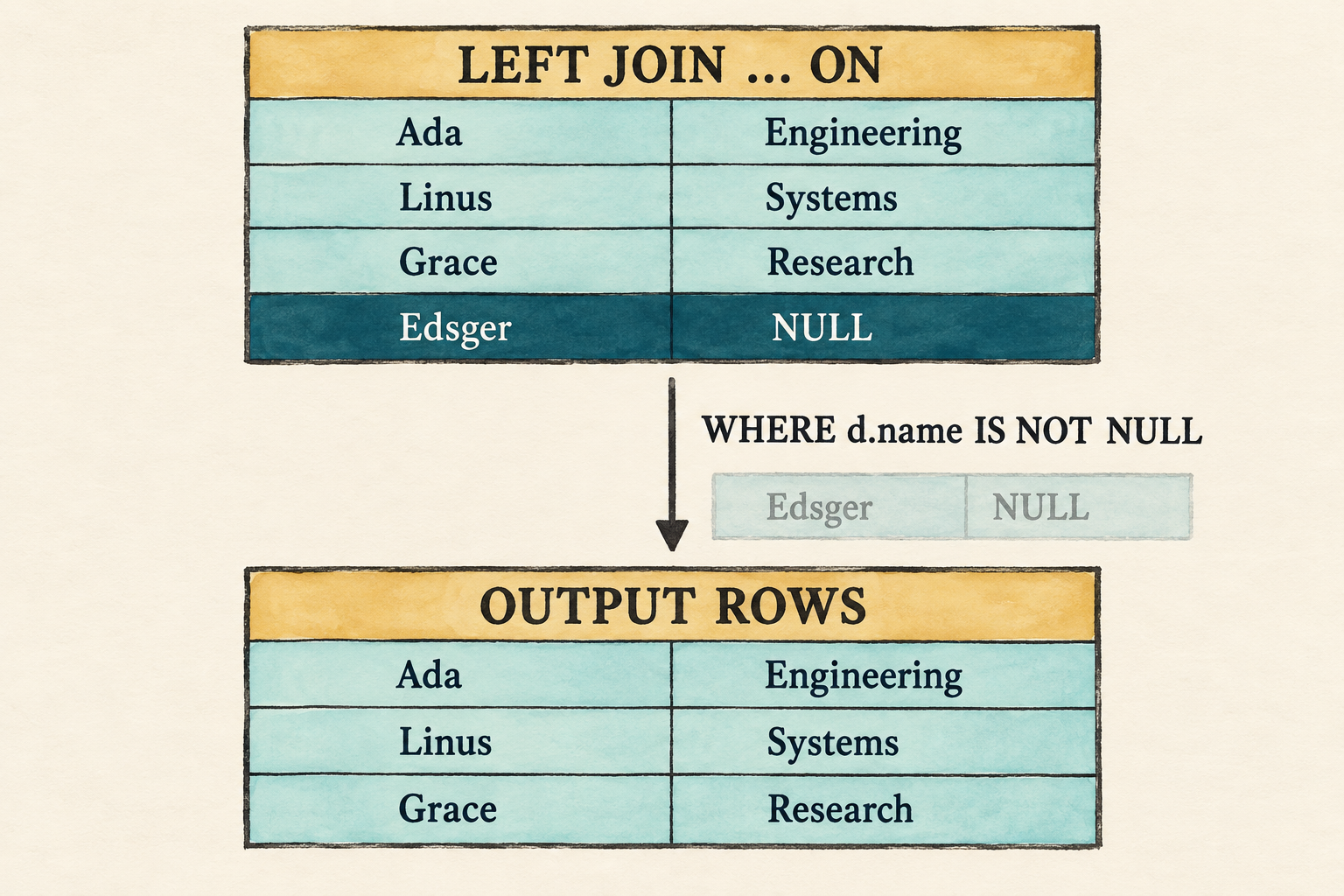
ON determines matching and preservation before WHERE filters the joined rows.The left join creates Edsger’s null-extended row before Filter evaluates
d.name IS NOT NULL and removes it. The final result therefore looks like an
inner join, but the plan reached it through different semantics:
Project
|
Filter(d.name IS NOT NULL)
|
Left Join(on: e.department_id = d.id)
This ordering explains why an outer-join rewrite requires more care than the
inner-join equivalence shown earlier. Moving conditions between ON and
WHERE can change the result.
8.12 Reconnect the application
The parser checkpoint still occupies main.rs, while the catalog and executor
now support the complete join path. Reconnection has three parts: restore the
application and add unmatched sample rows, point the fixed demonstration at
the representative left join, and run the connected path before returning to
the prompt.
8.12.1 Restore the application and extend its data
The AST checkpoint replaced the application. Restore the Chapter 7 version before applying the final catalog and demonstration changes:
git restore --source lesson-007 -- src/main.rs
Update the row helper so an employee can be unassigned. A present identifier
becomes an integer value; None becomes SQL NULL.
src/main.rs: replace employee()
fn employee(id: i64, name: &str, salary: i64,
department_id: Option<i64>) -> Row
{
Row::new(vec![
("id", Value::Integer(id)),
("name", Value::Text(name.into())),
("salary", Value::Integer(salary)),
("department_id",
department_id.map_or(Value::Null, Value::Integer)),
])
}Change the existing employee calls to pass Some(10), Some(20), and
Some(30), then add the unmatched rows to their respective catalog tables.
src/main.rs: replace the employee rows
rows: vec![
employee(1, "Ada", 70_000, Some(10)),
employee(2, "Linus", 50_000, Some(20)),
employee(3, "Grace", 72_000, Some(30)),
employee(4, "Edsger", 65_000, None),
],src/main.rs: replace the department rows
rows: vec![
department(10, "Engineering"),
department(20, "Systems"),
department(30, "Research"),
department(40, "Operations"),
],8.12.2 Run the representative left join
Finally, make the fixed demonstration run the representative left join. The prompt already routes every statement through the same parse-bind-execute path, so it needs no separate join-specific change.
src/main.rs: replace run_demo()
fn run_demo(catalog: &Catalog) {
let sql = "SELECT e.name AS employee_name, \
d.name AS department_name \
FROM employees AS e \
LEFT JOIN departments AS d \
ON e.department_id = d.id;";
let rows = execute_sql(sql, catalog)
.expect("the lesson query should execute");
println!("Employees and their departments:");
for row in rows {
println!("{row}");
}
}8.12.3 Check the connected path
The visible demonstration should print:
cargo fmt
cargo run --quiet
Employees and their departments:
{employee_name: "Ada", department_name: "Engineering"}
{employee_name: "Linus", department_name: "Systems"}
{employee_name: "Grace", department_name: "Research"}
{employee_name: "Edsger", department_name: NULL}
Binding failures remain ordinary query errors. An unknown name in ON, an
ambiguous unqualified column, or a non-Boolean condition must fail before any
rows are scanned.
Run the prompt to compare the other forms:
cargo run --quiet -- --prompt
The completed lesson-008 checkpoint contains parser, binding,
null-extension, row-preservation, empty-input, and end-to-end tests. Their
source remains in the Rust files rather than the build-along narration.
8.13 What we deliberately did not build
- Nested loops remain the only join execution strategy.
- The logical and physical plan representations are still combined.
- There is no hash join, merge join, join reordering, or cost-based choice.
NATURAL JOIN,USING, lateral inputs, and semi/anti joins are absent.- The grammar’s
table_primaryis still a catalog table, not a subquery or parenthesized table expression. - Conditions are not pushed below joins.
These limits keep the chapter focused on one semantic distinction: matching a pair and preserving an unmatched row are separate decisions.
8.14 Try it
Run the prompt and predict each result before executing it:
-
Replace
LEFT JOINwithINNER JOIN. -
Replace it with bare
JOIN. -
Use
RIGHT JOINand identify the null-extended row. -
Use
FULL OUTER JOINand predict the complete row order. -
Change
ON e.department_id = d.idtoON FALSEfor each join kind. -
Restore the left join and add
WHERE d.name IS NOT NULL. -
Use
ON e.department_id + d.nameand predict which stage rejects it. -
Use the same catalog table under another alias to build an
a JOIN b JOIN cchain:SELECT e.name AS employee, d.name AS department, coworker.name AS coworker FROM employees AS e JOIN departments AS d ON e.department_id = d.id JOIN employees AS coworker ON coworker.department_id = d.id; -
Place a comma after an explicit join so its three matching rows form a Cartesian product with all four departments:
SELECT e.name AS employee, d.name AS department, all_departments.name AS compared_department FROM employees AS e JOIN departments AS d ON e.department_id = d.id, departments AS all_departments;
Check your reasoning
- Only Ada, Linus, and Grace remain because an inner join discards both unmatched sides.
- Bare
JOINhas the same meaning asINNER JOIN. - The result includes
{employee_name: NULL, department_name: "Operations"}. - The three matches appear first, followed by Edsger with
NULL, thenNULLwith Operations. INNERemits no rows,LEFTpreserves every employee,RIGHTpreserves every department, andFULLpreserves every row from both inputs.- The join creates Edsger’s null-extended row, then
WHEREremoves it. - Binding rejects the expression because arithmetic requires integers before
it checks whether the complete
ONresult is Boolean. - The parser creates one
TableReferencewhosejoinsvector contains two clauses. Each department currently has one employee, so the chain produces three rows in whichemployeeandcoworkerhave the same name. - The first
TableReferenceproduces three employee-department matches. The comma combines those rows with the four-rowall_departmentsinput, so the result contains3 × 4 = 12rows.
8.15 Many rows can become one answer
The database can now express whether unmatched rows disappear or survive. Its logical plan records the join kind and match condition, while one deliberately simple nested-loop implementation executes all four forms.
The result is still one row per surviving pair. Questions such as “How many
employees belong to each department?” require a different operation: several
input rows must contribute to one output value. The next chapter introduces
aggregate functions, GROUP BY, and HAVING to make that many-to-one flow
visible.
Appendix A: Enough Rust to Build a Database
You do not need to master Rust before building a database. This appendix explains the language features used by the chapters, using code from the database itself. Read the section you need, then return to the database concept that brought you here.
This is a growing reference, not a Rust course. It deliberately leaves out features that our database does not use yet. When a later chapter needs something new, the corresponding explanation can be added here.
A.1 Build and run the project
Rust projects are commonly built with Cargo. Cargo.toml names the package and
records its dependencies. src/main.rs is the entry point for our executable,
while files such as src/row.rs and src/plan.rs hold related code.
cargo run --quiet
cargo test
cargo fmt --check
cargo clippy
cargo run builds and starts the program. --quiet hides Cargo’s routine
messages. cargo test runs the test suite. The final two commands check
formatting and warn about suspicious or unnecessarily complicated code.
A.2 Values, variables, and text
A variable gives a name to a value. Chapter 1 constructs Ada’s row with this expression:
Row::new(vec![
("id", Value::Integer(1)),
("name", Value::Text("Ada".to_string())),
("salary", Value::Integer(70_000)),
])The program assigns expressions like this to names using let. For example,
let employees = ... binds employees to the relation on the right. Variables
cannot be reassigned by default. Adding mut, as in let mut output_rows,
permits the code to change that variable’s value.
vec![...] creates a growable list. This list contains column-and-value pairs.
The complete employees variable uses another list around its three rows.
Underscores improve the readability of number literals, so 70_000 has the
same value as 70000.
String owns its text. A value such as "Ada" is a string slice, written
&str, which provides a read-only view of text stored elsewhere. Calling
.to_string() creates an owned String.
A.3 Group data with enums and structs
An enum represents a value that can take one of several forms:
#[derive(Clone, Debug, PartialEq, Eq)]
pub enum Value {
Integer(i64),
Text(String),
}Integer and Text are variants of Value. The data in parentheses belongs
to that variant. i64 is a signed 64-bit integer. Handling the variants
separately prevents the engine from treating a name as a salary.
A struct groups fields that always belong together:
#[derive(Clone, Debug, PartialEq, Eq)]
pub struct Row {
values: Vec<(String, Value)>,
}Row has one field named values. Its type is a list of tuples. Each tuple
contains exactly two items: a column name and its value. The angle brackets
describe the kind of item stored in the list.
The pub keyword makes an item available outside its module. The
#[derive(...)] attribute asks Rust to generate common behavior. Clone
allows explicit cloning, Debug provides diagnostic formatting, and
PartialEq with Eq permits equality comparisons. Clone does not copy
values automatically.
A.4 Define and call methods
An impl block defines behavior associated with a type. This excerpt shows the
first two Row methods; project() follows them in src/row.rs:
impl Row {
pub fn new(values: Vec<(&str, Value)>) -> Self {
let mut owned_values = Vec::new();
for (column, value) in values {
owned_values.push((column.to_string(), value));
}
Self {
values: owned_values,
}
}
pub fn get(&self, column: &str) -> Option<&Value> {
for (name, value) in &self.values {
if name == column {
return Some(value);
}
}
None
}
}Row::new(...) calls a function associated with the Row type. It does not
operate on an existing row. Inside this block, Self means Row. By contrast,
row.get("salary") calls a method on a particular row, and &self gives the
method read-only access to it.
Row::new(), Row::get(), and Row::project() belong to our database. They
are not built into Rust. The arrow in -> Self states what a function returns.
Other examples include -> Vec<Row> and -> Option<&Value>.
Rust’s Display trait defines how a value appears in user-facing text. The
implementation for Value handles its two variants separately:
impl fmt::Display for Value {
fn fmt(&self, formatter: &mut fmt::Formatter<'_>) -> fmt::Result {
match self {
Value::Integer(value) => write!(formatter, "{value}"),
Value::Text(value) => write!(formatter, "\"{value}\""),
}
}
}The standard fmt module supplies Display, Formatter, and fmt::Result.
A Result represents either success or failure, and fmt::Result is the form
used while formatting text. write! sends text to the formatter. The ?
returns a formatting failure to the caller instead of continuing. Once Row
implements Display, println!("{row}") uses it automatically.
The row formatter calls .iter().enumerate() to visit stored values while
also receiving their positions. It writes ", " before every entry except the
first, avoiding an extra comma at either end of the row.
A.5 Make decisions and repeat work
A for loop processes a collection one item at a time. Row::get() uses one
to search its column-and-value pairs:
for (name, value) in &self.values {
if name == column {
return Some(value);
}
}
NoneThe loop borrows the stored list and names the two parts of each pair. if
runs its block only when the column names are equal. return immediately
finishes the method.
Option represents a value that may be absent. Some(value) means the search
succeeded, while None means no requested column was found. This makes absence
explicit instead of inventing a special value for it.
A match chooses behavior based on the form of a value:
let value = match row.get(column) {
Some(Value::Integer(value)) => value,
Some(Value::Text(_)) => panic!("column is not an integer: {column}"),
None => panic!("unknown column: {column}"),
};The first arm extracts an integer. The second recognizes text, and _ means
its contents are not needed. The final arm handles a missing column. Here,
panic! stops the program with the supplied message. Later chapters will
introduce ordinary query errors when they are needed.
A.6 Own, borrow, clone, and box data
Rust tracks who owns each value. When an owner goes away, Rust releases that
value. Passing an owned value can move it to a new owner. A reference beginning
with & temporarily borrows a value, allowing code to inspect it without
taking it from its owner.
Our executor sometimes needs a separate owned result. The scan uses
rows.clone() to make a complete copy, and projection clones selected names
and values into new rows. These copies are deliberately simple, but chapter 1
identifies their cost.
Plans introduce one more ownership tool:
Filter {
column: String,
greater_than: i64,
input: Box<Plan>,
}A plan can contain another plan, which makes the type recursive. Rust must know
the size of every directly stored value, but an endlessly nested Plan has no
fixed direct size. Box<Plan> stores the child separately and keeps a
fixed-size pointer in the parent. Box::new(child) creates that box.
A.7 Modules and tests
Each Rust file is a module in this small project. The beginning of main.rs
declares two modules and brings selected names into scope:
mod plan;
mod row;
use plan::Plan;
use row::{Row, Value};Tests live beside the code they verify. #[test] marks a function as a test,
and assert_eq! compares an actual value with the expected value:
#[test]
fn scan_returns_source_rows() {
let rows = employees();
let plan = Plan::Scan { rows: rows.clone() };
assert_eq!(plan.execute(), rows);
}If the values differ, the assertion fails and prints diagnostic output. The
derived Debug, PartialEq, and Eq behavior on Row and Value makes this
comparison possible.
A.8 Read compiler errors
Compiler messages often look larger than the mistake that caused them. Start with the first error, note its file and line, and read the primary message before its suggestions. Later messages may be consequences of the first one.
For example, calling row.project(columns) before defining project() causes
Rust to report that no such method exists for Row. Check whether the name is
misspelled, whether its impl block exists, and whether the item is accessible.
Fix that first error, then compile again.
Treat compiler suggestions as clues rather than commands. A suggestion may make the program compile while adding a copy we did not intend. Ask what the value represents in the database and who should own it, then choose the smallest change that preserves that meaning.
Appendix B: The SQL Grammar We Support
This appendix collects the complete planned grammar for the SQL language built throughout the course. Individual chapters repeat only the rules they add. This is a readable map of our educational, SQL-89-inspired dialect, not a claim of SQL-89 conformance.
A rule appearing here is not automatically implemented. Section B.4 assigns every grammar family to a chapter or subsystem owner. A rule remains planned until a tagged checkpoint implements and tests it; the implementation, tests, and latest lesson tag remain the authority for what the database accepts today.
B.1 Notation
Quoted words and symbols are written in SQL. A name such as expression
refers to another rule. Parentheses group subexpressions, | means “or,” ?
means optional, * means zero or more repetitions, and + means one or more.
Each suffix applies to the token or parenthesized group immediately before it.
For example, "OUTER"? accepts zero or one OUTER, while
("," identifier)* accepts any number of additional identifiers. These
notation marks are not typed into a query.
Keywords are case-insensitive. Identifiers retain their original spelling.
B.2 Complete syntactic grammar
Statements
Planned across the query, storage, transaction, and authorization seasons:
statement = query_statement
| create_table_statement
| insert_statement
| update_statement
| delete_statement
| start_statement
| commit_statement
| rollback_statement
| grant_statement
| revoke_statement ;
query_statement = query ";" ;
Queries
Chapters 3 through 8 establish the query-language foundation. Later query-completion checkpoints add the advanced forms needed by the benchmark chapters:
query = with_clause? query_expression order_by_clause?
limit_clause? ;
query_expression = select_query (("UNION" | "INTERSECT" | "EXCEPT")
"ALL"? select_query)* ;
with_clause = "WITH" "RECURSIVE"? named_query ("," named_query)* ;
named_query = identifier "AS" "(" query ")" ;
select_query = "SELECT" set_quantifier? select_list
"FROM" table_reference ("," table_reference)*
where_clause? group_by_clause? having_clause? ;
set_quantifier = "DISTINCT" | "ALL" ;
select_list = select_item ("," select_item)* ;
select_item = "*" | qualified_star | expression alias? ;
qualified_star = identifier "." "*" ;
alias = "AS"? identifier ;
table_reference = table_primary join_clause* ;
table_primary = identifier alias? | "(" query ")" alias
| "(" table_reference ")" ;
join_clause = ("INNER" | "LEFT" "OUTER"? | "RIGHT" "OUTER"?
| "FULL" "OUTER"?)?
"JOIN" table_primary "ON" expression ;
where_clause = "WHERE" expression ;
group_by_clause = "GROUP" "BY" grouping_element
("," grouping_element)* ;
grouping_element = expression
| "ROLLUP" "(" expression ("," expression)* ")"
| "CUBE" "(" expression ("," expression)* ")" ;
having_clause = "HAVING" expression ;
order_by_clause = "ORDER" "BY" ordering ("," ordering)* ;
ordering = expression ("ASC" | "DESC")?
("NULLS" ("FIRST" | "LAST"))? ;
limit_clause = "LIMIT" integer ("OFFSET" integer)? ;
LIMIT is a documented modern extension, not SQL-89 syntax.
Expressions and predicates
Chapter 4 begins this expression hierarchy. Later chapters extend it as joins, aggregation, subqueries, data types, and benchmark queries require more forms:
expression = or_expression ;
or_expression = and_expression ("OR" and_expression)* ;
and_expression = not_expression ("AND" not_expression)* ;
not_expression = "NOT" not_expression | predicate ;
predicate = value_expression comparison_operator value_expression
| value_expression "NOT"? "BETWEEN" value_expression
"AND" value_expression
| value_expression "NOT"? "LIKE" value_expression
| value_expression "IS" "NOT"? "NULL"
| value_expression "NOT"? "IN" "(" in_value ")"
| "EXISTS" "(" query ")"
| "(" expression ")" ;
comparison_operator = "=" | "<>" | "<" | "<=" | ">" | ">=" ;
in_value = query | expression ("," expression)* ;
value_expression = concatenation ;
concatenation = additive ("||" additive)* ;
additive = term (("+" | "-") term)* ;
term = factor (("*" | "/") factor)* ;
factor = ("+" | "-") factor | primary ;
primary = column_reference | literal | function_call
| case_expression | extract_expression | cast_expression
| substring_expression
| "(" query ")" | "(" value_expression ")" ;
column_reference = (identifier ".")? identifier ;
literal = integer | decimal | string | date_literal
| timestamp_literal | interval_literal
| "TRUE" | "FALSE" | "NULL" ;
date_literal = "DATE" string ;
timestamp_literal = "TIMESTAMP" string ;
interval_literal = "INTERVAL" string interval_unit ;
interval_unit = "YEAR" | "MONTH" | "DAY" | "HOUR" | "MINUTE"
| "SECOND" ;
function_call = identifier "(" ("*" | set_quantifier? expression
("," expression)*)? ")" over_clause? ;
extract_expression = "EXTRACT" "(" identifier "FROM" expression ")" ;
cast_expression = "CAST" "(" expression "AS" data_type ")" ;
substring_expression = "SUBSTRING" "(" expression "FROM" expression
("FOR" expression)? ")" ;
case_expression = "CASE" expression?
("WHEN" expression "THEN" expression)+
("ELSE" expression)? "END" ;
over_clause = "OVER" "(" partition_by_clause? order_by_clause?
window_frame? ")" ;
partition_by_clause = "PARTITION" "BY" expression ("," expression)* ;
window_frame = ("ROWS" | "RANGE") frame_extent ;
frame_extent = frame_bound
| "BETWEEN" frame_bound "AND" frame_bound ;
frame_bound = "UNBOUNDED" ("PRECEDING" | "FOLLOWING")
| "CURRENT" "ROW"
| integer ("PRECEDING" | "FOLLOWING") ;
The first implementation supports only integer comparison with >. The wider
expression grammar is a benchmark-driven destination and will be implemented
incrementally with explicit precedence and NULL semantics.
Schema definition
Introduced when writable storage needs table definitions:
create_table_statement = "CREATE" "TABLE" identifier
"(" table_element
("," table_element)* ")" ";" ;
table_element = column_definition | table_constraint ;
column_definition = identifier data_type column_constraint* ;
data_type = "INTEGER"
| "BIGINT"
| "DECIMAL" "(" integer "," integer ")"
| "CHAR" "(" integer ")"
| "VARCHAR" "(" integer ")"
| "DATE"
| "TIMESTAMP" ;
column_constraint = "NOT" "NULL" | "UNIQUE" | "PRIMARY" "KEY"
| "DEFAULT" expression
| "REFERENCES" identifier "(" identifier ")"
| "CHECK" "(" expression ")" ;
table_constraint = ("CONSTRAINT" identifier)?
("PRIMARY" "KEY" column_list
| "UNIQUE" column_list
| "FOREIGN" "KEY" column_list "REFERENCES"
identifier column_list
| "CHECK" "(" expression ")") ;
column_list = "(" identifier ("," identifier)* ")" ;
Data mutation
INSERT arrives with writable storage. UPDATE and DELETE arrive when the
transaction chapters can make their effects and failure behavior visible:
insert_statement = "INSERT" "INTO" identifier
("(" identifier ("," identifier)* ")")?
insert_source ";" ;
insert_source = "VALUES" row_value ("," row_value)* | query ;
row_value = "(" expression ("," expression)* ")" ;
update_statement = "UPDATE" identifier "SET" assignment
("," assignment)* where_clause? ";" ;
assignment = identifier "=" expression ;
delete_statement = "DELETE" "FROM" identifier where_clause? ";" ;
Transaction control
Introduced with transactions:
start_statement = "BEGIN" ("TRANSACTION" | "WORK")? ";"
| "START" "TRANSACTION" ";" ;
commit_statement = "COMMIT" ";" ;
rollback_statement = "ROLLBACK" ";" ;
Authorization
Introduced only after the database has identities and an authorization boundary:
grant_statement = "GRANT" privilege_list "ON" identifier
"TO" identifier ";" ;
revoke_statement = "REVOKE" privilege_list "ON" identifier
"FROM" identifier ";" ;
privilege_list = privilege ("," privilege)* ;
privilege = "SELECT" | "INSERT" | "UPDATE" | "DELETE" ;
B.3 Lexical grammar
identifier = (letter | "_") (letter | digit | "_")* ;
integer = digit+ ;
decimal = digit+ "." digit+ ;
string = "'" string_character* "'" ;
string_character = non_quote | "''" ;
letter = ? ASCII letter A-Z or a-z ? ;
digit = ? ASCII digit 0-9 ? ;
non_quote = ? any character except "'" ? ;
whitespace = ? Unicode whitespace character ? ;
Text between ? delimiters describes a character class recognized by the
lexer rather than a literal sequence. Whitespace is a skipped lexical
category: it may separate tokens, but the lexer does not emit it, so it does
not appear in the query productions. A doubled quote inside a string
represents one quote character. Quoted identifiers, comments, Unicode
identifier rules, and numeric forms beyond integers and fixed-point decimals
are not currently planned.
B.4 Grammar implemented at each checkpoint
Every family in Sections B.2 and B.3 has an owner below. Advanced query and authorization work now has concrete chapters; storage and transaction syntax belongs to the named subsystem chapters and receives an exact checkpoint when those seasons become active. A planned rule may be removed only by recording why the course no longer intends to support it; it must not disappear merely because no early chapter needs it.
| Grammar family | Course owner | Delivery condition |
|---|---|---|
| No SQL text | lesson-001 and lesson-002 | Plans are constructed directly in Rust. |
One-column SELECT/FROM/WHERE, >, integer, semicolon, basic identifiers | lesson-003 | Implemented and tested. |
Qualified names, aliases, core literals, arithmetic, comparison, Boolean and NULL predicates | lesson-004 foundation and Chapter 67 completion | Core parsing and precedence are executable and tested; later expression forms complete the planned hierarchy. |
| Catalog binding, basic expression types, and three-valued evaluation | lesson-005 | Parsed names resolve before execution, invalid operand types fail during binding, and NULL behavior is tested. |
Multiple selected expressions, output aliases, *, and qualified wildcards | Chapter 6 | Projection produces several labelled values, repeated labels remain valid, and wildcard items expand from the catalog in one-table scope. |
Multiple table references, optional WHERE, Cartesian products, and comma-plus-WHERE inner joins | Chapter 7 | Multi-table binding, ambiguity errors, unfiltered row combinations, and the first logical join are executable. |
INNER, LEFT, RIGHT, and FULL JOIN ... ON | Chapter 8 | Join conditions bind when both inputs are visible; each form has executable row-preservation semantics. |
Aggregate calls, GROUP BY, and HAVING | Chapter 9 | Aggregate and grouping behavior is executable and tested. |
DISTINCT, ALL, ordering, null ordering, LIMIT, and OFFSET | Chapter 10 | Ordering and duplicate behavior is explicit. |
Scalar, IN, and EXISTS subqueries, derived tables, and non-recursive common table expressions | Chapter 11 | Name scope and subquery execution are visible. |
| Recursive common table expressions | Chapter 66 | Recursive evaluation and termination behavior are taught before support is claimed. |
UNION, INTERSECT, and EXCEPT | Chapter 65 | Duplicate semantics for default and ALL forms are tested. |
Advanced scalar functions, CASE, CAST, EXTRACT, SUBSTRING, and date/time/interval expressions | Chapter 67 | Added with the execution and type semantics required by the analytical workload. |
ROLLUP and CUBE | Chapter 68 | Subtotal rows and their NULL behavior is explicit. |
| Window functions and frames | Chapter 69 | Partitioning, ordering, and frame boundaries are executable and tested. |
CREATE TABLE, data types, defaults, and column/table constraints | Writable-storage chapters | Definitions affect real stored tables and validated writes. |
INSERT, UPDATE, and DELETE | Writable-storage and transaction chapters | Mutation, failure, and rollback behavior is observable. |
BEGIN, START TRANSACTION, COMMIT, and ROLLBACK | Transaction chapters | Statements control the transaction implementation built there. |
GRANT and REVOKE | Chapter 71 | The database has identities and an enforceable authorization boundary. |
| Strings, decimals, and later punctuation and keywords | The chapter owning the associated syntax | The lexical grammar and lexer tests grow together. |
Update this table only after parser and behavior tests establish a checkpoint’s actual coverage. Chapter 70 audits the complete table before the final benchmark and integration chapters can claim SQL compatibility.
B.5 Benchmark coverage target
TPC-style workloads are a long-term test of the whole database, not merely its
parser. TPC-H requires joins, subqueries, aggregation, arithmetic, dates,
CASE, ordering, and exact decimal values. TPC-DS additionally motivates
common table expressions, set operations, outer joins, and eventually OLAP
features such as window functions. TPC-C requires exact monetary arithmetic,
fixed and variable text, date/time values, mutations, rollback, constraints,
concurrency, and durability.
The target is complete TPC-H query coverage, progressively broader TPC-DS coverage, and a TPC-C-inspired transaction workload. Appendix B must gain a construct before a benchmark query depends on it, and the checkpoint list must identify when that construct becomes executable. Scaled or adapted workloads must be labelled as such; they are not official benchmark results.
Appendix C: Values, Types, and Operators
This appendix records the value and operator rules implemented by the current database. Chapters teach why each rule is needed; this page provides one place to look up the resulting behavior.
A planned type or operation is not supported merely because it appears here. The implementation, tests, and latest lesson tag remain the authority for what the database can execute.
C.1 Values and data types
Chapter 5 introduces four runtime values and four corresponding type categories:
| SQL form | Runtime value | Data type |
|---|---|---|
42 | Value::Integer(42) | DataType::Integer |
'Ada' | Value::Text("Ada") | DataType::Text |
TRUE, FALSE | Value::Boolean | DataType::Boolean |
NULL | Value::Null | DataType::Null while binding a bare NULL |
Value is data produced or stored at runtime. DataType describes the
category a column or expression may produce. DataType::Null is a temporary
binding type for a bare NULL, not a declaration that a column accepts only
null values.
C.2 Implemented operator rules
These rules are implemented at the Lesson 5 checkpoint:
| Operator | Accepted operands | Bound result type | Runtime result |
|---|---|---|---|
unary +, unary - | integer | integer | integer |
NOT | Boolean | Boolean | Boolean or NULL |
+, -, *, / | integer and integer | integer | integer or NULL |
=, <> | matching integer, text, or Boolean values | Boolean | Boolean or NULL |
<, <=, >, >= | matching integer or text values | Boolean | Boolean or NULL |
AND, OR | Boolean values | Boolean | Boolean or NULL |
IS NULL, IS NOT NULL | any value | Boolean | Boolean |
A bare NULL may stand where one of these operators expects another type.
Most operations involving it produce NULL. AND and OR instead follow
SQL three-valued logic, where the known operand can sometimes determine the
result. Chapter 5 contains the complete truth tables.
There are no implicit conversions. An integer and text value do not become comparable merely because their displayed contents look alike.
C.3 Text comparison
Text equality and ordering use Rust’s case-sensitive String comparison.
This gives the teaching engine a small deterministic rule, but it is not a SQL
collation system. Locale-aware ordering, case-insensitive comparison, Unicode
normalization, and configurable collations are not implemented.
Text arithmetic is also absent. In particular, + accepts integers only and
does not concatenate text.
C.4 Planned extensions
The advanced SQL season will expand this reference when the database gains:
- exact decimals
- dates and timestamps
- intervals
CAST- string concatenation
- richer scalar expressions
Their conversion, comparison, arithmetic, and NULL rules remain unspecified
until the chapters that need them implement and test them. This appendix
should grow with the executable system rather than predicting those decisions
in advance.