5. Binding Gives Names Meaning
A parser can recognize a name. A database must decide what it names.
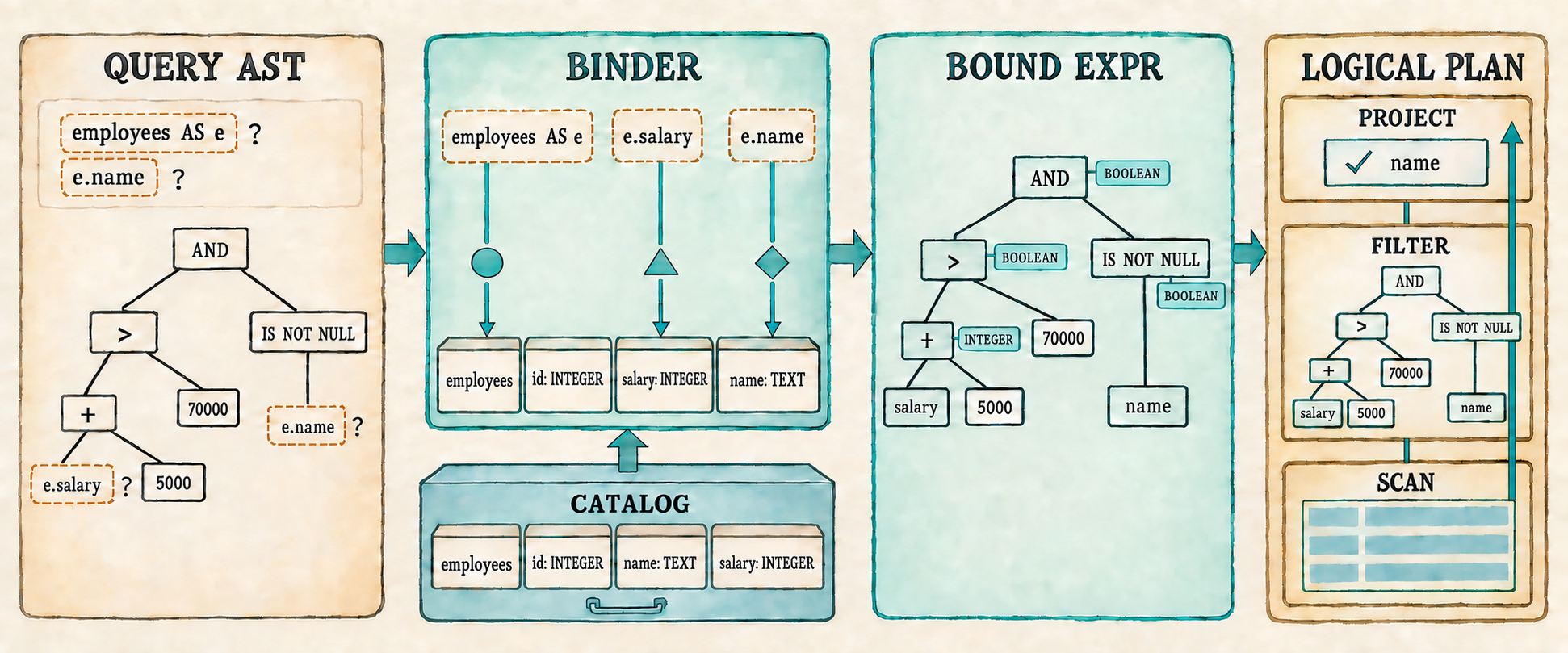
Chapter 4 can now parse this request into an expression tree:
SELECT e.name
FROM employees AS e
WHERE e.salary + 5000 > 70000 AND e.name IS NOT NULL;
The tree preserves precedence and nesting, but names such as employees, e,
name, and salary remain unchecked. Grammar also cannot tell us whether
salary + 5000 is type-correct or whether the complete WHERE expression
produces a Boolean.
The expression grammar deliberately accepts general combinations such as
1 + 'cat' and salary + 1. We could complicate the grammar to reject some
incompatible literals, but it still could not determine the type of salary
without consulting the catalog. Operand compatibility therefore belongs to
binding and type checking rather than parsing.
This chapter inserts a binding stage between parsing and planning. The binder performs three jobs:
- It resolves tables, aliases, and columns against the catalog.
- It checks that each operator receives compatible operand types.
- It converts each
Exprinto aBoundExprand places those checked trees in the logical plan.
Once the binder is in place, Filter and Project can trust their checked
expression trees. One logical plan shape can then run many non-trivial
single-table queries instead of one fixed comparison.
We will stop at three checkpoints. Section 5.5 prints the checked plan after all three binding jobs are complete. Section 5.7 executes that plan to produce rows. Section 5.9 reconnects the complete application and verifies its fixed demonstration and interactive prompt.
The completed query returns Ada and Grace but not Linus. Invalid tables, columns, qualifiers, and operand types fail before any rows are scanned.
Before changing the program, begin from the completed Chapter 4 checkpoint:
git switch --create chapter-005 lesson-004
5.1 Names are still unresolved
Run the Chapter 4 AST prompt:
cargo run --quiet
First enter the representative query:
SELECT e.name
FROM employees AS e
WHERE e.salary + 5000 > 70000 AND e.name IS NOT NULL;
The printed Query preserves the complete expression structure, but its names
are still strings. The table is stored as "employees", the alias as "e",
and the projection contains a column with qualifier "e" and name "name".
Nothing in that tree proves that any of those names exist.
Now enter a query whose table name is deliberately wrong:
SELECT name FROM missing_table WHERE salary > 50000;
It also produces a Query because its tokens follow the grammar. Its table
field contains missing_table, but nothing has compared that text with the
database’s available tables. The same is true of name and salary.
Lexing answered which tokens were present. Parsing answered how those tokens fit together. Binding must now connect the names in that structure to real database objects. It needs a place to look them up.
5.2 Introduce the catalog
The AST checkpoint leaves names such as employees, e, and salary
unresolved. Binding needs a description of the objects those names may refer
to. A database calls that description a catalog. Our first catalog is only
an in-memory list of tables.
The catalog structures themselves live in catalog.rs. DataType, however,
is also expression vocabulary because the binder uses it to describe the type
produced by an expression. We therefore add it to expression.rs beside the
operator and expression types.
Begin with the type categories that the catalog and binder need.
src/expression.rs: add before UnaryOp
#[derive(Clone, Debug, PartialEq, Eq)]
pub enum DataType {
    Integer,
    Text,
    Boolean,
    Null,
}
DataType describes a category such as integers or text, while Value stores
one actual piece of row data such as Value::Integer(70000) or
Value::Text("Ada"). A catalog column must describe every value allowed in
that position, not hold one representative value. Using Value there would
require a meaningless placeholder such as Value::Integer(0) merely to say
that a column contains integers. We therefore pair the column name with its
DataType.
src/catalog.rs: create this file
use crate::expression::DataType;
use crate::row::Row;

#[derive(Clone)]
pub struct Column {
    pub name: String,
    pub data_type: DataType,
}
A table combines those columns with the rows they describe. The catalog then holds the tables available to this database.
src/catalog.rs: add after Column
#[derive(Clone)]
pub struct Table {
    pub name: String,
    pub columns: Vec<Column>,
    pub rows: Vec<Row>,
}

pub struct Catalog {
    tables: Vec<Table>,
}

impl Catalog {
    pub fn new(tables: Vec<Table>) -> Self {
        Self { tables }
    }
}
This catalog describes tables, columns, and rows in memory. Persisting catalog information to storage comes later. We now know where binding can look up a name; next we define what it produces after a lookup succeeds.
5.3 Represent a checked expression
The AST checkpoint showed an unresolved tree: e.name still contains two
strings whose meaning has not been checked. Binding needs to produce a second
tree for the executable form that remains after those checks succeed.
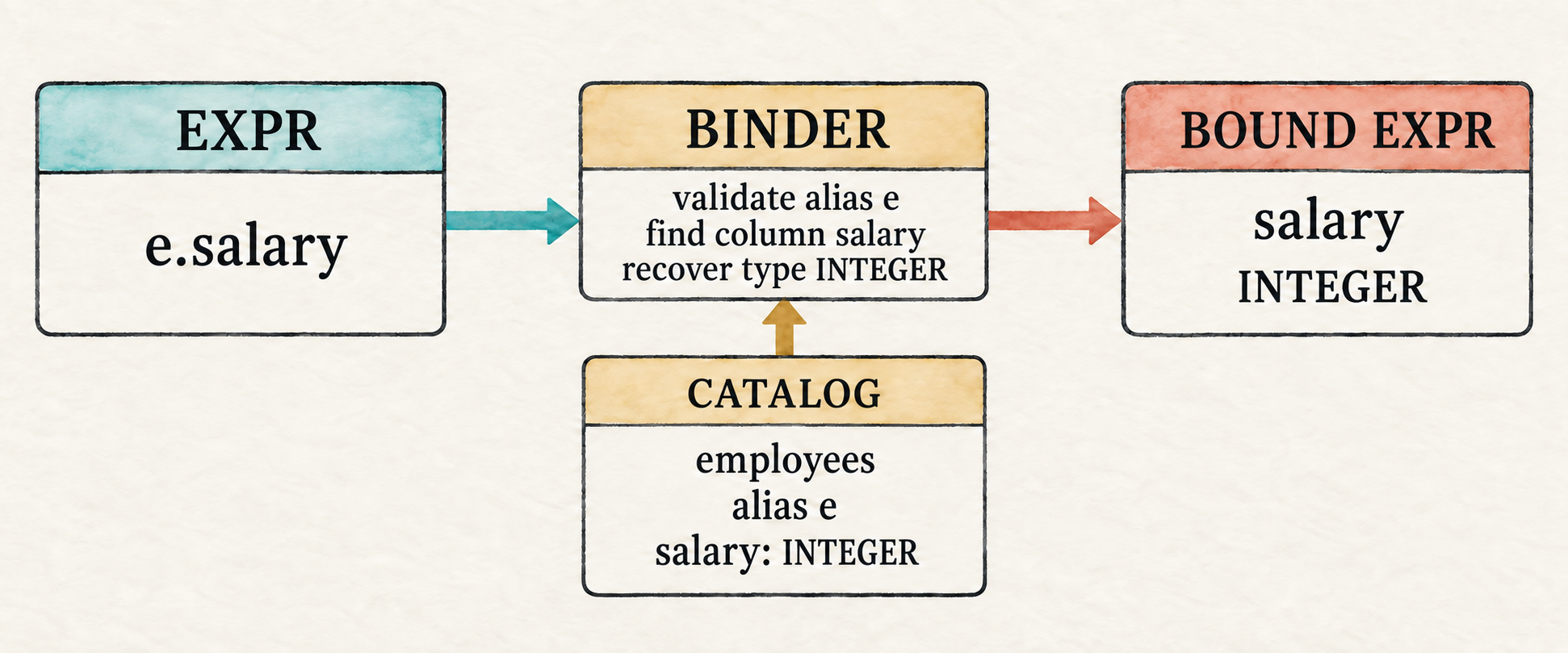
When binding succeeds in this single-table engine, the binder will have checked the qualifier, found the column in the selected table, and recovered its type. The resulting bound column can therefore discard the qualifier and retain only the column name used to read the row.
Keeping Expr and BoundExpr as separate Rust enums will make that validation
step visible. Code that accepts Expr must still resolve its names and check
its operators. Once we build the binder, code that receives BoundExpr will
know that those checks succeeded.
src/expression.rs: add after Expr
#[derive(Clone, Debug, PartialEq, Eq)]
pub enum BoundExpr {
    Column(String),
    Literal(Value),
    Unary {
        op: UnaryOp,
        expression: Box<BoundExpr>,
    },
    Binary {
        left: Box<BoundExpr>,
        op: BinaryOp,
        right: Box<BoundExpr>,
    },
    IsNull {
        expression: Box<BoundExpr>,
        negated: bool,
    },
}
The two trees have similar shapes but different promises:
Expr::Column { qualifier: Some("e"), name: "salary" }
                         ↓ binding
BoundExpr::Column("salary")
The two trees represent different stages. Expr records what the user wrote;
BoundExpr is the executable form produced after validation. In this
chapter’s one-table plans, a checked column can be represented by its name
alone. Plans with multiple inputs will eventually need a less ambiguous
column identity.
Writing the binder starts with the names available for a lookup, which we will collect in a scope.
5.4 Bind a whole query
We will bind the complete query in the three steps shown in the opening
illustration: resolve the input table and column references, check operand
types while converting Expr into BoundExpr, and place the checked
projection and filter in a logical plan. The recursive expression walk will
handle the middle of that path; the final subsection will connect it to the
whole query.
5.4.1 Define the type-checking rules
Binding an expression will need two kinds of context: rules for valid operand types and a scope for resolving column names. We will define the type rules first because they do not depend on a particular query or table. Keeping them in small functions lets the recursive walk state what each operator requires without repeating the error handling.
require_type() checks an operand against one expected type. Unary - and
integer arithmetic will require Integer; NOT, AND, and OR will require
Boolean.
src/catalog.rs: add after impl Catalog
fn require_type(actual: &DataType, expected: &DataType,
    message: &str) -> Result<(), String>
{
    if actual == expected || actual == &DataType::Null {
        Ok(())
    } else {
        Err(format!("{message}: found {actual:?}"))
    }
}
A bare NULL receives the temporary type DataType::Null. When the helper
compares the actual and expected types, the code above also accepts
DataType::Null as a valid operand. SQL operations normally propagate this
unknown value and produce Value::Null, so binding should not reject it merely
because it differs from the expected integer or Boolean type.
The comparison operators =, <>, <, <=, >, and >= compare a left
operand with a right operand. All of them require matching operand types unless
either operand is NULL; the ordered operators will need one further check.
src/catalog.rs: add after require_type()
fn require_matching_types(left: &DataType, right: &DataType)
    -> Result<(), String>
{
    if left == &DataType::Null || right == &DataType::Null
        || left == right
    {
        Ok(())
    } else {
        Err(format!("cannot compare {left:?} with {right:?}"))
    }
}
An ordered comparison uses <, <=, >, or >= to ask whether one value
comes before or after another. These operators also reject types such as
Boolean, which have no ordering in this chapter’s SQL dialect.
src/catalog.rs: add after require_matching_types()
fn require_ordered_type(data_type: &DataType) -> Result<(), String> {
    match data_type {
        DataType::Integer | DataType::Text | DataType::Null => Ok(()),
        _ => Err(format!(
            "ordered comparison requires integers or text: found {data_type:?}"
        )),
    }
}
These helpers give the expression walk a compact vocabulary: require one specific type, require two compatible types, or require a type that can be ordered.
5.4.2 Establish the scope
A database may contain hundreds of tables, but a query can refer only to the
inputs named in its FROM clause. A scope records that smaller set of visible
tables, aliases, and columns. The binder must establish it before walking the
expressions so that every column reference is checked against the names
available to this query. Our current query has one input table; later queries
will place several tables in the same scope.
The type rules are independent of a query, but its scope is not. After parsing
produces a Query, its input table and optional alias determine which names
are visible to the projection and filter expression trees.
The whole-query binder will use query.table to find the corresponding
catalog table, then create one Scope. The scope borrows the verified table
name and column definitions from that catalog entry and the optional alias
from the parsed query. We will pass it through every recursive expression
binding call.
src/catalog.rs: add after require_ordered_type()
struct Scope<'a> {
    table_name: &'a str,
    alias: Option<&'a str>,
    columns: &'a [Column],
}
table_name and alias determine which qualifier is valid. If an alias
exists, that alias is accepted; otherwise, the table name may qualify a
column. columns contains the selected table’s catalog columns. The binder
searches this slice to verify a column name and recover its type.
This teaching dialect compares table, alias, and column names using their exact spelling. Standard SQL normally folds unquoted identifiers to a canonical case, but identifier normalization and quoted identifiers remain outside the current chapter.
For the representative query:
SELECT e.name
FROM employees AS e
WHERE e.salary + 5000 > 70000 AND e.name IS NOT NULL;
the parsed Query supplies employees and the alias e. After finding the
employees table in the catalog, the whole-query binder will create a scope
that conceptually contains:
Scope {
    table_name: "employees",
    alias: Some("e"),
    columns: [
        id: Integer,
        name: Text,
        salary: Integer,
    ],
}
That scope makes e.name and e.salary available to both expression trees.
It would reject another qualifier, such as x.name, and a column absent from
the catalog schema, such as e.department.
The whole-query binder will pass the same shared &Scope to the projection
and filter. Binding changes the expression as it walks the tree, but it never
changes the scope.
5.4.3 Walk and check the expression tree
The whole-query binder will call bind_expression() twice: once with the
projection Expr and once with the filter Expr. Each call handles one AST
tree and returns a pair containing its checked BoundExpr and result
DataType. Parent nodes use the child types to validate their operators before
constructing their own bound nodes.
The complete walk consumes Expr and needs every expression type involved in
that conversion. Add them to the catalog import first.
src/catalog.rs: replace the DataType import
use crate::expression::{BinaryOp, BoundExpr, DataType, Expr, UnaryOp};src/catalog.rs: begin bind_expression() after Scope
fn bind_expression(expression: Expr, scope: &Scope<'_>)
    -> Result<(BoundExpr, DataType), String>
{
    match expression {
        Expr::Column { qualifier, name } => {
            if let Some(qualifier) = qualifier {
                let expected = scope.alias.unwrap_or(scope.table_name);
                if qualifier != expected {
                    return Err(format!(
                        "unknown table or alias: {qualifier}"));
                }
            }

            let column = scope.columns.iter()
                .find(|column| column.name == name)
                .ok_or_else(|| format!("unknown column: {name}"))?;
            Ok((BoundExpr::Column(name), column.data_type.clone()))
        }
After the qualifier and column name have been validated against the Scope,
the binder no longer needs the qualifier. It produces
BoundExpr::Column(name) and returns the column type recorded by the catalog.
Unlike a column, literal and operator nodes do not require name lookup, but
they still return their result types. A literal maps its stored Value
directly to the corresponding DataType; no validation is needed because the
parser has already constructed the value.
src/catalog.rs: continue the match in bind_expression()
        Expr::Literal(value) => {
            let data_type = match &value {
                crate::row::Value::Integer(_) => DataType::Integer,
                crate::row::Value::Text(_) => DataType::Text,
                crate::row::Value::Boolean(_) => DataType::Boolean,
                crate::row::Value::Null => DataType::Null,
            };
            Ok((BoundExpr::Literal(value), data_type))
        }
A unary node first binds its child. It then chooses the only valid operand
type for its operator: NOT requires a Boolean, while unary + and -
require an integer. The earlier require_type() helper performs that check.
src/catalog.rs: continue the match
        Expr::Unary { op, expression } => {
            let (expression, data_type) =
                bind_expression(*expression, scope)?;
            let expected = match op {
                UnaryOp::Not => DataType::Boolean,
                _ => DataType::Integer,
            };
            require_type(&data_type, &expected,
                "invalid unary operand")?;
            Ok((BoundExpr::Unary {
                op,
                expression: Box::new(expression),
            }, expected))
        }
Binary operators fall into four groups with distinct operand and result rules:
| Operator group | Operand rule | Result type |
|---|---|---|
+, -, *, / | Integer on both sides | Integer |
AND, OR | Boolean on both sides | Boolean |
=, <> | matching Integer, Text, or Boolean types; either side may be NULL | Boolean |
<, <=, >, >= | matching Integer or Text types; either side may be NULL | Boolean |
Text supports equality and ordering, but not arithmetic. Appendix C records the implemented value and operator rules in one reference table.
Each binary node recursively binds both children before inspecting its operator. Arithmetic and Boolean operators require one specific type on both sides.
src/catalog.rs: continue the match
        Expr::Binary { left, op, right } => {
            let (left, left_type) = bind_expression(*left, scope)?;
            let (right, right_type) = bind_expression(*right, scope)?;
            let result_type = match op {
                BinaryOp::Add | BinaryOp::Subtract
                | BinaryOp::Multiply | BinaryOp::Divide => {
                    require_type(&left_type, &DataType::Integer,
                        "arithmetic requires integers")?;
                    require_type(&right_type, &DataType::Integer,
                        "arithmetic requires integers")?;
                    DataType::Integer
                }
                BinaryOp::And | BinaryOp::Or => {
                    require_type(&left_type, &DataType::Boolean,
                        "AND and OR require Boolean expressions")?;
                    require_type(&right_type, &DataType::Boolean,
                        "AND and OR require Boolean expressions")?;
                    DataType::Boolean
                }
Equality needs compatible operands but does not require them to be ordered. The four ordering operators require both compatibility and an orderable type. Every comparison produces a Boolean result.
src/catalog.rs: continue the operator match
                BinaryOp::Equal | BinaryOp::NotEqual => {
                    require_matching_types(&left_type, &right_type)?;
                    DataType::Boolean
                }
                BinaryOp::Less | BinaryOp::LessOrEqual
                | BinaryOp::Greater | BinaryOp::GreaterOrEqual => {
                    require_matching_types(&left_type, &right_type)?;
                    require_ordered_type(&left_type)?;
                    require_ordered_type(&right_type)?;
                    DataType::Boolean
                }
            };
            Ok((BoundExpr::Binary {
                left: Box::new(left),
                op,
                right: Box::new(right),
            }, result_type))
        }
IS NULL and IS NOT NULL accept every operand type because either test can
ask whether any value is NULL. The recursive call still binds the child, so
column lookup and any nested operator checks occur normally. There is no
expected child type to compare, which is why the returned child type is
ignored. The null test itself always produces a Boolean result. This arm also
closes the match and the function.
src/catalog.rs: finish bind_expression()
        Expr::IsNull { expression, negated } => {
            let (expression, _) = bind_expression(*expression, scope)?;
            Ok((BoundExpr::IsNull {
                expression: Box::new(expression),
                negated,
            }, DataType::Boolean))
        }
    }
}
Equality therefore accepts matching integer, text, or Boolean operands.
Ordered comparisons accept matching integers or text. name + 1 fails during
binding because name is text, so execution does not discover that mistake
halfway through a scan.
Trace one part of the representative filter from its leaves upward:
e.salary + 5000 > 70000

e.salary       → resolve column → Integer
5000           → bind literal   → Integer
Integer + Integer               → Integer
70000          → bind literal   → Integer
Integer > Integer               → Boolean
Each child returns a checked expression and its result type. Only then can its
parent validate the operator and construct the next BoundExpr node. The
walk therefore checks the same tree shape that the parser produced, working
from the leaves toward the root.
5.4.4 Assemble the bound plan
bind_expression() handles one tree. A complete Query has two of them: the
projection and the filter. It also has an input table that must be resolved
first. The whole-query binder will find that table, construct the scope, bind
both trees, check the filter’s result type, and assemble a logical plan.
That plan needs to carry bound expressions before it can be constructed. Replace the Chapter 4 plan shape now, but leave execution for the second checkpoint.
src/plan.rs: replace the file
use crate::expression::BoundExpr;
use crate::row::Row;

#[derive(Debug)]
pub struct ProjectExpression {
    pub name: String,
    pub expression: BoundExpr,
}

#[derive(Debug)]
pub enum Plan {
    Scan { rows: Vec<Row> },
    Filter { predicate: BoundExpr, input: Box<Plan> },
    Project {
        expressions: Vec<ProjectExpression>,
        input: Box<Plan>,
    },
}
ProjectExpression pairs a checked expression with the column name used in
the output row. A bare column can reuse its column name. A computed expression
has no SQL alias in the grammar yet, but Row still requires every value to
have a String name, so the binder uses "expression" temporarily. Making
this field optional would only postpone the same naming decision until the
row is constructed. A later chapter can replace the placeholder when selected
expression aliases are introduced.
Catalog::bind() will consume the parsed query and produce this plan.
src/catalog.rs: add with the imports
use crate::parser::Query;
use crate::plan::{Plan, ProjectExpression};
The original impl Catalog ended after new(). Reopen it at the current
position so bind() is an associated method rather than a free function.
src/catalog.rs: add after bind_expression()
impl Catalog {
    pub fn bind(&self, query: Query) -> Result<Plan, String> {
        let table = self.tables.iter()
            .find(|table| table.name == query.table)
            .ok_or_else(|| format!("unknown table: {}", query.table))?;

        let scope = Scope {
            table_name: &table.name,
            alias: query.table_alias.as_deref(),
            columns: &table.columns,
        };

        let (projection, _) = bind_expression(query.projection, &scope)?;
        let projection_name = match &projection {
            BoundExpr::Column(name) => name.clone(),
            _ => "expression".to_string(),
        };
        let (predicate, predicate_type) =
            bind_expression(query.filter, &scope)?;
        if !matches!(predicate_type, DataType::Boolean | DataType::Null) {
            return Err("WHERE expression must be Boolean".to_string());
        }

        Ok(Plan::Project {
            expressions: vec![ProjectExpression {
                name: projection_name,
                expression: projection,
            }],
            input: Box::new(Plan::Filter {
                predicate,
                input: Box::new(Plan::Scan { rows: table.rows.clone() }),
            }),
        })
    }
}
WHERE normally requires a Boolean expression. A bare NULL has the
temporary type DataType::Null, so it is also accepted; during execution its
unknown result removes every row. The matches! condition rejects every
other result type, including integer and text expressions.
The Scope introduced at the start of this section is now concrete. Its table
name and columns come from the catalog entry found through query.table; its
alias comes from the parsed query. Both expression walks receive a shared
reference to that same scope.
Type checking does not happen in a separate pass. Each successful expression match arm constructs the checked node that corresponds to the AST node it just validated:
| AST node | Bound result | Result type |
|---|---|---|
Expr::Column | verified column name | catalog column type |
Expr::Literal | literal value | type of the value |
Expr::Unary | checked operator and child | operator’s result type |
Expr::Binary | checked operator and children | operator’s result type |
Expr::IsNull | checked child and null test | Boolean |
Because the recursive calls return BoundExpr, a parent can be produced only
after all of its children have resolved names and passed their type checks.
The resulting plan contains two checked trees but has no execution method yet.
5.5 Inspect the bound plan
The first checkpoint makes binding visible before evaluation is added. We will populate the catalog, parse each entered query, bind it, and print the checked plan. The temporary shell allows dead code in modules whose execution methods will arrive in the next two sections.
src/main.rs: temporarily replace the file
mod catalog;
#[allow(dead_code)]
mod expression;
mod lexer;
mod parser;
#[allow(dead_code)]
mod plan;
#[allow(dead_code)]
mod row;

use std::io::{self, Write};
use catalog::{Catalog, Column, Table};
use expression::DataType;
use parser::parse;
use row::{Row, Value};

fn main() -> io::Result<()> {
    let catalog = employee_catalog();
    run_binding_prompt(&catalog)
}
Add the employee table that gives the catalog real names and types to resolve.
src/main.rs: add after main()
fn employee(id: i64, name: &str, salary: i64) -> Row {
    Row::new(vec![
        ("id", Value::Integer(id)),
        ("name", Value::Text(name.to_string())),
        ("salary", Value::Integer(salary)),
    ])
}

fn employee_catalog() -> Catalog {
    Catalog::new(vec![Table {
        name: "employees".to_string(),
        columns: vec![
            Column { name: "id".to_string(),
                data_type: DataType::Integer },
            Column { name: "name".to_string(),
                data_type: DataType::Text },
            Column { name: "salary".to_string(),
                data_type: DataType::Integer },
        ],
        rows: vec![
            employee(1, "Ada", 70_000),
            employee(2, "Linus", 50_000),
            employee(3, "Grace", 72_000),
        ],
    }])
}
The column list is the schema for the rows below it. Nothing in this small
catalog forces that schema and employee() to agree, so adding or changing a
column requires updating both. Later, when rows are created from a table’s
schema, the database can prevent this mismatch instead of relying on the
application to keep the column definitions and row values synchronized. The
roadmap deliberately leaves that exact chapter boundary open.
The prompt retains Chapter 3’s multiline statement collection. It stops after binding and prints the plan rather than executing it.
src/main.rs: add after employee_catalog()
fn run_binding_prompt(catalog: &Catalog) -> io::Result<()> {
    loop {
        let mut sql = String::new();

        loop {
            if sql.is_empty() {
                print!("sql> ");
            } else {
                print!("...> ");
            }
            io::stdout().flush()?;

            let mut line = String::new();
            if io::stdin().read_line(&mut line)? == 0 {
                println!();
                if !sql.trim().is_empty() {
                    eprintln!("error: incomplete query at end of input");
                }
                return Ok(());
            }
            if sql.is_empty() && line.trim().is_empty() {
                break;
            }
            if append_sql_line(&mut sql, &line) {
                break;
            }
        }

        if !sql.trim().is_empty() {
            let result = parse(&sql)
                .map_err(|error| error.to_string())
                .and_then(|query| catalog.bind(query));
            match result {
                Ok(plan) => println!("{plan:#?}"),
                Err(error) => eprintln!("error: {error}"),
            }
        }
    }
}

fn append_sql_line(sql: &mut String, line: &str) -> bool {
    sql.push_str(line);
    line.trim_end().ends_with(';')
}
Run the prompt and enter the representative query:
cargo run --quiet
The complete debug output includes the predicate tree and every employee row. This abridged rendering shows its important shape:
Project {
    expressions: [
        ProjectExpression {
            name: "name",
            expression: Column("name"),
        },
    ],
    input: Filter {
        predicate: Binary {
            left: Binary {
                left: Binary { ... },
                op: Greater,
                right: Literal(Integer(70000)),
            },
            op: And,
            right: IsNull {
                expression: Column("name"),
                negated: true,
            },
        },
        input: Scan { rows: [...] },
    },
}
The outer Project contains a checked column expression. Its input is a
Filter containing the checked Boolean tree, whose input is the employee
scan. No alias or unresolved column reference remains in the plan.
Binding errors are visible at the same checkpoint:
sql> SELECT name FROM missing_table WHERE salary > 50000;
error: unknown table: missing_table
sql> SELECT x.name FROM employees AS e WHERE e.salary > 50000;
error: unknown table or alias: x
sql> SELECT name FROM employees WHERE name + 1 > 0;
error: arithmetic requires integers: found Text
The binder has now completed the three jobs shown at the beginning of the chapter: it resolved names, checked types, and placed checked expressions in a logical plan. The plan is printable but not executable. That limitation gives us the next task: evaluate its bound expressions. The final application in Section 5.8 will replace this temporary shell; for now it makes the binder’s work visible.
5.6 Evaluate the bound expression
Binding asks whether an expression is meaningful. Evaluation asks what value that checked expression produces for the current row.
Binding has already removed unresolved names and rejected invalid operand types. Evaluation can therefore work from the leaves upward for each current row: a column leaf reads its value from that row, a literal supplies its stored value, and each parent operator combines the values produced by its children. As with binding, we will define the operation-specific functions first and assemble the recursive dispatcher last.
5.6.1 Evaluate unary operations
Evaluation will read columns from a Row, so import Row alongside Value
before adding the operation-specific functions.
src/expression.rs: replace the first import
use crate::row::{Row, Value};Unary evaluation is small because binding has already checked the operand
type. NULL propagates through all three unary operators.
src/expression.rs: add after BoundExpr
fn evaluate_unary(op: &UnaryOp, value: Value) -> Result<Value, String> {
    match (op, value) {
        (_, Value::Null) => Ok(Value::Null),
        (UnaryOp::Plus, Value::Integer(value)) =>
            Ok(Value::Integer(value)),
        (UnaryOp::Minus, Value::Integer(value)) =>
            Ok(Value::Integer(-value)),
        (UnaryOp::Not, Value::Boolean(value)) =>
            Ok(Value::Boolean(!value)),
        _ => Err("bound unary expression received an invalid value".into()),
    }
}
5.6.2 Define three-valued Boolean logic
Binary evaluation must account for SQL’s unknown value. NULL propagates
through arithmetic and comparisons: for example, both 1 + NULL and
1 = NULL produce NULL. AND and OR are different because one known
operand can sometimes decide the result. They follow these truth tables:
AND | TRUE | FALSE | NULL |
|---|---|---|---|
TRUE | TRUE | FALSE | NULL |
FALSE | FALSE | FALSE | FALSE |
NULL | NULL | FALSE | NULL |
OR | TRUE | FALSE | NULL |
|---|---|---|---|
TRUE | TRUE | TRUE | TRUE |
FALSE | TRUE | FALSE | NULL |
NULL | TRUE | NULL | NULL |
A false value decides AND even when the other side is unknown. A true value
similarly decides OR. Encode those two tables before adding the binary
evaluator that calls them.
src/expression.rs: add the three-valued Boolean helpers after
evaluate_unary()
fn and(left: Value, right: Value) -> Result<Value, String> {
    match (left, right) {
        (Value::Boolean(false), _) | (_, Value::Boolean(false)) =>
            Ok(Value::Boolean(false)),
        (Value::Boolean(true), Value::Boolean(true)) =>
            Ok(Value::Boolean(true)),
        (Value::Boolean(true), Value::Null)
        | (Value::Null, Value::Boolean(true))
        | (Value::Null, Value::Null) => Ok(Value::Null),
        _ => Err("AND received a non-Boolean value".into()),
    }
}

fn or(left: Value, right: Value) -> Result<Value, String> {
    match (left, right) {
        (Value::Boolean(true), _) | (_, Value::Boolean(true)) =>
            Ok(Value::Boolean(true)),
        (Value::Boolean(false), Value::Boolean(false)) =>
            Ok(Value::Boolean(false)),
        (Value::Boolean(false), Value::Null)
        | (Value::Null, Value::Boolean(false))
        | (Value::Null, Value::Null) => Ok(Value::Null),
        _ => Err("OR received a non-Boolean value".into()),
    }
}
5.6.3 Evaluate binary operations
With the Boolean helpers in place, binary evaluation can handle nulls before dispatching ordinary arithmetic, comparison, and Boolean operations. Division by zero remains an execution error.
src/expression.rs: add after or()
fn evaluate_binary(left: Value, op: &BinaryOp, right: Value)
    -> Result<Value, String>
{
    if left == Value::Null || right == Value::Null {
        return match op {
            BinaryOp::And => and(left, right),
            BinaryOp::Or => or(left, right),
            _ => Ok(Value::Null),
        };
    }

    match (left, op, right) {
        (Value::Integer(left), BinaryOp::Add,
            Value::Integer(right)) => Ok(Value::Integer(left + right)),
        (Value::Integer(left), BinaryOp::Subtract,
            Value::Integer(right)) => Ok(Value::Integer(left - right)),
        (Value::Integer(left), BinaryOp::Multiply,
            Value::Integer(right)) => Ok(Value::Integer(left * right)),
        (Value::Integer(_), BinaryOp::Divide,
            Value::Integer(0)) => Err("division by zero".to_string()),
        (Value::Integer(left), BinaryOp::Divide,
            Value::Integer(right)) => Ok(Value::Integer(left / right)),
        (Value::Integer(left), op, Value::Integer(right)) =>
            compare(left, op, right),
        (Value::Text(left), op, Value::Text(right)) =>
            compare(left, op, right),
        (Value::Boolean(left), BinaryOp::Equal,
            Value::Boolean(right)) => Ok(Value::Boolean(left == right)),
        (Value::Boolean(left), BinaryOp::NotEqual,
            Value::Boolean(right)) => Ok(Value::Boolean(left != right)),
        (Value::Boolean(left), BinaryOp::And,
            Value::Boolean(right)) => Ok(Value::Boolean(left && right)),
        (Value::Boolean(left), BinaryOp::Or,
            Value::Boolean(right)) => Ok(Value::Boolean(left || right)),
        _ => Err("bound binary expression received invalid values".into()),
    }
}
The first branch handles every operation involving NULL. Most such
operations return NULL; only AND and OR need their truth-table helpers.
Once both operands are known, the main match performs the operation selected
by BinaryOp. The final arm guards against a broken binder invariant.
src/expression.rs: add the comparison helper
fn compare<T: PartialEq + PartialOrd>(left: T,
    op: &BinaryOp, right: T) -> Result<Value, String>
{
    let result = match op {
        BinaryOp::Equal => left == right,
        BinaryOp::NotEqual => left != right,
        BinaryOp::Less => left < right,
        BinaryOp::LessOrEqual => left <= right,
        BinaryOp::Greater => left > right,
        BinaryOp::GreaterOrEqual => left >= right,
        _ => return Err(
            "bound comparison received an invalid operator".into()),
    };
    Ok(Value::Boolean(result))
}
Binding guarantees that compare() receives a comparison operator. Its error
arm remains because the Rust type BinaryOp also contains non-comparison
variants and cannot express that narrower guarantee by itself.
5.6.4 Assemble the bound-tree evaluator
The supporting functions now cover unary, Boolean, arithmetic, and comparison
operations. BoundExpr::evaluate() can dispatch each node to the appropriate
behavior and recursively evaluate child expressions.
src/expression.rs: add after compare()
impl BoundExpr {
    pub fn evaluate(&self, row: &Row) -> Result<Value, String> {
        match self {
            BoundExpr::Column(name) => row.get(name).cloned()
                .ok_or_else(|| format!(
                    "bound column is missing at execution: {name}")),
            BoundExpr::Literal(value) => Ok(value.clone()),
            BoundExpr::Unary { op, expression } => {
                evaluate_unary(op, expression.evaluate(row)?)
            }
            BoundExpr::Binary { left, op, right } => {
                evaluate_binary(left.evaluate(row)?, op,
                    right.evaluate(row)?)
            }
            BoundExpr::IsNull { expression, negated } => {
                let is_null = expression.evaluate(row)? == Value::Null;
                Ok(Value::Boolean(if *negated {
                    !is_null
                } else {
                    is_null
                }))
            }
        }
    }
}
Columns read a value from the current row, and literals clone their stored
value. Unary and binary nodes recursively evaluate their children before
applying an operator. IsNull asks whether its child produced Value::Null
and always returns a Boolean.
The missing-column error should be unreachable for rows constructed through the catalog schema because binding has already verified the column. Today, however, the catalog schema and row values are assembled separately. The error exposes a mismatch between them rather than silently producing an incorrect result. Schema-aware row construction can make that mismatch unrepresentable later; retaining this check would still provide a useful defense against a broken internal invariant.
A bound expression can now evaluate one row. The checked plan from the first checkpoint must next call that evaluator for every row it filters or projects.
5.7 Turn the plan into rows
Section 5.6 gave BoundExpr an evaluator. Plan::Filter and Plan::Project
can now use it to turn the checked plan from the first checkpoint into rows.
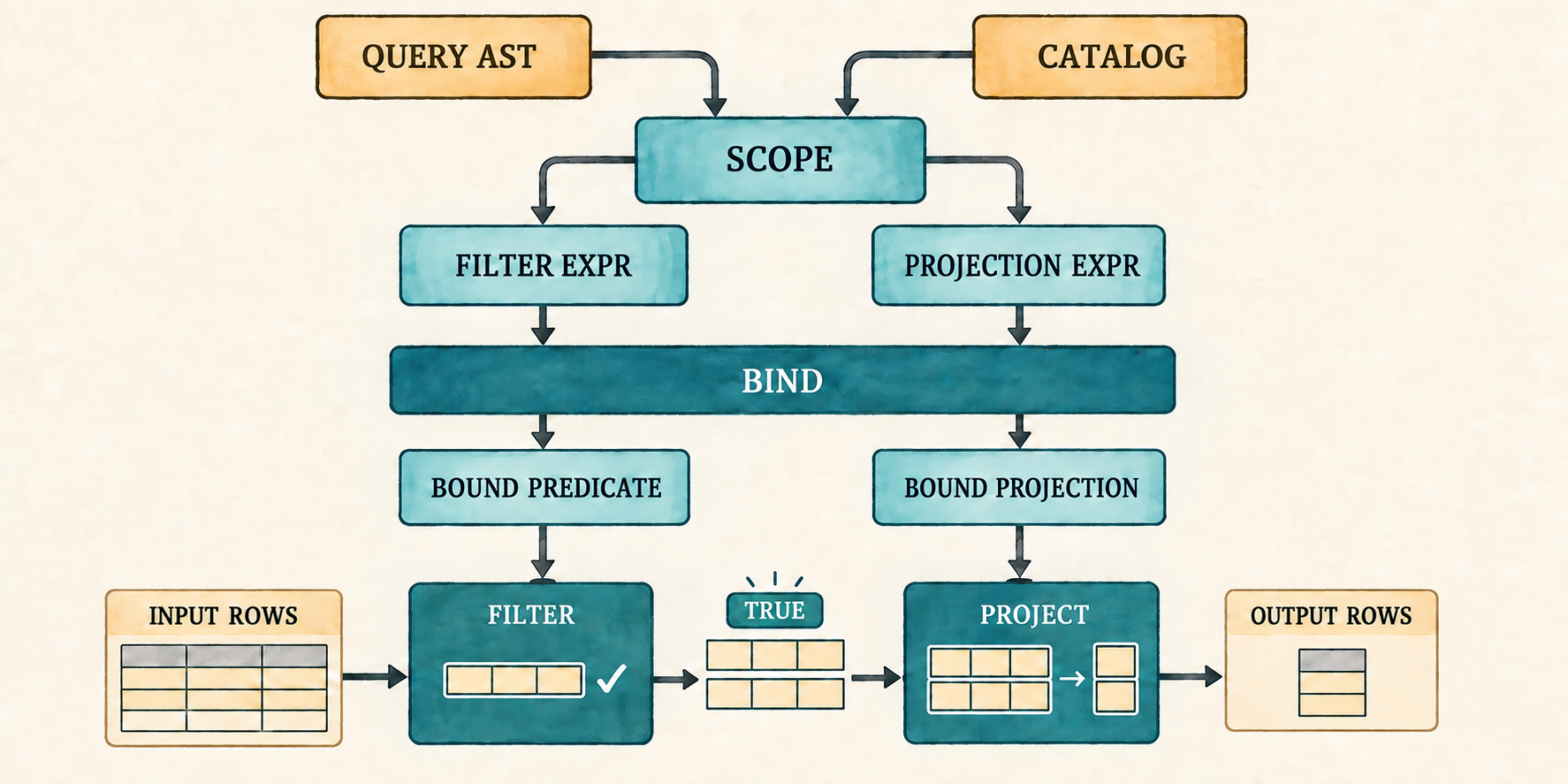
Filter evaluates its bound predicate for every input row and forwards only
rows whose result is TRUE. Project evaluates its bound expressions for
each forwarded row and constructs a new row. Those output rows become the
input of the next plan node.
Projection will produce a Vec<(String, Value)> whose column names are already
owned. Row::new() accepts borrowed names and converts each one into a new
String; this second constructor can instead move the completed vector into
the row directly. The project node added below will use this constructor after
it evaluates its expressions.
src/row.rs: add to the first impl Row
pub fn from_owned(values: Vec<(String, Value)>) -> Self {
    Self { values }
}
With a constructor for projected rows in place, the plan can evaluate its filter and projection.
plan.rs already imports Row. Execution also inspects Boolean and null
values, so extend that import.
src/plan.rs: replace the Row import
use crate::row::{Row, Value};A filter retains only TRUE. FALSE and NULL both remove the row, which is
how SQL treats an unknown WHERE condition. The whole-query binder accepted a
WHERE expression with a Boolean or temporary null type; this match defines
what those results do during execution. Execution does not search the catalog
or reinterpret SQL because binding has already settled those questions.
The three plan arms preserve the recursive execution order established in
Chapter 1. Scan returns its rows. Filter executes its input and evaluates
one predicate for each row. Project executes its input, evaluates every
selected expression, and moves the resulting names and values into a new row.
src/plan.rs: add Plan::execute()
impl Plan {
    pub fn execute(&self) -> Result<Vec<Row>, String> {
        match self {
            Plan::Scan { rows } => Ok(rows.clone()),
            Plan::Filter { predicate, input } => {
                let mut output = Vec::new();
                for row in input.execute()? {
                    match predicate.evaluate(&row)? {
                        Value::Boolean(true) => output.push(row),
                        Value::Boolean(false) | Value::Null => {}
                        _ => return Err(
                            "WHERE expression did not produce a Boolean".into()),
                    }
                }
                Ok(output)
            }
            Plan::Project { expressions, input } => {
                let mut output = Vec::new();
                for row in input.execute()? {
                    let mut values = Vec::new();
                    for expression in expressions {
                        values.push((expression.name.clone(),
                            expression.expression.evaluate(&row)?));
                    }
                    output.push(Row::from_owned(values));
                }
                Ok(output)
            }
        }
    }
}
The second checkpoint executes the plan that the binding prompt previously
printed. Extend its result pipeline through Plan::execute() and print the
returned rows.
src/main.rs: replace the result and match inside run_binding_prompt()
let result = parse(&sql)
    .map_err(|error| error.to_string())
    .and_then(|query| catalog.bind(query))
    .and_then(|plan| plan.execute());
match result {
    Ok(rows) => for row in rows { println!("{row}"); },
    Err(error) => eprintln!("error: {error}"),
}
Run the prompt and enter the representative query again:
cargo run --quiet
sql> SELECT e.name FROM employees AS e WHERE e.salary + 5000 > 70000 AND e.name IS NOT NULL;
{name: "Ada"}
{name: "Grace"}
The same bound plan that was visible at the first checkpoint can now produce rows. The final checkpoint will give this path a shared application function, a fixed demonstration, and error-preserving prompt behavior.
5.8 Connect the application
Parsing, binding, and execution now work together in the temporary prompt. We
will move that pipeline into one shared function, restore the fixed
demonstration, and reconnect the final prompt. The reader has already seen this
application shape, so replace the temporary checkpoint file with the complete
application portion of main.rs.
src/main.rs: replace the file
mod catalog;
mod expression;
mod lexer;
mod parser;
mod plan;
mod row;

use std::io::{self, Write};

use catalog::{Catalog, Column, Table};
use expression::DataType;
use parser::parse;
use row::{Row, Value};

fn main() {
    let catalog = employee_catalog();
    if std::env::args().nth(1).as_deref() == Some("--prompt") {
        run_prompt(&catalog).expect("failed to read SQL from the terminal");
    } else {
        run_demo(&catalog);
    }
}

fn employee(id: i64, name: &str, salary: i64) -> Row {
    Row::new(vec![
        ("id", Value::Integer(id)),
        ("name", Value::Text(name.into())),
        ("salary", Value::Integer(salary)),
    ])
}

fn employee_catalog() -> Catalog {
    Catalog::new(vec![Table {
        name: "employees".into(),
        columns: vec![
            Column {
                name: "id".into(),
                data_type: DataType::Integer,
            },
            Column {
                name: "name".into(),
                data_type: DataType::Text,
            },
            Column {
                name: "salary".into(),
                data_type: DataType::Integer,
            },
        ],
        rows: vec![
            employee(1, "Ada", 70_000),
            employee(2, "Linus", 50_000),
            employee(3, "Grace", 72_000),
        ],
    }])
}

fn execute_sql(sql: &str, catalog: &Catalog) -> Result<Vec<Row>, String> {
    let query = parse(sql).map_err(|error| error.to_string())?;
    catalog.bind(query)?.execute()
}

fn run_demo(catalog: &Catalog) {
    let sql =
        "SELECT e.name FROM employees AS e WHERE e.salary + 5000 > 70000 AND e.name IS NOT NULL;";
    let rows = execute_sql(sql, catalog).expect("the lesson query should execute");
    println!("Employees matching the bound expression:");
    for row in rows {
        println!("{row}");
    }
}

fn run_prompt(catalog: &Catalog) -> io::Result<()> {
    loop {
        let mut sql = String::new();

        loop {
            if sql.is_empty() {
                print!("sql> ");
            } else {
                print!("...> ");
            }
            io::stdout().flush()?;

            let mut line = String::new();
            if io::stdin().read_line(&mut line)? == 0 {
                println!();
                if !sql.trim().is_empty() {
                    eprintln!("error: incomplete query at end of input");
                }
                return Ok(());
            }
            if sql.is_empty() && line.trim().is_empty() {
                break;
            }
            if append_sql_line(&mut sql, &line) {
                break;
            }
        }

        if !sql.trim().is_empty() {
            print_query_result(&sql, catalog);
        }
    }
}

fn append_sql_line(sql: &mut String, line: &str) -> bool {
    sql.push_str(line);
    line.trim_end().ends_with(';')
}

fn print_query_result(sql: &str, catalog: &Catalog) {
    match execute_sql(sql, catalog) {
        Ok(rows) => {
            for row in rows {
                println!("{row}");
            }
        }
        Err(error) => eprintln!("error: {error}"),
    }
}
Projection now lives in Plan::Project, which evaluates bound expressions and
constructs each result with Row::from_owned(). The older method that copies a
fixed list of named columns therefore has no caller.
src/row.rs: remove Row::project() and its
project_keeps_only_requested_columns() test. That is the only test in the
module, so remove the now-empty mod tests block as well.
The application now connects the parser, catalog and binder, plan, and executor. Compile it before running queries so missing modules, stale imports, or mismatched plan fields fail at this checkpoint.
cargo check
5.9 Run and verify
The complete path is now connected. Verify its successful result with the fixed demonstration and its failures through the prompt.
Run the completed path:
cargo run --quiet
Employees matching the bound expression:
{name: "Ada"}
{name: "Grace"}
The source text now becomes an unresolved AST, then a checked bound plan, and only then rows. The executor itself never sees an alias or table name.
Start the interactive path:
cargo run --quiet -- --prompt
The old false success now stops during binding:
sql> SELECT name FROM missing_table WHERE salary > 50000;
error: unknown table: missing_table
An invalid qualifier and invalid operand type fail just as clearly:
sql> SELECT x.name FROM employees AS e WHERE e.salary > 50000;
error: unknown table or alias: x
sql> SELECT name FROM employees WHERE name + 1 > 0;
error: arithmetic requires integers: found Text
The prompt remains ready after each failure. A bad query no longer becomes a process panic or silently reads an unrelated table.
5.10 What we deliberately did not build
With the complete path verified, we can state the boundaries that remain. The new frontend remains intentionally bounded:
- A query has one input table and one selected expression.
- The selected expression cannot have an output alias. A bare column reuses
its column name, while a computed expression is named
expression. - The catalog exists only in memory and is assembled by the application.
- Names use exact spelling; quoted identifiers are absent.
- Arithmetic uses integers only.
- Text equality and ordering use Rust’s case-sensitive string comparison; SQL collations and locale-aware ordering are absent.
- Division by zero is an execution error.
- There are no functions,
BETWEEN,LIKE,IN,CASE,CAST, dates, or intervals. - There is no optimizer or separate physical plan.
- Bound columns use names rather than stable catalog identifiers.
These limits keep the chapter focused on the boundary between syntax and meaning. Appendix B records where the remaining expression forms belong; Appendix C records the implemented value and operator rules.
5.11 Try it
Run the prompt, predict the stage that will accept or reject each query, and then try it.
- Change
employeestoEmployeeswithout changing the catalog. - Use
employees.namewithout a table alias, then addAS ewhile keeping the same qualifier. - Select
salary + 5000and useWHERE TRUE. Inspect the output column name. - Use
WHERE salarywithout a comparison. - Try
WHERE TRUE OR NULL, thenWHERE FALSE AND NULL. - Use bare
NULLas the completeWHEREexpression. - Select
10 / 0withWHERE TRUE. Predict whether parsing, binding, or execution reports the error.
Check your reasoning
- Parsing succeeds, but exact-name catalog lookup reports
unknown table: Employeesduring binding. employees.namebinds when no alias exists. AfterAS e, the accepted qualifier ise, soemployees.namereports an unknown table or alias.- The arithmetic expression binds and evaluates for every row. Until output
aliases are added, the projected column is named
expression. - Binding rejects the integer result because
WHERErequires Boolean orNULL. TRUE OR NULLis true, so every row survives.FALSE AND NULLis false, so no rows survive.- Binding accepts the temporary
Nulltype, and execution removes every row because an unknown predicate is not true. - Parsing and binding succeed because both operands are integers. Evaluation
reports
division by zerowhile executing the projection.
5.12 One selected expression is no longer enough
The frontend can now preserve expression structure, and the binder can reject
unknown names and incompatible types before execution. One limitation remains
in the outer query representation: Query stores exactly one projection
expression.
That is enough to select name or compute salary + 1000, but not to return
both results together:
SELECT name AS employee_name,
       salary + 1000 AS raised_salary
FROM employees
WHERE salary > 50000;
This query still uses the one-table scope built in this chapter. Its new
problem is on the output side. The parser must preserve a list of selected
expressions, the binder must check every expression in that list, and the
project node must give each resulting value a useful name. A bare column can
retain its column name, while a computed expression needs an output alias such
as raised_salary instead of the temporary name expression.
The next chapter widens projection from one expression to a named list while keeping the existing single-table scope unchanged. The prompt already accepts the longer query across several lines.