8. Outer Joins Preserve Unmatched Rows
A join kind decides whether an unmatched row disappears or survives with
NULLs for the absent side.
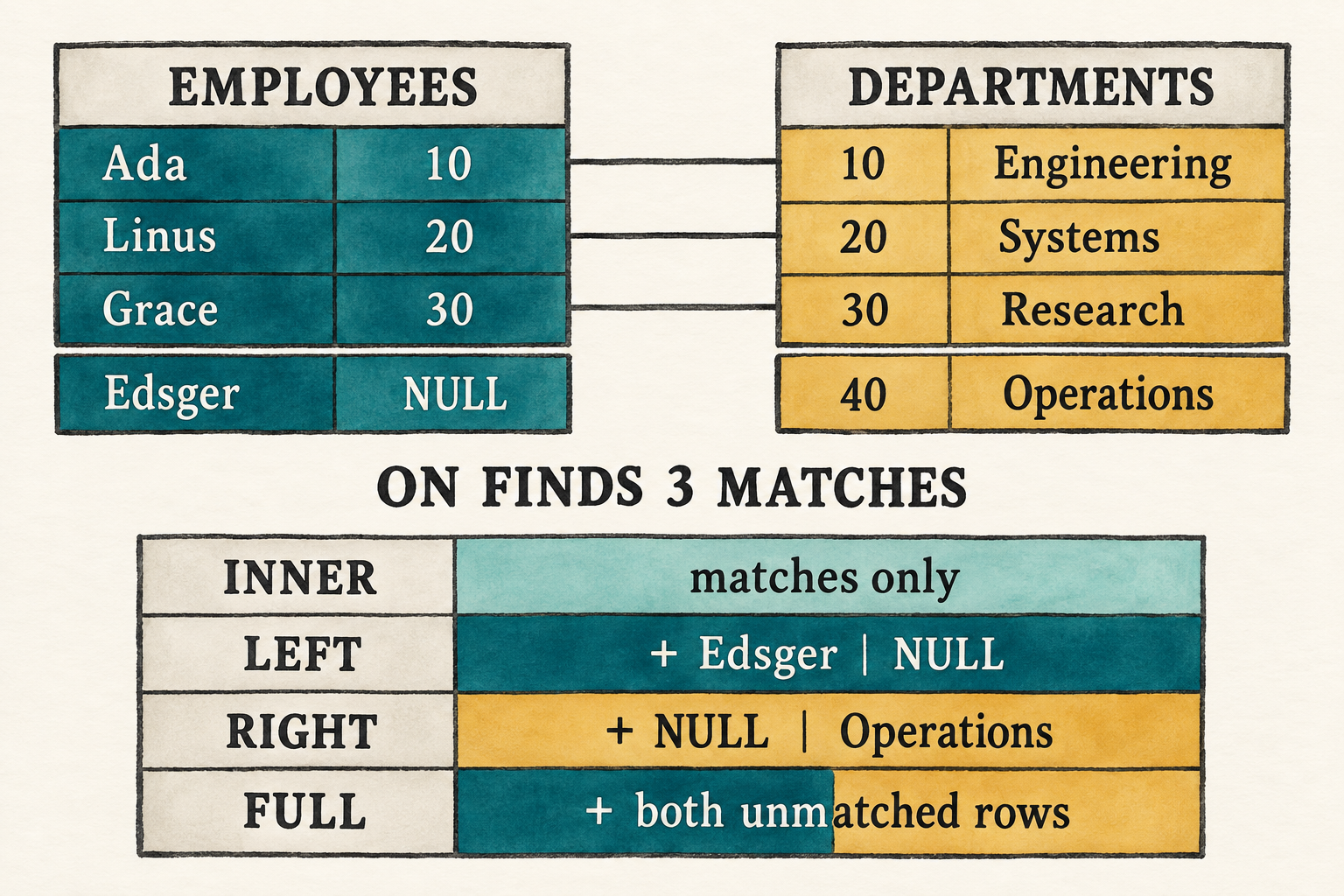
ON finds matching pairs first; the join kind then decides which unmatched rows survive with NULLs for the absent side.Chapter 7 created every possible pair and let WHERE discard the pairs that
do not match:
SELECT e.name AS employee_name, d.name AS department_name
FROM employees AS e, departments AS d
WHERE e.department_id = d.id;
That is enough when a report needs only employees who belong to a department.
A staffing report may need to expose the gaps as well: employees who have not
been assigned to any department, departments that currently have no employees,
or both. The inner-join result cannot show those cases because a row without a
match disappears. An outer join preserves the requested unmatched rows and
fills the columns from the absent side with NULL.
This chapter will make that distinction visible by adding one unmatched row to each input:
employees                              departments
Ada      department_id 10              10  Engineering
Linus    department_id 20              20  Systems
Grace    department_id 30              30  Research
Edsger   department_id NULL            40  Operations
Edsger has not been assigned to a department, while Operations has no employees. These are valid missing relationships rather than a broken department reference, and they leave one unmatched row on each side for the outer joins to preserve.
The representative left join is:
SELECT e.name AS employee_name, d.name AS department_name
FROM employees AS e
LEFT JOIN departments AS d ON e.department_id = d.id;
It returns the three matches plus {employee_name: "Edsger", department_name: NULL}. A right join instead preserves the unmatched
Operations department. A full join preserves both.
Supporting that result requires more than new keywords. The parser must attach
an ON expression to a particular join. The binder must resolve that
expression after both inputs are visible. The executor must distinguish a pair
that satisfies ON from an unmatched row that the join kind promises to keep.
This chapter makes those changes in four steps:
- Extend the grammar and query AST to represent explicit join clauses and
their
ONexpressions. - Bind each
ONexpression in the scope of the inputs available at that join. - Add the join kind and checked condition to the logical
Joinnode. - Extend the nested loops to emit null-extended rows when the join kind preserves an unmatched side.
Before changing the program, begin from the completed Chapter 7 checkpoint:
git switch --create chapter-008 lesson-007
8.1 A filter cannot preserve a missing match
For inner joins, these two queries return the same rows:
SELECT e.name, d.name
FROM employees AS e, departments AS d
WHERE e.department_id = d.id;
SELECT e.name, d.name
FROM employees AS e
INNER JOIN departments AS d ON e.department_id = d.id;
Both forms retain only matching pairs. The second form places the matching rule beside the operation that combines the tables, which becomes essential for an outer join.
A plan passes rows upward. The join therefore decides which combined rows
exist before WHERE sees any of them. An inner join emits only matching pairs,
so Edsger never reaches the filter. Because WHERE can only keep or discard
rows it receives, it cannot recreate his missing row.
Preservation must instead happen inside the join. After a left join has tried Edsger against every department and found no match, it emits one combined row:
employee values + NULL department values
That is null extension. It makes the preserved row the same width as an ordinary joined row, so the existing slot-based expressions can still read it.
The distinction gives ON and WHERE separate jobs:
ONdecides whether a left and right row match.- the join kind decides which unmatched rows are preserved;
WHERE, when present, filters the rows produced by the join, including null-extended rows.
We will preserve that order in the grammar, AST, logical plan, and executor.
8.2 Extend the join grammar
The syntax change has two layers. First we will extend the grammar to describe
explicit join kinds, their right inputs, and their ON expressions. Then we
will add the fixed-word tokens that let the lexer distinguish that syntax from
ordinary identifiers. The parser can construct the join AST only after both
layers are in place.
8.2.1 Describe explicit joins
Chapter 7 treated FROM as a comma-separated list of simple table references.
The expanded grammar lets each table reference carry explicit joins.
Appendix B places this addition in the larger SQL
grammar:
query            = "SELECT" select_list
                   "FROM" table_reference ("," table_reference)*
                   ("WHERE" expression)? ";" ;

table_reference  = table_primary join_clause* ;
table_primary    = identifier alias? ;

join_clause      = ("INNER"
                   | "LEFT" "OUTER"?
                   | "RIGHT" "OUTER"?
                   | "FULL" "OUTER"?)?
                   "JOIN" table_primary "ON" expression ;
The grammar calls one unjoined input a table_primary. In this chapter, that
means one catalog table with an optional alias. Subqueries and parenthesized
table expressions remain later work.
The optional prefix makes bare JOIN mean INNER JOIN. OUTER is optional in
LEFT OUTER JOIN, RIGHT OUTER JOIN, and FULL OUTER JOIN; it does not change
their meaning.
8.2.2 Recognize the join words
Every new fixed word needs a token before the parser can recognize the new productions.
src/lexer.rs: add the join tokens after False
Inner,
Left,
Right,
Full,
Outer,
Join,
On,
Classify those words alongside the existing SQL keywords.
src/lexer.rs: add to word_token()
"INNER" => Token::Inner,
"LEFT" => Token::Left,
"RIGHT" => Token::Right,
"FULL" => Token::Full,
"OUTER" => Token::Outer,
"JOIN" => Token::Join,
"ON" => Token::On,
The lexer now distinguishes join syntax from identifiers. The AST must retain
which kind was written, which table appears on the right, and which expression
follows ON.
8.3 Represent a chain of joins in the AST
The current TableReference stores only one table name and alias. It cannot
record that departments AS d is the right input of a left join or that the
following expression belongs to its ON clause.
Replace the single-table shape with a first input followed by the joins attached to it.
src/parser.rs: replace TableReference and add the join types
#[derive(Debug, PartialEq, Eq)]
pub struct TableReference {
    pub first: TablePrimary,
    pub joins: Vec<JoinClause>,
}

#[derive(Debug, PartialEq, Eq)]
pub struct TablePrimary {
    pub name: String,
    pub alias: Option<String>,
}

#[derive(Debug, PartialEq, Eq)]
pub struct JoinClause {
    pub kind: JoinKind,
    pub right: TablePrimary,
    pub condition: Expr,
}

#[derive(Clone, Copy, Debug, PartialEq, Eq)]
pub enum JoinKind {
    Inner,
    Left,
    Right,
    Full,
}
For the representative query, first stores employees AS e. Its one
JoinClause stores Left, departments AS d, and the unresolved expression
tree for e.department_id = d.id.
The outer Vec<TableReference> preserves comma-separated inputs. Each
TableReference now starts with one table and carries any explicit join
clauses attached to it.
This representation also permits a chain such as a JOIN b ON ... JOIN c ON ...: first stores a, and joins stores the clauses for b and c in
source order. We can now teach the parser to construct that shape.
8.4 Parse table references and join clauses
The parser will construct the nested AST from the outside inward. We will first
parse a complete table reference and its required first table, then parse each
join clause attached to it. An AST checkpoint will finish the section by
showing that the join kind, right input, and ON expression landed in the
intended nodes.
A table reference may build a left-deep chain:
FROM employees AS e
LEFT JOIN departments AS d ON e.department_id = d.id
INNER JOIN locations AS l ON d.location_id = l.id
This chapter’s demonstration uses two tables, but the AST does not need a special two-table shape.
8.4.1 Parse the first table in a table reference
table_reference = table_primary join_clause* ;
table_primary   = identifier alias? ;
parse_table_reference() begins with the required first table, then consumes
every join that follows it. Each loop iteration implements the join_clause*
part of the grammar.
src/parser.rs: replace parse_table_reference()
fn parse_table_reference(&mut self) -> Result<TableReference, ParseError> {
    let first = self.parse_table_primary()?;
    let mut joins = Vec::new();
    while matches!(
        self.peek(),
        Some(Token::Inner | Token::Left | Token::Right
            | Token::Full | Token::Join)
    ) {
        joins.push(self.parse_join_clause()?);
    }
    Ok(TableReference { first, joins })
}
The delegated table_primary production contains the name-and-alias behavior
that the old parse_table_reference() handled by itself.
src/parser.rs: add after parse_table_reference()
fn parse_table_primary(&mut self) -> Result<TablePrimary, ParseError> {
    Ok(TablePrimary {
        name: self.identifier("expected a table name")?,
        alias: self.parse_alias()?,
    })
}
8.4.2 Parse one join clause
join_clause = ("INNER"
              | "LEFT" "OUTER"?
              | "RIGHT" "OUTER"?
              | "FULL" "OUTER"?)?
              "JOIN" table_primary "ON" expression ;
The join parser treats an omitted kind as Inner. For an outer join it also
accepts, but does not require, the noise word OUTER. After the right table it
requires ON and parses a complete expression tree.
src/parser.rs: add after parse_table_primary()
fn parse_join_clause(&mut self) -> Result<JoinClause, ParseError> {
    let kind = if self.consume(&Token::Inner) {
        JoinKind::Inner
    } else if self.consume(&Token::Left) {
        self.consume(&Token::Outer);
        JoinKind::Left
    } else if self.consume(&Token::Right) {
        self.consume(&Token::Outer);
        JoinKind::Right
    } else if self.consume(&Token::Full) {
        self.consume(&Token::Outer);
        JoinKind::Full
    } else {
        JoinKind::Inner
    };
    self.expect(Token::Join, "expected JOIN")?;
    let right = self.parse_table_primary()?;
    self.expect(Token::On, "expected ON after joined table")?;
    let condition = self.parse_expression()?;
    Ok(JoinClause { kind, right, condition })
}
8.4.3 Inspect the join AST
Changing TableReference temporarily makes the Chapter 7 binder stale. As in
the previous frontend checkpoint, isolate the parser before updating the
remaining stages.
The existing parser tests still inspect the old TableReference fields.
Remove the #[cfg(test)] mod tests block from parser.rs before running this
checkpoint. The completed lesson source contains the rewritten tests, but
reproducing them in the build-along would not add to the parsing explanation.
src/main.rs: temporarily replace the file
#[allow(dead_code)]
mod expression;
mod lexer;
mod parser;
#[allow(dead_code)]
mod row;

use parser::parse;

fn main() {
    let sql = "SELECT e.name AS employee_name, \
        d.name AS department_name \
        FROM employees AS e \
        LEFT JOIN departments AS d \
        ON e.department_id = d.id;";
    println!("{:#?}",
        parse(sql).expect("the checkpoint query should parse"));
}
Run the checkpoint:
cargo run --quiet
The printed AST makes three facts visible:
Leftbelongs to the join clause;departments AS dis its right input;e.department_id = d.idremains an unresolvedExpr.
That tree preserves the request. The binder must now decide which names and types make the request valid.
8.5 Teach the logical plan which rows to preserve
Chapter 7 needed a Join to hold two input plans, so its variant recorded only
those children:
Join {
    left: Box<Plan>,
    right: Box<Plan>,
}
That representation means “combine every left row with every right row.” It
cannot record the ON condition that decides whether a pair matches, the join
kind that decides which unmatched rows survive, or the shape needed to fill a
missing side with correctly labelled NULL values.
The logical plan must now carry all three facts alongside its two inputs.
Import the join kind, then replace the old Join variant.
src/plan.rs: add with the imports
use crate::parser::JoinKind;src/plan.rs: replace Plan::Join
Join {
    kind: JoinKind,
    condition: Option<BoundExpr>,
    left_columns: Vec<String>,
    right_columns: Vec<String>,
    left: Box<Plan>,
    right: Box<Plan>,
}
condition is absent only for Chapter 7’s comma-separated Cartesian join.
Explicit joins carry their checked ON expression. kind tells execution
which unmatched sides, if any, it must preserve.
The column-name lists describe the shapes of the two inputs. When one side has
no match, the executor needs those names to construct the correct number of
labelled NULL values. It cannot infer that shape from the first row because
an input table may be empty.
The logical plan for the representative query becomes:
Project(employee_name, department_name)
                 |
        Left Join(on: e.department_id = d.id)
               /     \
 Scan(employees)     Scan(departments)
There is no Filter unless the SQL also contains WHERE. The match condition
belongs to Join because row preservation depends on it. With this
representation in place, the binder can construct the expanded Plan::Join
node.
8.6 Bind ON when both inputs are visible
The parser has produced TableReference nodes containing table names, join
kinds, and unresolved ON expressions. The logical plan now has an expanded
Plan::Join variant ready to hold checked information. The binder must bridge
those representations: resolve each table, add its columns to the scope,
convert each ON expression from Expr to BoundExpr, and assemble the
corresponding Scan and Join plan nodes.
That work must follow the left-to-right structure recorded in each
TableReference. This section first establishes when an ON expression may
see each input. It then adds the scope operations needed to preserve that
boundary, builds the first input and any comma joins, binds each explicit join,
and finally binds projection and WHERE against the completed scope.
8.6.1 Establish the binding order
Chapter 7 built one scope containing every comma-separated input before it
bound projection and WHERE. An explicit join needs a more precise moment for
its condition.
For:
FROM employees AS e
LEFT JOIN departments AS d ON e.department_id = d.id
binding proceeds in this order:
add employees AS e to scope
        ↓
add departments AS d to scope
        ↓
bind e.department_id = d.id in that scope
        ↓
construct the checked Join
The right input must be visible before binding ON, but a table mentioned
later in FROM must not be used early by that condition. Building the scope
incrementally keeps that boundary explicit.
As with WHERE, the checked condition must produce Boolean or Null:
error: ON expression must be Boolean
NULL is accepted as a condition type because SQL three-valued logic treats
it as not matching a pair. Name resolution, ambiguity checks, column slots, and
ordinary operator type checks remain the same as Chapter 7.
After the complete FROM input is bound, projection and the optional WHERE
expression use the full resulting scope.
8.6.2 Maintain the growing scope
The binder first needs the new AST types.
src/catalog.rs: replace the parser import
use crate::parser::{JoinKind, Query, SelectItem, TablePrimary};Each join plan stores the column names expected from its left and right inputs.
scope_columns() captures the current left-input shape before another table
is added to the scope.
src/catalog.rs: add before impl Catalog
fn scope_columns(scope: &Scope<'_>) -> Vec<String> {
    scope.tables.iter()
        .flat_map(|table| table.columns.iter()
            .map(|column| column.name.clone()))
        .collect()
}
These names later let execution construct a correctly shaped null row even when the corresponding input contains no rows.
The companion function resolves one table against the catalog, rejects a repeated qualifier, and assigns the table the next available column offset.
src/catalog.rs: add after scope_columns()
fn add_table_to_scope<'a>(
    catalog: &'a Catalog,
    table_primary: TablePrimary,
    scope: &mut Scope<'a>,
) -> Result<&'a Table, String> {
    let table = catalog.tables.iter()
        .find(|table| table.name == table_primary.name)
        .ok_or_else(|| format!(
            "unknown table: {}", table_primary.name))?;
    let qualifier = table_primary.alias
        .unwrap_or(table_primary.name);
    if scope.tables.iter()
        .any(|table| table.qualifier == qualifier)
    {
        return Err(format!("duplicate table or alias: {qualifier}"));
    }
    let offset = scope.tables.iter()
        .map(|table| table.columns.len()).sum();
    scope.tables.push(ScopeTable {
        qualifier,
        columns: &table.columns,
        offset,
    });
    Ok(table)
}
The returned Table supplies the scan rows and right-input schema. The new
ScopeTable makes that table available to subsequent expression binding.
8.6.3 Build the first input and comma joins
Now change the beginning of Catalog::bind(). Destructuring Query separates
the input, projection, and optional-filter phases. The outer loop begins each
table reference with its first table.
src/catalog.rs: replace the beginning of Catalog::bind() through the start
of the old input-table loop
let Query { projections, tables, filter } = query;
let mut scope = Scope { tables: Vec::new() };
let mut input = None;

for table_reference in tables {
    let left_columns = scope_columns(&scope);
    let table = add_table_to_scope(
        self, table_reference.first, &mut scope)?;
    let right_columns: Vec<String> = table.columns.iter()
        .map(|column| column.name.clone()).collect();
    let scan = Plan::Scan { rows: table.rows.clone() };
    input = Some(match input {
        None => scan,
        Some(left) => Plan::Join {
            kind: JoinKind::Inner,
            condition: None,
            left_columns,
            right_columns,
            left: Box::new(left),
            right: Box::new(scan),
        },
    });
The first table becomes the first scan. A later comma-separated table becomes
an unconditional inner Join: condition: None tells execution that every
candidate pair matches.
8.6.4 Bind each explicit join
Still inside the outer loop, process each explicit join after its left input
exists. Capture the left shape first, add the right table, and only then bind
the ON expression in the enlarged scope.
src/catalog.rs: continue the table-reference loop
    for join in table_reference.joins {
        let left_columns = scope_columns(&scope);
        let table = add_table_to_scope(
            self, join.right, &mut scope)?;
        let right_columns = table.columns.iter()
            .map(|column| column.name.clone()).collect();
        let (condition, condition_type) =
            bind_expression(join.condition, &scope)?;
        if !matches!(condition_type,
            DataType::Boolean | DataType::Null)
        {
            return Err("ON expression must be Boolean".to_string());
        }
        input = Some(Plan::Join {
            kind: join.kind,
            condition: Some(condition),
            left_columns,
            right_columns,
            left: Box::new(input
                .expect("a join always has a left input")),
            right: Box::new(Plan::Scan {
                rows: table.rows.clone(),
            }),
        });
    }
}
An explicit join stores Some(condition). Because later tables have not yet
entered the scope, an earlier ON expression cannot refer to them.
8.6.5 Finish projection and filter binding
The remainder of binding uses the renamed local fields. Iterate over
projections instead of query.projections, and match on filter instead of
query.filter. Replace the old code that assembled input_tables with:
let mut input = input
    .ok_or_else(|| "query requires at least one input table".to_string())?;
Projection and WHERE now see the completed scope, while each ON expression
saw exactly the inputs available at its join. The binder has produced a plan
whose join conditions are checked at the correct point.
8.7 Construct a null-extended row
Row::combine() already establishes the slot order: all left values followed
by all right values. Add a constructor that creates one NULL value for each
column name supplied by the plan.
src/row.rs: add to the second impl Row
pub fn nulls(columns: &[String]) -> Row {
    Row {
        values: columns.iter()
            .map(|column| (column.clone(), Value::Null))
            .collect(),
    }
}
For the departments input, that constructor produces:
null row for departments
[(id, NULL), (name, NULL)]
Combining Edsger’s employee row with that null row preserves the six-slot layout predicted by binding:
[4, Edsger, 65000, NULL] + [NULL, NULL]
d.name still reads the department-name slot. The value at that slot is now
NULL rather than missing, so projection and later expressions need no special
outer-join lookup rule.
The same mechanism creates null employee values when a right or full join
preserves the unmatched Operations department.
8.8 Execute INNER JOIN with the existing loops
The existing nested loops already visit every left-right pair. Inner-join execution adds one decision inside those loops:
combine left and right rows
        ↓
evaluate ON against the combined row
        ↓
TRUE: emit the row
FALSE or NULL: discard it
The three matching employee-department pairs survive. Edsger and Operations do not appear because neither has a match.
This produces the same rows as Chapter 7’s comma-plus-WHERE query. That
equivalence is useful, but it is limited to inner joins. Moving an outer join’s
ON condition into WHERE changes which unmatched rows survive.
8.9 Preserve the left or right side
A left join remembers whether each left row matched at least one right row. After the inner loop finishes:
- if a match occurred, the matching combined rows have already been emitted;
- if no match occurred, emit the left row combined with a null right row.
For the representative query, Edsger reaches the second branch.
A right join needs the mirror image, but the loop order need not change. Keep a Boolean entry for each materialized right row. Whenever a pair matches, mark that right position. After all left rows have been examined, emit a null left row combined with each right row that was never marked.
The output remains deterministic:
- matching pairs appear in left-row then right-row order;
- unmatched right rows follow in right-input order.
The chapter keeps this straightforward materialized algorithm. It does not yet choose another physical strategy.
8.10 Assemble all four join kinds
The preceding sections established how inner joins match pairs and how the two
outer sides are preserved. We can now assemble those rules in the
Plan::Join execution arm. We will compare the four join kinds first, then
build the arm in execution order: prepare its inputs, test candidate pairs,
preserve unmatched left rows, and preserve unmatched right rows.
8.10.1 Compare their preservation rules
A full join combines the two preservation rules. It emits unmatched left rows during the outer loop and remembers right-side matches for a final pass.
For the sample data, the result contains five rows:
Ada      Engineering
Linus    Systems
Grace    Research
Edsger   NULL
NULL     Operations
This checkpoint should make the join kinds comparable:
| Join kind | Matched rows | Unmatched employees | Unmatched departments |
|---|---|---|---|
INNER | keep | discard | discard |
LEFT | keep | keep | discard |
RIGHT | keep | discard | keep |
FULL | keep | keep | keep |
The table describes row preservation, not a physical algorithm. All four forms still use the same visible nested loops.
8.10.2 Prepare the inputs and match tracking
Replace the old Plan::Join execution arm in consecutive pieces. Begin by
executing both children and allocating the output. One Boolean per right row
records whether any left row has matched that position.
src/plan.rs: begin the new Plan::Join execution arm
Plan::Join {
    kind,
    condition,
    left_columns,
    right_columns,
    left,
    right,
} => {
    let left_rows = left.execute()?;
    let right_rows = right.execute()?;
    let mut output = Vec::new();
    let mut matched_right = vec![false; right_rows.len()];
The vector uses right-row positions rather than row values, so duplicate right rows are tracked independently.
8.10.3 Match candidate pairs
The familiar nested loops combine each candidate pair before evaluating ON.
TRUE emits the pair and marks both sides as matched. FALSE and NULL both
mean that this candidate did not match. None belongs to a comma join, where
every candidate pair matches.
src/plan.rs: continue the Plan::Join arm
    for left_row in &left_rows {
        let mut matched_left = false;
        for (right_index, right_row) in
            right_rows.iter().enumerate()
        {
            let row = left_row.combine(right_row);
            let matches = match condition {
                Some(condition) => match condition.evaluate(&row)? {
                    Value::Boolean(value) => value,
                    Value::Null => false,
                    _ => return Err(
                        "ON expression did not produce a Boolean".into()),
                },
                None => true,
            };
            if matches {
                matched_left = true;
                matched_right[right_index] = true;
                output.push(row);
            }
        }
Binding has already required ON to produce Boolean or Null. The final
error arm protects that invariant at execution rather than silently accepting
an invalid plan assembled directly in Rust.
8.10.4 Preserve unmatched left rows
Only after one left row has tried every right row can matched_left == false
prove that it had no match. A left or full join then combines that row with a
null row shaped like the right input.
src/plan.rs: continue the outer loop
        if !matched_left
            && matches!(kind, JoinKind::Left | JoinKind::Full)
        {
            output.push(left_row.combine(&Row::nulls(right_columns)));
        }
    }
An empty right input naturally reaches this branch for every left row because
the inner loop never sets matched_left.
8.10.5 Preserve unmatched right rows
Right-side preservation must wait until every candidate pair has been tested.
Only then does a false entry in matched_right prove that no left row matched
that particular right row.
src/plan.rs: finish the Plan::Join arm
    if matches!(kind, JoinKind::Right | JoinKind::Full) {
        let null_left = Row::nulls(left_columns);
        for (matched, right_row) in
            matched_right.iter().zip(&right_rows)
        {
            if !matched {
                output.push(null_left.combine(right_row));
            }
        }
    }

    Ok(output)
}
The two column-name vectors let either preservation branch construct the correct null row even when the opposite input is empty. Together, these five pieces form the complete replacement arm.
8.11 Apply WHERE after row preservation
Add a filter to the representative left join:
SELECT e.name AS employee_name, d.name AS department_name
FROM employees AS e
LEFT JOIN departments AS d ON e.department_id = d.id
WHERE d.name IS NOT NULL;
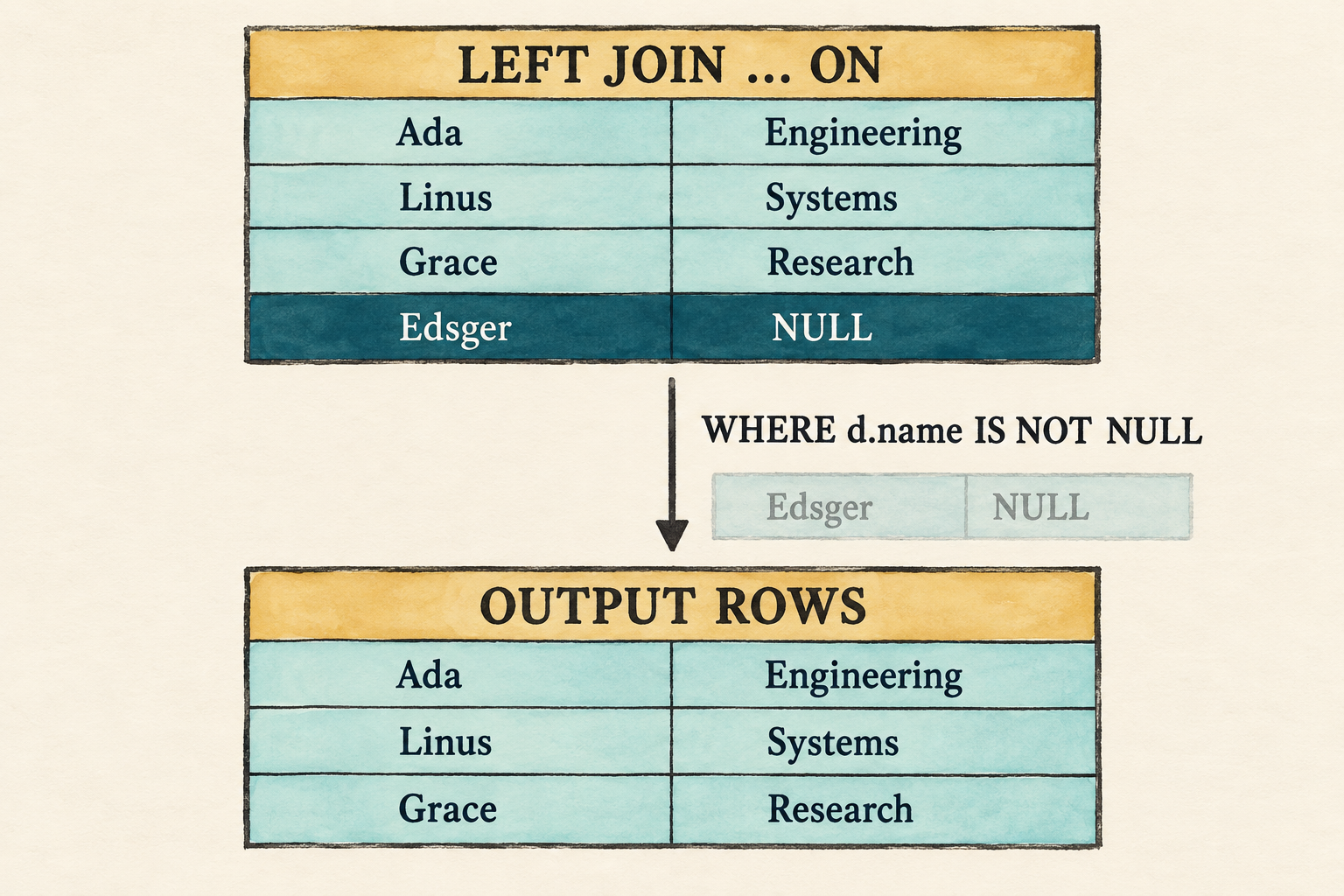
ON determines matching and preservation before WHERE filters the joined rows.The left join creates Edsger’s null-extended row before Filter evaluates
d.name IS NOT NULL and removes it. The final result therefore looks like an
inner join, but the plan reached it through different semantics:
Project
   |
Filter(d.name IS NOT NULL)
   |
Left Join(on: e.department_id = d.id)
This ordering explains why an outer-join rewrite requires more care than the
inner-join equivalence shown earlier. Moving conditions between ON and
WHERE can change the result.
8.12 Reconnect the application
The parser checkpoint still occupies main.rs, while the catalog and executor
now support the complete join path. Reconnection has three parts: restore the
application and add unmatched sample rows, point the fixed demonstration at
the representative left join, and run the connected path before returning to
the prompt.
8.12.1 Restore the application and extend its data
The AST checkpoint replaced the application. Restore the Chapter 7 version before applying the final catalog and demonstration changes:
git restore --source lesson-007 -- src/main.rs
Update the row helper so an employee can be unassigned. A present identifier
becomes an integer value; None becomes SQL NULL.
src/main.rs: replace employee()
fn employee(id: i64, name: &str, salary: i64,
    department_id: Option<i64>) -> Row
{
    Row::new(vec![
        ("id", Value::Integer(id)),
        ("name", Value::Text(name.into())),
        ("salary", Value::Integer(salary)),
        ("department_id",
            department_id.map_or(Value::Null, Value::Integer)),
    ])
}
Change the existing employee calls to pass Some(10), Some(20), and
Some(30), then add the unmatched rows to their respective catalog tables.
src/main.rs: replace the employee rows
rows: vec![
    employee(1, "Ada", 70_000, Some(10)),
    employee(2, "Linus", 50_000, Some(20)),
    employee(3, "Grace", 72_000, Some(30)),
    employee(4, "Edsger", 65_000, None),
],src/main.rs: replace the department rows
rows: vec![
    department(10, "Engineering"),
    department(20, "Systems"),
    department(30, "Research"),
    department(40, "Operations"),
],
8.12.2 Run the representative left join
Finally, make the fixed demonstration run the representative left join. The prompt already routes every statement through the same parse-bind-execute path, so it needs no separate join-specific change.
src/main.rs: replace run_demo()
fn run_demo(catalog: &Catalog) {
    let sql = "SELECT e.name AS employee_name, \
        d.name AS department_name \
        FROM employees AS e \
        LEFT JOIN departments AS d \
        ON e.department_id = d.id;";
    let rows = execute_sql(sql, catalog)
        .expect("the lesson query should execute");
    println!("Employees and their departments:");
    for row in rows {
        println!("{row}");
    }
}
8.12.3 Check the connected path
The visible demonstration should print:
cargo fmt
cargo run --quiet
Employees and their departments:
{employee_name: "Ada", department_name: "Engineering"}
{employee_name: "Linus", department_name: "Systems"}
{employee_name: "Grace", department_name: "Research"}
{employee_name: "Edsger", department_name: NULL}
Binding failures remain ordinary query errors. An unknown name in ON, an
ambiguous unqualified column, or a non-Boolean condition must fail before any
rows are scanned.
Run the prompt to compare the other forms:
cargo run --quiet -- --prompt
The completed lesson-008 checkpoint contains parser, binding,
null-extension, row-preservation, empty-input, and end-to-end tests. Their
source remains in the Rust files rather than the build-along narration.
8.13 What we deliberately did not build
- Nested loops remain the only join execution strategy.
- The logical and physical plan representations are still combined.
- There is no hash join, merge join, join reordering, or cost-based choice.
NATURAL JOIN,USING, lateral inputs, and semi/anti joins are absent.- The grammar’s
table_primaryis still a catalog table, not a subquery or parenthesized table expression. - Conditions are not pushed below joins.
These limits keep the chapter focused on one semantic distinction: matching a pair and preserving an unmatched row are separate decisions.
8.14 Try it
Run the prompt and predict each result before executing it:
-
Replace
LEFT JOINwithINNER JOIN. -
Replace it with bare
JOIN. -
Use
RIGHT JOINand identify the null-extended row. -
Use
FULL OUTER JOINand predict the complete row order. -
Change
ON e.department_id = d.idtoON FALSEfor each join kind. -
Restore the left join and add
WHERE d.name IS NOT NULL. -
Use
ON e.department_id + d.nameand predict which stage rejects it. -
Use the same catalog table under another alias to build an
a JOIN b JOIN cchain:SELECT e.name AS employee, d.name AS department, coworker.name AS coworker FROM employees AS e JOIN departments AS d ON e.department_id = d.id JOIN employees AS coworker ON coworker.department_id = d.id; -
Place a comma after an explicit join so its three matching rows form a Cartesian product with all four departments:
SELECT e.name AS employee, d.name AS department,
       all_departments.name AS compared_department
FROM employees AS e
JOIN departments AS d ON e.department_id = d.id,
     departments AS all_departments;
Check your reasoning
- Only Ada, Linus, and Grace remain because an inner join discards both unmatched sides.
- Bare
JOINhas the same meaning asINNER JOIN. - The result includes
{employee_name: NULL, department_name: "Operations"}. - The three matches appear first, followed by Edsger with
NULL, thenNULLwith Operations. INNERemits no rows,LEFTpreserves every employee,RIGHTpreserves every department, andFULLpreserves every row from both inputs.- The join creates Edsger’s null-extended row, then
WHEREremoves it. - Binding rejects the expression because arithmetic requires integers before
it checks whether the complete
ONresult is Boolean. - The parser creates one
TableReferencewhosejoinsvector contains two clauses. Each department currently has one employee, so the chain produces three rows in whichemployeeandcoworkerhave the same name. - The first
TableReferenceproduces three employee-department matches. The comma combines those rows with the four-rowall_departmentsinput, so the result contains3 × 4 = 12rows.
8.15 Many rows can become one answer
The database can now express whether unmatched rows disappear or survive. Its logical plan records the join kind and match condition, while one deliberately simple nested-loop implementation executes all four forms.
The result is still one row per surviving pair. Questions such as “How many
employees belong to each department?” require a different operation: several
input rows must contribute to one output value. The next chapter introduces
aggregate functions, GROUP BY, and HAVING to make that many-to-one flow
visible.