3. SQL Is Just a Frontend
SQL lets us write a plan without drawing the tree ourselves.
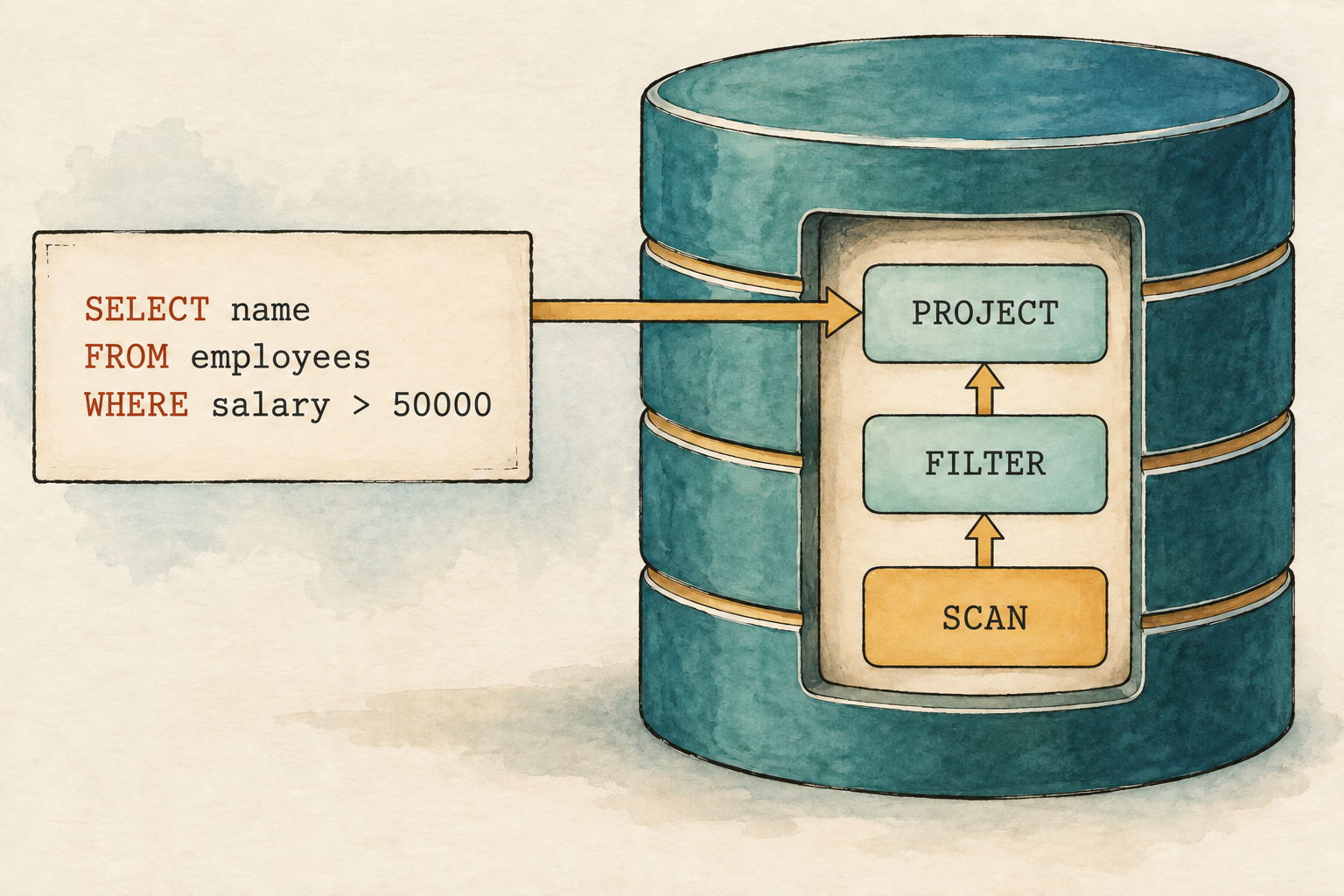
Chapter 2 ended with a plan that our engine could inspect and execute. There was only one inconvenience: we had to construct that plan ourselves. A person should be able to write a request like this instead:
SELECT name
FROM employees
WHERE salary > 50000;
To us, the request already looks meaningful. To the program, it begins as a sequence of characters. Before the existing engine can run it, a new frontend must recognize the words and punctuation, discover how they fit together, and turn that structure into the logical plan we already understand. That translation must preserve the request’s meaning: producing a plan is not enough if the plan answers a different question.
This chapter follows that journey:
SQL
 ↓
Tokens
 ↓
Abstract syntax tree
 ↓
Logical plan
 ↓
Rows
We will support only the query shown above and other queries with the same shape. That narrow boundary lets us see every stage without hiding parsing inside a library. Appendix B records the complete planned grammar. Later chapters will implement more of it when aliases, expressions, joins, aggregation, sorting, and subqueries give us a reason.
Before changing the program, create a working branch from the completed Chapter 2 checkpoint:
git switch --create chapter-003 lesson-002
The existing executor will remain unchanged while we add the frontend above it.
3.1 Give the frontend a place to answer
Before recognizing a single SQL word, we need somewhere to enter a query and observe what the frontend does with it. We will add a small interactive prompt that accepts one query at a time and prints what the database produces:
$ cargo run --quiet -- --prompt
sql> SELECT name FROM employees WHERE salary > 50000;
{name: "Ada"}
{name: "Grace"}
sql>
This is a read-evaluate-print loop, usually shortened to REPL. It reads
one statement, evaluates that statement, prints either rows or an error, and
then loops back for another query. SQL uses ; to mark the end of the statement,
so a query may span several input lines. An end-of-file signal, usually
Control-D on Linux and macOS or Control-Z followed by Enter on Windows, leaves
the prompt.
The prompt will make the frontend’s growth visible. Its first version will print tokens. The next version will print the AST. Once plan conversion is connected, the same entered line will produce rows. Each step gives us something concrete to inspect before we add the next one.
characters → tokens → Query AST → logical plan → rows
The loop has only two jobs: collect one semicolon-terminated statement and print the response. It passes the complete string to another function that does the database work. The loop itself will not need to change as the frontend grows.
Begin with a prompt that echoes each nonempty line. We will replace only
inspect_sql() as the frontend gains meaning.
src/main.rs: temporarily replace the file with this first block
use std::io::{self, Write};

fn main() -> io::Result<()> {
    run_prompt()
}

fn inspect_sql(sql: &str) {
    println!("{}", sql.trim());
}
One small function appends a line and reports whether that line ends the
statement. trim_end() permits spaces after the semicolon.
src/main.rs: add after inspect_sql()
fn append_sql_line(sql: &mut String, line: &str) -> bool {
    sql.push_str(line);
    line.trim_end().ends_with(';')
}
The input loop uses sql> for the first line and ...> while it waits for
the terminating semicolon. An outer loop accepts later statements.
src/main.rs: add after append_sql_line()
fn run_prompt() -> io::Result<()> {
    loop {
        let mut sql = String::new();

        loop {
            if sql.is_empty() {
                print!("sql> ");
            } else {
                print!("...> ");
            }
            io::stdout().flush()?;

            let mut line = String::new();
            if io::stdin().read_line(&mut line)? == 0 {
                println!();
                if !sql.trim().is_empty() {
                    eprintln!("error: incomplete query at end of input");
                }
                return Ok(());
            }
            if sql.is_empty() && line.trim().is_empty() {
                break;
            }
            if append_sql_line(&mut sql, &line) {
                break;
            }
        }

        if !sql.trim().is_empty() {
            inspect_sql(&sql);
        }
    }
}
Run cargo run --quiet and enter the opening query in its multiline form. The
prompt displays ...> until the line containing ;, prints the accumulated
text, and waits for another statement. It cannot understand SQL yet, but the
input loop works.
3.2 SQL begins as characters
Place the query in a Rust string:
SELECT name FROM employees WHERE salary > 50000;
The string preserves every character, but it does not record where one word
ends and another begins or what role each word plays. The computer receives an
S, followed by an E, followed by an L, and so on. It does not begin with
a SELECT clause, a table name, or a predicate. The frontend must recover
those boundaries and roles before it can construct a plan.
Trying to find each clause with string splitting would work for this one example, but small changes would quickly expose the trick. Extra spaces, newlines, and lowercase keywords should not change the query. Names also have different roles depending on where they occur. We need a representation that is more useful than individual characters but simpler than a complete query.
3.3 Turn characters into tokens
Read the query from left to right and collect characters that belong together.
SELECT is one meaningful unit. So are name, >, 50000, and ;.
Such a unit is called a token. The component that produces tokens is a
lexer, sometimes called a scanner.
We will build the lexer in three steps. First, we will decide how the program represents tokens and characters it cannot recognize. Next, we will walk through the SQL text and produce those tokens. Finally, we will connect the lexer to the prompt so we can see both successful output and errors.
3.3.1 Represent tokens and lexical errors
Begin with the seven kinds of token our query can contain.
src/lexer.rs: create this file
use std::fmt;

#[derive(Clone, Debug, PartialEq, Eq)]
pub enum Token {
    Select,
    From,
    Where,
    Identifier(String),
    GreaterThan,
    Integer(i64),
    Semicolon,
}
The keyword variants represent SQL words with fixed meanings. Identifier
stores a name chosen by the user, while Integer stores a numeric value.
GreaterThan and Semicolon represent the two punctuation marks supported by
this chapter.
Using these variants, the employee query becomes:
Select
Identifier("name")
From
Identifier("employees")
Where
Identifier("salary")
GreaterThan
Integer(50000)
Semicolon
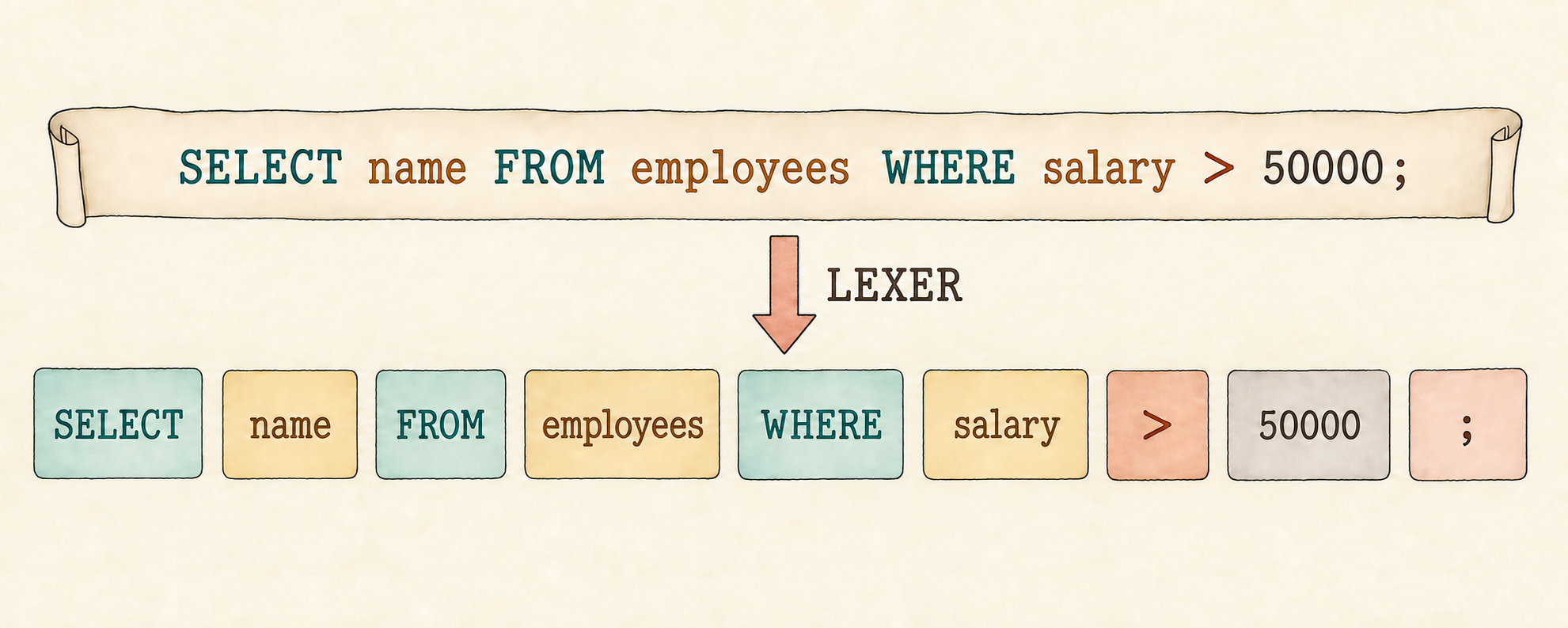
Whitespace does not appear in the sequence because it only separates tokens.
The spelling of each identifier is preserved, while the five digits in
50000 have become one integer value.
An invalid character needs a position and a readable explanation. Add the
error value below Token.
src/lexer.rs: add after Token
#[derive(Debug, PartialEq, Eq)]
pub struct LexError {
    position: usize,
    message: String,
}

impl fmt::Display for LexError {
    fn fmt(&self, formatter: &mut fmt::Formatter<'_>) -> fmt::Result {
        write!(
            formatter,
            "at character {}: {}",
            self.position, self.message
        )
    }
}
LexError records where the unexpected character appeared and explains why
the lexer stopped.
3.3.2 Walk the input once
The lexer keeps one cursor pointing at the next character to inspect. At each position, it performs one of six actions:
whitespace             → skip it
letter or underscore   → read one word
digit                  → read one integer
>                      → emit a greater-than token
;                      → emit a semicolon token
anything else          → return a lexical error
Start the lexer by storing the input SQL query as characters, creating an empty token list, and placing the cursor at the beginning.
src/lexer.rs: add after impl fmt::Display for LexError
pub fn tokenize(sql: &str) -> Result<Vec<Token>, LexError> {
    let characters: Vec<char> = sql.chars().collect();
    let mut tokens = Vec::new();
    let mut current = 0;

    while current < characters.len() {
        let character = characters[current];
Whitespace separates tokens, so it advances the cursor without adding
anything. A letter or underscore begins a word. The inner loop consumes the
rest of that word before word_token() classifies it.
src/lexer.rs: continue inside the while loop
        if character.is_whitespace() {
            current += 1;
        } else if character.is_ascii_alphabetic() || character == '_' {
            let start = current;
            current += 1;
            while current < characters.len()
                && (characters[current].is_ascii_alphanumeric()
                    || characters[current] == '_')
            {
                current += 1;
            }

            let word: String = characters[start..current].iter().collect();
            tokens.push(word_token(word));
characters[start..current] is the portion of the input occupied by the
word. Calling iter().collect() gathers those characters into a String.
A digit starts an integer. This branch consumes all adjacent digits and
converts them together, so 50000 becomes one value instead of five tokens.
src/lexer.rs: continue the same if chain
        } else if character.is_ascii_digit() {
            let start = current;
            current += 1;
            while current < characters.len() && characters[current].is_ascii_digit() {
                current += 1;
            }

            let digits: String = characters[start..current].iter().collect();
            let value = digits.parse().map_err(|_| LexError {
                position: start + 1,
                message: format!("integer is too large: {digits}"),
            })?;
            tokens.push(Token::Integer(value));
Only > and ; remain. Any other character becomes the LexError defined
above. This branch also closes the loop and returns the completed token list.
src/lexer.rs: finish the if chain and tokenize()
        } else {
            let token = match character {
                '>' => Token::GreaterThan,
                ';' => Token::Semicolon,
                _ => {
                    return Err(LexError {
                        position: current + 1,
                        message: format!("unexpected character '{character}'"),
                    });
                }
            };
            tokens.push(token);
            current += 1;
        }
    }

    Ok(tokens)
}
Finally, classify a completed word. SQL keywords ignore letter case; every other word remains an identifier with its original spelling.
src/lexer.rs: add after tokenize()
fn word_token(word: String) -> Token {
    if word.eq_ignore_ascii_case("SELECT") {
        Token::Select
    } else if word.eq_ignore_ascii_case("FROM") {
        Token::From
    } else if word.eq_ignore_ascii_case("WHERE") {
        Token::Where
    } else {
        Token::Identifier(word)
    }
}
Keywords ignore ASCII letter case, so select and SELECT produce the same
token. Identifiers keep their original spelling because the next chapter must
decide how names correspond to tables and columns. The lexer recognizes units;
it does not decide whether a name exists or whether the sequence makes sense.
3.3.3 First prompt checkpoint
We now have enough code to make the prompt recognize something. Keep the loop from Section 3.1 and connect the lexer above it.
src/main.rs: add at the top of the file
mod lexer;src/main.rs: add after use std::io::{self, Write};
use lexer::tokenize;src/main.rs: replace inspect_sql()
fn inspect_sql(sql: &str) {
    match tokenize(sql) {
        Ok(tokens) => println!("{tokens:#?}"),
        Err(error) => eprintln!("error: {error}"),
    }
}
Run cargo run --quiet and enter:
SELECT name FROM employees WHERE salary > 50000;
The prompt prints the nine-token sequence shown in Section 3.3.1. Then enter
SELECT @;. It prints:
error: at character 8: unexpected character '@'
The prompt then asks for another line. We have now observed both successful tokenization and a lexical error.
The tokens are correct, but they are still only a flat list. Nothing in that
list says that name belongs after SELECT, or that 50000 must follow
>. To recover those relationships, we need to describe which token
sequences form a query.
3.4 Give the tokens a shape
A grammar is a set of rules describing valid structure. The complete planned course grammar lives in Appendix B, but our first parser needs only four productions:
query          = select_clause from_clause where_clause ";" ;
select_clause  = "SELECT" identifier ;
from_clause    = "FROM" identifier ;
where_clause   = "WHERE" identifier ">" integer ;
The unquoted semicolon at the end of each line marks the end of a grammar
production. In the query rule, the quoted ";" is different: it is the
literal semicolon that must appear in the SQL input.
Read the first rule as a recipe. A query contains a select clause, followed by
a from clause, followed by a where clause and a semicolon. The other rules say
what each clause contains. The quoted words and symbols must appear literally;
identifier and integer refer to token categories.
These productions will do more than recognize valid text. Together they describe one complete query form, and later in this chapter we will give that form a meaning by translating it into relational operations. This approach is called syntax-directed translation: the recognized grammatical structure tells the frontend which translation rule to apply. As the grammar grows, each new query form will need both syntax and a meaning instead of a collection of special cases hidden in the parser.
This grammar accepts only the query form needed in this lesson. It cannot yet
select multiple columns, accept a query without a WHERE clause, compare
text, or use another comparison operator. Those forms are outside the current
language rather than parser mistakes. The parser should reject them clearly
instead of guessing what the user intended.
The component that checks tokens against these rules is a parser. We will
write a recursive-descent parser, in which one method represents each
grammar production. It begins with the outer query rule and consumes one
expected token at a time. When the next token cannot satisfy the current rule,
parsing stops with a syntax error.
Each production will become one parser method:
| Grammar production | Parser method | Information produced |
|---|---|---|
query | parse_query() | complete Query AST |
select_clause | parse_select_clause() | selected column |
from_clause | parse_from_clause() | table name |
where_clause | parse_where_clause() | filter column and integer |
The public parse() function will tokenize the SQL and then call
parse_query() to begin applying these productions.
The clause methods will recover a selected column, a table name, a filter
column, and an integer. The outer parse_query() method will gather those
pieces. Before writing the methods, we need a value that can hold what they
discover.
3.5 Store what the parser discovers
A parser must do more than report that the tokens follow the grammar. It must preserve the names and number needed by the next stage. We store them in an abstract syntax tree, usually shortened to AST. An AST preserves the meaningful structure while discarding details, such as whitespace and keyword capitalization, that no longer matter.
Our grammar has no nesting yet, so its first AST looks more like a record than a branching tree:
src/parser.rs: create the parsed-query representation
#[derive(Debug, PartialEq, Eq)]
pub struct Query {
    pub selected_column: String,
    pub table: String,
    pub filter_column: String,
    pub greater_than: i64,
}
For the employee query, the four fields contain name, employees,
salary, and 50000. The value records the structure recovered from the SQL;
it has not read a table, filtered a row, or chosen a column.
We now have all three ingredients:
Tokens provide the input
          ↓
Grammar provides the recipe
          ↓
The Query AST stores the result
The parser connects them.
3.6 Parse one complete query
Keep the Query structure from the previous section and build the parser
around it. The parser will consume tokens in grammar order and fill the
corresponding fields.
Start by importing the lexer and defining the error returned to callers.
src/parser.rs: add at the top of the file
use std::fmt;

use crate::lexer::{Token, tokenize};

#[derive(Debug, PartialEq, Eq)]
pub struct ParseError(String);

impl fmt::Display for ParseError {
    fn fmt(&self, formatter: &mut fmt::Formatter<'_>) -> fmt::Result {
        formatter.write_str(&self.0)
    }
}
ParseError(String) is a tuple struct with one unnamed field. Inside its
implementation, .0 accesses that field.
The public function turns SQL into tokens, places them in a Parser, and asks
that parser for one query.
src/parser.rs: add after impl fmt::Display for ParseError
pub fn parse(sql: &str) -> Result<Query, ParseError> {
    let tokens = tokenize(sql).map_err(|error| ParseError(error.to_string()))?;
    let mut parser = Parser { tokens, current: 0 };
    parser.parse_query()
}

struct Parser {
    tokens: Vec<Token>,
    current: usize,
}
tokenize() returns a LexError, while parse() returns a ParseError.
map_err() converts the lexical error, and ? returns it immediately when
tokenization fails.
Each grammar clause gets a method. These first two consume a keyword followed by an identifier.
select_clause = "SELECT" identifier ;
from_clause   = "FROM" identifier ;
src/parser.rs: begin impl Parser
impl Parser {
    fn parse_select_clause(&mut self) -> Result<String, ParseError> {
        self.expect(Token::Select, "expected SELECT at start of query")?;
        self.identifier("expected a column name after SELECT")
    }

    fn parse_from_clause(&mut self) -> Result<String, ParseError> {
        self.expect(Token::From, "expected FROM after selected column")?;
        self.identifier("expected a table name after FROM")
    }
The WHERE clause returns both pieces needed by our filter.
where_clause = "WHERE" identifier ">" integer ;
src/parser.rs: continue inside impl Parser
    fn parse_where_clause(&mut self) -> Result<(String, i64), ParseError> {
        self.expect(Token::Where, "expected WHERE after table name")?;
        let column = self.identifier("expected a column name after WHERE")?;
        self.expect(Token::GreaterThan, "expected > after filter column")?;
        let value = self.integer("expected an integer after >")?;
        Ok((column, value))
    }
The outer rule calls those clause methods in grammar order and then requires the semicolon. It also confirms that no token follows the semicolon. The grammar describes one complete query, so anything remaining is extra input.
query = select_clause from_clause where_clause ";" ;
src/parser.rs: continue inside impl Parser
    fn parse_query(&mut self) -> Result<Query, ParseError> {
        let selected_column = self.parse_select_clause()?;
        let table = self.parse_from_clause()?;
        let (filter_column, greater_than) = self.parse_where_clause()?;
        self.expect(Token::Semicolon, "expected ; after query")?;

        if self.current != self.tokens.len() {
            return Err(ParseError("unexpected token after ;".to_string()));
        }

        Ok(Query {
            selected_column,
            table,
            filter_column,
            greater_than,
        })
    }
Each grammar method delegates token matching to one of three cursor helpers.
expect() consumes a fixed token. identifier() and integer() recover the
value stored inside a token while advancing the cursor.
src/parser.rs: continue inside impl Parser
    fn expect(&mut self, expected: Token, message: &str) -> Result<(), ParseError> {
        if self.tokens.get(self.current) == Some(&expected) {
            self.current += 1;
            Ok(())
        } else {
            Err(ParseError(message.to_string()))
        }
}src/parser.rs: add after expect()
    fn identifier(&mut self, message: &str) -> Result<String, ParseError> {
        match self.tokens.get(self.current) {
            Some(Token::Identifier(value)) => {
                self.current += 1;
                Ok(value.clone())
            }
            _ => Err(ParseError(message.to_string())),
        }
    }
clone() gives the Query its own String; the parser’s token list retains
the original.
src/parser.rs: finish impl Parser
    fn integer(&mut self, message: &str) -> Result<i64, ParseError> {
        match self.tokens.get(self.current) {
            Some(Token::Integer(value)) => {
                self.current += 1;
                Ok(*value)
            }
            _ => Err(ParseError(message.to_string())),
        }
    }
}
The parser stores the token list and the position of the next token. Each successful helper call advances that position, so the next call sees exactly what remains.
3.6.1 Second prompt checkpoint
Now let the same prompt reveal the structure recovered by the parser.
src/main.rs: add after mod lexer;
mod parser;src/main.rs: replace use lexer::tokenize;
use parser::parse;src/main.rs: replace inspect_sql()
fn inspect_sql(sql: &str) {
    match parse(sql) {
        Ok(query) => println!("{query:#?}"),
        Err(error) => eprintln!("error: {error}"),
    }
}
Running the employee query now prints a Query containing name,
employees, salary, and 50000. The characters have become tokens, and the
tokens have become structured data. The prompt uses the required semicolon as
its statement boundary, so omitting it leaves the prompt at ...> waiting for
the rest of the query.
The order of these calls mirrors the four grammar rules. After consuming the semicolon, the parser also checks that no token remains. Without that final check, it could accept one valid query followed by arbitrary text and silently ignore the unwanted part.
The parser still requires Token::Semicolon independently of the prompt. That
keeps parse() correct for callers that provide SQL directly. It stops after
the first syntax error rather than attempting recovery. A later
multi-statement interface may need to find the next safe boundary after an
error; today, one precise failure keeps the behavior easy to inspect.
3.7 Build the logical plan
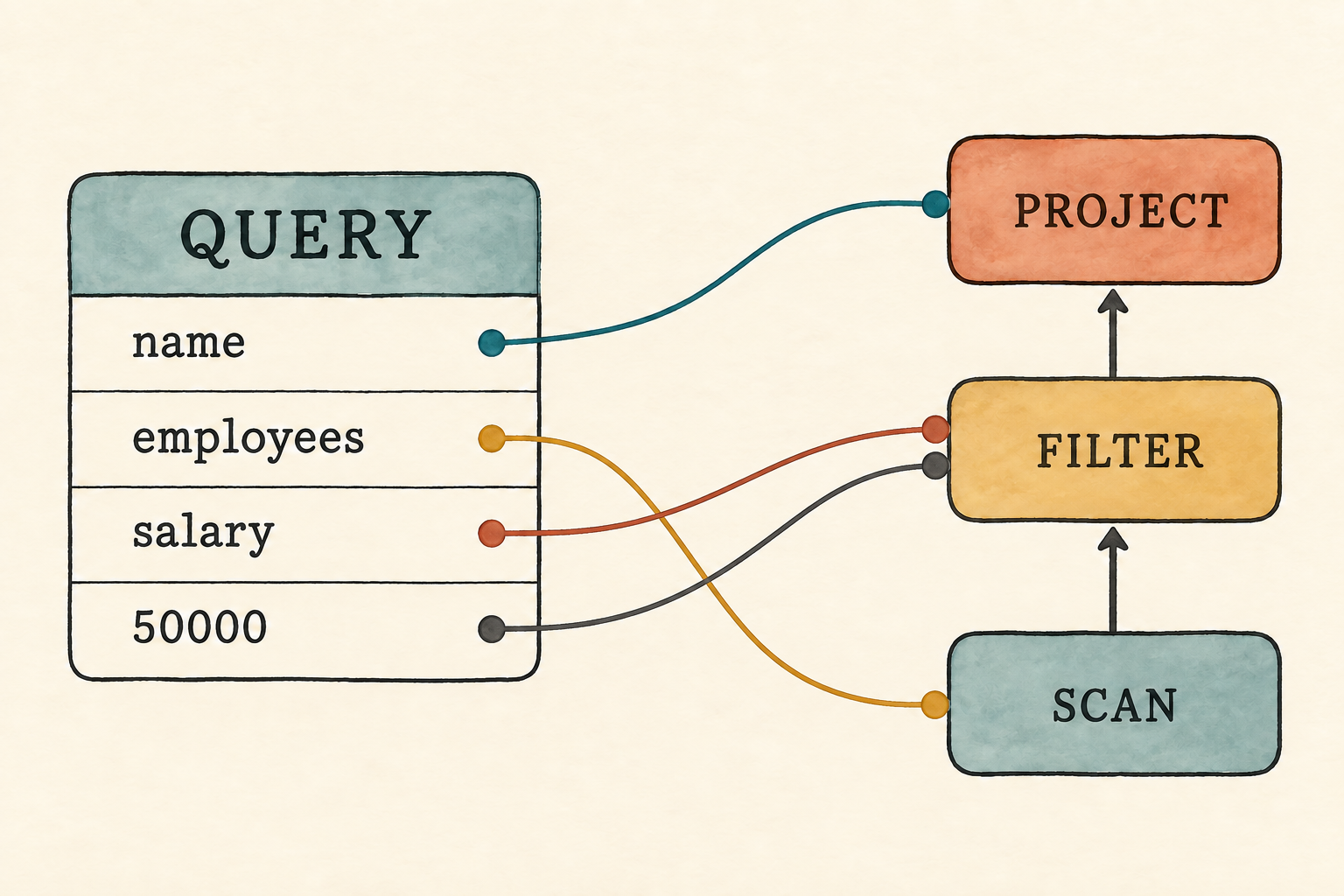
Parsing gives us a Query, but the executor from Chapter 1 accepts a Plan.
The conversion is direct: the table supplies a scan, the WHERE clause
supplies a filter, and the selected column supplies a project at the root.
The two representations have different jobs. The AST records the structure of the SQL text, while the logical plan describes relational work. As the SQL language grows, different ASTs may describe the same work and translate into equivalent plans in the Chapter 2 sense. Keeping the representations separate means the executor can continue to receive familiar relational operators instead of learning a special case for every SQL spelling.
The conversion is the meaning of our complete query form, written as one rule:
SELECT c FROM t WHERE p → πc(σp(t))
Read the relational expression from the inside out. Begin with table t, keep
the rows that satisfy predicate p, then retain column c. Substituting the
four fields in our AST gives employees, salary > 50000, and name, which
is exactly the plan we constructed by hand in Chapter 1.
The rule is a promise about answers, not merely a convenient tree shape. If the translation loses the predicate or projects a different column, the plan may execute successfully while answering the wrong question. Our plan still preserves duplicates and row order as described in Chapter 2; the algebraic notation here names the operations without changing those engine semantics.
This separation creates another useful boundary. A future optimizer can transform the logical plan while the SQL text and AST remain unchanged. It must still obey the equivalence conditions from Chapter 2, so a faster plan is acceptable only when it preserves the answer.
Query AST                         Logical plan

selected_column: name             Project(name)
table: employees                       ↑
filter_column: salary             Filter(salary > 50000)
greater_than: 50000                    ↑
                                  Scan(employee rows)
Before parser.rs can refer to crate::plan and crate::row, declare those
modules at the crate root.
src/main.rs: add after mod parser;
mod plan;
mod row;src/parser.rs: add the two new imports near the top
use crate::plan::Plan;
use crate::row::Row;src/parser.rs: add after Query
impl Query {
    pub fn into_plan(self, rows: Vec<Row>) -> Plan {
        // The parser records the table name, but cannot resolve it yet.
        // Chapter 5 introduces binding. For now the caller supplies the rows.

        Plan::Project {
            columns: vec![self.selected_column],
            input: Box::new(Plan::Filter {
                column: self.filter_column,
                greater_than: self.greater_than,
                input: Box::new(Plan::Scan { rows }),
            }),
        }
    }
}
One missing action deserves attention. The AST records employees, but
into_plan() does not use that field to find data. Our database has no
catalog of named tables. The caller supplies the employee rows directly, and
the table name remains unresolved. We keep that gap visible instead of
pretending that parsing has solved name lookup.
Further reading
Stefano Ceri and Georg Gottlob describe syntax-directed translation for a larger SQL subset and use the resulting relational expressions to study meaning, equivalence, and optimization. Our single rule is the fragment that matches this chapter’s language. See “Translating SQL into Relational Algebra: Optimization, Semantics, and Equivalence of SQL Queries,” IEEE Transactions on Software Engineering, 1985.
3.8 Run SQL repeatedly
The frontend can now replace the hand-built plan with a query string. We will
add an execute_sql() function that parses the text, converts the AST into a
plan, and executes that plan. Then we will restore the fixed demonstration and
update the interactive prompt so both paths use this function.
3.8.1 Restore the fixed demonstration
We will restore the fixed demonstration first, giving us a runnable checkpoint
before reconnecting the prompt. The plan and row modules are already
declared for plan conversion. Import the row types needed to rebuild the
employee table.
src/main.rs: add alongside the existing imports
use row::{Row, Value};The program still needs the same employee rows from Chapter 1. Begin with a small function that creates one employee row.
src/main.rs: add after main()
fn employee(id: i64, name: &str, salary: i64) -> Row {
    Row::new(vec![
        ("id", Value::Integer(id)),
        ("name", Value::Text(name.to_string())),
        ("salary", Value::Integer(salary)),
    ])
}
Now use it to construct the table.
src/main.rs: add after employee()
fn employee_rows() -> Vec<Row> {
    vec![
        employee(1, "Ada", 70_000),
        employee(2, "Linus", 50_000),
        employee(3, "Grace", 72_000),
    ]
}
Add the function that owns the complete SQL-to-rows path.
src/main.rs: add after employee_rows()
fn execute_sql(sql: &str, rows: &[Row]) -> Result<Vec<Row>, String> {
    let query = parse(sql).map_err(|error| error.to_string())?;
    Ok(query.into_plan(rows.to_vec()).execute())
}
Plan::Scan currently owns its rows, so rows.to_vec() gives the plan an
owned copy. This means every query copies the small employee table. We accept
that ownership simplification for now.
The final line converts the AST into a plan, executes the plan, and wraps the
resulting rows in Ok.
Returning String keeps this first shared entry point small, but it also
erases whether an error came from lexing or parsing. A later error type can
preserve that distinction when callers need it.
The fixed demonstration calls it with the original query.
src/main.rs: add after execute_sql()
fn run_demo(employees: &[Row]) {
    let sql = "SELECT name FROM employees WHERE salary > 50000;";
    let result = execute_sql(sql, employees).expect("the lesson query should execute");

    println!("Employees earning more than 50,000:");
    for row in result {
        println!("{row}");
    }
}
The query is fixed by the program, so failure here would indicate a mistake in
the lesson code. expect() returns the rows on success; on failure, it stops
the program and prints the supplied message with the error.
Now replace the temporary prompt-only main() with a demonstration-only
entry point.
src/main.rs: replace main()
fn main() {
    let employees = employee_rows();
    run_demo(&employees);
}
Remove the temporary prompt
Before running this checkpoint, remove the prompt code left by Section 3.6.1:
- remove
use std::io::{self, Write}; - remove the complete
inspect_sql()function - remove the complete
append_sql_line()function - remove the complete no-argument
run_prompt()function
Section 3.8.2 will add the final prompt after the demonstration works.
Run the fixed demonstration
Run this checkpoint:
cargo run --quiet
It prints Ada and Grace, now using SQL rather than a plan assembled inside
main().
3.8.2 Connect the final prompt
The fixed demonstration works again. Now let main() choose between it and the
interactive prompt. Begin by restoring the terminal I/O import.
src/main.rs: add with the imports
use std::io::{self, Write};src/main.rs: replace main()
fn main() {
    let employees = employee_rows();
    if std::env::args().nth(1).as_deref() == Some("--prompt") {
        run_prompt(&employees).expect("failed to read SQL from the terminal");
    } else {
        run_demo(&employees);
    }
}
std::env::args().nth(1) reads the first command-line argument after the
program name. as_deref() lets us compare that optional String with the
string slice "--prompt". With that argument, the program opens the prompt;
without it, the fixed demonstration runs.
run_prompt() returns an io::Result. If terminal input or output fails,
expect() stops the program because the prompt cannot continue using that
terminal.
The final prompt preserves the statement-collection behavior from Section 3.1,
but sends the completed SQL to execute_sql() instead of inspect_sql().
src/main.rs: add after run_demo()
fn run_prompt(employees: &[Row]) -> io::Result<()> {
    loop {
        let mut sql = String::new();

        loop {
            if sql.is_empty() {
                print!("sql> ");
            } else {
                print!("...> ");
            }
            io::stdout().flush()?;

            let mut line = String::new();
            if io::stdin().read_line(&mut line)? == 0 {
                println!();
                if !sql.trim().is_empty() {
                    eprintln!("error: incomplete query at end of input");
                }
                return Ok(());
            }
            if sql.is_empty() && line.trim().is_empty() {
                break;
            }
            if append_sql_line(&mut sql, &line) {
                break;
            }
        }

        if !sql.trim().is_empty() {
            print_query_result(&sql, employees);
        }
    }
}src/main.rs: add after run_prompt()
fn append_sql_line(sql: &mut String, line: &str) -> bool {
    sql.push_str(line);
    line.trim_end().ends_with(';')
}src/main.rs: add after append_sql_line()
fn print_query_result(sql: &str, employees: &[Row]) {
    match execute_sql(sql, employees) {
        Ok(rows) => {
            for row in rows {
                println!("{row}");
            }
        }
        Err(error) => eprintln!("error: {error}"),
    }
}
Read run_prompt() from the inside out. The inner loop collects lines through
the semicolon. execute_sql() then evaluates the complete statement. The
match prints either the returned rows or a frontend error, and the outer loop
starts another statement. An empty first line does no work. End-of-file exits;
if it arrives during a statement, the prompt reports that the query is
incomplete.
Try the interactive prompt
Run the interactive path:
cargo run --quiet -- --prompt
Enter the original query across four lines, then change the boundary to
70000. The first statement returns Ada and Grace. The second returns only
Grace. Then enter this malformed query:
SELECT name FROM employees WHERE salary > @;
The lexer reports the unexpected @, and the prompt remains ready for another
line.
Step back from the prompt for a moment.
The executor has not changed. The same scan, filter, and project still produce the rows. We added a frontend that turns one human-facing representation into the logical representation the engine already knew. SQL is not the execution engine; it is one way to describe work to it.
3.9 What we deliberately did not parse
Our first frontend is intentionally narrow:
- It accepts exactly one selected column, one table, and one
WHEREcomparison. - The comparison must use
>with a non-negative integer. - A semicolon is required, and no second statement may follow it.
- It has no aliases, qualified names, Boolean expressions, joins, functions, aggregation, ordering, or subqueries.
- It recognizes only ASCII letters, digits, and underscores in identifiers.
- It stops at the first lexical or syntax error.
- It records names but does not resolve them against tables or columns.
Appendix B shows where the language is heading, not what this version already implements. Each later chapter will move a small group of rules into the executable language. Accepting syntax before we can give it correct database meaning would make the grammar look impressive while making the system less trustworthy.
Production note: Real SQL parsers
Production systems accept much larger dialects, preserve source locations, report richer diagnostics, and often recover far enough to find several errors in one input. Our handwritten parser is useful because every token and rule is visible. We can replace or extend it when maintaining syntax begins to distract from the database concepts it serves.
3.10 Try it
Use the current lexer, parser, and employee rows for these experiments. Enter each query at the prompt after predicting which stage will accept or reject it.
- Change every keyword to lowercase. Does the result change?
- Add several spaces and newlines between tokens. Which tokens record them?
- Replace
>with@. Does the lexer or parser report the error? - Remove
WHERE salary > 50000. What token does the parser expect next? - Change
employeestomissing_table. Does parsing succeed? What happens if the caller still supplies the employee rows?
Check your reasoning
- The result does not change because keywords are case-insensitive.
- No token records whitespace. The lexer uses it only as a separator.
- The lexer rejects
@because it cannot form any token in this lesson. - After the table name, the parser reports that it expected
WHERE. - Parsing succeeds, and the current conversion still executes the supplied employee rows. The parser knows that a table name belongs there, but it cannot decide what that name refers to.
The fifth result is the important one. Our frontend can recognize valid syntax without understanding whether its names make sense. This is not a tokenization or parsing problem. It requires a different kind of work.
3.11 Parsing is not understanding
Consider two queries:
SELECT name FROM employees WHERE salary > 50000;
SELECT name FROM missing_table WHERE salary > 50000;
Both follow the grammar, so both produce a Query AST. Yet only the first
table name should lead to our employee rows. The same problem appears with an
unknown column, and a subtler version appears when a query compares text with
an integer. Grammar alone cannot answer any of those questions.
The database eventually needs a step that connects names in the AST to actual tables and columns, then checks whether operations make sense for their types. That step is called binding. Before a binder can check richer requests, however, the frontend must represent more than one column and one fixed comparison. The next chapter turns arithmetic, comparisons, Boolean operators, and null tests into expression trees that a binder can later inspect.