1. The Smallest Query Engine
Before a database can become distributed, it must first answer one small question correctly.

A database begins with a query: a request for some result. The query engine turns that request into a plan, reads the required data, performs the plan’s operations, and returns the result. A large database may spread this work across many processors and machines, but we will begin with a version small enough to hold in our heads.
In this chapter, we will build a tiny database program. Instead of reading SQL, it will execute a plan that we construct ourselves. Our first engine will know only three operations: read rows, remove rows that fail a condition, and remove columns that were not requested. Databases call these operations scan, filter, and project. Together they can answer an ordinary question such as this one:
SELECT name
FROM employees
WHERE salary > 50000;
Read the query one line at a time. FROM employees identifies the table named
employees. WHERE salary > 50000 keeps a row only when its salary is greater
than 50,000. SELECT name asks for the name column from each remaining row.
SQL writes numbers without thousands separators, so 50000 means 50,000.
Here is the complete employees table we will use:
| id | name | salary |
|---|---|---|
| 1 | Ada | 70,000 |
| 2 | Linus | 50,000 |
| 3 | Grace | 72,000 |
Ada and Grace earn more than 50,000, so their names belong in the result. Linus
earns exactly 50,000. The query uses >, not >=, so equality is not enough
and his row is removed. After removing the unrequested id and salary
columns, our tiny database program should print:
Employees earning more than 50,000:
{name: "Ada"}
{name: "Grace"}
The work sounds manageable: read the employees, discard the row whose salary does not satisfy the condition, and remove every column except the name.
By the end of the chapter, we will have represented the table in Rust, described the required work, executed it, and checked the result. That is not much of a database, but it is enough database to teach us how a query engine begins.
This chapter uses a small amount of Rust without pausing to teach the language. If any syntax is unfamiliar, keep Appendix A nearby and return here when the code is readable again.
To build alongside this chapter, clone the repository and create a working branch from the pre-code checkpoint:
git clone https://github.com/shashankkhasare/database-zero-to-distributed.git
cd database-zero-to-distributed
git switch --create chapter-001 lesson-000
cargo init --bin .
cargo init adds Cargo.toml and a starter src/main.rs to the existing
directory. The lesson-001 tag contains the completed chapter for comparison
or recovery; it is the destination, not the starting point.
1.1 Begin without SQL
We know what result this SQL query should produce. What we do not yet know is how the database performs the work.
Before a database can execute SQL, it must translate the text into an internal description of the required operations. That begins with a parser, which recognizes the query’s words, names, punctuation, and structure. We will build that machinery later. We will skip parsing for now and begin with the internal description a parser would produce. That leaves us with the question at the heart of this chapter:
Once the database knows which operations to perform, how does it produce the requested rows?
We will construct that plan directly in Rust and create the employee rows ourselves. A later chapter will translate SQL into the same plan.
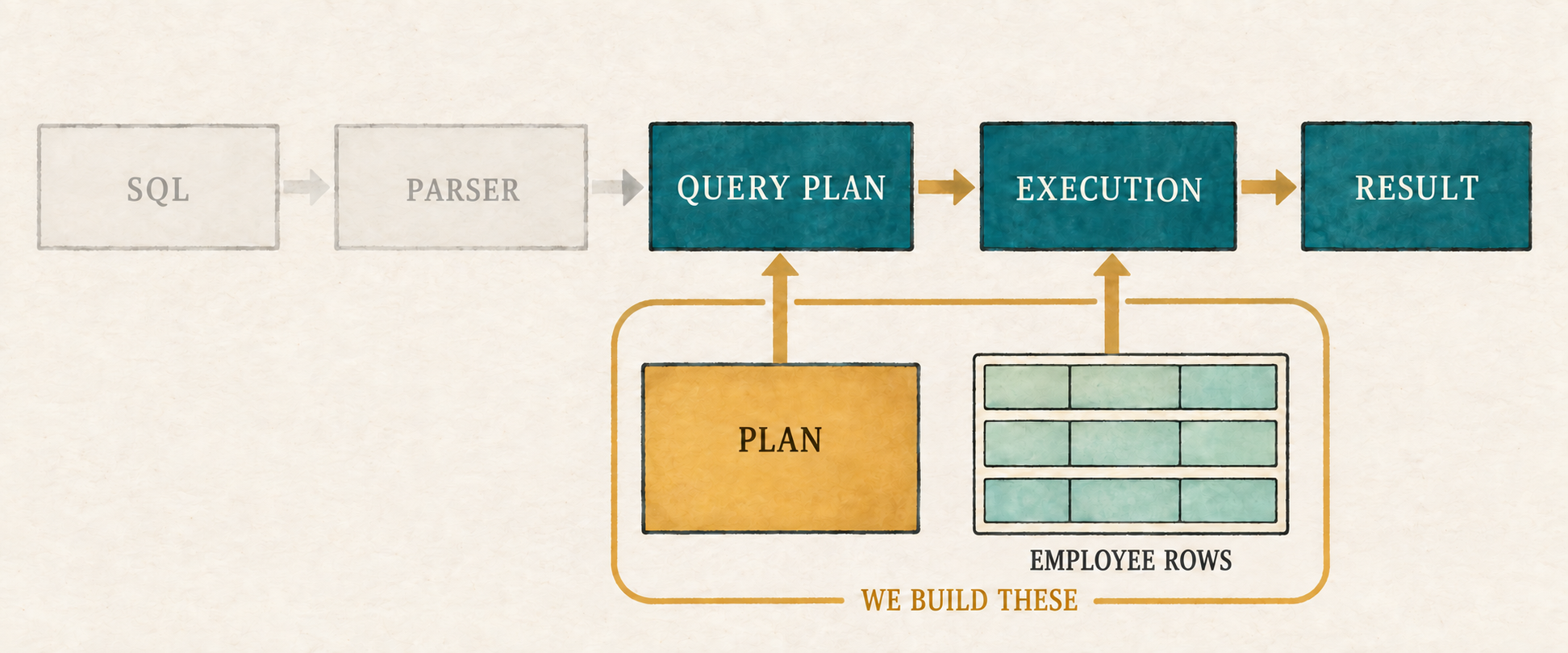
We already know the input and expected answer. Before our program can connect the two, it needs a way to represent one row.
1.2 Represent the table as rows
A table is made of rows and columns. Each row represents one item, in this case
one employee, and each column describes one fact about it. Database theory often
calls a table-like collection of rows a relation. We will use both words,
but “table” is a perfectly good mental picture. Our rows need integers for id
and salary, and text for name.
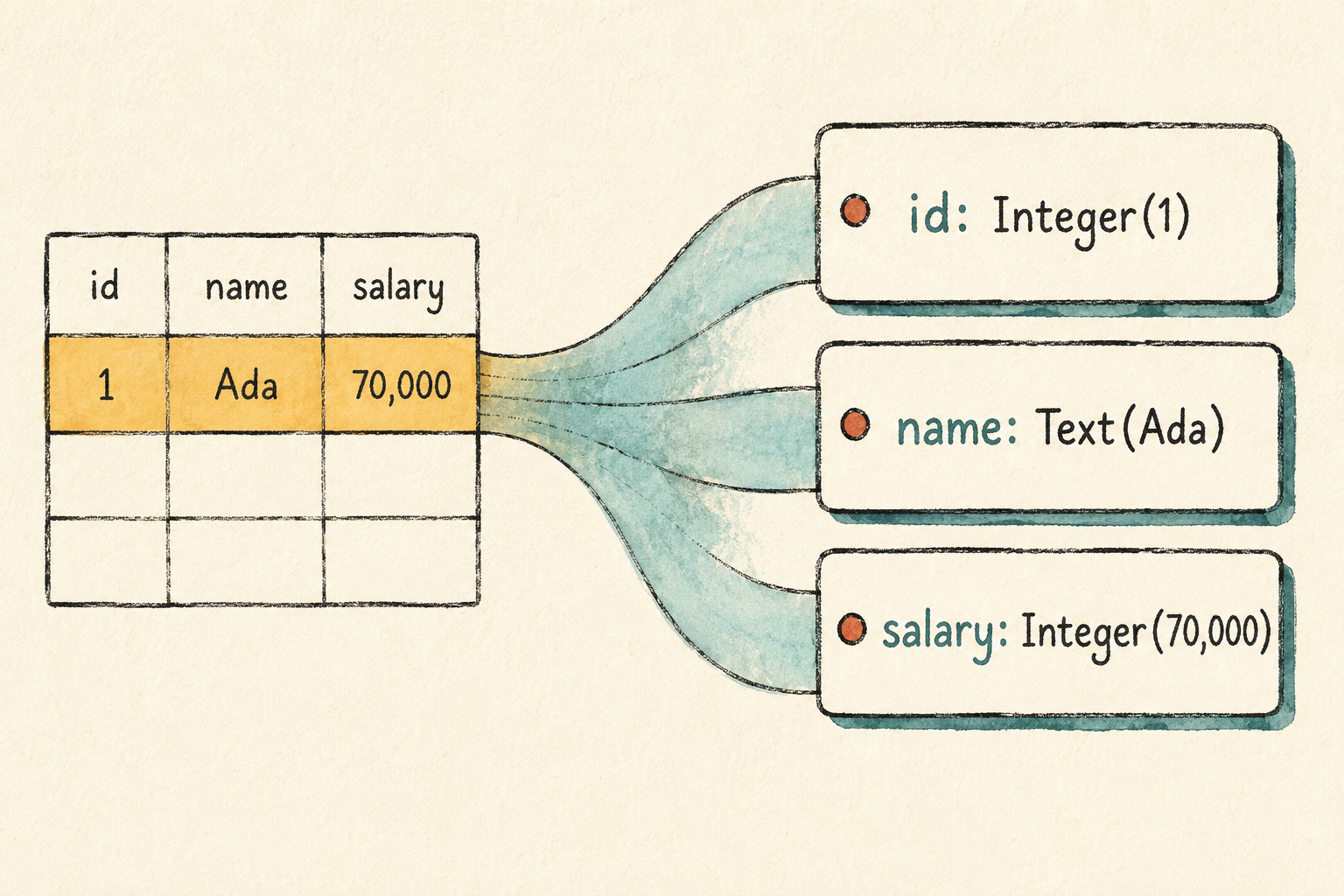
Look at the places where rows and columns meet. Ada’s id cell contains the
number 1, while her name cell contains the text Ada. Each cell holds one
value, and the engine must know what kind of value it holds before it can
compare or display it. We will begin with a type named Value.
src/row.rs: create this file
#[derive(Clone, Debug, PartialEq, Eq)]
pub enum Value {
    Integer(i64),
    Text(String),
}
Rust compiles a source file only after it is included in the program’s module
tree. Add the new row module at the top of the starter file.
src/main.rs: add at the top of the file
mod row;Integer and Text cover every cell in our employee table. Keeping the two
kinds distinct makes it impossible to mistake a name for a salary. We can add
another kind of value when a later query gives us a reason.
One Value represents only one cell in the table. A row brings together all
the cells that describe one employee. Ada’s row contains id 1, name Ada,
and salary 70,000. Our program will represent that complete record with a
type named Row, storing each column name beside its value.
src/row.rs: add after Value
#[derive(Clone, Debug, PartialEq, Eq)]
pub struct Row {
    values: Vec<(String, Value)>,
}
The values field stores the row as a list of column-and-value pairs. Ada’s row
will contain ("id", Integer(1)), ("name", Text("Ada")), and
("salary", Integer(70_000)). The column name travels with each value, so we
can tell what every value means by inspecting the row itself.
A stored row is useful only if the engine can work with it. We need to create rows for the employee table, find a value when the filter asks for a column, and build a smaller row when the project selects columns. We will add one method for each job.
src/row.rs: add after Row
impl Row {
    pub fn new(values: Vec<(&str, Value)>) -> Self {
        let mut owned_values = Vec::new();

        for (column, value) in values {
            owned_values.push((column.to_string(), value));
        }

        Self {
            values: owned_values,
        }
    }
}
Row::new() stores each column name as an owned String beside its value.
src/row.rs: add after the first impl Row
impl Row {
    pub fn get(&self, column: &str) -> Option<&Value> {
        for (name, value) in &self.values {
            if name == column {
                return Some(value);
            }
        }

        None
    }
}
Row::get() searches by column name and returns the matching value, or None
when the column does not exist.
src/row.rs: add after the second impl Row
impl Row {
    pub fn project(&self, columns: &[String]) -> Self {
        let mut values = Vec::new();

        for column in columns {
            let value = match self.get(column) {
                Some(value) => value,
                None => panic!("unknown column: {column}"),
            };

            values.push((column.clone(), value.clone()));
        }

        Self { values }
    }
}
Row::project() copies the requested columns, in order, into a new row. An
unknown column stops the program because plans are still written directly by
the programmer.
We can now represent Ada’s complete employee row:
Row::new(vec![
    ("id", Value::Integer(1)),
    ("name", Value::Text("Ada".to_string())),
    ("salary", Value::Integer(70_000)),
])
This design repeats column names in every row and searches them one by one. That would be wasteful for a large table, but it keeps our first implementation easy to inspect and works well enough for three rows. We will improve it when the limitation begins to matter.
Production note: Where is the schema?
Real database systems usually keep column names and types in a separate description called a schema. Rows can then store values compactly without repeating the names. Our first lesson keeps the names inside each row so the relationship between a column and its value remains obvious.
Each row can now store data, find a named value, and create a smaller row with selected columns. Those are all the row operations our first plan will need. Before we build that plan, we need one practical addition: a readable way to display its result rows.
1.2.1 Make result rows readable
The query will be easier to inspect if each result resembles a small record rather than Rust’s internal representation. We will print a row inside braces, separate its columns with commas, and place a colon between each column name and value. Text will appear in quotation marks, while integers will not.
For example, projecting Ada’s row to the name column should produce:
{name: "Ada"}
The following formatting code establishes that output. It preserves the order of values stored in the row, which also preserves the order requested by a project.
Rust’s formatting interfaces live in the standard library’s fmt module.
Import it at the top of row.rs before adding the display implementations.
src/row.rs: add at the top of the file
use std::fmt;src/row.rs: add after impl Row
impl fmt::Display for Row {
    fn fmt(&self, formatter: &mut fmt::Formatter<'_>) -> fmt::Result {
        write!(formatter, "{{")?;

        for (index, (column, value)) in self.values.iter().enumerate() {
            if index > 0 {
                write!(formatter, ", ")?;
            }

            write!(formatter, "{column}: {value}")?;
        }

        write!(formatter, "}}")
    }
}src/row.rs: add after impl fmt::Display for Row
impl fmt::Display for Value {
    fn fmt(&self, formatter: &mut fmt::Formatter<'_>) -> fmt::Result {
        match self {
            Value::Integer(value) => write!(formatter, "{value}"),
            Value::Text(value) => write!(formatter, "\"{value}\""),
        }
    }
}
This code controls presentation only. It does not change the values stored in a row or the way query operations process them. Appendix A explains Rust’s formatting machinery in more detail. Our rows are now represented and readable; the next piece must describe what the engine should do with them.
1.3 Describe the work as a plan
We need three operations:
- read the employee rows
- keep rows whose salary is greater than 50,000
- keep only the
namecolumn
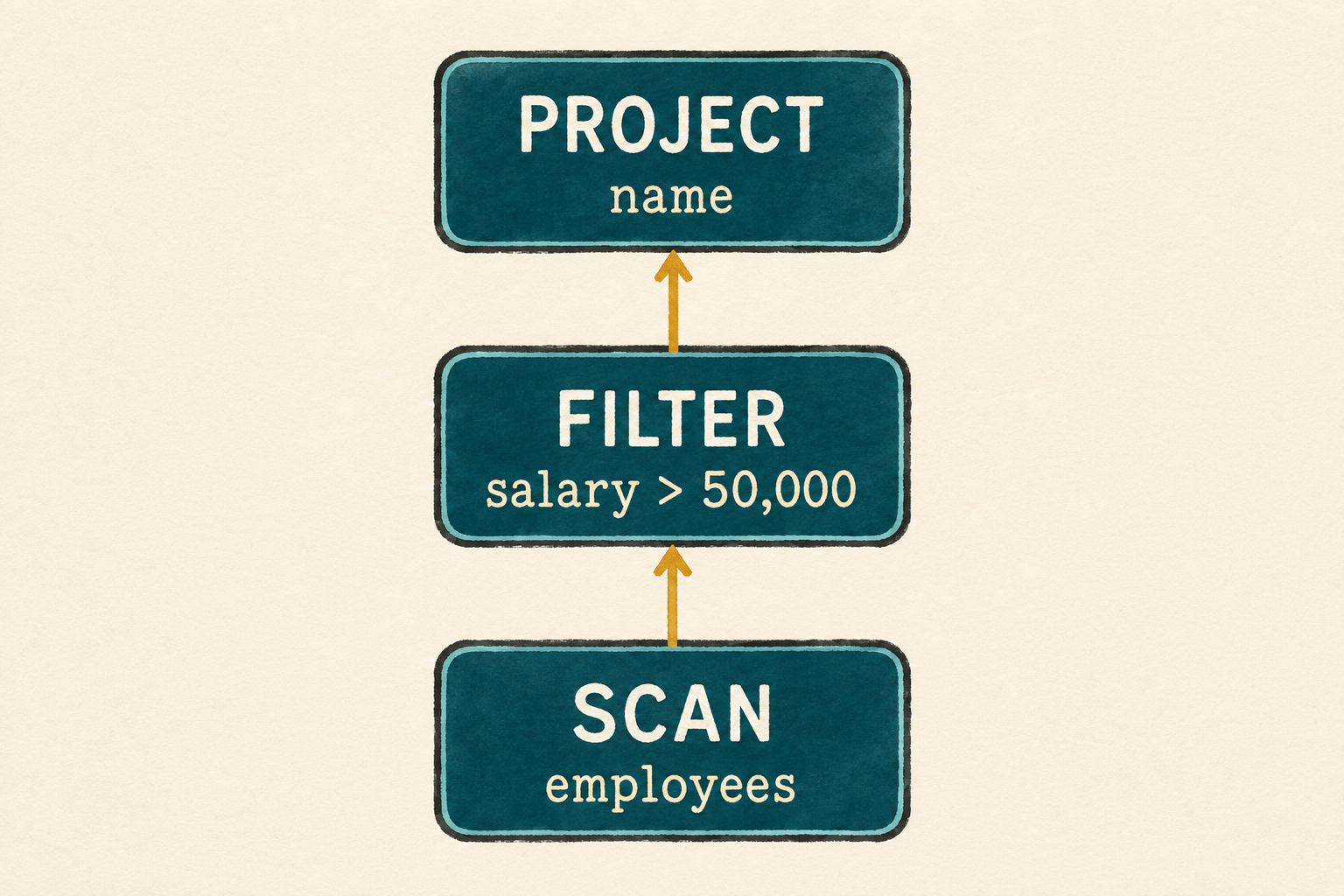
Databases commonly call these operations scan, filter, and project. They must run in a particular order. The scan supplies rows to the filter, and the filter supplies its surviving rows to the project. We can connect them like this:
Project name
    ↑
Filter salary > 50,000
    ↑
Scan employees
Each operation is a node, and the connected nodes form a query plan, a description of the work used to answer a query. This plan has only one path, so it looks like a chain. We still describe the structure as a tree because later operations, such as joins, can receive rows from more than one input and create branches.
The scan sits at the bottom because it needs no earlier result. A node without a child is called a leaf. The filter consumes the scan’s rows, and the project consumes the filter’s rows. The arrows point upward because rows flow from the scan toward the final result at the top.
Early diagrams will show these arrows explicitly. Once the convention is familiar, a plain connecting line may imply the same upward flow.
The engine needs more than the three operation names. A scan must hold the rows it will read. A filter must remember which column to inspect, what value to compare against, and which operation supplies its rows. A project must remember which columns to keep and where its rows come from.
Each operation becomes one node in the plan. In this tree, every node above the
scan stores an input that points to its child below it. The filter’s child is
the scan, and the project’s child is the filter. These links form the hierarchy
we drew above. Since a node can be a scan, filter, or project, we can represent
all three possibilities with one Plan type.
src/plan.rs: create this file
use crate::row::{Row, Value};

pub enum Plan {
    Scan {
        rows: Vec<Row>,
    },
    Filter {
        column: String,
        greater_than: i64,
        input: Box<Plan>,
    },
    Project {
        columns: Vec<String>,
        input: Box<Plan>,
    },
}
This first filter is deliberately narrow. It compares one integer column with
>. That is enough for the employee query, and we will generalize predicates
when another query requires more.
Include the second source file in the module tree as soon as we create it.
src/main.rs: add above mod row;
mod plan;For our employee query, those nodes and their attributes form this structure:
Project
├── columns: ["name"]
└── input
    └── Filter
        ├── column: "salary"
        ├── greater_than: 50,000
        └── input
            └── Scan
                └── rows: employees
This diagram shows the plan’s structure, not the direction in which calls or
rows travel. Project is the root. Its input points to the filter child, and
the filter’s input points to the scan child. The scan is the leaf because it
reads the employee rows without needing another operation below it.
We keep all three operations together in one Plan type, so the engine’s
complete vocabulary remains visible in one place. In the next section, we will
define the behavior of each kind of node directly. Splitting them behind
additional layers would make this first tree harder to see without solving a
problem we currently have.
We can now describe the query. Describing it is not the same as running it, so let’s teach the plan how to execute.
1.4 Execute the plan
Our plan currently describes work but cannot perform it. We will give Plan a
method named execute(). Calling it asks that plan to run and return its result
rows.
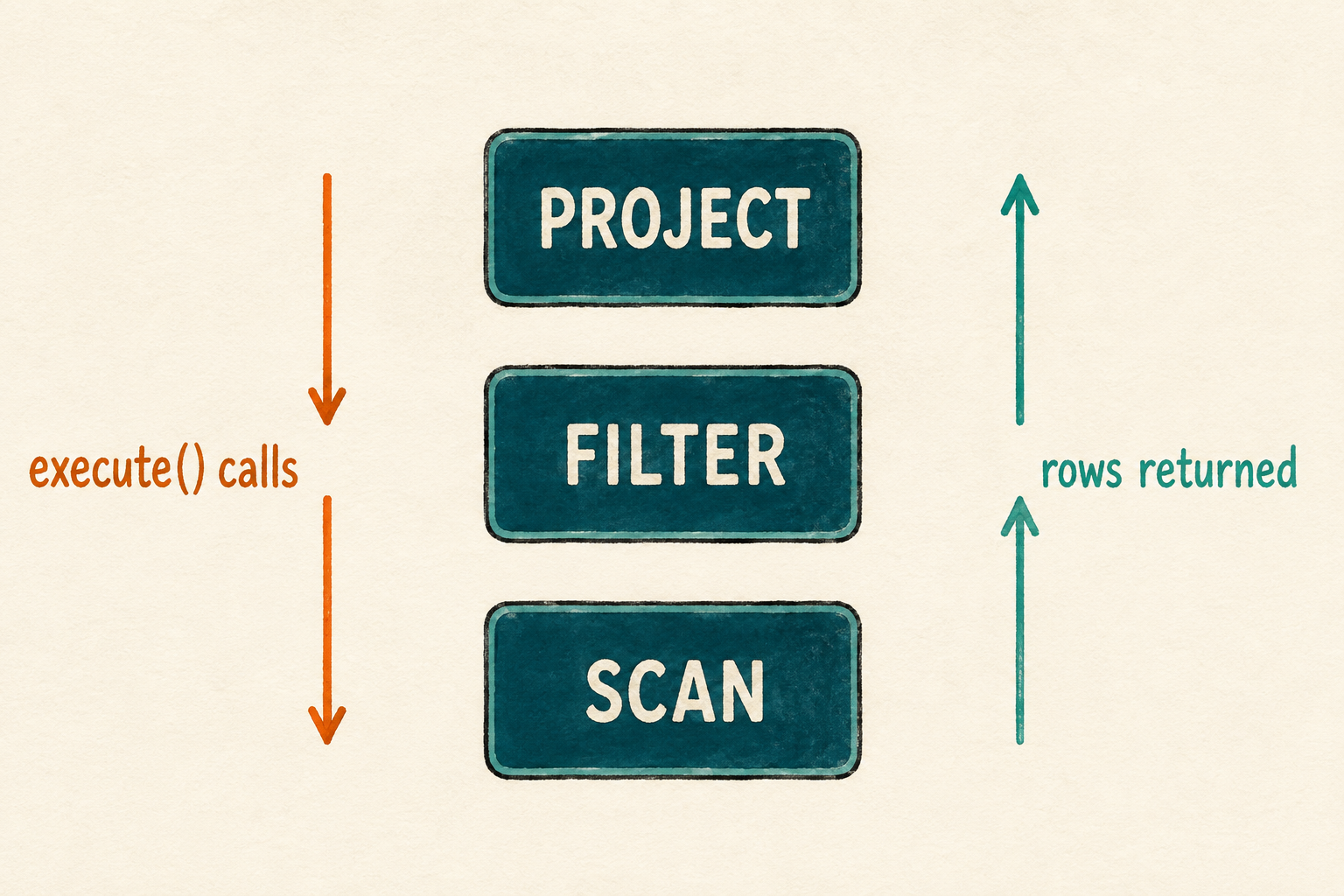
Calling execute() on the project does not begin by projecting a row. The
project has no rows yet. It first asks its input, the filter, to execute. The
filter has the same problem, so it asks the scan to execute. The requests occur
in this order:
Project.execute()
        ↓ asks its input
Filter.execute()
        ↓ asks its input
Scan.execute()
The scan already has the employee rows, so it can answer. It returns them to the filter, which removes Linus and returns two complete employee rows to the project. The project then keeps only their names:
Scan result: all three employee rows
        ↓ filter keeps two rows
Filter result: Ada and Grace rows
        ↓ project keeps one column
Project result: Ada and Grace names
Each node asks its child to execute before processing the returned rows. The
same execute() method therefore calls itself on a smaller input plan. Calling
a function from within itself is recursion.
The implementation will follow the same conversation. It examines the current node and runs the behavior for a scan, filter, or project. We will begin with a placeholder for each operation, then replace them one at a time.
src/plan.rs: add an implementation block after the Plan enum
impl Plan {
    pub fn execute(&self) -> Vec<Row> {
        match self {
            Plan::Scan { .. } => todo!("execute scan"),
            Plan::Filter { .. } => todo!("execute filter"),
            Plan::Project { .. } => todo!("execute project"),
        }
    }
}
Each todo!() marks behavior we have not implemented yet. The temporary
version gives every kind of plan node a place in execute(), allowing us to
build the executor in the same order that rows travel upward: scan, filter,
then project.
Before replacing the placeholders, let one run. Temporarily replace the starter
program with the smallest plan that calls execute().
src/main.rs: temporarily replace the file
mod plan;
mod row;

use plan::Plan;

fn main() {
    let plan = Plan::Scan { rows: Vec::new() };
    plan.execute();
}
cargo run --quiet
Rust first prints warnings because this temporary program does not yet use all the row methods and plan variants we have defined. Those warnings are expected at this incomplete checkpoint. After them, the program stops at the first unfinished operation:
thread 'main' panicked:
not yet implemented: execute scan
The exact output may also include a thread number, source location, and note about backtraces. The final panic is what matters: it proves that execution reached the scan placeholder. We can now replace that placeholder with real behavior and continue upward through the plan.
1.4.1 Scan returns its rows
The scan is the leaf of the plan, so it does not ask another node for input. It already contains the employee rows and returns all of them without filtering or changing their columns. Our first executor returns a complete copy of those rows. That is sufficient for this small, materialized query, although copying every row would become expensive for a large table. We will keep that cost visible until a later lesson gives us a reason to change how rows move through the engine.
src/plan.rs: replace the Scan placeholder
Plan::Scan { rows } => rows.clone(),1.4.2 Filter decides which rows survive
The filter cannot decide which rows survive until its child has produced them. It therefore executes its input first and stores the complete result. It then visits those rows one at a time, building a new output that will contain only the rows that satisfy the filter’s condition.
For each employee, the filter finds the requested column and checks whether it contains an integer. It then asks whether that integer is greater than the stored boundary. This yes-or-no condition is called a predicate. A row is added to the output only when the predicate is true.
Our plans are still written directly by the programmer, so a missing column or a text value indicates a mistake in the plan. This implementation stops with a focused message instead of adding error-handling machinery to the first executor.
src/plan.rs: replace the Filter placeholder
Plan::Filter {
    column,
    greater_than,
    input,
} => {
    let input_rows = input.execute();
    let mut output_rows = Vec::new();
    for row in input_rows {
        let value = match row.get(column) {
            Some(Value::Integer(value)) => value,
            Some(Value::Text(_)) => panic!("column is not an integer: {column}"),
            None => panic!("unknown column: {column}"),
        };
        if value > greater_than {
            output_rows.push(row);
        }
    }

    output_rows
}
Production note: Invalid plans
Stopping is a temporary shortcut, not a claim about good database behavior. Both filtering and
Row::project()currently panic when a requested column is missing; filtering also panics when its column contains text instead of an integer. Once plans come from user-written SQL, invalid names and incompatible types will need ordinary error messages instead.
1.4.3 Project makes each row smaller
Filtering changes how many rows remain. Projection changes what each remaining row contains. We asked for names rather than complete employee records, so this operation constructs a smaller row for every input row.
src/plan.rs: replace the Project placeholder
Plan::Project { columns, input } => {
    let input_rows = input.execute();
    let mut output_rows = Vec::new();

    for row in input_rows {
        output_rows.push(row.project(columns));
    }

    output_rows
}
Like the filter, the project executes its input and creates an empty output
list. The filter may discard an input row, but the project adds exactly one
output row for every input row. Row::project() keeps the requested columns in
the requested order and copies their values into a new row. Database theory
calls this choice of columns projection.
Scan can now return rows, filter can remove rows, and project can reshape rows. Each operation performs one small job. Their request-and-response pattern lets the output from one operation become the input to the operation above it. We have all three behaviors, so it is time to connect them into the employee query.
1.5 Build the employee query
The executor now knows how each kind of node behaves, but it still needs a
specific relation and plan to execute. We will represent the three rows from
the employees table in their original order. These rows become the source
owned by the scan at the bottom of the plan.
Now we connect the operations. The scan contains every employee row. The
filter uses the scan as its input and keeps salaries greater than 50,000. The
project uses the filter as its input and keeps only name. In Rust, the scan
is nested inside the filter, which is nested inside the project. Execution
reaches the scan first, then returns through the filter and project.
Finally, the program executes the completed plan and prints every result row. We will assemble the entry point in short pieces, beginning with the modules and a function that creates one employee row.
src/main.rs: replace the temporary file
mod plan;
mod row;

use plan::Plan;
use row::{Row, Value};

fn employee(id: i64, name: &str, salary: i64) -> Row {
    Row::new(vec![
        ("id", Value::Integer(id)),
        ("name", Value::Text(name.to_string())),
        ("salary", Value::Integer(salary)),
    ])
}
Now create the three-row table with that function.
src/main.rs: add after employee()
fn employee_rows() -> Vec<Row> {
    vec![
        employee(1, "Ada", 70_000),
        employee(2, "Linus", 50_000),
        employee(3, "Grace", 72_000),
    ]
}
The entry point connects those rows to the plan.
src/main.rs: add after employee_rows()
fn main() {
    let plan = Plan::Project {
        columns: vec!["name".to_string()],
        input: Box::new(Plan::Filter {
            column: "salary".to_string(),
            greater_than: 50_000,
            input: Box::new(Plan::Scan {
                rows: employee_rows(),
            }),
        }),
};src/main.rs: finish main()
    println!("Employees earning more than 50,000:");
    for row in plan.execute() {
        println!("{row}");
    }
}
cargo run --quiet
Expected output:
Employees earning more than 50,000:
{name: "Ada"}
{name: "Grace"}
Ada and Grace remain because their salaries are greater than 50,000, while
Linus is absent because equality is not enough for >. Each result contains
only a name, showing that projection ran after filtering. Together, these rows
confirm that the scan read the employees, the filter applied the strict salary
condition, and the project removed the columns we did not request.
1.6 What we deliberately did not build
Our query engine runs, but calling it a database in polite company would be optimistic. It currently:
- stores every row in memory
- repeats column names inside every row
- searches columns one by one
- copies rows between operations
- collects a complete result at every step
- supports one kind of integer comparison
- has no SQL parser, files, indexes, schema, or transactions
- uses one thread in one process
Notice that each operation finishes a complete list of rows before the next operation processes it. The scan returns all employee rows, the filter builds its entire output, and only then does the project build the final result. A complete intermediate result like this is called a materialized result, so our engine uses materialized execution.
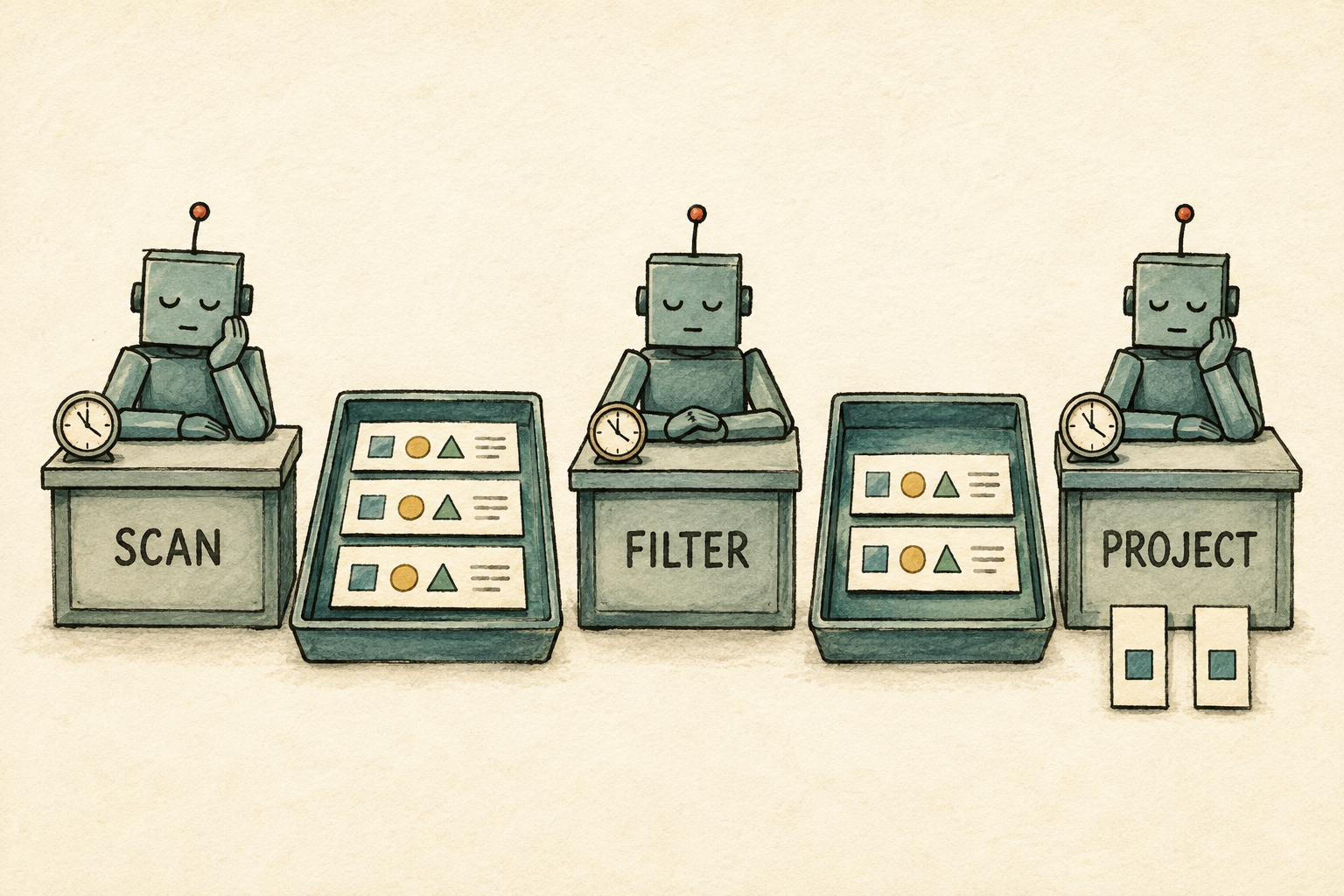
Materialized execution is easy to follow and works well for three rows. With a large table, however, those intermediate lists could consume a great deal of memory. A later chapter will let the next operation process rows as they become available instead of waiting for a complete list.
1.7 Try it
These experiments stay within the ideas from this chapter:
- Change the salary boundary to 70,000. Predict the output before running the program.
- Project both
nameandsalary. Notice that the requested column order becomes the output order. - Reverse the employee input rows. Confirm that the output order changes in
the same way. This demonstrates how our current
Vec<Row>implementation behaves; it is not yet a guarantee of the relational model. - Add an employee who earns 50,001 and confirm that the strict comparison includes the new row.
Restore the original employee rows after experimenting, then continue.
1.8 We accidentally built some algebra
We began with three ordinary actions: read rows, keep some rows, and keep some columns. Connecting them gave us this tree:
Project(name)
    ↑
Filter(salary > 50000)
    ↑
Scan(employees)
This plan is more than a convenient Rust data structure. Its operations belong to relational algebra, a language for describing how relations are transformed. Relational algebra gives each operation a precise meaning, which lets us compare plans instead of treating them as arbitrary arrangements of Rust values.
Two plans can have different shapes and still answer the same query. That matters because one arrangement may perform less work than another. But before we can choose a better plan, we must know that it preserves the original result.
So the next chapter asks: when do two different query plans mean the same thing?